作者:微信小助手
发布时间:2021-06-04T22:40:38
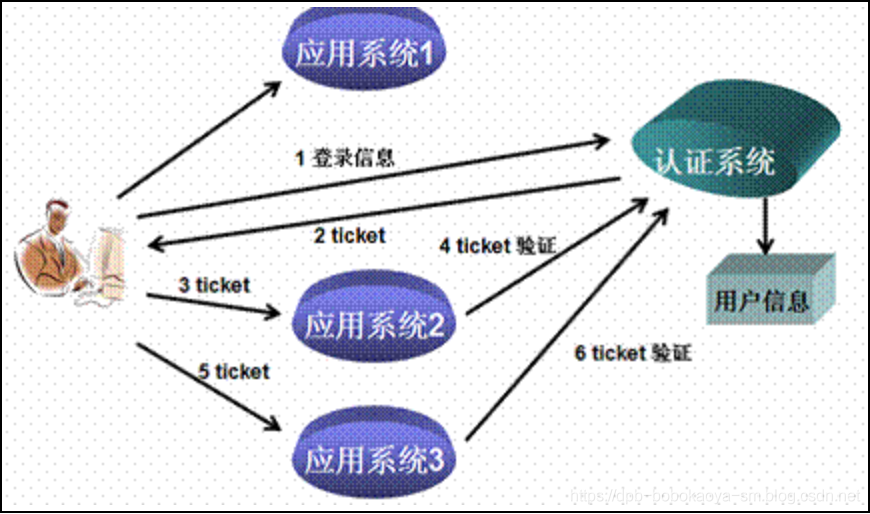
戳这里,加关注哦~ 通过前面几天文章我们详细的介绍了SpringSecurity的使用,本文我们来看下,结合JWT来实现单点登录操作。 单点登录(Single Sign On),简称为 SSO,是目前比较流行的企业业务整合的解决方案之一。SSO的定义是在多个应用系统中,用户只需要登录一次就可以访问所有相互信任的应用系统 单点登录的机制其实是比较简单的,用一个现实中的例子做比较。某公园内部有许多独立的景点,游客可以在各个景点门口单独买票。 对于需要游玩所有的景点的游客,这种买票方式很不方便,需要在每个景点门口排队买票,钱包拿 进拿出的,容易丢失,很不安全。 于是绝大多数游客选择在大门口买一张通票(也叫套票),就可以玩遍所有的景点而不需要重新再买票。他们只需要在每个景点门 口出示一下刚才买的套票就能够被允许进入每个独立的景点。 单点登录的机制也一样,如下图所示, 用户认证: 这一环节主要是用户向认证服务器发起认证请求,认证服务器给用户返回一个成功的令牌token,主要在认证服务器中完成,即图中的认证系统,注意认证系统只能有一个。 身份校验: 这一环节是用户携带token去访问其他服务器时,在其他服务器中要对token的真伪进行检验,主要在资源服务器中完成,即图中的应用系统2 3 从分布式认证流程中,我们不难发现,这中间起最关键作用的就是token,token的安全与否,直接关系到系统的健壮性,这里我们选择使用JWT来实现token的生成和校验。 JWT,全称JSON Web Token,官网地址https://jwt.io,是一款出色的分布式身份校验方案。可以生成token,也可以解析检验token。 从JWT生成的token组成上来看,要想避免token被伪造,主要就得看签名部分了,而签名部分又有三部分组成,其中头部和载荷的base64编码,几乎是透明的,毫无安全性可言,那么最终守护token安全的重担就落在了加入的盐上面了! 试想:如果生成token所用的盐与解析token时加入的盐是一样的。岂不是类似于中国人民银行把人民币防伪技术公开了?大家可以用这个盐来解析token,就能用来伪造token。这时,我们就需要对盐采用非对称加密的方式进行加密,以达到生成token与校验token方所用的盐不一致的安全效果! 基本原理: 同时生成两把密钥:私钥和公钥,私钥隐秘保存,公钥可以下发给信任客户端 优点: 安全,难以破解 缺点: 算法比较耗时,为了安全,可以接受 历史: 三位数学家Rivest、Shamir 和 Adleman 设计了一种算法,可以实现非对称加密。这种算法用他们三个人的名字缩写:RSA。 SpringSecurity主要是通过过滤器来实现功能的!我们要找到SpringSecurity实现认证和校验身份的过滤器! 用户认证:使用 身份校验:使用 用户认证: 由于分布式项目,多数是前后端分离的架构设计,我们要满足可以接受异步post的认证请求参数,需要修改 另外,默认 身份校验: 原来BasicAuthenticationFilter过滤器中doFilterInternal方法校验用户是否登录,就是看session中是否有用户信息,我们要修改为,验证用户携带的token是否合法,并解析出用户信息,交给SpringSecurity,以便于后续的授权功能可以正常使用。 为了演示单点登录的效果,我们设计如下项目结构 因为本案例需要创建多个系统,所以我们使用maven聚合工程来实现,首先创建一个父工程,导入springboot的父依赖即可 然后创建一个common工程,其他工程依赖此系统 导入JWT相关的依赖 创建相关的工具类 Payload JsonUtils JwtUtils RsaUtils 在通用子模块中编写测试类生成rsa公钥和私钥

一、什么是单点登陆
二、简单的运行机制
三、JWT介绍
概念说明
JWT生成的token由三部分组成:
JWT生成token的安全性分析
非对称加密RSA介绍
四、SpringSecurity整合JWT
1.认证思路分析
回顾集中式认证流程
UsernamePasswordAuthenticationFilter过滤器中attemptAuthentication方法实现认证功能,该过滤器父类中successfulAuthentication方法实现认证成功后的操作。BasicAuthenticationFilter过滤器中doFilterInternal方法验证是否登录,以决定能否进入后续过滤器。分析分布式认证流程
UsernamePasswordAuthenticationFilter过滤器中attemptAuthentication方法,让其能够接收请求体。successfulAuthentication方法在认证通过后,是把用户信息直接放入session就完事了,现在我们需要修改这个方法,在认证通过后生成token并返回给用户。2.具体实现
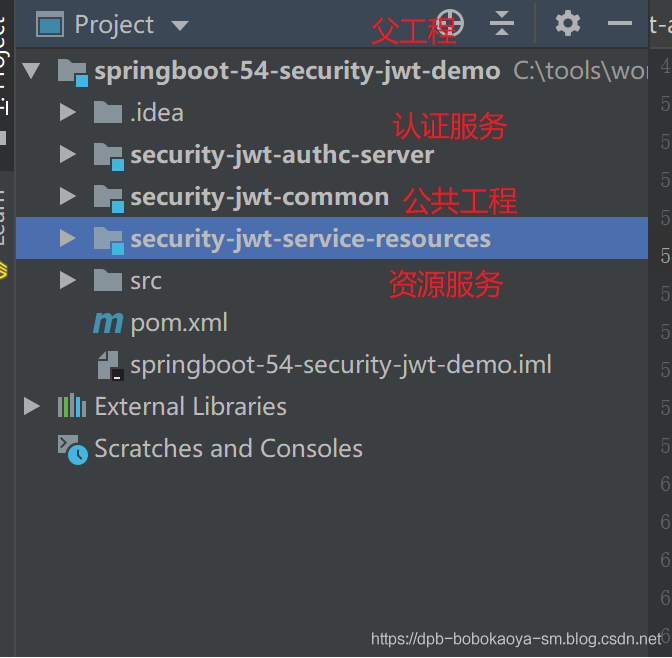
2.1父工程创建
<parent>
    <groupId>org.springframework.boot</groupId>
    <artifactId>spring-boot-starter-parent</artifactId>
    <version>2.1.3.RELEASE</version>
    <relativePath/>
</parent>
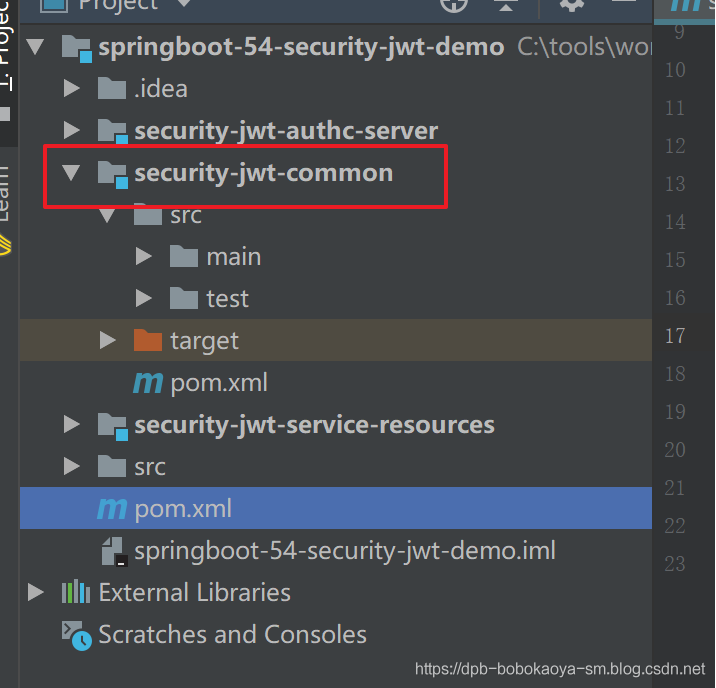
2.2公共工程创建
<dependencies>
    <dependency>
        <groupId>io.jsonwebtoken</groupId>
        <artifactId>jjwt-api</artifactId>
        <version>0.10.7</version>
    </dependency>
    <dependency>
        <groupId>io.jsonwebtoken</groupId>
        <artifactId>jjwt-impl</artifactId>
        <version>0.10.7</version>
        <scope>runtime</scope>
    </dependency>
    <dependency>
        <groupId>io.jsonwebtoken</groupId>
        <artifactId>jjwt-jackson</artifactId>
        <version>0.10.7</version>
        <scope>runtime</scope>
    </dependency>
    <!--jackson包-->
    <dependency>
        <groupId>com.fasterxml.jackson.core</groupId>
        <artifactId>jackson-databind</artifactId>
        <version>2.9.9</version>
    </dependency>
    <!--日志包-->
    <dependency>
        <groupId>org.springframework.boot</groupId>
        <artifactId>spring-boot-starter-logging</artifactId>
    </dependency>
    <dependency>
        <groupId>joda-time</groupId>
        <artifactId>joda-time</artifactId>
    </dependency>
    <dependency>
        <groupId>org.projectlombok</groupId>
        <artifactId>lombok</artifactId>
    </dependency>
    <dependency>
        <groupId>org.springframework.boot</groupId>
        <artifactId>spring-boot-starter-test</artifactId>
    </dependency>
</dependencies>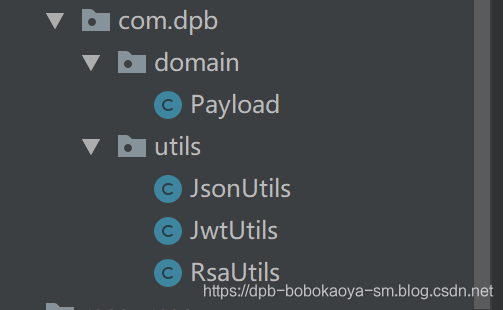
/**
 * @program: springboot-54-security-jwt-demo
 * @description:
 * @author: 波波烤鸭
 */
@Data
public class Payload <T>{
    private String id;
    private T userInfo;
    private Date expiration;
}package com.dpb.utils;
import com.fasterxml.jackson.core.JsonProcessingException;
import com.fasterxml.jackson.core.type.TypeReference;
import com.fasterxml.jackson.databind.ObjectMapper;
import org.slf4j.Logger;
import org.slf4j.LoggerFactory;
import java.io.IOException;
import java.util.List;
import java.util.Map;
/**
* @author: 波波烤鸭
**/
public class JsonUtils {
public static final ObjectMapper mapper = new ObjectMapper();
private static final Logger logger = LoggerFactory.getLogger(JsonUtils.class);
public static String toString(Object obj) {
if (obj == null) {
return null;
}
if (obj.getClass() == String.class) {
return (String) obj;
}
try {
return mapper.writeValueAsString(obj);
} catch (JsonProcessingException e) {
logger.error("json序列化出错:" + obj, e);
return null;
}
}
public static <T> T toBean(String json, Class<T> tClass) {
try {
return mapper.readValue(json, tClass);
} catch (IOException e) {
logger.error("json解析出错:" + json, e);
return null;
}
}
public static <E> List<E> toList(String json, Class<E> eClass) {
try {
return mapper.readValue(json, mapper.getTypeFactory().constructCollectionType(List.class, eClass));
} catch (IOException e) {
logger.error("json解析出错:" + json, e);
return null;
}
}
public static <K, V> Map<K, V> toMap(String json, Class<K> kClass, Class<V> vClass) {
try {
return mapper.readValue(json, mapper.getTypeFactory().constructMapType(Map.class, kClass, vClass));
} catch (IOException e) {
logger.error("json解析出错:" + json, e);
return null;
}
}
public static <T> T nativeRead(String json, TypeReference<T> type) {
try {
return mapper.readValue(json, type);
} catch (IOException e) {
logger.error("json解析出错:" + json, e);
return null;
}
}
}package com.dpb.utils;
import com.dpb.domain.Payload;
import io.jsonwebtoken.Claims;
import io.jsonwebtoken.Jws;
import io.jsonwebtoken.Jwts;
import io.jsonwebtoken.SignatureAlgorithm;
import org.joda.time.DateTime;
import java.security.PrivateKey;
import java.security.PublicKey;
import java.util.Base64;
import java.util.UUID;
/**
* @author: 波波烤鸭
* 生成token以及校验token相关方法
*/
public class JwtUtils {
private static final String JWT_PAYLOAD_USER_KEY = "user";
/**
* 私钥加密token
*
* @param userInfo 载荷中的数据
* @param privateKey 私钥
* @param expire 过期时间,单位分钟
* @return JWT
*/
public static String generateTokenExpireInMinutes(Object userInfo, PrivateKey privateKey, int expire) {
return Jwts.builder()
.claim(JWT_PAYLOAD_USER_KEY, JsonUtils.toString(userInfo))
.setId(createJTI())
.setExpiration(DateTime.now().plusMinutes(expire).toDate())
.signWith(privateKey, SignatureAlgorithm.RS256)
.compact();
}
/**
* 私钥加密token
*
* @param userInfo 载荷中的数据
* @param privateKey 私钥
* @param expire 过期时间,单位秒
* @return JWT
*/
public static String generateTokenExpireInSeconds(Object userInfo, PrivateKey privateKey, int expire) {
return Jwts.builder()
.claim(JWT_PAYLOAD_USER_KEY, JsonUtils.toString(userInfo))
.setId(createJTI())
.setExpiration(DateTime.now().plusSeconds(expire).toDate())
.signWith(privateKey, SignatureAlgorithm.RS256)
.compact();
}
/**
* 公钥解析token
*
* @param token 用户请求中的token
* @param publicKey 公钥
* @return Jws<Claims>
*/
private static Jws<Claims> parserToken(String token, PublicKey publicKey) {
return Jwts.parser().setSigningKey(publicKey).parseClaimsJws(token);
}
private static String createJTI() {
return new String(Base64.getEncoder().encode(UUID.randomUUID().toString().getBytes()));
}
/**
* 获取token中的用户信息
*
* @param token 用户请求中的令牌
* @param publicKey 公钥
* @return 用户信息
*/
public static <T> Payload<T> getInfoFromToken(String token, PublicKey publicKey, Class<T> userType) {
Jws<Claims> claimsJws = parserToken(token, publicKey);
Claims body = claimsJws.getBody();
Payload<T> claims = new Payload<>();
claims.setId(body.getId());
claims.setUserInfo(JsonUtils.toBean(body.get(JWT_PAYLOAD_USER_KEY).toString(), userType));
claims.setExpiration(body.getExpiration());
return claims;
}
/**
* 获取token中的载荷信息
*
* @param token 用户请求中的令牌
* @param publicKey 公钥
* @return 用户信息
*/
public static <T> Payload<T> getInfoFromToken(String token, PublicKey publicKey) {
Jws<Claims> claimsJws = parserToken(token, publicKey);
Claims body = claimsJws.getBody();
Payload<T> claims = new Payload<>();
claims.setId(body.getId());
claims.setExpiration(body.getExpiration());
return claims;
}
}package com.dpb.utils;
import java.io.File;
import java.io.IOException;
import java.nio.file.Files;
import java.security.*;
import java.security.spec.InvalidKeySpecException;
import java.security.spec.PKCS8EncodedKeySpec;
import java.security.spec.X509EncodedKeySpec;
import java.util.Base64;
/**
* @author 波波烤鸭
*/
public class RsaUtils {
private static final int DEFAULT_KEY_SIZE = 2048;
/**
* 从文件中读取公钥
*
* @param filename 公钥保存路径,相对于classpath
* @return 公钥对象
* @throws Exception
*/
public static PublicKey getPublicKey(String filename) throws Exception {
byte[] bytes = readFile(filename);
return getPublicKey(bytes);
}
/**
* 从文件中读取密钥
*
* @param filename 私钥保存路径,相对于classpath
* @return 私钥对象
* @throws Exception
*/
public static PrivateKey getPrivateKey(String filename) throws Exception {
byte[] bytes = readFile(filename);
return getPrivateKey(bytes);
}
/**
* 获取公钥
*
* @param bytes 公钥的字节形式
* @return
* @throws Exception
*/
private static PublicKey getPublicKey(byte[] bytes) throws Exception {
bytes = Base64.getDecoder().decode(bytes);
X509EncodedKeySpec spec = new X509EncodedKeySpec(bytes);
KeyFactory factory = KeyFactory.getInstance("RSA");
return factory.generatePublic(spec);
}
/**
* 获取密钥
*
* @param bytes 私钥的字节形式
* @return
* @throws Exception
*/
private static PrivateKey getPrivateKey(byte[] bytes) throws NoSuchAlgorithmException, InvalidKeySpecException {
bytes = Base64.getDecoder().decode(bytes);
PKCS8EncodedKeySpec spec = new PKCS8EncodedKeySpec(bytes);
KeyFactory factory = KeyFactory.getInstance("RSA");
return factory.generatePrivate(spec);
}
/**
* 根据密文,生存rsa公钥和私钥,并写入指定文件
*
* @param publicKeyFilename 公钥文件路径
* @param privateKeyFilename 私钥文件路径
* @param secret 生成密钥的密文
*/
public static void generateKey(String publicKeyFilename, String privateKeyFilename, String secret, int keySize) throws Exception {
KeyPairGenerator keyPairGenerator = KeyPairGenerator.getInstance("RSA");
SecureRandom secureRandom = new SecureRandom(secret.getBytes());
keyPairGenerator.initialize(Math.max(keySize, DEFAULT_KEY_SIZE), secureRandom);
KeyPair keyPair = keyPairGenerator.genKeyPair();
// 获取公钥并写出
byte[] publicKeyBytes = keyPair.getPublic().getEncoded();
publicKeyBytes = Base64.getEncoder().encode(publicKeyBytes);
writeFile(publicKeyFilename, publicKeyBytes);
// 获取私钥并写出
byte[] privateKeyBytes = keyPair.getPrivate().getEncoded();
privateKeyBytes = Base64.getEncoder().encode(privateKeyBytes);
writeFile(privateKeyFilename, privateKeyBytes);
}
private static byte[] readFile(String fileName) throws Exception {
return Files.readAllBytes(new File(fileName).toPath());
}
private static void writeFile(String destPath, byte[] bytes) throws IOException {
File dest = new File(destPath);
if (!dest.exists()) {
dest.createNewFile();
}
Files.write(dest.toPath(), bytes);
}
}/**
* @program: springboot-54-security-jwt-demo
* @description:
* @author: 波波烤鸭
*/
public class JwtTest {
private String privateKey = "c:/tools/auth_key/id_key_rsa";
private String publicKey = "c:/tools/auth_key/id_key_rsa.pub";
@Test
public void test1() throws Exception{
RsaUtils.generateKey(publicKey,privateKey,"dpb",1024);
}
}