作者:じ☆ve宝贝
## 安装 #### 前置条件: ##### 安装jdk ``` yum install java-1.8.0-openjdk export JAVA_HOME=/usr/java ``` #### 1、下载安装公共签名密钥 ``` rpm --import https://artifacts.elastic.co/GPG-KEY-elasticsearch ``` #### 2、配置yum源 yum 源在/etc/yum.repos.d/目录下,以.repo结尾,例如logstash.repo vi /etc/yum.repos.d/logstash.repo 复制如下内容: [logstash-5.x] name=Elastic repository for 5.x packages baseurl=https://artifacts.elastic.co/packages/5.x/yum gpgcheck=1 gpgkey=https://artifacts.elastic.co/GPG-KEY-elasticsearch enabled=1 autorefresh=1 type=rpm-md #### 3、执行安装 ``` yum clean all yum install logstash ``` ##### Hello World案例: ``` /usr/share/logstash/bin/logstash -e 'input{stdin{}}output{stdout{codec=>rubydebug}}' ``` 执行配置文件执行 ``` /usr/share/logstash/bin/logstash -f /usr/share/logstash/logstash.conf ``` 结果: ``` { "@timestamp" => 2017-07-12T02:12:28.516Z, "@version" => "1", "host" => "localhost", "message" => "Hello world" } ``` #### 4、插件安装 查看已安装插件(插件源码地址:https://github.com/logstash-plugins/) ` bin/logstash-plugin list ` 安装插件 ` bin/logstash-plugin install logstash-output-webhdfs ` 升级插件 ` bin/logstash-plugin update logstash-output-webhdfs ` 本地插件安装 ` bin/logstash-plugin install /data/logstash/logstash-filter-crash.gem ` #### 5、后台运行 ##### nohup方式运行 ``` nohup /usr/share/logstash/bin/logstash -f /etc/logstash/logstash.conf &>/dev/null & ``` ##### SCREEN 不受用户登出限制 ``` https://www.studyjava.cn/post/206 ``` ##### 采用daemontools ###### 安装 ``` yum -y install supervisord --enablerepo=epel ``` 在 /etc/supervisord.conf 配置文件里添加内容,定义你要启动的程序: ``` [program:logstash_1] environment=LS_HEAP_SIZE=5000m directory=/usr/share/logstash/ command=/usr/share/logstash/bin/logstash -f /etc/logstash/logstash.conf -w 10 -l /var/log/logstash/logstash.log [program:logstash_2] environment=LS_HEAP_SIZE=5000m directory=/usr/share/logstash/ command=/usr/share/logstash/bin/logstash -f /etc/logstash/logstash2.conf -w 10 -l /var/log/logstash/logstash2.log 启动 service supervisord start 停止 supervisorctl stop logstash_2 ``` #### 6、Demo ###### 1、日志文件格式 ``` 2017-05-07-16:03:04|10.4.29.158|120.131.74.116|WEB|11299073|http://quxue.renren.com/shareApp?isappinstalled=0&userId=11299073&from=groupmessage|/shareApp|null|Mozilla/5.0 (iPhone; CPU iPhone OS 8_2 like Mac OS X) AppleWebKit/600.1.4 (KHTML, like Gecko) Mobile/12D508 MicroMessenger/6.1.5 NetType/WIFI|duringTime|98|| ``` logstash配置 ``` #输入源 input { file { path => ["/data/logs/logstash-1.log"] start_position => "beginning" #从文件开始处读写 type => "system" } } #过滤 拆分条件 filter { #定义数据的格式 grok { match => { "message" => "%{DATA:timestamp}\|%{IP:serverIp}\|%{IP:clientIp}\|%{DATA:logSource}\|%{DATA:userId}\|%{DATA:reqUrl}\|%{DATA:reqUri}\|%{DATA:refer}\|%{DATA:device}\|%{DATA:textDuring}\|%{DATA:duringTime:int}\|\|"} } #定义时间戳的格式 date { match => [ "timestamp", "yyyy-MM-dd-HH:mm:ss" ] locale => "cn" } } output { stdout { codec => rubydebug } } ``` #### 2、自定义解析log4j日志 ###### 日志文件格式 ``` 2017-07-05 09:45:41 [cv.studyjava.spider.job.jobs.ChoiceReportJob:175]-[main]-[execute]-[WARN] 报告: 温迪数字:2015年度报告(更正公告) 已经存在,路过本次抓取 2017-07-05 09:45:41 [cv.studyjava.spider.job.jobs.ChoiceReportJob:175]-[main]-[execute]-[WARN] 报告: 温迪数字:2015年度报告(更正公告) 已经存在,路过本次抓取 2017-07-05 09:45:11 [cv.studyjava.spider.job.jobs.ChoiceReportJob:272]-[main]-[execute]-[FATAL] Choice 报告数据抓取异常 java.io.IOException: Connection(zbus:80) timeout at org.zbus.net.tcp.TcpClient.sendMessage(TcpClient.java:235) at org.zbus.net.tcp.TcpClient.invokeSync(TcpClient.java:371) at org.zbus.broker.SingleBroker.invokeSync(SingleBroker.java:98) at org.zbus.broker.SingleBroker.invokeSync(SingleBroker.java:38) at org.zbus.broker.ZbusBroker.invokeSync(ZbusBroker.java:81) at org.zbus.broker.ZbusBroker.invokeSync(ZbusBroker.java:21) at org.zbus.mq.MqAdmin.invokeSync(MqAdmin.java:63) at org.zbus.mq.MqAdmin.createMQ(MqAdmin.java:94) at cv.studyjava.spider.job.jobs.ChoiceReportJob.execute(ChoiceReportJob.java:86) at cv.studyjava.spider.job.jobs.ChoiceReportJob.main(ChoiceReportJob.java:52) 2017-07-05 09:45:05 [com.alibaba.druid.pool.DruidDataSource:715]-[main]-[init]-[INFO] {dataSource-1} inited 2017-07-05 09:45:11 [org.zbus.net.tcp.TcpClient:213]-[main]-[connectSync]-[WARN] Connection(zbus:80) timeout ``` ##### logstash conf配置 ``` input { file { path => ["/data/logs/logstash-2.log"] start_position => "beginning" #从文件开始处读写 sincedb_path => "/dev/null" 不记录读取位置,每次强制从头开始 type => "system" codec => multiline { pattern => "^[1-9]\d{3}-(0[1-9]|1[0-2])-(0[1-9]|[1-2][0-9]|3[0-1])\s*(20|21|22|23|[0-1]\d):[0-5]\d:[0-5]\d\s+\[" negate => true what => "previous" } } } filter { grok { match => { "message" => "%{GREEDYDATA:timestamp} \[%{DATA:class}\]\-\[%{DATA:threadName}\]\-\[%{DATA:method}\]\-\[%{DATA:logLevel}\] %{GREEDYDATA:content}"} } date { match => [ "timestamp", "yyyy-MM-dd-HH:mm:ss" ] locale => "cn" timezone => "+00:00" } } output { stdout { codec => rubydebug } } ``` #### 输出ES 在output中添加 ``` # elasticsearch { # hosts => ["test41:9200","test42:9200","test43:9200"] # index => "%{hostabc}" # document_type => "%{hostabc}" # #protocol: "http" # flush_size => 100 # idle_flush_time => 10 # user => "elastic" # password => "baoshan" # } ``` ## 注意事项 #### 1、Logstash默认不处理一天之前的数据,但是可以通过配置修改 通过设置file中的ignore_older选项来配置ignore_older => 604800 #不处理一周以前的文件,数字对应的单位为s。 #### 2、让Logstash每次都从头读文件 要点就在这行 sincedb_path => “/dev/null” 了!该参数用来指定 sincedb 文件名,但是如果我们设置为 /dev/null这个 Linux 系统上特殊的空洞文件,那么 logstash 每次重启进程的时候,尝试读取 sincedb 内容,都只会读到空白内容,也就会理解成之前没有过运行记录,自然就从初始位置开始读取了! (实际生产场景中,最好不要这么用,因为日志过大,每次重头读日志耗费资源,也无必要。此处适合测试场景) #### 3、注意 有些同学测试会在Windows上创建一个txt,改成.log。上传到Linux上,这样可能会导致文件无法读取。应该使用vim在Linux上创建文件,将测试日志粘贴在文件中 ####参考资料 [ELKstack 中文指南](https://kibana.logstash.es/content/)
作者:0HFe9SICi
人工智能开发课程【尚学堂•百战程序员201805版】,视频课程主要介绍人工智能开发的远景与概况,今后会持续更新…… 典型案例: 所有其它语言,底层虚拟机的实现。比如Java、.Net、Python(C版本)等等。 大部分IT基础设施,例如操作系统、文件系统(比如NTFS、ZFS)。 效率为王的重要软件,比如浏览器内核,3D游戏引擎。 等等其它,可以添加评论 :) 课程内容: 01_人工智能开发及远景介绍(预科) 02_线性回归深入和代码实现 03_梯度下降和过拟合和归一化 04_逻辑回归详解和应用 05_分类器项目案例和神经网络算法 06_多分类、决策树分类、随机森林分类 07_分类评估、聚类 08_密度聚类、谱聚类 09_深度学习、TensorFlow安装和实现线性回归 10_TensorFlow深入、TensorBoard可视化 11_DNN深度神经网络手写图片识别 12_TensorBoard可视化 13_卷积神经网络、CNN识别图片 14_卷积神经网络深入、AlexNet模型实现 15_Keras深度学习框架 全集 链接:https://pan.baidu.com/s/1Sv5p9KsNPk6K4kzE2wLWwg 密码:845r
作者:微信小助手
<section style="box-sizing: border-box;font-size: 16px;"> <section style="box-sizing: border-box;" powered-by="xiumi.us"> <section style="margin-top: 10px;margin-bottom: 10px;box-sizing: border-box;"> <section style="padding-top: 10px;padding-right: 10px;padding-left: 10px;box-sizing: border-box;background-color: rgb(239, 239, 239);"> <span style="display: inline-block;width: 5%;line-height: 0.8;font-weight: bolder;font-size: 48px;box-sizing: border-box;"> <section style="box-sizing: border-box;"> “ </section></span> <section style="display: inline-block;vertical-align: top;float: right;width: 90%;line-height: 1.5;font-size: 15px;color: rgb(89, 89, 89);box-sizing: border-box;"> <p style="box-sizing: border-box;"><span style="letter-spacing: 1px;">小史是一个非科班的程序员,虽然学的是电子专业,但是通过自己的努力成功通过了面试,现在要开始迎接新生活了。</span></p> </section> <section style="clear: both;box-sizing: border-box;"></section> </section> </section> </section> </section> <p style="line-height: 1.75em;"><br></p> <p style="text-align: center;margin-left: 8px;margin-right: 8px;margin-bottom: 5px;"><img class="rich_pages" data-copyright="0" data-ratio="0.4793491864831039" data-s="300,640" src="/upload/9bc576dde2c6c5e2327b035ca31ccf6a.png" data-type="png" data-w="799" style=""></p> <p style="text-align: center;margin-left: 8px;margin-right: 8px;line-height: 1.75em;margin-bottom: 5px;"><img style="width: 558px !important;visibility: visible !important;word-wrap: break-word !important;box-sizing: border-box !important;" src="/upload/2ff1805dda7d70892bb3f61234ae0ac2.jpg" data-w="558" data-type="jpeg" data-s="300,640" data-ratio="0.44802867383512546" data-copyright="0"></p> <p style="text-align: center;margin-left: 8px;margin-right: 8px;line-height: 1.75em;margin-bottom: 5px;"><img style="width: 533px !important;visibility: visible !important;word-wrap: break-word !important;box-sizing: border-box !important;" src="/upload/adf72567cdcb4513d6f75d30e8e73870.jpg" data-w="533" data-type="jpeg" data-s="300,640" data-ratio="0.5628517823639775" data-copyright="0"></p> <p style="text-align: justify;margin-left: 8px;margin-right: 8px;line-height: 1.75em;margin-bottom: 5px;"><span style="font-size: 15px;color: rgb(89, 89, 89);letter-spacing: 1px;">今天,小史的姐姐和吕老师一起过来看小史,一进屋,就有一股难闻的气味。</span></p> <p style="text-align: center;margin-left: 8px;margin-right: 8px;line-height: 1.75em;margin-bottom: 5px;"><img style="width: 448px !important;visibility: visible !important;word-wrap: break-word !important;box-sizing: border-box !important;" src="/upload/c2517567526fc0a158348d9db22ade43.jpg" data-w="448" data-type="jpeg" data-s="300,640" data-ratio="1.0223214285714286" data-copyright="0"></p> <p style="text-align: center;margin-left: 8px;margin-right: 8px;line-height: 1.75em;margin-bottom: 5px;"><img style="width: 448px !important;visibility: visible !important;word-wrap: break-word !important;box-sizing: border-box !important;" src="/upload/a5a23a7cc54a8895a1f29bb7574df1c1.jpg" data-w="448" data-type="jpeg" data-s="300,640" data-ratio="1.0223214285714286" data-copyright="0"></p> <p style="text-align: justify;margin-left: 8px;margin-right: 8px;line-height: 1.75em;margin-bottom: 5px;"><span style="font-size: 15px;color: rgb(89, 89, 89);letter-spacing: 1px;">可不,小史姐姐走进卫生间,发现地下一个盆子里全是没洗的袜子。</span></p> <p style="text-align: center;margin-left: 8px;margin-right: 8px;line-height: 1.75em;margin-bottom: 5px;"><img style="width: 448px !important;visibility: visible !important;word-wrap: break-word !important;box-sizing: border-box !important;" src="/upload/b1021b4b31f9399929d25d2c3d7428a1.jpg" data-w="448" data-type="jpeg" data-s="300,640" data-ratio="1.0223214285714286" data-copyright="0"></p> <p style="text-align: center;margin-left: 8px;margin-right: 8px;line-height: 1.75em;margin-bottom: 5px;"><img style="letter-spacing: 0.54px;width: 448px !important;visibility: visible !important;word-wrap: break-word !important;box-sizing: border-box !important;" src="/upload/db5c1c1abfc1f72e10e1d12e495d9b7e.jpg" data-w="448" data-type="jpeg" data-s="300,640" data-ratio="1.0223214285714286" data-copyright="0"></p> <p style="text-align: justify;margin-left: 8px;margin-right: 8px;line-height: 1.75em;margin-bottom: 5px;"><strong><span style="font-size: 15px;color: rgb(89, 89, 89);letter-spacing: 1px;">小史:</span></strong><span style="font-size: 15px;color: rgb(89, 89, 89);letter-spacing: 1px;">当然不是,盆里的袜子满了,就先放到这个桶里,然后再继续装,等到桶里的袜子满了,然后才放到洗衣机里一次洗完,这样不仅效率高,而且节省水电费。</span></p> <p style="text-align: center;margin-left: 8px;margin-right: 8px;line-height: 1.75em;margin-bottom: 5px;"><img style="width: 424px !important;visibility: visible !important;word-wrap: break-word !important;box-sizing: border-box !important;" src="/upload/b782adb2df9ad723a9c808fc245d5c88.jpg" data-w="424" data-type="jpeg" data-s="300,640" data-ratio="1.1367924528301887" data-copyright="0"></p> <p style="text-align: justify;margin-left: 8px;margin-right: 8px;line-height: 1.75em;margin-bottom: 5px;"><span style="font-size: 15px;color: rgb(89, 89, 89);letter-spacing: 1px;">小史洋洋得意地介绍起自己洗袜子的流程。</span></p> <p style="text-align: center;margin-left: 8px;margin-right: 8px;line-height: 1.75em;margin-bottom: 5px;"><img style="width: 448px !important;visibility: visible !important;word-wrap: break-word !important;box-sizing: border-box !important;" src="/upload/eab82ff9e58bb9916b07e97c75bf1101.jpg" data-w="448" data-type="jpeg" data-s="300,640" data-ratio="1.0223214285714286" data-copyright="0"></p> <p style="text-align: justify;margin-left: 8px;margin-right: 8px;line-height: 1.75em;margin-bottom: 5px;"><span style="font-size: 15px;color: rgb(89, 89, 89);letter-spacing: 1px;">小史一听就有点不高兴,全世界都黑程序员,没想到自己还没变成程序员就被自家姐姐黑了。</span></p> <p style="text-align: center;margin-left: 8px;margin-right: 8px;line-height: 1.75em;margin-bottom: 5px;"><img style="width: 448px !important;visibility: visible !important;word-wrap: break-word !important;box-sizing: border-box !important;" src="/upload/dc760c7e487926a011c531db2d964e55.jpg" data-w="448" data-type="jpeg" data-s="300,640" data-ratio="1.0223214285714286" data-copyright="0"></p> <p style="text-align: justify;margin-left: 8px;margin-right: 8px;line-height: 1.75em;margin-bottom: 5px;"><span style="font-size: 15px;color: rgb(89, 89, 89);letter-spacing: 1px;">说完就进自己房间,把姐姐和吕老师晾在外面。小史姐姐也意识到不该拿程序员开玩笑,但现在也不知道该怎么办,就看着吕老师。</span></p> <p style="text-align: center;margin-left: 8px;margin-right: 8px;line-height: 1.75em;margin-bottom: 5px;"><img style="width: 448px !important;visibility: visible !important;word-wrap: break-word !important;box-sizing: border-box !important;" src="/upload/657c4ec6868ef476817c0417a4966279.jpg" data-w="448" data-type="jpeg" data-s="300,640" data-ratio="1.0223214285714286" data-copyright="0"></p> <p style="text-align: justify;margin-left: 8px;margin-right: 8px;line-height: 1.75em;margin-bottom: 5px;"><span style="font-size: 15px;color: rgb(89, 89, 89);letter-spacing: 1px;">吕老师走进小史的房间。</span></p> <p style="text-align: center;margin-left: 8px;margin-right: 8px;line-height: 1.75em;margin-bottom: 5px;"><img style="width: 448px !important;visibility: visible !important;word-wrap: break-word !important;box-sizing: border-box !important;" src="/upload/c8423f5b719395365367cf2fc87aa233.jpg" data-w="448" data-type="jpeg" data-s="300,640" data-ratio="1.0223214285714286" data-copyright="0"></p> <p style="text-align: center;margin-left: 8px;margin-right: 8px;line-height: 1.75em;"><img style="width: 448px !important;visibility: visible !important;word-wrap: break-word !important;box-sizing: border-box !important;" src="/upload/41c1eeaa983b6418ecc8f287460e330e.jpg" data-w="448" data-type="jpeg" data-s="300,640" data-ratio="1.0223214285714286" data-copyright="0"></p> <section style="box-sizing: border-box;font-size: 16px;"> <section style="box-sizing: border-box;" powered-by="xiumi.us"> <section style="border-bottom-width: 1px;border-bottom-style: solid;border-bottom-color: black;margin-top: 0.5em;margin-bottom: 0.5em;line-height: 1.2;box-sizing: border-box;"> <section style="display: inline-block;border-bottom-width: 6px;border-bottom-style: solid;border-color: rgb(89, 89, 89);margin-bottom: -1px;font-size: 20px;color: rgb(89, 89, 89);box-sizing: border-box;"> <p style="box-sizing: border-box;">HBase是啥</p> </section> </section> </section> </section> <p style="line-height: normal;"><br></p> <p style="text-align: center;margin-left: 8px;margin-right: 8px;line-height: 1.75em;margin-bottom: 5px;"><img style="width: 448px !important;visibility: visible !important;word-wrap: break-word !important;box-sizing: border-box !important;" src="/upload/196744ac7b7875c71b454898965060c7.jpg" data-w="448" data-type="jpeg" data-s="300,640" data-ratio="1.0223214285714286" data-copyright="0"></p> <p style="text-align: center;margin-left: 8px;margin-right: 8px;line-height: 1.75em;margin-bottom: 5px;"><img style="width: 448px !important;visibility: visible !important;word-wrap: break-word !important;box-sizing: border-box !important;" src="/upload/bc0866662a3d9bc5add404833a4ceb32.jpg" data-w="448" data-type="jpeg" data-s="300,640" data-ratio="1.0223214285714286" data-copyright="0"></p> <p style="text-align: justify;margin-left: 8px;margin-right: 8px;line-height: 1.75em;"><strong><span style="font-size: 15px;color: rgb(89, 89, 89);letter-spacing: 1px;">小史:</span></strong><span style="font-size: 15px;color: rgb(89, 89, 89);letter-spacing: 1px;">别吹了,构建在 HDFS 上除了能存储海量数据之外,缺点一大堆,上次你给我介绍的 <span style="color: rgb(89, 89, 89);font-size: 15px;letter-spacing: 1px;line-height: 29.75px;">HDFS</span> 缺点我可没忘啊,不支持小文件,不支持并发写,不支持文件随机修改,查询效率也低。</span></p> <p style="line-height: normal;"><br></p> <p style="text-align: justify;margin-left: 8px;margin-right: 8px;line-height: 1.75em;margin-bottom: 5px;"><span style="font-size: 15px;letter-spacing: 1px;color: rgb(71, 193, 168);">小史仔细回忆起 <span style="font-size: 15px;letter-spacing: 1px;line-height: 29.75px;">HDFS</span> 来:</span></p> <p style="text-align: center;margin-left: 8px;margin-right: 8px;line-height: 1.75em;margin-bottom: 5px;"><img style="width: 448px !important;visibility: visible !important;word-wrap: break-word !important;box-sizing: border-box !important;" src="/upload/d86d6d6ea1f1c321c6022b6fb2eb9350.jpg" data-w="448" data-type="jpeg" data-s="300,640" data-ratio="1.0223214285714286" data-copyright="0"></p> <p style="text-align: justify;margin-left: 8px;margin-right: 8px;line-height: 1.75em;margin-bottom: 5px;"><strong><span style="font-size: 15px;color: rgb(89, 89, 89);letter-spacing: 1px;">吕老师:</span></strong><span style="font-size: 15px;color: rgb(89, 89, 89);letter-spacing: 1px;">HDFS 确实有很多缺点,但是 HBase 却是一个支持百万级别高并发写入,支持实时查询,适合存储稀疏数据的分布式数据库系统。</span></p> <p style="text-align: center;margin-left: 8px;margin-right: 8px;line-height: 1.75em;margin-bottom: 5px;"><img style="letter-spacing: 0.54px;width: 448px !important;visibility: visible !important;word-wrap: break-word !important;box-sizing: border-box !important;" src="/upload/55248c7bbc391f678084a840ae564732.jpg" data-w="448" data-type="jpeg" data-s="300,640" data-ratio="1.0223214285714286" data-copyright="0"></p> <p style="text-align: center;margin-left: 8px;margin-right: 8px;line-height: 1.75em;margin-bottom: 5px;"><img style="width: 448px !important;visibility: visible !important;word-wrap: break-word !important;box-sizing: border-box !important;" src="/upload/e785a07dae4be08d5ffa0db21e3f83fb.jpg" data-w="448" data-type="jpeg" data-s="300,640" data-ratio="1.0223214285714286" data-copyright="0"></p> <p style="text-align: justify;margin-left: 8px;margin-right: 8px;line-height: 1.75em;margin-bottom: 5px;"><strong><span style="font-size: 15px;color: rgb(89, 89, 89);letter-spacing: 1px;">吕老师:</span></strong><span style="font-size: 15px;color: rgb(89, 89, 89);letter-spacing: 1px;">HBase 主要用于大数据领域,在这方面,确实比 MySQL 要厉害得多啊,它和 MySQL 的存储方式就完全不一样。<span style="color: rgb(89, 89, 89);font-size: 15px;letter-spacing: 1px;line-height: 29.75px;">MySQL</span> 是行式存储,HBase 是列式存储。</span></p> <p style="text-align: center;margin-left: 8px;margin-right: 8px;line-height: 1.75em;margin-bottom: 5px;"><img style="width: 448px !important;visibility: visible !important;word-wrap: break-word !important;box-sizing: border-box !important;" src="/upload/6230b75b9e8f8de80daf0f7d5835b223.jpg" data-w="448" data-type="jpeg" data-s="300,640" data-ratio="1.0223214285714286" data-copyright="0"></p> <section style="box-sizing: border-box;font-size: 16px;"> <section style="box-sizing: border-box;" powered-by="xiumi.us"> <section style="border-bottom-width: 1px;border-bottom-style: solid;border-bottom-color: black;margin-top: 0.5em;margin-bottom: 0.5em;line-height: 1.2;box-sizing: border-box;"> <section style="display: inline-block;border-bottom-width: 6px;border-bottom-style: solid;border-color: rgb(89, 89, 89);margin-bottom: -1px;font-size: 20px;color: rgb(89, 89, 89);box-sizing: border-box;"> <p style="box-sizing: border-box;">列式存储</p> </section> </section> </section> </section> <p style="line-height: normal;"><br></p> <p style="text-align: center;margin-left: 8px;margin-right: 8px;line-height: 1.75em;margin-bottom: 5px;"><img style="width: 448px !important;visibility: visible !important;word-wrap: break-word !important;box-sizing: border-box !important;" src="/upload/b89acce1109d99f524d35d5a28079be3.jpg" data-w="448" data-type="jpeg" data-s="300,640" data-ratio="1.0223214285714286" data-copyright="0"></p> <p style="text-align: center;margin-left: 8px;margin-right: 8px;line-height: 1.75em;margin-bottom: 5px;"><img style="width: 402px !important;visibility: visible !important;word-wrap: break-word !important;box-sizing: border-box !important;" src="/upload/cf70d6fc6c59e618226e6f877f793bd5.jpg" data-w="402" data-type="jpeg" data-s="300,640" data-ratio="1.0422885572139304" data-copyright="0"></p> <p style="text-align: center;margin-left: 8px;margin-right: 8px;line-height: 1.75em;margin-bottom: 5px;"><img style="width: 448px !important;visibility: visible !important;word-wrap: break-word !important;box-sizing: border-box !important;" src="/upload/fc8e96edc189e8740e7c71bc828172a1.jpg" data-w="448" data-type="jpeg" data-s="300,640" data-ratio="1.0223214285714286" data-copyright="0"></p> <p style="text-align: center;margin-left: 8px;margin-right: 8px;line-height: 1.75em;margin-bottom: 5px;"><img style="width: 448px !important;visibility: visible !important;word-wrap: break-word !important;box-sizing: border-box !important;" src="/upload/69a07ee62d6fc67c01d8f27e0c5da670.jpg" data-w="448" data-type="jpeg" data-s="300,640" data-ratio="1.0223214285714286" data-copyright="0"></p> <p style="text-align: center;margin-left: 8px;margin-right: 8px;line-height: 1.75em;margin-bottom: 5px;"><img style="width: 448px !important;visibility: visible !important;word-wrap: break-word !important;box-sizing: border-box !important;" src="/upload/aeb3fa4f27e9fb4f8314f87b9095c198.jpg" data-w="448" data-type="jpeg" data-s="300,640" data-ratio="1.0223214285714286" data-copyright="0"></p> <p style="text-align: center;margin-left: 8px;margin-right: 8px;line-height: 1.75em;margin-bottom: 5px;"><img style="width: 424px !important;visibility: visible !important;word-wrap: break-word !important;box-sizing: border-box !important;" src="/upload/420e41aea11b6b07fb70be7925a47047.jpg" data-w="424" data-type="jpeg" data-s="300,640" data-ratio="0.8632075471698113" data-copyright="0"></p> <p style="text-align: center;margin-left: 8px;margin-right: 8px;line-height: 1.75em;margin-bottom: 5px;"><img style="width: 448px !important;visibility: visible !important;word-wrap: break-word !important;box-sizing: border-box !important;" src="/upload/16dc47263b6af7c1e3d58ba82ddb8bcc.jpg" data-w="448" data-type="jpeg" data-s="300,640" data-ratio="1.0223214285714286" data-copyright="0"></p> <p style="text-align: center;margin-left: 8px;margin-right: 8px;line-height: 1.75em;margin-bottom: 5px;"><img style="width: 448px !important;visibility: visible !important;word-wrap: break-word !important;box-sizing: border-box !important;" src="/upload/128efa0757ec48d398ec0cd8846572ec.jpg" data-w="448" data-type="jpeg" data-s="300,640" data-ratio="1.0223214285714286" data-copyright="0"></p> <p style="text-align: center;margin-left: 8px;margin-right: 8px;line-height: 1.75em;margin-bottom: 5px;"><img style="width: 448px !important;visibility: visible !important;word-wrap: break-word !important;box-sizing: border-box !important;" src="/upload/edeeb3654f64e397e201201eadc992f6.jpg" data-w="448" data-type="jpeg" data-s="300,640" data-ratio="1.0223214285714286" data-copyright="0"></p> <p style="text-align: justify;margin-left: 8px;margin-right: 8px;line-height: 1.75em;margin-bottom: 5px;"><strong><span style="font-size: 15px;color: rgb(89, 89, 89);letter-spacing: 1px;">吕老师:</span></strong><span style="font-size: 15px;color: rgb(89, 89, 89);letter-spacing: 1px;">没错,这就是行式存储系统存储稀疏数据的问题,我们再来看看列式存储如何解决这个问题,</span><span style="font-size: 15px;letter-spacing: 1px;color: rgb(71, 193, 168);">它的存储结构是这样的:</span></p> <p style="text-align: center;margin-left: 8px;margin-right: 8px;line-height: 1.75em;margin-bottom: 5px;"><img style="width: 402px !important;visibility: visible !important;word-wrap: break-word !important;box-sizing: border-box !important;" src="/upload/1ddea2ee698e904bea6e89ebb8c99ea7.jpg" data-w="402" data-type="jpeg" data-s="300,640" data-ratio="1.291044776119403" data-copyright="0"></p> <p style="text-align: center;margin-left: 8px;margin-right: 8px;line-height: 1.75em;margin-bottom: 5px;"><img style="width: 448px !important;visibility: visible !important;word-wrap: break-word !important;box-sizing: border-box !important;" src="/upload/8ea9d94c2dedacb1773b74a34da63d48.jpg" data-w="448" data-type="jpeg" data-s="300,640" data-ratio="1.0223214285714286" data-copyright="0"></p> <p style="text-align: justify;margin-left: 8px;margin-right: 8px;line-height: 1.75em;margin-bottom: 5px;"><strong><span style="font-size: 15px;color: rgb(89, 89, 89);letter-spacing: 1px;">小史:</span></strong><span style="font-size: 15px;color: rgb(89, 89, 89);letter-spacing: 1px;">这个我看懂了,相当于把每一行的每一列拆开,然后通过 Rowkey 关联起来,Rowkey 相同的这些数据其实就是原来的一行。</span></p> <p style="text-align: center;margin-left: 8px;margin-right: 8px;line-height: 1.75em;margin-bottom: 5px;"><img style="letter-spacing: 0.54px;width: 448px !important;visibility: visible !important;word-wrap: break-word !important;box-sizing: border-box !important;" src="/upload/810e6b44d17649bb6d4b3d7268d86367.jpg" data-w="448" data-type="jpeg" data-s="300,640" data-ratio="1.0223214285714286" data-copyright="0"></p> <p style="text-align: center;margin-left: 8px;margin-right: 8px;line-height: 1.75em;margin-bottom: 5px;"><img style="letter-spacing: 0.54px;width: 448px !important;visibility: visible !important;word-wrap: break-word !important;box-sizing: border-box !important;" src="/upload/94039cbf60e5bd56e68be388fb853665.jpg" data-w="448" data-type="jpeg" data-s="300,640" data-ratio="1.0223214285714286" data-copyright="0"></p> <p style="text-align: center;margin-left: 8px;margin-right: 8px;line-height: 1.75em;margin-bottom: 5px;"><img style="width: 448px !important;visibility: visible !important;word-wrap: break-word !important;box-sizing: border-box !important;" src="/upload/8303d1a5519eb22350053e021a695be5.jpg" data-w="448" data-type="jpeg" data-s="300,640" data-ratio="1.0223214285714286" data-copyright="0"></p> <p style="text-align: justify;margin-left: 8px;margin-right: 8px;line-height: 1.75em;"><strong><span style="font-size: 15px;color: rgb(89, 89, 89);letter-spacing: 1px;">吕老师:</span></strong><span style="font-size: 15px;color: rgb(89, 89, 89);letter-spacing: 1px;">你这里只说到了一个好处,由于把一行数据变成了这样的 key-value 的形式。</span></p> <p style="line-height: normal;"><br></p> <p style="text-align: justify;margin-left: 8px;margin-right: 8px;line-height: 1.75em;margin-bottom: 5px;"><span style="font-size: 15px;color: rgb(89, 89, 89);letter-spacing: 1px;">所以 HBase 可以存储上百万列,又由于 HBase 基于 HDFS 来存储,所以 HBase 可以存储上亿行,是一个真正的海量数据库。</span></p> <p style="text-align: center;margin-left: 8px;margin-right: 8px;line-height: 1.75em;margin-bottom: 5px;"><img style="width: 448px !important;visibility: visible !important;word-wrap: break-word !important;box-sizing: border-box !important;" src="/upload/b9647c52102c6f4ca12f960343647da7.jpg" data-w="448" data-type="jpeg" data-s="300,640" data-ratio="1.0223214285714286" data-copyright="0"></p> <p style="text-align: center;margin-left: 8px;margin-right: 8px;line-height: 1.75em;margin-bottom: 5px;"><img style="width: 448px !important;visibility: visible !important;word-wrap: break-word !important;box-sizing: border-box !important;" src="/upload/e704eaef988ab1a9f5efb4a82820eaa8.jpg" data-w="448" data-type="jpeg" data-s="300,640" data-ratio="1.0223214285714286" data-copyright="0"></p> <p style="text-align: justify;margin-left: 8px;margin-right: 8px;line-height: 1.75em;margin-bottom: 5px;"><strong><span style="font-size: 15px;color: rgb(89, 89, 89);letter-spacing: 1px;">吕老师:</span></strong><span style="font-size: 15px;color: rgb(89, 89, 89);letter-spacing: 1px;">这就是 HBase 的威力呀,还不只如此,其实很多时候,我们做 Select 查询的时候,只关注某几列,比如我现在只关心大家的工资,传统的按行存储,要选出所有人的工资是怎么办的呢?</span></p> <p style="text-align: center;margin-left: 8px;margin-right: 8px;line-height: 1.75em;margin-bottom: 5px;"><img style="letter-spacing: 0.54px;width: 448px !important;visibility: visible !important;word-wrap: break-word !important;box-sizing: border-box !important;" src="/upload/938980f53b2e2d60c3a24b6c38d3c30e.jpg" data-w="448" data-type="jpeg" data-s="300,640" data-ratio="1.0223214285714286" data-copyright="0"></p> <p style="text-align: center;margin-left: 8px;margin-right: 8px;line-height: 1.75em;margin-bottom: 5px;"><img style="width: 424px !important;visibility: visible !important;word-wrap: break-word !important;box-sizing: border-box !important;" src="/upload/4070d14d827dddfb77814451940a2bc5.jpg" data-w="424" data-type="jpeg" data-s="300,640" data-ratio="1.2311320754716981" data-copyright="0"></p> <p style="text-align: center;margin-left: 8px;margin-right: 8px;line-height: 1.75em;margin-bottom: 5px;"><img style="width: 448px !important;visibility: visible !important;word-wrap: break-word !important;box-sizing: border-box !important;" src="/upload/21677eb7d4260afe4df9ac526e148486.jpg" data-w="448" data-type="jpeg" data-s="300,640" data-ratio="1.0223214285714286" data-copyright="0"></p> <p><br style="max-width: 100%;box-sizing: border-box !important;word-wrap: break-word !important;"></p> <p style="text-align: center;margin-left: 8px;margin-right: 8px;line-height: 1.75em;margin-bottom: 5px;"><img style="width: 402px !important;visibility: visible !important;word-wrap: break-word !important;box-sizing: border-box !important;" src="/upload/dbd1fceccdda0ba668627dd54e1276f.jpg" data-w="402" data-type="jpeg" data-s="300,640" data-ratio="1.291044776119403" data-copyright="0"></p> <p style="text-align: center;margin-left: 8px;margin-right: 8px;line-height: 1.75em;margin-bottom: 5px;"><img style="width: 448px !important;visibility: visible !important;word-wrap: break-word !important;box-sizing: border-box !important;" src="/upload/cd01776bfbb3969b08dd70d400d09662.jpg" data-w="448" data-type="jpeg" data-s="300,640" data-ratio="1.0223214285714286" data-copyright="0"></p> <p style="text-align: justify;margin-left: 8px;margin-right: 8px;line-height: 1.75em;margin-bottom: 5px;"><strong><span style="font-size: 15px;color: rgb(89, 89, 89);letter-spacing: 1px;">小史:</span></strong><span style="font-size: 15px;color: rgb(89, 89, 89);letter-spacing: 1px;">哦,我大概明白了,原来是这样,所以 HBase 的查询效率也很高,但是我有个问题啊,如果我就要查我的所有信息,这是一行数据,HBase 查询起来是不是反而更慢了呢?</span></p> <p style="text-align: center;margin-left: 8px;margin-right: 8px;line-height: 1.75em;margin-bottom: 5px;"><img style="width: 448px !important;visibility: visible !important;word-wrap: break-word !important;box-sizing: border-box !important;" src="/upload/f4aa05a68064bea3a16aa23b4c6192a0.jpg" data-w="448" data-type="jpeg" data-s="300,640" data-ratio="1.0223214285714286" data-copyright="0"></p> <section style="box-sizing: border-box;font-size: 16px;"> <section style="box-sizing: border-box;" powered-by="xiumi.us"> <section style="border-bottom-width: 1px;border-bottom-style: solid;border-bottom-color: black;margin-top: 0.5em;margin-bottom: 0.5em;line-height: 1.2;box-sizing: border-box;"> <section style="display: inline-block;border-bottom-width: 6px;border-bottom-style: solid;border-color: rgb(89, 89, 89);margin-bottom: -1px;font-size: 20px;color: rgb(89, 89, 89);box-sizing: border-box;"> <p style="box-sizing: border-box;">列簇</p> </section> </section> </section> </section> <p style="line-height: normal;"><br></p> <p style="text-align: center;margin-left: 8px;margin-right: 8px;line-height: 1.75em;margin-bottom: 5px;"><img style="width: 448px !important;visibility: visible !important;word-wrap: break-word !important;box-sizing: border-box !important;" src="/upload/43ee467fe5fa3e6d883d5b654ab54cb8.jpg" data-w="448" data-type="jpeg" data-s="300,640" data-ratio="1.0223214285714286" data-copyright="0"></p> <p style="text-align: justify;margin-left: 8px;margin-right: 8px;line-height: 1.75em;"><strong><span style="font-size: 15px;color: rgb(89, 89, 89);letter-spacing: 1px;">吕老师:</span></strong><span style="font-size: 15px;color: rgb(89, 89, 89);letter-spacing: 1px;">列簇,顾名思义,就是把一些列放在一起咯,在 HBase 中,会把列簇中的列存储在一起,比如我们把和工作相关的 Salary 和 Job 都放在 Work 这个列簇下。</span></p> <p style="line-height: normal;"><br></p> <p style="text-align: justify;margin-left: 8px;margin-right: 8px;line-height: 1.75em;margin-bottom: 5px;"><span style="font-size: 15px;letter-spacing: 1px;color: rgb(71, 193, 168);">那么大概是这样的:</span><span style="font-size: 15px;color: rgb(89, 89, 89);letter-spacing: 1px;"></span></p> <p style="text-align: center;margin-left: 8px;margin-right: 8px;line-height: 1.75em;margin-bottom: 5px;"><img style="width: 402px !important;visibility: visible !important;word-wrap: break-word !important;box-sizing: border-box !important;" src="/upload/964a293602bacd2557033d58347fae0f.jpg" data-w="402" data-type="jpeg" data-s="300,640" data-ratio="1.318407960199005" data-copyright="0"></p> <p style="text-align: center;margin-left: 8px;margin-right: 8px;line-height: 1.75em;margin-bottom: 5px;"><img style="width: 448px !important;visibility: visible !important;word-wrap: break-word !important;box-sizing: border-box !important;" src="/upload/3793c0e065d78712ae2cbd615e7efdf2.jpg" data-w="448" data-type="jpeg" data-s="300,640" data-ratio="1.0223214285714286" data-copyright="0"></p> <p style="text-align: center;margin-left: 8px;margin-right: 8px;line-height: 1.75em;margin-bottom: 5px;"><img style="letter-spacing: 0.54px;width: 448px !important;visibility: visible !important;word-wrap: break-word !important;box-sizing: border-box !important;" src="/upload/42216a577b33294b8a5ee670d4bcebbc.jpg" data-w="448" data-type="jpeg" data-s="300,640" data-ratio="1.0223214285714286" data-copyright="0"></p> <p style="text-align: center;margin-left: 8px;margin-right: 8px;line-height: 1.75em;margin-bottom: 5px;"><img style="width: 402px !important;visibility: visible !important;word-wrap: break-word !important;box-sizing: border-box !important;" src="/upload/45c85bd237f95d31e5f808ada269a35d.jpg" data-w="402" data-type="jpeg" data-s="300,640" data-ratio="1.291044776119403" data-copyright="0"></p> <p style="text-align: center;margin-left: 8px;margin-right: 8px;line-height: 1.75em;margin-bottom: 5px;"><img style="width: 448px !important;visibility: visible !important;word-wrap: break-word !important;box-sizing: border-box !important;" src="/upload/a28050d4131b38dda1e4ca2d6dd1ed0e.jpg" data-w="448" data-type="jpeg" data-s="300,640" data-ratio="1.0223214285714286" data-copyright="0"></p> <p style="text-align: justify;margin-left: 8px;margin-right: 8px;line-height: 1.75em;margin-bottom: 5px;"><strong><span style="font-size: 15px;color: rgb(89, 89, 89);letter-spacing: 1px;">小史:</span></strong><span style="font-size: 15px;color: rgb(89, 89, 89);letter-spacing: 1px;">哦,我明白了,这样的话,一个列簇中的列会被一次就拿出来,如果我要查所有列的信息的话,把所有信息都放在一个列簇就好了。</span></p> <p style="text-align: center;margin-left: 8px;margin-right: 8px;line-height: 1.75em;margin-bottom: 5px;"><img style="width: 448px !important;visibility: visible !important;word-wrap: break-word !important;box-sizing: border-box !important;" src="/upload/a1ea5e6593822379c5b435637bfd4b36.jpg" data-w="448" data-type="jpeg" data-s="300,640" data-ratio="1.0223214285714286" data-copyright="0"></p> <p style="text-align: justify;margin-left: 8px;margin-right: 8px;line-height: 1.75em;"><strong><span style="font-size: 15px;color: rgb(89, 89, 89);letter-spacing: 1px;">注意:</span></strong><span style="font-size: 15px;color: rgb(89, 89, 89);letter-spacing: 1px;">HBase 中,其实所有列都是在列簇中,定义表的时候就需要指定列簇。生产环境由于性能考虑和数据均衡考虑,一般只会用一个列簇,最多两个列簇。</span></p> <p style="line-height: normal;"><br></p> <section style="box-sizing: border-box;font-size: 16px;"> <section style="box-sizing: border-box;" powered-by="xiumi.us"> <section style="border-bottom-width: 1px;border-bottom-style: solid;border-bottom-color: black;margin-top: 0.5em;margin-bottom: 0.5em;line-height: 1.2;box-sizing: border-box;"> <section style="display: inline-block;border-bottom-width: 6px;border-bottom-style: solid;border-color: rgb(89, 89, 89);margin-bottom: -1px;font-size: 20px;color: rgb(89, 89, 89);box-sizing: border-box;"> <p style="box-sizing: border-box;">Rowkey 设计</p> </section> </section> </section> </section> <p style="line-height: normal;"><br></p> <p style="text-align: center;margin-left: 8px;margin-right: 8px;line-height: 1.75em;margin-bottom: 5px;"><img style="letter-spacing: 0.54px;width: 448px !important;visibility: visible !important;word-wrap: break-word !important;box-sizing: border-box !important;" src="/upload/52ac8fa82839bde71e1f706a6b2d2ed.jpg" data-w="448" data-type="jpeg" data-s="300,640" data-ratio="1.0223214285714286" data-copyright="0"></p> <p style="text-align: center;margin-left: 8px;margin-right: 8px;line-height: 1.75em;margin-bottom: 5px;"><img style="width: 448px !important;visibility: visible !important;word-wrap: break-word !important;box-sizing: border-box !important;" src="/upload/80073af02dfd0b0af32db5c3d47bada2.jpg" data-w="448" data-type="jpeg" data-s="300,640" data-ratio="1.0223214285714286" data-copyright="0"></p> <p style="text-align: justify;margin-left: 8px;margin-right: 8px;line-height: 1.75em;margin-bottom: 5px;"><strong><span style="font-size: 15px;color: rgb(89, 89, 89);letter-spacing: 1px;">注:</span></strong><span style="font-size: 15px;color: rgb(89, 89, 89);letter-spacing: 1px;">当然,有些中间件把 SQL 翻译成 HBase 的查询规则,从而支持了 SQL 查 HBase,不在本文讨论范围内。</span></p> <p style="text-align: center;margin-left: 8px;margin-right: 8px;line-height: 1.75em;margin-bottom: 5px;"><img style="width: 448px !important;visibility: visible !important;word-wrap: break-word !important;box-sizing: border-box !important;" src="/upload/e095ef412773ae7809e1155965087209.jpg" data-w="448" data-type="jpeg" data-s="300,640" data-ratio="1.0223214285714286" data-copyright="0"></p> <p style="text-align: justify;margin-left: 8px;margin-right: 8px;line-height: 1.75em;margin-bottom: 5px;"><strong><span style="font-size: 15px;color: rgb(89, 89, 89);letter-spacing: 1px;">小史:</span></strong><span style="font-size: 15px;color: rgb(89, 89, 89);letter-spacing: 1px;">啊?这和我想象的不一样啊,如果我想查询工资比 20w 多的记录,在 MySQL 中,只要用一条很简单的 SQL 就行啊,这在 HBase 中怎么查呢?</span></p> <p style="text-align: center;margin-left: 8px;margin-right: 8px;line-height: 1.75em;margin-bottom: 5px;"><img style="width: 448px !important;visibility: visible !important;word-wrap: break-word !important;box-sizing: border-box !important;" src="/upload/a5ee32665208be4c1b6fd4928143699a.jpg" data-w="448" data-type="jpeg" data-s="300,640" data-ratio="1.0223214285714286" data-copyright="0"></p> <p style="text-align: justify;margin-left: 8px;margin-right: 8px;line-height: 1.75em;margin-bottom: 5px;"><strong><span style="font-size: 15px;color: rgb(89, 89, 89);letter-spacing: 1px;">吕老师:</span></strong><span style="font-size: 15px;color: rgb(89, 89, 89);letter-spacing: 1px;">在 HBase 中,你需要把要查询的字段巧妙地设置在 Rowkey 中,一个 Rowkey 你可以理解为一个字符串,而 HBase 就是根据 Rowkey 来建立索引的。</span></p> <p style="text-align: center;margin-left: 8px;margin-right: 8px;line-height: 1.75em;margin-bottom: 5px;"><img style="width: 448px !important;visibility: visible !important;word-wrap: break-word !important;box-sizing: border-box !important;" src="/upload/bb963b17223108fd2c67f56295dfc692.jpg" data-w="448" data-type="jpeg" data-s="300,640" data-ratio="1.0223214285714286" data-copyright="0"></p> <p style="text-align: center;margin-left: 8px;margin-right: 8px;line-height: 1.75em;margin-bottom: 5px;"><img style="width: 448px !important;visibility: visible !important;word-wrap: break-word !important;box-sizing: border-box !important;" src="/upload/51a9bb523766c5be838c8feb19f78d4.jpg" data-w="448" data-type="jpeg" data-s="300,640" data-ratio="1.0223214285714286" data-copyright="0"></p> <p style="text-align: justify;margin-left: 8px;margin-right: 8px;line-height: 1.75em;margin-bottom: 5px;"><span style="font-size: 15px;color: rgb(89, 89, 89);letter-spacing: 1px;">不熟悉 B+ 树的同学可以看<a href="http://mp.weixin.qq.com/s?__biz=MjM5ODI5Njc2MA==&mid=2655823045&idx=1&sn=4b26147c86a456f3dc9e738cad9f5051&chksm=bd74e9128a0360049bac7b6c7d210f682f0361223967fc1642e69c2fe6fed8325fca6398149b&scene=21#wechat_redirect" target="_blank" data-itemshowtype="0" data-linktype="2">这篇文章</a>。</span><a href="http://mp.weixin.qq.com/s?__biz=MzIzMTE1ODkyNQ==&mid=2649410831&idx=1&sn=6f7a44307403ceab496334bc828ddd06&chksm=f0b608edc7c181fb2569e4174652174134eaa22500e6a3424f6930fcd5799d82a08ec30b45d2&scene=21#wechat_redirect" target="_blank" data-linktype="2"><span style="font-size: 15px;color: rgb(89, 89, 89);letter-spacing: 1px;"></span></a><span style="font-size: 15px;color: rgb(89, 89, 89);letter-spacing: 1px;">HBase 的 HFile 底层也是一样的原理。</span></p> <p style="text-align: center;margin-left: 8px;margin-right: 8px;line-height: 1.75em;margin-bottom: 5px;"><img style="width: 448px !important;visibility: visible !important;word-wrap: break-word !important;box-sizing: border-box !important;" src="/upload/94f39893cbe481ed416caa3e3eece214.jpg" data-w="448" data-type="jpeg" data-s="300,640" data-ratio="1.0223214285714286" data-copyright="0"></p> <p style="text-align: center;margin-left: 8px;margin-right: 8px;line-height: 1.75em;margin-bottom: 5px;"><img style="width: 448px !important;visibility: visible !important;word-wrap: break-word !important;box-sizing: border-box !important;" src="/upload/43cab67637759d4226f2b8910ffd7507.jpg" data-w="448" data-type="jpeg" data-s="300,640" data-ratio="1.0223214285714286" data-copyright="0"></p> <p style="text-align: justify;margin-left: 8px;margin-right: 8px;line-height: 1.75em;margin-bottom: 5px;"><strong><span style="font-size: 15px;color: rgb(89, 89, 89);letter-spacing: 1px;">吕老师:</span></strong><span style="font-size: 15px;color: rgb(89, 89, 89);letter-spacing: 1px;">假设员工工资 9999w 封顶,查询的时候可能根据员工工资查询,也可能根据名字查询一个特定的员工,</span><span style="font-size: 15px;letter-spacing: 1px;color: rgb(71, 193, 168);">那么 Rowkey 就可以这样设计:</span></p> <p style="text-align: center;margin-left: 8px;margin-right: 8px;line-height: 1.75em;margin-bottom: 5px;"><img style="width: 402px !important;visibility: visible !important;word-wrap: break-word !important;box-sizing: border-box !important;" src="/upload/956f73ad03e34a219d3e723be36ce87f.jpg" data-w="402" data-type="jpeg" data-s="300,640" data-ratio="1.318407960199005" data-copyright="0"></p> <p style="text-align: justify;margin-left: 8px;margin-right: 8px;line-height: 1.75em;margin-bottom: 5px;"><strong><span style="font-size: 15px;color: rgb(89, 89, 89);letter-spacing: 1px;">注意:</span></strong><span style="font-size: 15px;color: rgb(89, 89, 89);letter-spacing: 1px;">以上 Rowkey 是简化版设计,只是为了讲清楚范围查询。实际使用中由于 Rowkey 需要考虑散列性,所以可能不会这么用。后文会具体探讨散列性。</span></p> <p style="text-align: center;margin-left: 8px;margin-right: 8px;line-height: 1.75em;margin-bottom: 5px;"><img style="width: 448px !important;visibility: visible !important;word-wrap: break-word !important;box-sizing: border-box !important;" src="/upload/fec48ee928ec80013701099537f7e34a.jpg" data-w="448" data-type="jpeg" data-s="300,640" data-ratio="1.0223214285714286" data-copyright="0"></p> <p style="text-align: center;margin-left: 8px;margin-right: 8px;line-height: 1.75em;margin-bottom: 5px;"><img style="width: 448px !important;visibility: visible !important;word-wrap: break-word !important;box-sizing: border-box !important;" src="/upload/e8d72a46ae14783e8031f6a51cc259e6.jpg" data-w="448" data-type="jpeg" data-s="300,640" data-ratio="1.0223214285714286" data-copyright="0"></p> <p style="text-align: justify;margin-left: 8px;margin-right: 8px;line-height: 1.75em;"><strong><span style="font-size: 15px;color: rgb(89, 89, 89);letter-spacing: 1px;">吕老师:</span></strong><span style="font-size: 15px;color: rgb(89, 89, 89);letter-spacing: 1px;"></span><span style="color: rgb(71, 193, 168);font-size: 15px;letter-spacing: 1px;">HBase 提供了三种查询方式:</span></p> <ul class=" list-paddingleft-2" style="list-style-type: disc;"> <li><p style="text-align: justify;margin-left: 8px;margin-right: 8px;line-height: 1.75em;"><span style="font-size: 15px;color: rgb(89, 89, 89);letter-spacing: 1px;">全表扫描,Scan。</span></p></li> <li><p style="text-align: justify;margin-left: 8px;margin-right: 8px;line-height: 1.75em;"><span style="font-size: 15px;color: rgb(89, 89, 89);letter-spacing: 1px;">根据一个 Rowkey 进行查询。</span></p></li> <li><p style="text-align: justify;margin-left: 8px;margin-right: 8px;line-height: 1.75em;"><span style="font-size: 15px;color: rgb(89, 89, 89);letter-spacing: 1px;">根据 Rowkey 过滤的范围查询。</span></p></li> </ul> <p style="line-height: normal;"><br></p> <p style="text-align: justify;margin-left: 8px;margin-right: 8px;line-height: 1.75em;margin-bottom: 5px;"><span style="font-size: 15px;color: rgb(89, 89, 89);letter-spacing: 1px;">比如你要查工资不少于 20w 的记录,就可以用范围查询,查出从 startRow=0020 到 stopRow=9999 的所有记录,这是 HBase 直接支持的一种查询方式哦。</span></p> <p style="text-align: center;margin-left: 8px;margin-right: 8px;line-height: 1.75em;margin-bottom: 5px;"><img style="width: 448px !important;visibility: visible !important;word-wrap: break-word !important;box-sizing: border-box !important;" src="/upload/5044383a740a7bc22069ab01e9266422.jpg" data-w="448" data-type="jpeg" data-s="300,640" data-ratio="1.0223214285714286" data-copyright="0"></p> <p style="text-align: justify;margin-left: 8px;margin-right: 8px;line-height: 1.75em;margin-bottom: 5px;"><strong><span style="font-size: 15px;color: rgb(89, 89, 89);letter-spacing: 1px;">吕老师:</span></strong><span style="font-size: 15px;color: rgb(89, 89, 89);letter-spacing: 1px;">这里要注意几点,首先,Rowkey 是按照字符串字典序来组织成 B+ 树的,所以数字的话需要补齐,不然的话会出现 123w 小于 20w 的情况,但是补齐的话,你就会发现 020w 小于 123w。</span></p> <p style="text-align: center;margin-left: 8px;margin-right: 8px;line-height: 1.75em;margin-bottom: 5px;"><img style="width: 448px !important;visibility: visible !important;word-wrap: break-word !important;box-sizing: border-box !important;" src="/upload/d02a79ec2d02a52e41e858a8d409d7c0.jpg" data-w="448" data-type="jpeg" data-s="300,640" data-ratio="1.0223214285714286" data-copyright="0"></p> <p style="text-align: center;margin-left: 8px;margin-right: 8px;line-height: 1.75em;margin-bottom: 5px;"><img style="width: 448px !important;visibility: visible !important;word-wrap: break-word !important;box-sizing: border-box !important;" src="/upload/9f128f7eea680f76cb51268212b50b9c.jpg" data-w="448" data-type="jpeg" data-s="300,640" data-ratio="1.0223214285714286" data-copyright="0"></p> <p style="text-align: justify;margin-left: 8px;margin-right: 8px;line-height: 1.75em;"><strong><span style="font-size: 15px;color: rgb(89, 89, 89);letter-spacing: 1px;">小史:</span></strong><span style="font-size: 15px;color: rgb(89, 89, 89);letter-spacing: 1px;">哦,明白了,这都很好理解,因为 Rowkey 是字符串形式,所以肯定是按照字符串顺序排序咯。</span></p> <p style="line-height: normal;"><br></p> <p style="text-align: justify;margin-left: 8px;margin-right: 8px;line-height: 1.75em;"><span style="font-size: 15px;color: rgb(89, 89, 89);letter-spacing: 1px;">而且 Rowkey 有点类似于 MySQL</span><span style="line-height: 1.75em;font-size: 15px;color: rgb(89, 89, 89);letter-spacing: 1px;"> 中的主键吧,所以保证其唯一性也是可以理解的。</span></p> <p style="text-align: justify;margin-left: 8px;margin-right: 8px;line-height: 1.75em;"><span style="line-height: 1.75em;font-size: 15px;color: rgb(89, 89, 89);letter-spacing: 1px;"></span></p> <p style="line-height: normal;"><br></p> <p style="text-align: justify;margin-left: 8px;margin-right: 8px;line-height: 1.75em;margin-bottom: 5px;"><span style="line-height: 1.75em;font-size: 15px;color: rgb(89, 89, 89);letter-spacing: 1px;">还有就是因为每个 key-value 都包含 Rowkey,所以 Rowkey 越短,越能节省存储空间。</span></p> <p style="text-align: justify;margin-left: 8px;margin-right: 8px;line-height: 1.75em;"><span style="font-size: 15px;color: rgb(89, 89, 89);letter-spacing: 1px;"></span></p> <p style="text-align: center;margin-left: 8px;margin-right: 8px;line-height: 1.75em;margin-bottom: 5px;"><img style="width: 448px !importan
作者:じ☆ve宝贝
## 19.备忘录模式(Memento) 主要目的是保存一个对象的某个状态,以便在适当的时候恢复对象,个人觉得叫备份模式更形象些。通俗的讲下:假设有原始类A,A中有各种属性,A可以决定需要备份的属性,备忘录类B是用来存储A的一些内部状态,类C呢,就是一个用来存储备忘录的,且只能存储,不能修改等操作。做个图来分析一下: 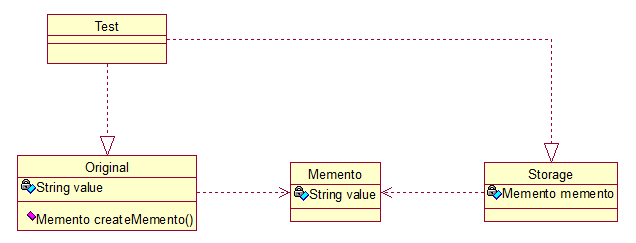 Original类是原始类,里面有需要保存的属性value及创建一个备忘录类,用来保存value值。Memento类是备忘录类,Storage类是存储备忘录的类,持有Memento类的实例,该模式很好理解。直接看源码: ``` public class Original { private String value; public String getValue() { return value; } public void setValue(String value) { this.value = value; } public Original(String value) { this.value = value; } public Memento createMemento(){ return new Memento(value); } public void restoreMemento(Memento memento){ this.value = memento.getValue(); } } ``` ``` public class Memento { private String value; public Memento(String value) { this.value = value; } public String getValue() { return value; } public void setValue(String value) { this.value = value; } } ``` ``` public class Storage { private Memento memento; public Storage(Memento memento) { this.memento = memento; } public Memento getMemento() { return memento; } public void setMemento(Memento memento) { this.memento = memento; } } ``` 测试类: ``` public class Test { public static void main(String[] args) { // 创建原始类 Original origi = new Original("egg"); // 创建备忘录 Storage storage = new Storage(origi.createMemento()); // 修改原始类的状态 System.out.println("初始化状态为:" + origi.getValue()); origi.setValue("niu"); System.out.println("修改后的状态为:" + origi.getValue()); // 回复原始类的状态 origi.restoreMemento(storage.getMemento()); System.out.println("恢复后的状态为:" + origi.getValue()); } } ``` 输出: 初始化状态为:egg 修改后的状态为:niu 恢复后的状态为:egg 简单描述下:新建原始类时,value被初始化为egg,后经过修改,将value的值置为niu,最后倒数第二行进行恢复状态,结果成功恢复了。其实我觉得这个模式叫“备份-恢复”模式最形象。
作者:微信小助手
<hr style="border-style: solid;border-width: 1px 0 0;border-color: rgba(0,0,0,0.1);-webkit-transform-origin: 0 0;-webkit-transform: scale(1, 0.5);transform-origin: 0 0;transform: scale(1, 0.5);"> <section class="_editor"> <section style="margin: 10px 0%;text-align: center;"> <section style="display: inline-block;vertical-align: middle;width: 80%;padding-left: 10px;box-sizing: border-box;" data-width="80%"> <section style="box-sizing: border-box;"> <section style="color: #fa7f7f;box-sizing: border-box;"> <p style="text-shadow: #fbd8d8 5px -3px 1px;box-sizing: border-box;font-size: 18px;"><span style="color: rgb(0, 82, 255);"><strong><span style="font-size: 14px;">点击左上角蓝字,关注“锅外的大佬”</span></strong></span><img src="/upload/3e8e6f059ad3a6eaf4bb1a86e5aba133.gif" data-type="gif" data-width="44%" style="font-size: 17px;vertical-align: middle;width: 25px;height: 29px;" class="" data-ratio="1.1625" data-w="80"></p> </section> </section> </section> </section> </section> <section class="_editor"> <p style="text-align: center;margin-top: 5px;margin-bottom: 5px;line-height: normal;text-indent: 0em;"><strong style="color: rgb(217, 33, 66);font-family: Helvetica, Arial, sans-serif;font-size: 14px;letter-spacing: 0.544px;text-align: center;white-space: normal;">专注分享国外最新技术内容</strong></p> </section> <section class="layout" style="font-size: 16px;color: black;padding: 10px;line-height: 1.6;letter-spacing: 0px;overflow-wrap: break-word;font-family: Optima-Regular, Optima, PingFangSC-light, PingFangTC-light, "PingFang SC", Cambria, Cochin, Georgia, Times, "Times New Roman", serif;word-break: break-all;background-image: linear-gradient(90deg, rgba(50, 0, 0, 0.05) 3%, rgba(0, 0, 0, 0) 3%), linear-gradient(360deg, rgba(50, 0, 0, 0.05) 3%, rgba(0, 0, 0, 0) 3%);background-size: 20px 20px;background-position: center center;"> <p style="padding-top: 5px;padding-bottom: 5px;line-height: 26px;"><em>了解更多有关基于反应流的方法以及如何避免回调地狱的信息。</em></p> <p style="padding-top: 5px;padding-bottom: 5px;line-height: 26px;">更好地理解基于反应流的方法的有用性的方法之一是它如何简化非阻塞 IO 调用。</p> <p style="padding-top: 5px;padding-bottom: 5px;line-height: 26px;">本篇文章将简要介绍进行同步远程调用所涉及的代码类型。然后,我们将演示非阻塞 IO 中的分层如何高效使用资源(尤其是线程),引入了称为回调地狱带来的复杂性以及基于反应流方法如何简化编程模型。</p> <h2 style="margin-top: 20px;margin-bottom: 10px;font-weight: bold;border-bottom: 2px solid rgb(239, 112, 96);font-size: 1.3em;"><span style="display: inline-block;font-weight: normal;background: rgb(239, 112, 96);color: #ffffff;padding: 3px 10px 1px;border-top-right-radius: 3px;border-top-left-radius: 3px;margin-right: 3px;">1. 目标服务</span><span style="display: inline-block;vertical-align: bottom;border-bottom: 36px solid #efebe9;border-right: 20px solid transparent;"> </span></h2> <p style="padding-top: 5px;padding-bottom: 5px;line-height: 26px;">客户端调用表示城市详细信息的目标服务有两个端口。当使用类型为——/cityids 的 URI 调用时,返回城市 id 列表,并且示例结果如下所示:</p> <section class="code-snippet__fix code-snippet__js"> <ul class="code-snippet__line-index code-snippet__js"> <li></li> <li></li> <li></li> <li></li> <li></li> <li></li> <li></li> <li></li> <li></li> </ul> <pre class="code-snippet__js" data-lang="json"><code style=" border-radius: 0px;padding: 2px;text-align: left;white-space: pre;display: flex; font-family: Consolas, "Liberation Mono", Menlo, Courier, monospace;background: rgba(0, 0, 0, 0); "><span class="code-snippet_outer" style="line-height: 20px;">[</span></code><code style=" border-radius: 0px;padding: 2px;text-align: left;white-space: pre;display: flex; font-family: Consolas, "Liberation Mono", Menlo, Courier, monospace;background: rgba(0, 0, 0, 0); "><span class="code-snippet_outer" style="line-height: 20px;"> 1,</span></code><code style=" border-radius: 0px;padding: 2px;text-align: left;white-space: pre;display: flex; font-family: Consolas, "Liberation Mono", Menlo, Courier, monospace;background: rgba(0, 0, 0, 0); "><span class="code-snippet_outer" style="line-height: 20px;"> 2,</span></code><code style=" border-radius: 0px;padding: 2px;text-align: left;white-space: pre;display: flex; font-family: Consolas, "Liberation Mono", Menlo, Courier, monospace;background: rgba(0, 0, 0, 0); "><span class="code-snippet_outer" style="line-height: 20px;"> 3,</span></code><code style=" border-radius: 0px;padding: 2px;text-align: left;white-space: pre;display: flex; font-family: Consolas, "Liberation Mono", Menlo, Courier, monospace;background: rgba(0, 0, 0, 0); "><span class="code-snippet_outer" style="line-height: 20px;"> 4,</span></code><code style=" border-radius: 0px;padding: 2px;text-align: left;white-space: pre;display: flex; font-family: Consolas, "Liberation Mono", Menlo, Courier, monospace;background: rgba(0, 0, 0, 0); "><span class="code-snippet_outer" style="line-height: 20px;"> 5,</span></code><code style=" border-radius: 0px;padding: 2px;text-align: left;white-space: pre;display: flex; font-family: Consolas, "Liberation Mono", Menlo, Courier, monospace;background: rgba(0, 0, 0, 0); "><span class="code-snippet_outer" style="line-height: 20px;"> 6,</span></code><code style=" border-radius: 0px;padding: 2px;text-align: left;white-space: pre;display: flex; font-family: Consolas, "Liberation Mono", Menlo, Courier, monospace;background: rgba(0, 0, 0, 0); "><span class="code-snippet_outer" style="line-height: 20px;"> 7</span></code><code style=" border-radius: 0px;padding: 2px;text-align: left;white-space: pre;display: flex; font-family: Consolas, "Liberation Mono", Menlo, Courier, monospace;background: rgba(0, 0, 0, 0); "><span class="code-snippet_outer" style="line-height: 20px;">]</span></code></pre> </section> <p style="padding-top: 5px;padding-bottom: 5px;line-height: 26px;">一个端口返回给定其 ID 的城市的详细信息,例如,当使用 ID 为1——“/cities/1” 调用时:</p> <section class="code-snippet__fix code-snippet__js"> <ul class="code-snippet__line-index code-snippet__js"> <li></li> <li></li> <li></li> <li></li> <li></li> <li></li> </ul> <pre class="code-snippet__js" data-lang="json"><code style=" border-radius: 0px;padding: 2px;text-align: left;white-space: pre;display: flex; font-family: Consolas, "Liberation Mono", Menlo, Courier, monospace;background: rgba(0, 0, 0, 0); "><span class="code-snippet_outer" style="line-height: 20px;">{</span></code><code style=" border-radius: 0px;padding: 2px;text-align: left;white-space: pre;display: flex; font-family: Consolas, "Liberation Mono", Menlo, Courier, monospace;background: rgba(0, 0, 0, 0); "><span class="code-snippet_outer" style="line-height: 20px;"> "country": "USA",</span></code><code style=" border-radius: 0px;padding: 2px;text-align: left;white-space: pre;display: flex; font-family: Consolas, "Liberation Mono", Menlo, Courier, monospace;background: rgba(0, 0, 0, 0); "><span class="code-snippet_outer" style="line-height: 20px;"> "id": 1,</span></code><code style=" border-radius: 0px;padding: 2px;text-align: left;white-space: pre;display: flex; font-family: Consolas, "Liberation Mono", Menlo, Courier, monospace;background: rgba(0, 0, 0, 0); "><span class="code-snippet_outer" style="line-height: 20px;"> "name": "Portland",</span></code><code style=" border-radius: 0px;padding: 2px;text-align: left;white-space: pre;display: flex; font-family: Consolas, "Liberation Mono", Menlo, Courier, monospace;background: rgba(0, 0, 0, 0); "><span class="code-snippet_outer" style="line-height: 20px;"> "pop": 1600000</span></code><code style=" border-radius: 0px;padding: 2px;text-align: left;white-space: pre;display: flex; font-family: Consolas, "Liberation Mono", Menlo, Courier, monospace;background: rgba(0, 0, 0, 0); "><span class="code-snippet_outer" style="line-height: 20px;">}</span></code></pre> </section> <p style="padding-top: 5px;padding-bottom: 5px;line-height: 26px;">客户端的责任是获取城市 ID 的列表,然后对于每个城市,根据 ID 获取城市的详细信息并将其组合到城市列表中。</p> <h2 style="margin-top: 20px;margin-bottom: 10px;font-weight: bold;border-bottom: 2px solid rgb(239, 112, 96);font-size: 1.3em;"><span style="display: inline-block;font-weight: normal;background: rgb(239, 112, 96);color: #ffffff;padding: 3px 10px 1px;border-top-right-radius: 3px;border-top-left-radius: 3px;margin-right: 3px;">2. 同步调用</span><span style="display: inline-block;vertical-align: bottom;border-bottom: 36px solid #efebe9;border-right: 20px solid transparent;"> </span></h2> <p style="padding-top: 5px;padding-bottom: 5px;line-height: 26px;">我正在使用 Spring Framework 的 RestTemplate 进行远程调用。获取 cityId 列表的 Kotlin 函数如下所示:</p> <section class="code-snippet__fix code-snippet__js"> <ul class="code-snippet__line-index code-snippet__js"> <li></li> <li></li> <li></li> <li></li> <li></li> <li></li> <li></li> <li></li> </ul> <pre class="code-snippet__js" data-lang="kotlin"><code style=" border-radius: 0px;padding: 2px;text-align: left;white-space: pre;display: flex; font-family: Consolas, "Liberation Mono", Menlo, Courier, monospace;background: rgba(0, 0, 0, 0); "><span class="code-snippet_outer" style="line-height: 20px;">private fun getCityIds(): List<String> {</span></code><code style=" border-radius: 0px;padding: 2px;text-align: left;white-space: pre;display: flex; font-family: Consolas, "Liberation Mono", Menlo, Courier, monospace;background: rgba(0, 0, 0, 0); "><span class="code-snippet_outer" style="line-height: 20px;"> val cityIdsEntity: ResponseEntity<List<String>> = restTemplate</span></code><code style=" border-radius: 0px;padding: 2px;text-align: left;white-space: pre;display: flex; font-family: Consolas, "Liberation Mono", Menlo, Courier, monospace;background: rgba(0, 0, 0, 0); "><span class="code-snippet_outer" style="line-height: 20px;"> .exchange("http://localhost:$localServerPort/cityids",</span></code><code style=" border-radius: 0px;padding: 2px;text-align: left;white-space: pre;display: flex; font-family: Consolas, "Liberation Mono", Menlo, Courier, monospace;background: rgba(0, 0, 0, 0); "><span class="code-snippet_outer" style="line-height: 20px;"> HttpMethod.GET,</span></code><code style=" border-radius: 0px;padding: 2px;text-align: left;white-space: pre;display: flex; font-family: Consolas, "Liberation Mono", Menlo, Courier, monospace;background: rgba(0, 0, 0, 0); "><span class="code-snippet_outer" style="line-height: 20px;"> null,</span></code><code style=" border-radius: 0px;padding: 2px;text-align: left;white-space: pre;display: flex; font-family: Consolas, "Liberation Mono", Menlo, Courier, monospace;background: rgba(0, 0, 0, 0); "><span class="code-snippet_outer" style="line-height: 20px;"> object : ParameterizedTypeReference<List<String>>() {})</span></code><code style=" border-radius: 0px;padding: 2px;text-align: left;white-space: pre;display: flex; font-family: Consolas, "Liberation Mono", Menlo, Courier, monospace;background: rgba(0, 0, 0, 0); "><span class="code-snippet_outer" style="line-height: 20px;"> return cityIdsEntity.body!!</span></code><code style=" border-radius: 0px;padding: 2px;text-align: left;white-space: pre;display: flex; font-family: Consolas, "Liberation Mono", Menlo, Courier, monospace;background: rgba(0, 0, 0, 0); "><span class="code-snippet_outer" style="line-height: 20px;">}</span></code></pre> </section> <p style="padding-top: 5px;padding-bottom: 5px;line-height: 26px;">获取城市详情:</p> <section class="code-snippet__fix code-snippet__js"> <ul class="code-snippet__line-index code-snippet__js"> <li></li> <li></li> <li></li> </ul> <pre class="code-snippet__js" data-lang="kotlin"><code style=" border-radius: 0px;padding: 2px;text-align: left;white-space: pre;display: flex; font-family: Consolas, "Liberation Mono", Menlo, Courier, monospace;background: rgba(0, 0, 0, 0); "><span class="code-snippet_outer" style="line-height: 20px;">private fun getCityForId(id: String): City {</span></code><code style=" border-radius: 0px;padding: 2px;text-align: left;white-space: pre;display: flex; font-family: Consolas, "Liberation Mono", Menlo, Courier, monospace;background: rgba(0, 0, 0, 0); "><span class="code-snippet_outer" style="line-height: 20px;"> return restTemplate.getForObject("http://localhost:$localServerPort/cities/$id", City::class.java)!!</span></code><code style=" border-radius: 0px;padding: 2px;text-align: left;white-space: pre;display: flex; font-family: Consolas, "Liberation Mono", Menlo, Courier, monospace;background: rgba(0, 0, 0, 0); "><span class="code-snippet_outer" style="line-height: 20px;">}</span></code></pre> </section> <p style="padding-top: 5px;padding-bottom: 5px;line-height: 26px;">鉴于这两个函数,它们很容易组合,以便于轻松返回城市列表 :</p> <section class="code-snippet__fix code-snippet__js"> <ul class="code-snippet__line-index code-snippet__js"> <li></li> <li></li> <li></li> <li></li> <li></li> <li></li> </ul> <pre class="code-snippet__js" data-lang="kotlin"><code style=" border-radius: 0px;padding: 2px;text-align: left;white-space: pre;display: flex; font-family: Consolas, "Liberation Mono", Menlo, Courier, monospace;background: rgba(0, 0, 0, 0); "><span class="code-snippet_outer" style="line-height: 20px;">val cityIds: List<String> = getCityIds()</span></code><code style=" border-radius: 0px;padding: 2px;text-align: left;white-space: pre;display: flex; font-family: Consolas, "Liberation Mono", Menlo, Courier, monospace;background: rgba(0, 0, 0, 0); "><span class="code-snippet_outer" style="line-height: 20px;">val cities: List<City> = cityIds</span></code><code style=" border-radius: 0px;padding: 2px;text-align: left;white-space: pre;display: flex; font-family: Consolas, "Liberation Mono", Menlo, Courier, monospace;background: rgba(0, 0, 0, 0); "><span class="code-snippet_outer" style="line-height: 20px;"> .stream()</span></code><code style=" border-radius: 0px;padding: 2px;text-align: left;white-space: pre;display: flex; font-family: Consolas, "Liberation Mono", Menlo, Courier, monospace;background: rgba(0, 0, 0, 0); "><span class="code-snippet_outer" style="line-height: 20px;"> .map<City> { cityId -> getCityForId(cityId) }</span></code><code style=" border-radius: 0px;padding: 2px;text-align: left;white-space: pre;display: flex; font-family: Consolas, "Liberation Mono", Menlo, Courier, monospace;background: rgba(0, 0, 0, 0); "><span class="code-snippet_outer" style="line-height: 20px;"> .collect(Collectors.toList())</span></code><code style=" border-radius: 0px;padding: 2px;text-align: left;white-space: pre;display: flex; font-family: Consolas, "Liberation Mono", Menlo, Courier, monospace;background: rgba(0, 0, 0, 0); "><span class="code-snippet_outer" style="line-height: 20px;">cities.forEach { city -> LOGGER.info(city.toString()) }</span></code></pre> </section> <p style="padding-top: 5px;padding-bottom: 5px;line-height: 26px;">代码很容易理解;但是,涉及八个阻塞调用:</p> <ol style="" class=" list-paddingleft-2"> <li><p>获取 7 个城市 ID 的列表,然后获取每个城市的详细信息</p></li> <li><p>获取 7 个城市的详细信息</p></li> </ol> <p style="padding-top: 5px;padding-bottom: 5px;line-height: 26px;">每一个调用都将在不同的线程上。</p> <h2 style="margin-top: 20px;margin-bottom: 10px;font-weight: bold;border-bottom: 2px solid rgb(239, 112, 96);font-size: 1.3em;"><span style="display: inline-block;font-weight: normal;background: rgb(239, 112, 96);color: #ffffff;padding: 3px 10px 1px;border-top-right-radius: 3px;border-top-left-radius: 3px;margin-right: 3px;">3. 非阻塞 IO 回调</span><span style="display: inline-block;vertical-align: bottom;border-bottom: 36px solid #efebe9;border-right: 20px solid transparent;"> </span></h2> <p style="padding-top: 5px;padding-bottom: 5px;line-height: 26px;">我将使用 AsyncHttpClient 库来进行非阻塞 IO 调用。</p> <p style="padding-top: 5px;padding-bottom: 5px;line-height: 26px;">进行远程调用时,<code style="font-size: 14px;overflow-wrap: break-word;padding: 2px 4px;border-radius: 4px;margin-right: 2px;margin-left: 2px;background-color: rgba(27, 31, 35, 0.05);font-family: "Operator Mono", Consolas, Monaco, Menlo, monospace;word-break: break-all;color: rgb(239, 112, 96);">AyncHttpClient</code> 返回 ListenableFuture 类型。</p> <section class="code-snippet__fix code-snippet__js"> <ul class="code-snippet__line-index code-snippet__js"> <li></li> <li></li> <li></li> </ul> <pre class="code-snippet__js" data-lang="kotlin"><code style=" border-radius: 0px;padding: 2px;text-align: left;white-space: pre;display: flex; font-family: Consolas, "Liberation Mono", Menlo, Courier, monospace;background: rgba(0, 0, 0, 0); "><span class="code-snippet_outer" style="line-height: 20px;">val responseListenableFuture: ListenableFuture<Response> = asyncHttpClient</span></code><code style=" border-radius: 0px;padding: 2px;text-align: left;white-space: pre;display: flex; font-family: Consolas, "Liberation Mono", Menlo, Courier, monospace;background: rgba(0, 0, 0, 0); "><span class="code-snippet_outer" style="line-height: 20px;"> .prepareGet("http://localhost:$localServerPort/cityids")</span></code><code style=" border-radius: 0px;padding: 2px;text-align: left;white-space: pre;display: flex; font-family: Consolas, "Liberation Mono", Menlo, Courier, monospace;background: rgba(0, 0, 0, 0); "><span class="code-snippet_outer" style="line-height: 20px;"> .execute()</span></code></pre> </section> <p style="padding-top: 5px;padding-bottom: 5px;line-height: 26px;">可以将回调附加到 <code style="font-size: 14px;overflow-wrap: break-word;padding: 2px 4px;border-radius: 4px;margin-right: 2px;margin-left: 2px;background-color: rgba(27, 31, 35, 0.05);font-family: "Operator Mono", Consolas, Monaco, Menlo, monospace;word-break: break-all;color: rgb(239, 112, 96);">ListenableFuture</code> 以在可用时对响应进行操作。</p> <section class="code-snippet__fix code-snippet__js"> <ul class="code-snippet__line-index code-snippet__js"> <li></li> <li></li> <li></li> <li></li> <li></li> <li></li> <li></li> </ul> <pre class="code-snippet__js" data-lang="kotlin"><code style=" border-radius: 0px;padding: 2px;text-align: left;white-space: pre;display: flex; font-family: Consolas, "Liberation Mono", Menlo, Courier, monospace;background: rgba(0, 0, 0, 0); "><span class="code-snippet_outer" style="line-height: 20px;">responseListenableFuture.addListener(Runnable {</span></code><code style=" border-radius: 0px;padding: 2px;text-align: left;white-space: pre;display: flex; font-family: Consolas, "Liberation Mono", Menlo, Courier, monospace;background: rgba(0, 0, 0, 0); "><span class="code-snippet_outer" style="line-height: 20px;"> val response: Response = responseListenableFuture.get()</span></code><code style=" border-radius: 0px;padding: 2px;text-align: left;white-space: pre;display: flex; font-family: Consolas, "Liberation Mono", Menlo, Courier, monospace;background: rgba(0, 0, 0, 0); "><span class="code-snippet_outer" style="line-height: 20px;"> val responseBody: String = response.responseBody</span></code><code style=" border-radius: 0px;padding: 2px;text-align: left;white-space: pre;display: flex; font-family: Consolas, "Liberation Mono", Menlo, Courier, monospace;background: rgba(0, 0, 0, 0); "><span class="code-snippet_outer" style="line-height: 20px;"> val cityIds: List<Long> = objectMapper.readValue<List<Long>>(responseBody,</span></code><code style=" border-radius: 0px;padding: 2px;text-align: left;white-space: pre;display: flex; font-family: Consolas, "Liberation Mono", Menlo, Courier, monospace;background: rgba(0, 0, 0, 0); "><span class="code-snippet_outer" style="line-height: 20px;"> object : TypeReference<List<Long>>() {})</span></code><code style=" border-radius: 0px;padding: 2px;text-align: left;white-space: pre;display: flex; font-family: Consolas, "Liberation Mono", Menlo, Courier, monospace;background: rgba(0, 0, 0, 0); "><span class="code-snippet_outer" style="line-height: 20px;"> ....</span></code><code style=" border-radius: 0px;padding: 2px;text-align: left;white-space: pre;display: flex; font-family: Consolas, "Liberation Mono", Menlo, Courier, monospace;background: rgba(0, 0, 0, 0); "><span class="code-snippet_outer" style="line-height: 20px;">}</span></code></pre> </section> <p style="padding-top: 5px;padding-bottom: 5px;line-height: 26px;">鉴于 cityIds 的列表,我想获得城市的详细信息,因此从响应中,我需要进行更多的远程调用并为每个调用附加回调以获取城市的详细信息:</p> <section class="code-snippet__fix code-snippet__js"> <ul class="code-snippet__line-index code-snippet__js"> <li></li> <li></li> <li></li> <li></li> <li></li> <li></li> <li></li> <li></li> <li></li> <li></li> <li></li> <li></li> <li></li> <li></li> <li></li> <li></li> <li></li> <li></li> <li></li> <li></li> </ul> <pre class="code-snippet__js" data-lang="kotlin"><code style=" border-radius: 0px;padding: 2px;text-align: left;white-space: pre;display: flex; font-family: Consolas, "Liberation Mono", Menlo, Courier, monospace;background: rgba(0, 0, 0, 0); "><span class="code-snippet_outer" style="line-height: 20px;">val responseListenableFuture: ListenableFuture<Response> = asyncHttpClient</span></code><code style=" border-radius: 0px;padding: 2px;text-align: left;white-space: pre;display: flex; font-family: Consolas, "Liberation Mono", Menlo, Courier, monospace;background: rgba(0, 0, 0, 0); "><span class="code-snippet_outer" style="line-height: 20px;"> .prepareGet("http://localhost:$localServerPort/cityids")</span></code><code style=" border-radius: 0px;padding: 2px;text-align: left;white-space: pre;display: flex; font-family: Consolas, "Liberation Mono", Menlo, Courier, monospace;background: rgba(0, 0, 0, 0); "><span class="code-snippet_outer" style="line-height: 20px;"> .execute()</span></code><code style=" border-radius: 0px;padding: 2px;text-align: left;white-space: pre;display: flex; font-family: Consolas, "Liberation Mono", Menlo, Courier, monospace;background: rgba(0, 0, 0, 0); "><span class="code-snippet_outer" style="line-height: 20px;">responseListenableFuture.addListener(Runnable {</span></code><code style=" border-radius: 0px;padding: 2px;text-align: left;white-space: pre;display: flex; font-family: Consolas, "Liberation Mono", Menlo, Courier, monospace;background: rgba(0, 0, 0, 0); "><span class="code-snippet_outer" style="line-height: 20px;"> val response: Response = responseListenableFuture.get()</span></code><code style=" border-radius: 0px;padding: 2px;text-align: left;white-space: pre;display: flex; font-family: Consolas, "Liberation Mono", Menlo, Courier, monospace;background: rgba(0, 0, 0, 0); "><span class="code-snippet_outer" style="line-height: 20px;"> val responseBody: String = response.responseBody</span></code><code style=" border-radius: 0px;padding: 2px;text-align: left;white-space: pre;display: flex; font-family: Consolas, "Liberation Mono", Menlo, Courier, monospace;background: rgba(0, 0, 0, 0); "><span class="code-snippet_outer" style="line-height: 20px;"> val cityIds: List<Long> = objectMapper.readValue<List<Long>>(responseBody,</span></code><code style=" border-radius: 0px;padding: 2px;text-align: left;white-space: pre;display: flex; font-family: Consolas, "Liberation Mono", Menlo, Courier, monospace;background: rgba(0, 0, 0, 0); "><span class="code-snippet_outer" style="line-height: 20px;"> object : TypeReference<List<Long>>() {})</span></code><code style=" border-radius: 0px;padding: 2px;text-align: left;white-space: pre;display: flex; font-family: Consolas, "Liberation Mono", Menlo, Courier, monospace;background: rgba(0, 0, 0, 0); "><span class="code-snippet_outer" style="line-height: 20px;"> cityIds.stream().map { cityId -></span></code><code style=" border-radius: 0px;padding: 2px;text-align: left;white-space: pre;display: flex; font-family: Consolas, "Liberation Mono", Menlo, Courier, monospace;background: rgba(0, 0, 0, 0); "><span class="code-snippet_outer" style="line-height: 20px;"> val cityListenableFuture = asyncHttpClient</span></code><code style=" border-radius: 0px;padding: 2px;text-align: left;white-space: pre;display: flex; font-family: Consolas, "Liberation Mono", Menlo, Courier, monospace;background: rgba(0, 0, 0, 0); "><span class="code-snippet_outer" style="line-height: 20px;"> .prepareGet("http://localhost:$localServerPort/cities/$cityId")</span></code><code style=" border-radius: 0px;padding: 2px;text-align: left;white-space: pre;display: flex; font-family: Consolas, "Liberation Mono", Menlo, Courier, monospace;background: rgba(0, 0, 0, 0); "><span class="code-snippet_outer" style="line-height: 20px;"> .execute()</span></code><code style=" border-radius: 0px;padding: 2px;text-align: left;white-space: pre;display: flex; font-family: Consolas, "Liberation Mono", Menlo, Courier, monospace;background: rgba(0, 0, 0, 0); "><span class="code-snippet_outer" style="line-height: 20px;"> cityListenableFuture.addListener(Runnable {</span></code><code style=" border-radius: 0px;padding: 2px;text-align: left;white-space: pre;display: flex; font-family: Consolas, "Liberation Mono", Menlo, Courier, monospace;background: rgba(0, 0, 0, 0); "><span class="code-snippet_outer" style="line-height: 20px;"> val cityDescResp = cityListenableFuture.get()</span></code><code style=" border-radius: 0px;padding: 2px;text-align: left;white-space: pre;display: flex; font-family: Consolas, "Liberation Mono", Menlo, Courier, monospace;background: rgba(0, 0, 0, 0); "><span class="code-snippet_outer" style="line-height: 20px;"> val cityDesc = cityDescResp.responseBody</span></code><code style=" border-radius: 0px;padding: 2px;text-align: left;white-space: pre;display: flex; font-family: Consolas, "Liberation Mono", Menlo, Courier, monospace;background: rgba(0, 0, 0, 0); "><span class="code-snippet_outer" style="line-height: 20px;"> val city = objectMapper.readValue(cityDesc, City::class.java)</span></code><code style=" border-radius: 0px;padding: 2px;text-align: left;white-space: pre;display: flex; font-family: Consolas, "Liberation Mono", Menlo, Courier, monospace;background: rgba(0, 0, 0, 0); "><span class="code-snippet_outer" style="line-height: 20px;"> LOGGER.info("Got city: $city")</span></code><code style=" border-radius: 0px;padding: 2px;text-align: left;white-space: pre;display: flex; font-family: Consolas, "Liberation Mono", Menlo, Courier, monospace;background: rgba(0, 0, 0, 0); "><span class="code-snippet_outer" style="line-height: 20px;"> }, executor)</span></code><code style=" border-radius: 0px;padding: 2px;text-align: left;white-space: pre;display: flex; font-family: Consolas, "Liberation Mono", Menlo, Courier, monospace;background: rgba(0, 0, 0, 0); "><span class="code-snippet_outer" style="line-height: 20px;"> }.collect(Collectors.toList())</span></code><code style=" border-radius: 0px;padding: 2px;text-align: left;white-space: pre;display: flex; font-family: Consolas, "Liberation Mono", Menlo, Courier, monospace;background: rgba(0, 0, 0, 0); "><span class="code-snippet_outer" style="line-height: 20px;">}, executor)</span></code></pre> </section> <p style="padding-top: 5px;padding-bottom: 5px;line-height: 26px;">这是一段粗糙的代码;回调中又包含一组回调,很难推理和理解 - 因此它被称为“回调地狱”。</p> <h2 style="margin-top: 20px;margin-bottom: 10px;font-weight: bold;border-bottom: 2px solid rgb(239, 112, 96);font-size: 1.3em;"><span style="display: inline-block;font-weight: normal;background: rgb(239, 112, 96);color: #ffffff;padding: 3px 10px 1px;border-top-right-radius: 3px;border-top-left-radius: 3px;margin-right: 3px;">4. 在 Java CompletableFuture 中使用非阻塞 IO</span><span style="display: inline-block;vertical-align: bottom;border-bottom: 36px solid #efebe9;border-right: 20px solid transparent;"> </span></h2> <p style="padding-top: 5px;padding-bottom: 5px;line-height: 26px;">通过将 Java 的 CompletableFuture 作为返回类型而不是 ListenableFuture 返回,可以稍微改进此代码。<code style="font-size: 14px;overflow-wrap: break-word;padding: 2px 4px;border-radius: 4px;margin-right: 2px;margin-left: 2px;background-color: rgba(27, 31, 35, 0.05);font-family: "Operator Mono", Consolas, Monaco, Menlo, monospace;word-break: break-all;color: rgb(239, 112, 96);">CompletableFuture</code> 提供允许修改和返回类型的运算符。</p> <p style="padding-top: 5px;padding-bottom: 5px;line-height: 26px;">例如,考虑获取城市 ID 列表的功能:</p> <section class="code-snippet__fix code-snippet__js"> <ul class="code-snippet__line-index code-snippet__js"> <li></li> <li></li> <li></li> <li></li> <li></li> <li></li> <li></li> <li></li> <li></li> <li></li> <li></li> </ul> <pre class="code-snippet__js" data-lang="kotlin"><code style=" border-radius: 0px;padding: 2px;text-align: left;white-space: pre;display: flex; font-family: Consolas, "Liberation Mono", Menlo, Courier, monospace;background: rgba(0, 0, 0, 0); "><span class="code-snippet_outer" style="line-height: 20px;">private fun getCityIds(): CompletableFuture<List<Long>> {</span></code><code style=" border-radius: 0px;padding: 2px;text-align: left;white-space: pre;display: flex; font-family: Consolas, "Liberation Mono", Menlo, Courier, monospace;background: rgba(0, 0, 0, 0); "><span class="code-snippet_outer" style="line-height: 20px;"> return asyncHttpClient</span></code><code style=" border-radius: 0px;padding: 2px;text-align: left;white-space: pre;display: flex; font-family: Consolas, "Liberation Mono", Menlo, Courier, monospace;background: rgba(0, 0, 0, 0); "><span class="code-snippet_outer" style="line-height: 20px;"> .prepareGet("http://localhost:$localServerPort/cityids")</span></code><code style=" border-radius: 0px;padding: 2px;text-align: left;white-space: pre;display: flex; font-family: Consolas, "Liberation Mono", Menlo, Courier, monospace;background: rgba(0, 0, 0, 0); "><span class="code-snippet_outer" style="line-height: 20px;"> .execute()</span></code><code style=" border-radius: 0px;padding: 2px;text-align: left;white-space: pre;display: flex; font-family: Consolas, "Liberation Mono", Menlo, Courier, monospace;background: rgba(0, 0, 0, 0); "><span class="code-snippet_outer" style="line-height: 20px;"> .toCompletableFuture()</span></code><code style=" border-radius: 0px;padding: 2px;text-align: left;white-space: pre;display: flex; font-family: Consolas, "Liberation Mono", Menlo, Courier, monospace;background: rgba(0, 0, 0, 0); "><span class="code-snippet_outer" style="line-height: 20px;"> .thenApply { response -></span></code><code style=" border-radius: 0px;padding: 2px;text-align: left;white-space: pre;display: flex; font-family: Consolas, "Liberation Mono", Menlo, Courier, monospace;background: rgba(0, 0, 0, 0); "><span class="code-snippet_outer" style="line-height: 20px;"> val s = response.responseBody</span></code><code style=" border-radius: 0px;padding: 2px;text-align: left;white-space: pre;display: flex; font-family: Consolas, "Liberation Mono", Menlo, Courier, monospace;background: rgba(0, 0, 0, 0); "><span class="code-snippet_outer" style="line-height: 20px;"> val l: List<Long> = objectMapper.readValue(s, object : TypeReference<List<Long>>() {})</span></code><code style=" border-radius: 0px;padding: 2px;text-align: left;white-space: pre;display: flex; font-family: Consolas, "Liberation Mono", Menlo, Courier, monospace;background: rgba(0, 0, 0, 0); "><span class="code-snippet_outer" style="line-height: 20px;"> l</span></code><code style=" border-radius: 0px;padding: 2px;text-align: left;white-space: pre;display: flex; font-family: Consolas, "Liberation Mono", Menlo, Courier, monospace;background: rgba(0, 0, 0, 0); "><span class="code-snippet_outer" style="line-height: 20px;"> }</span></code><code style=" border-radius: 0px;padding: 2px;text-align: left;white-space: pre;display: flex; font-family: Consolas, "Liberation Mono", Menlo, Courier, monospace;background: rgba(0, 0, 0, 0); "><span class="code-snippet_outer" style="line-height: 20px;">}</span></code></pre> </section> <p style="padding-top: 5px;padding-bottom: 5px;line-height: 26px;">在这里,我使用 <code style="font-size: 14px;overflow-wrap: break-word;padding: 2px 4px;border-radius: 4px;margin-right: 2px;margin-left: 2px;background-color: rgba(27, 31, 35, 0.05);font-family: "Operator Mono", Consolas, Monaco, Menlo, monospace;word-break: break-all;color: rgb(239, 112, 96);">thenApply</code> 运算符将 <code style="font-size: 14px;overflow-wrap: break-word;padding: 2px 4px;border-radius: 4px;margin-right: 2px;margin-left: 2px;background-color: rgba(27, 31, 35, 0.05);font-family: "Operator Mono", Consolas, Monaco, Menlo, monospace;word-break: break-all;color: rgb(239, 112, 96);">CompletableFuture<Response></code> 转换为 <code style="font-size: 14px;overflow-wrap: break-word;padding: 2px 4px;border-radius: 4px;margin-right: 2px;margin-left: 2px;background-color: rgba(27, 31, 35, 0.05);font-family: "Operator Mono", Consolas, Monaco, Menlo, monospace;word-break: break-all;color: rgb(239, 112, 96);">CompletableFuture<List<Long>></code> 。</p> <p style="padding-top: 5px;padding-bottom: 5px;line-height: 26px;">同样的,获取城市详情:</p> <section class="code-snippet__fix code-snippet__js"> <ul class="code-snippet__line-index code-snippet__js"> <li></li> <li></li> <li></li> <li></li> <li></li> <li></li> <li></li> <li></li> <li></li> <li></li> <li></li> </ul> <pre class="code-snippet__js" data-lang="kotlin"><code style=" border-radius: 0px;padding: 2px;text-align: left;white-space: pre;display: flex; font-family: Consolas, "Liberation Mono", Menlo, Courier, monospace;background: rgba(0, 0, 0, 0); "><span class="code-snippet_outer" style="line-height: 20px;">private fun getCityDetail(cityId: Long): CompletableFuture<City> {</span></code><code style=" border-radius: 0px;padding: 2px;text-align: left;white-space: pre;display: flex; font-family: Consolas, "Liberation Mono", Menlo, Courier, monospace;background: rgba(0, 0, 0, 0); "><span class="code-snippet_outer" style="line-height: 20px;"> return asyncHttpClient.prepareGet("http://localhost:$localServerPort/cities/$cityId")</span></code><code style=" border-radius: 0px;padding: 2px;text-align: left;white-space: pre;display: flex; font-family: Consolas, "Liberation Mono", Menlo, Courier, monospace;background: rgba(0, 0, 0, 0); "><span class="code-snippet_outer" style="line-height: 20px;"> .execute()</span></code><code style=" border-radius: 0px;padding: 2px;text-align: left;white-space: pre;display: flex; font-family: Consolas, "Liberation Mono", Menlo, Courier, monospace;background: rgba(0, 0, 0, 0); "><span class="code-snippet_outer" style="line-height: 20px;"> .toCompletableFuture()</span></code><code style=" border-radius: 0px;padding: 2px;text-align: left;white-space: pre;display: flex; font-family: Consolas, "Liberation Mono", Menlo, Courier, monospace;background: rgba(0, 0, 0, 0); "><span class="code-snippet_outer" style="line-height: 20px;"> .thenApply { response -></span></code><code style=" border-radius: 0px;padding: 2px;text-align: left;white-space: pre;display: flex; font-family: Consolas, "Liberation Mono", Menlo, Courier, monospace;background: rgba(0, 0, 0, 0); "><span class="code-snippet_outer" style="line-height: 20px;"> val s = response.responseBody</span></code><code style=" border-radius: 0px;padding: 2px;text-align: left;white-space: pre;display: flex; font-family: Consolas, "Liberation Mono", Menlo, Courier, monospace;background: rgba(0, 0, 0, 0); "><span class="code-snippet_outer" style="line-height: 20px;"> LOGGER.info("Got {}", s)</span></code><code style=" border-radius: 0px;padding: 2px;text-align: left;white-space: pre;display: flex; font-family: Consolas, "Liberation Mono", Menlo, Courier, monospace;background: rgba(0, 0, 0, 0); "><span class="code-snippet_outer" style="line-height: 20px;"> val city = objectMaper.readValue(s, City::class.java)</span></code><code style=" border-radius: 0px;padding: 2px;text-align: left;white-space: pre;display: flex; font-family: Consolas, "Liberation Mono", Menlo, Courier, monospace;background: rgba(0, 0, 0, 0); "><span class="code-snippet_outer" style="line-height: 20px;"> city</span></code><code style=" border-radius: 0px;padding: 2px;text-align: left;white-space: pre;display: flex; font-family: Consolas, "Liberation Mono", Menlo, Courier, monospace;background: rgba(0, 0, 0, 0); "><span class="code-snippet_outer" style="line-height: 20px;"> }</span></code><code style=" border-radius: 0px;padding: 2px;text-align: left;white-space: pre;display: flex; font-family: Consolas, "Liberation Mono", Menlo, Courier, monospace;background: rgba(0, 0, 0, 0); "><span class="code-snippet_outer" style="line-height: 20px;">}</span></code></pre> </section> <p style="padding-top: 5px;padding-bottom: 5px;line-height: 26px;">这是基于回调的方法的改进。但是,在这个特定情况下,<code style="font-size: 14px;overflow-wrap: break-word;padding: 2px 4px;border-radius: 4px;margin-right: 2px;margin-left: 2px;background-color: rgba(27, 31, 35, 0.05);font-family: "Operator Mono", Consolas, Monaco, Menlo, monospace;word-break: break-all;color: rgb(239, 112, 96);">CompletableFuture</code> 缺乏有用的运算符,例如,所有城市细节都需要放在一起:</p> <section class="code-snippet__fix code-snippet__js"> <ul class="code-snippet__line-index code-snippet__js"> <li></li> <li></li> <li></li> <li></li> <li></li> <li></li> <li></li> <li></li> <li></li> <li></li> <li></li> <li></li> <li></li> <li></li> <li></li> <li></li> <li></li> <li></li> </ul> <pre class="code-snippet__js" data-lang="kotlin"><code style=" border-radius: 0px;padding: 2px;text-align: left;white-space: pre;display: flex; font-family: Consolas, "Liberation Mono", Menlo, Courier, monospace;background: rgba(0, 0, 0, 0); "><span class="code-snippet_outer" style="line-height: 20px;">val cityIdsFuture: CompletableFuture<List<Long>> = getCityIds()</span></code><code style=" border-radius: 0px;padding: 2px;text-align: left;white-space: pre;display: flex; font-family: Consolas, "Liberation Mono", Menlo, Courier, monospace;background: rgba(0, 0, 0, 0); "><span class="code-snippet_outer" style="line-height: 20px;">val citiesCompletableFuture: CompletableFuture<List<City>> =</span></code><code style=" border-radius: 0px;padding: 2px;text-align: left;white-space: pre;display: flex; font-family: Consolas, "Liberation Mono", Menlo, Courier, monospace;background: rgba(0, 0, 0, 0); "><span class="code-snippet_outer" style="line-height: 20px;"> cityIdsFuture</span></code><code style=" border-radius: 0px;padding: 2px;text-align: left;white-space: pre;display: flex; font-family: Consolas, "Liberation Mono", Menlo, Courier, monospace;background: rgba(0, 0, 0, 0); "><span class="code-snippet_outer" style="line-height: 20px;"> .thenCompose { l -></span></code><code style=" border-radius: 0px;padding: 2px;text-align: left;white-space: pre;display: flex; font-family: Consolas, "Liberation Mono", Menlo, Courier, monospace;background: rgba(0, 0, 0, 0); "><span class="code-snippet_outer" style="line-height: 20px;"> val citiesCompletable: List<CompletableFuture<City>> =</span></code><code style=" border-radius: 0px;padding: 2px;text-align: left;white-space: pre;display: flex; font-family: Consolas, "Liberation Mono", Menlo, Courier, monospace;background: rgba(0, 0, 0, 0); "><span class="code-snippet_outer" style="line-height: 20px;"> l.stream()</span></code><code style=" border-radius: 0px;padding: 2px;text-align: left;white-space: pre;display: flex; font-family: Consolas, "Liberation Mono", Menlo, Courier, monospace;background: rgba(0, 0, 0, 0); "><span class="code-snippet_outer" style="line-height: 20px;"> .map { cityId -></span></code><code style=" border-radius: 0px;padding: 2px;text-align: left;white-space: pre;display: flex; font-family: Consolas, "Liberation Mono", Menlo, Courier, monospace;background: rgba(0, 0, 0, 0); "><span class="code-snippet_outer" style="line-height: 20px;"> getCityDetail(cityId)</span></code><code style=" border-radius: 0px;padding: 2px;text-align: left;white-space: pre;display: flex; font-family: Consolas, "Liberation Mono", Menlo, Courier, monospace;background: rgba(0, 0, 0, 0); "><span class="code-snippet_outer" style="line-height: 20px;"> }.collect(toList())</span></code><code style=" border-radius: 0px;padding: 2px;text-align: left;white-space: pre;display: flex; font-family: Consolas, "Liberation Mono", Menlo, Courier, monospace;background: rgba(0, 0, 0, 0); "><span class="code-snippet_outer" style="line-height: 20px;"> val citiesCompletableFutureOfList: CompletableFuture<List<City>> = CompletableFuture.allOf(*citiesCompletable.toTypedArray())</span></code><code style=" border-radius: 0px;padding: 2px;text-align: left;white-space: pre;display: flex; font-family: Consolas, "Liberation Mono", Menlo, Courier, monospace;background: rgba(0, 0, 0, 0); "><span class="code-snippet_outer" style="line-height: 20px;"> .thenApply { _: Void? -></span></code><code style=" border-radius: 0px;padding: 2px;text-align: left;white-space: pre;display: flex; font-family: Consolas, "Liberation Mono", Menlo, Courier, monospace;background: rgba(0, 0, 0, 0); "><span class="code-snippet_outer" style="line-height: 20px;"> citiesCompletable</span></code><code style=" border-radius: 0px;padding: 2px;text-align: left;white-space: pre;display: flex; font-family: Consolas, "Liberation Mono", Menlo, Courier, monospace;background: rgba(0, 0, 0, 0); "><span class="code-snippet_outer" style="line-height: 20px;"> .stream()</span></code><code style=" border-radius: 0px;padding: 2px;text-align: left;white-space: pre;display: flex; font-family: Consolas, "Liberation Mono", Menlo, Courier, monospace;background: rgba(0, 0, 0, 0); "><span class="code-snippet_outer" style="line-height: 20px;"> .map { it.join() }</span></code><code style=" border-radius: 0px;padding: 2px;text-align: left;white-space: pre;display: flex; font-family: Consolas, "Liberation Mono", Menlo, Courier, monospace;background: rgba(0, 0, 0, 0); "><span class="code-snippet_outer" style="line-height: 20px;"> .collect(toList())</span></code><code style=" border-radius: 0px;padding: 2px;text-align: left;white-space: pre;display: flex; font-family: Consolas, "Liberation Mono", Menlo, Courier, monospace;background: rgba(0, 0, 0, 0); "><span class="code-snippet_outer" style="line-height: 20px;"> }</span></code><code style=" border-radius: 0px;padding: 2px;text-align: left;white-space: pre;display: flex; font-family: Consolas, "Liberation Mono", Menlo, Courier, monospace;background: rgba(0, 0, 0, 0); "><span class="code-snippet_outer" style="line-height: 20px;"> citiesCompletableFutureOfList</span></code><code style=" border-radius: 0px;padding: 2px;text-align: left;white-space: pre;display: flex; font-family: Consolas, "Liberation Mono", Menlo, Courier, monospace;background: rgba(0, 0, 0, 0); "><span class="code-snippet_outer" style="line-height: 20px;"> }</span></code></pre> </section> <p style="padding-top: 5px;padding-bottom: 5px;line-height: 26px;">使用了一个名为 CompletableFuture.allOf 的运算符,它返回一个“Void”类型,并且必须强制返回所需类型的 <code style="font-size: 14px;overflow-wrap: break-word;padding: 2px 4px;border-radius: 4px;margin-right: 2px;margin-left: 2px;background-color: rgba(27, 31, 35, 0.05);font-family: "Operator Mono", Consolas, Monaco, Menlo, monospace;word-break: break-all;color: rgb(239, 112, 96);">CompletableFuture<List<City>></code>。</p> <h2 style="margin-top: 20px;margin-bottom: 10px;font-weight: bold;border-bottom: 2px solid rgb(239, 112, 96);font-size: 1.3em;"><span style="display: inline-block;font-weight: normal;background: rgb(239, 112, 96);color: #ffffff;padding: 3px 10px 1px;border-top-right-radius: 3px;border-top-left-radius: 3px;margin-right: 3px;">5. 使用 Reactor 项目</span><span style="display: inline-block;vertical-align: bottom;border-bottom: 36px solid #efebe9;border-right: 20px solid transparent;"> </span></h2> <p style="padding-top: 5px;padding-bottom: 5px;line-height: 26px;">Project Reactor 是 Reactive Streams 规范的实现。它有两种特殊类型可以返回 0/1 项的流和 0/n 项的流 - 前者是 Mono,后者是 Flux。</p> <p style="padding-top: 5px;padding-bottom: 5px;line-height: 26px;">Project Reactor 提供了一组非常丰富的运算符,允许以各种方式转换数据流。首先考虑返回城市 ID 列表的函数:</p> <section class="code-snippet__fix code-snippet__js"> <ul class="code-snippet__line-index code-snippet__js"> <li></li> <li></li> <li></li> <li></li> <li></li> <li></li> <li></li> <li></li> <li></li> </ul> <pre class="code-snippet__js" data-lang="kotlin"><code style=" border-radius: 0px;padding: 2px;text-align: left;white-space: pre;display: flex; font-family: Consolas, "Liberation Mono", Menlo, Courier, monospace;background: rgba(0, 0, 0, 0); "><span class="code-snippet_outer" style="line-height: 20px;">private fun getCityIds(): Flux<Long> {</span></code><code style=" border-radius: 0px;padding: 2px;text-align: left;white-space: pre;display: flex; font-family: Consolas, "Liberation Mono", Menlo, Courier, monospace;background: rgba(0, 0, 0, 0); "><span class="code-snippet_outer" style="line-height: 20px;"> return webClient.get()</span></code><code style=" border-radius: 0px;padding: 2px;text-align: left;white-space: pre;display: flex; font-family: Consolas, "Liberation Mono", Menlo, Courier, monospace;background: rgba(0, 0, 0, 0); "><span class="code-snippet_outer" style="line-height: 20px;"> .uri("/cityids")</span></code><code style=" border-radius: 0px;padding: 2px;text-align: left;white-space: pre;display: flex; font-family: Consolas, "Liberation Mono", Menlo, Courier, monospace;background: rgba(0, 0, 0, 0); "><span class="code-snippet_outer" style="line-height: 20px;"> .exchange()</span></code><code style=" border-radius: 0px;padding: 2px;text-align: left;white-space: pre;display: flex; font-family: Consolas, "Liberation Mono", Menlo, Courier, monospace;background: rgba(0, 0, 0, 0); "><span class="code-snippet_outer" style="line-height: 20px;"> .flatMapMany { response -></span></code><code style=" border-radius: 0px;padding: 2px;text-align: left;white-space: pre;display: flex; font-family: Consolas, "Liberation Mono", Menlo, Courier, monospace;background: rgba(0, 0, 0, 0); "><span class="code-snippet_outer" style="line-height: 20px;"> LOGGER.info("Received cities..")</span></code><code style=" border-radius: 0px;padding: 2px;text-align: left;white-space: pre;display: flex; font-family: Consolas, "Liberation Mono", Menlo, Courier, monospace;background: rgba(0, 0, 0, 0); "><span class="code-snippet_outer" style="line-height: 20px;"> response.bodyToFlux<Long>()</span></code><code style=" border-radius: 0px;padding: 2px;text-align: left;white-space: pre;display: flex; font-family: Consolas, "Liberation Mono", Menlo, Courier, monospace;background: rgba(0, 0, 0, 0); "><span class="code-snippet_outer" style="line-height: 20px;"> }</span></code><code style=" border-radius: 0px;padding: 2px;text-align: left;white-space: pre;display: flex; font-family: Consolas, "Liberation Mono", Menlo, Courier, monospace;background: rgba(0, 0, 0, 0); "><span class="code-snippet_outer" style="line-height: 20px;">}</span></code></pre> </section> <p style="padding-top: 5px;padding-bottom: 5px;line-height: 26px;">我正在使用 Spring 优秀的 WebClient 库进行远程调用并获得 Project Reactor <code style="font-size: 14px;overflow-wrap: break-word;padding: 2px 4px;border-radius: 4px;margin-right: 2px;margin-left: 2px;background-color: rgba(27, 31, 35, 0.05);font-family: "Operator Mono", Consolas, Monaco, Menlo, monospace;word-break: break-all;color: rgb(239, 112, 96);">Mono <ClientResponse></code> 类型的响应,可以使用 <code style="font-size: 14px;overflow-wrap: break-word;padding: 2px 4px;border-radius: 4px;margin-right: 2px;margin-left: 2px;background-color: rgba(27, 31, 35, 0.05);font-family: "Operator Mono", Consolas, Monaco, Menlo, monospace;word-break: break-all;color: rgb(239, 112, 96);">flatMapMany</code> 运算符将其修改为 <code style="font-size: 14px;overflow-wrap: break-word;padding: 2px 4px;border-radius: 4px;margin-right: 2px;margin-left: 2px;background-color: rgba(27, 31, 35, 0.05);font-family: "Operator Mono", Consolas, Monaco, Menlo, monospace;word-break: break-all;color: rgb(239, 112, 96);">Flux<Long></code> 类型。</p> <p style="padding-top: 5px;padding-bottom: 5px;line-height: 26px;">根据城市 ID,沿着同样的路线获取城市的详情:</p> <section class="code-snippet__fix code-snippet__js"> <ul class="code-snippet__line-index code-snippet__js"> <li></li> <li></li> <li></li> <li></li> <li></li> <li></li> <li></li> <li></li> <li></li> <li></li> </ul> <pre class="code-snippet__js" data-lang="kotlin"><code style=" border-radius: 0px;padding: 2px;text-align: left;white-space: pre;display: flex; font-family: Consolas, "Liberation Mono", Menlo, Courier, monospace;background: rgba(0, 0, 0, 0); "><span class="code-snippet_outer" style="line-height: 20px;">private fun getCityDetail(cityId: Long?): Mono<City> {</span></code><code style=" border-radius: 0px;padding: 2px;text-align: left;white-space: pre;display: flex; font-family: Consolas, "Liberation Mono", Menlo, Courier, monospace;background: rgba(0, 0, 0, 0); "><span class="code-snippet_outer" style="line-height: 20px;"> return webClient.get()</span></code><code style=" border-radius: 0px;padding: 2px;text-align: left;white-space: pre;display: flex; font-family: Consolas, "Liberation Mono", Menlo, Courier, monospace;background: rgba(0, 0, 0, 0); "><span class="code-snippet_outer" style="line-height: 20px;"> .uri("/cities/{id}", cityId!!)</span></code><code style=" border-radius: 0px;padding: 2px;text-align: left;white-space: pre;display: flex; font-family: Consolas, "Liberation Mono", Menlo, Courier, monospace;background: rgba(0, 0, 0, 0); "><span class="code-snippet_outer" style="line-height: 20px;"> .exchange()</span></code><code style=" border-radius: 0px;padding: 2px;text-align: left;white-space: pre;display: flex; font-family: Consolas, "Liberation Mono", Menlo, Courier, monospace;background: rgba(0, 0, 0, 0); "><span class="code-snippet_outer" style="line-height: 20px;"> .flatMap { response -></span></code><code style=" border-radius: 0px;padding: 2px;text-align: left;white-space: pre;display: flex; font-family: Consolas, "Liberation Mono", Menlo, Courier, monospace;background: rgba(0, 0, 0, 0); "><span class="code-snippet_outer" style="line-height: 20px;"> val city: Mono<City> = response.bodyToMono()</span></code><code style=" border-radius: 0px;padding: 2px;text-align: left;white-space: pre;display: flex; font-family: Consolas, "Liberation Mono", Menlo, Courier, monospace;background: rgba(0, 0, 0, 0); "><span class="code-snippet_outer" style="line-height: 20px;"> LOGGER.info("Received city..")</span></code><code style=" border-radius: 0px;padding: 2px;text-align: left;white-space: pre;display: flex; font-family: Consolas, "Liberation Mono", Menlo, Courier, monospace;background: rgba(0, 0, 0, 0); "><span class="code-snippet_outer" style="line-height: 20px;"> city</span></code><code style=" border-radius: 0px;padding: 2px;text-align: left;white-space: pre;display: flex; font-family: Consolas, "Liberation Mono", Menlo, Courier, monospace;background: rgba(0, 0, 0, 0); "><span class="code-snippet_outer" style="line-height: 20px;"> }</span></code><code style=" border-radius: 0px;padding: 2px;text-align: left;white-space: pre;display: flex; font-family: Consolas, "Liberation Mono", Menlo, Courier, monospace;background: rgba(0, 0, 0, 0); "><span class="code-snippet_outer" style="line-height: 20px;">}</span></code></pre> </section> <p style="padding-top: 5px;padding-bottom: 5px;line-height: 26px;">在这里,Project Reactor <code style="font-size: 14px;overflow-wrap: break-word;padding: 2px 4px;border-radius: 4px;margin-right: 2px;margin-left: 2px;background-color: rgba(27, 31, 35, 0.05);font-family: "Operator Mono", Consolas, Monaco, Menlo, monospace;word-break: break-all;color: rgb(239, 112, 96);">Mono<ClientResponse></code> 类型正在使用 <code style="font-size: 14px;overflow-wrap: break-word;padding: 2px 4px;border-radius: 4px;margin-right: 2px;margin-left: 2px;background-color: rgba(27, 31, 35, 0.05);font-family: "Operator Mono", Consolas, Monaco, Menlo, monospace;word-break: break-all;color: rgb(239, 112, 96);">flatMap</code> 运算符转换为 <code style="font-size: 14px;overflow-wrap: break-word;padding: 2px 4px;border-radius: 4px;margin-right: 2px;margin-left: 2px;background-color: rgba(27, 31, 35, 0.05);font-family: "Operator Mono", Consolas, Monaco, Menlo, monospace;word-break: break-all;color: rgb(239, 112, 96);">Mono<City></code> 类型。</p> <p style="padding-top: 5px;padding-bottom: 5px;line-height: 26px;">以及从中获取 cityIds,这是 City 的代码:</p> <section class="code-snippet__fix code-snippet__js"> <ul class="code-snippet__line-index code-snippet__js"> <li></li> <li></li> <li></li> <li></li> </ul> <pre class="code-snippet__js" data-lang="kotlin"><code style=" border-radius: 0px;padding: 2px;text-align: left;white-space: pre;display: flex; font-family: Consolas, "Liberation Mono", Menlo, Courier, monospace;background: rgba(0, 0, 0, 0); "><span class="code-snippet_outer" style="line-height: 20px;">val cityIdsFlux: Flux<Long> = getCityIds()</span></code><code style=" border-radius: 0px;padding: 2px;text-align: left;white-space: pre;display: flex; font-family: Consolas, "Liberation Mono", Menlo, Courier, monospace;background: rgba(0, 0, 0, 0); "><span class="code-snippet_outer" style="line-height: 20px;">val citiesFlux: Flux<City> = cityIdsFlux</span></code><code style=" border-radius: 0px;padding: 2px;text-align: left;white-space: pre;display: flex; font-family: Consolas, "Liberation Mono", Menlo, Courier, monospace;background: rgba(0, 0, 0, 0); "><span class="code-snippet_outer" style="line-height: 20px;"> .flatMap { this.getCityDetail(it) }</span></code><code style=" border-radius: 0px;padding: 2px;text-align: left;white-space: pre;display: flex; font-family: Consolas, "Liberation Mono", Menlo, Courier, monospace;background: rgba(0, 0, 0, 0); "><span class="code-snippet_outer" style="line-height: 20px;">return citiesFlux</span></code></pre> </section> <p style="padding-top: 5px;padding-bottom: 5px;line-height: 26px;">这非常具有表现力 - 对比基于回调的方法的混乱和基于 Reactive Streams 的方法的简单性。</p> <h2 style="margin-top: 20px;margin-bottom: 10px;font-weight: bold;border-bottom: 2px solid rgb(239, 112, 96);font-size: 1.3em;"><span style="display: inline-block;font-weight: normal;background: rgb(239, 112, 96);color: #ffffff;padding: 3px 10px 1px;border-top-right-radius: 3px;border-top-left-radius: 3px;margin-right: 3px;">6. 结束语</span><span style="display: inline-block;vertical-align: bottom;border-bottom: 36px solid #efebe9;border-right: 20px solid transparent;"> </span></h2> <p style="padding-top: 5px;padding-bottom: 5px;line-height: 26px;">在我看来,这是使用基于反应流的方法的最大原因之一,特别是 Project Reactor,用于涉及跨越异步边界的场景,例如在此实例中进行远程调用。它清理了回调和回调的混乱,提供了一种使用丰富的运算符进行修改/转换类型的自然方法。</p> <p style="padding-top: 5px;padding-bottom: 5px;line-height: 26px;">本文使用的所有示例的工作版本的存储库都可以在 GitHub 上找到。</p> <blockquote style="font-size: 0.9em;overflow: auto;color: rgb(106, 115, 125);padding: 10px 10px 10px 20px;margin-bottom: 20px;margin-top: 20px;border-left-color: rgb(239, 112, 96);background: rgb(239, 235, 233);"> <p style="font-size: 16px;padding-top: 5px;padding-bottom: 5px;color: black;line-height: 26px;">原文:https://dzone.com/articles/callback-hell-and-reactive-patterns</p> </blockquote> <blockquote style="font-size: 0.9em;overflow: auto;color: rgb(106, 115, 125);padding: 10px 10px 10px 20px;margin-bottom: 20px;margin-top: 20px;border-left-color: rgb(239, 112, 96);background: rgb(239, 235, 233);"> <p style="font-size: 16px;padding-top: 5px;padding-bottom: 5px;color: black;line-height: 26px;">作者:Biju Kunjummen</p> </blockquote> <blockquote style="font-size: 0.9em;overflow: auto;color: rgb(106, 115, 125);padding: 10px 10px 10px 20px;margin-bottom: 20px;margin-top: 20px;border-left-color: rgb(239, 112, 96);background: rgb(239, 235, 233);"> <p style="font-size: 16px;padding-top: 5px;padding-bottom: 5px;color: black;line-height: 26px;">译者:Emma<span style="text-align: center;color: rgb(51, 51, 51);font-family: -apple-system-font, BlinkMacSystemFont, "Helvetica Neue", "PingFang SC", "Hiragino Sans GB", "Microsoft YaHei UI", "Microsoft YaHei", Arial, sans-serif;font-size: 17px;"> </span></p> </blockquote> </section> <p><strong style="font-size: 15px;">推荐阅读:</strong></p> <p><strong style="font-size: 15px;"><a href="http://mp.weixin.qq.com/s?__biz=MzIzNzYxNDYzNw==&mid=2247483905&idx=1&sn=af56c9108b5f0998e51e6c44dbfcea2d&chksm=e8c4a143dfb328555c5aa2108860efdcbde2d935ace380e7f4240aa1fcae27dc42e7db9b71a0&scene=21#wechat_redirect" target="_blank" data-itemshowtype="0" data-linktype="2">如何排查Java内存泄漏?看完我给跪了!</a><br></strong></p> <p><strong><span style="font-size: 15px;"></span></strong></p> <p><span style="font-size: 15px;"><strong>上篇好文:</strong></span></p> <p><span style="font-size: 15px;"><strong><a href="http://mp.weixin.qq.com/s?__biz=MzIzNzYxNDYzNw==&mid=2247483940&idx=1&sn=9584d7e837bcbe3be99a483cffbe36a3&chksm=e8c4a166dfb328706a637defc33442bb82dd9c112debfa0520721bf9b78c5ddaeef58bbda924&scene=21#wechat_redirect" target="_blank" data-itemshowtype="0" data-linktype="2">Java动态规划</a><br></strong></span></p> <hr style="border-style: solid;border-width: 1px 0 0;border-color: rgba(0,0,0,0.1);-webkit-transform-origin: 0 0;-webkit-transform: scale(1, 0.5);transform-origin: 0 0;transform: scale(1, 0.5);"> <p style="text-align: center;"><strong><span style="font-size: 14px;">文章<strong style="text-align: center;white-space: normal;"><span style="font-size: 14px;">对你</span></strong>是否有帮助呢?</span></strong></p> <p style="text-align: center;"><strong><span style="font-size: 14px;">别忘记<strong style="text-align: center;white-space: normal;"><span style="font-size: 14px;">点</span></strong>右上角按钮分享给更多人哦<img src="/upload/bdebeb96d99dba4b9471ab46678229a3.null" data-ratio="1" data-w="20" style="display:inline-block;width:20px;vertical-align:text-bottom;">~</span></strong></p> <hr style="border-style: solid;border-width: 1px 0 0;border-color: rgba(0,0,0,0.1);-webkit-transform-origin: 0 0;-webkit-transform: scale(1, 0.5);transform-origin: 0 0;transform: scale(1, 0.5);"> <p style="white-space: normal;text-align: center;"><img class="rich_pages" data-backh="559" data-backw="556" data-before-oversubscription-url="https://mmbiz.qlogo.cn/mmbiz_png/6tgwFZrjh8GibDI59ziaoehN9TZWkByCg6opsiavxSyuKMRyTwibeIHnpvoa449EicdzwR1bXljia0pKDmIeqZL78s3A/0?wx_fmt=png" data-ratio="1.0055096418732783" data-s="300,640" src="/upload/7f46187a9ace7587f6cde759c3b3e2da.png" data-type="png" data-w="726" style="width: 556px;"><br></p> <hr style="white-space: normal;border-style: solid;border-right-width: 0px;border-bottom-width: 0px;border-left-width: 0px;border-color: rgba(0, 0, 0, 0.1);transform-origin: 0px 0px;transform: scale(1, 0.5);"> <p style="white-space: normal;text-align: right;"><strong><span style="font-size: 14px;"><span style="color: rgb(0, 0, 0);">点击</span><span style="color: rgb(2, 30, 170);">在看</span><span style="color: rgb(0, 0, 0);">,和我一起帮助更多开发者!</span></span></strong></p>
作者:じ☆ve宝贝
> Mybatis generator在1.3.6中增加新的属性domainObjectRenamingRule可以去除统一的前缀 **maven** ``` <dependency> <groupId>org.mybatis.generator</groupId> <artifactId>mybatis-generator-core</artifactId> <version>1.3.6</version> </dependency> <dependency> <groupId>mysql</groupId> <artifactId>mysql-connector-java</artifactId> <version>5.1.45</version> </dependency> ``` **generatorConfig.xml** ``` <table tableName="dc%"> <property name="useActualColumnNames" value="true" /> <generatedKey column="id" sqlStatement="MySql" identity="true" /> <domainObjectRenamingRule searchString="^Dc" replaceString="" /> <ignoreColumn column="FRED" /> </table> ``` **注意:**searchString在这里要写转换为驼峰后的名称 **实现类:**org.mybatis.generator.api.FullyQualifiedTable.java
作者:微信小助手
<p style="white-space: normal;" data-mpa-powered-by="yiban.io"><img class="" data-ratio="0.6666666666666666" data-type="png" data-w="127" src="/upload/4c8b91599182ea5ba1ead110e9271956.png" style="vertical-align: bottom;width:auto !important;max-width:100% !important;height:auto !important;"><br></p> <p style="white-space: normal;color: rgb(153, 80, 51);line-height: normal;"><span style="font-size: 15px;letter-spacing: 1px;">还没关注?伸出中指点这里!</span></p> <p style="white-space: normal;"><br></p> <p style="white-space: normal;line-height: 2em;"><span style="font-size: 15px;">本文作者:<strong>原子弹大侠</strong></span></p> <p style="white-space: normal;line-height: 2em;"><span style="font-size: 14px;color: rgb(64, 179, 230);">狸猫技术窝</span><span style="font-size: 14px;">特约作者,</span><span style="color: rgb(25, 31, 37);font-size: 14px;white-space: pre-wrap;">阿里P8高级技术专家</span></p> <p style="white-space: normal;"><span style="font-size: 14px;"></span></p> <section class="KolEditor" data-tools-id="85858" style="white-space: normal;"> <section class="Powered-by-KolEditor V5" powered-by="KolEditor.us"> <section class=""> <section class="" style="margin-bottom: 5px;height: 5px;background-color: rgb(154, 157, 170);"></section> <section class="" style="margin-bottom: 5px;height: 5px;background-color: rgb(154, 157, 170);"></section> <section class="" style="margin-bottom: 5px;height: 5px;background-color: rgb(154, 157, 170);"></section> <section class="" style="margin-bottom: 5px;height: 5px;background-color: rgb(154, 157, 170);"></section> <section class="" style="margin-bottom: 5px;height: 5px;background-color: rgb(154, 157, 170);"></section> <section class="" style="margin-bottom: 5px;height: 5px;background-color: rgb(154, 157, 170);"></section> <section class="" style="margin-top: -40px;margin-right: 1.5em;margin-left: 1.5em;padding: 10px;background-color: rgb(226, 230, 0);"> <section class="Powered-by-KolEditor V5" powered-by="KolEditor.us"> <section class=""> <section class="" style="text-align: center;color: rgb(255, 255, 255);"> <section> <span style="color: rgb(0, 0, 0);"><span style="font-size: 15px;">聊技术、论职场!</span></span> </section> <section> <span style="color: rgb(0, 0, 0);"><span style="font-size: 15px;">为IT人打造一个“有温度”的</span><strong style="font-size: 15px;"><span style="color: rgb(201, 56, 28);">狸猫技术窝</span></strong></span> </section> </section> </section> </section> </section> </section> </section> </section> <p style="white-space: normal;text-align: right;line-height: normal;"><br><em style="font-size: 12px;">转载请联系</em><span style="font-size: 12px;color: rgb(64, 179, 230);">【狸猫技术窝】</span><em style="font-size: 12px;">获取授权</em></p> <p style="white-space: normal;text-align: right;"><em style="font-size: 12px;text-align: right;white-space: normal;"></em></p> <p style="white-space: normal;"><br></p> <p style="line-height: 2em;"><span style="font-weight: bold;font-size: 18px;"><br></span></p> <p style="line-height: 2em;"><span style="font-weight: bold;font-size: 18px;color: rgb(61, 167, 66);">概述</span><span style="font-weight: bold;font-size: 18px;"></span></p> <p style="line-height: normal;"><span style="font-size: 15px;"><br></span></p> <p style="line-height: 2em;"><span style="font-size: 16px;letter-spacing: 1px;">很多人想要到阿里巴巴、美团、京东等互联网大公司去面试,但是现在互联网大厂面试一般都必定会考核JVM相关的知识积累和实践经验,毕竟线上系统写好代码部署之后,每个工程师都必须关注JVM相关的东西,比如OOM、GC等问题.</span></p> <p style="line-height: 2em;"><br></p> <p style="line-height: 2em;"><span style="font-size: 16px;letter-spacing: 1px;">所以一起来看看JVM的最基本的区域划分以及工作原理,这个基本上是互联网公司面试必问。</span><span style="font-size: 15px;"></span></p> <p style="line-height: 2em;"><span style="font-size: 15px;"><br></span></p> <p style="line-height: 2em;"><span style="font-size: 15px;"><br></span></p> <p style="line-height: 2em;"><span style="font-weight: bold;font-size: 18px;color: rgb(61, 167, 66);">区域划分</span><span style="font-weight: bold;font-size: 18px;"></span></p> <p style="line-height: normal;"><span style="font-size: 15px;"><br></span></p> <p style="line-height: 2em;"><span style="font-size: 16px;letter-spacing: 1px;">jvm的区域划分如下所示:</span><span style="font-size: 15px;"></span></p> <p><span class="author-p-53348239"><br></span></p> <p><span class="Tencent-attachment-1554948308139-679babce4c33fac3 author-p-53348239 attrimg img"><img class="inline-img" data-ratio="0.3758741258741259" data-type="png" src="/upload/a9677d786e8401fa7bdd7dc3b9a117c3.png" data-w="572"></span></p> <p><span class="author-p-53348239"><br></span></p> <p style="line-height: 2em;"><span style="font-size: 16px;letter-spacing: 1px;">大致就是分为:程序计数器,虚拟机栈,堆,方法区,本地方法栈,这几个部分。</span></p> <p style="line-height: 2em;"><span style="font-size: 16px;letter-spacing: 1px;"><br></span></p> <p style="line-height: 2em;"><span style="font-size: 16px;letter-spacing: 1px;">接下来我们从自己写好的Java代码如何通过JVM来运行的角度,来分析一下JVM里这些区域是如何支撑我们的Java代码跑起来的。</span><span class="author-p-53348239" style="font-size: 15px;"></span></p> <p style="line-height: 2em;"><span style="font-size: 15px;"><br></span></p> <p style="line-height: 2em;"><span style="font-size: 15px;"><br></span></p> <p style="line-height: 2em;"><span style="font-weight: bold;font-size: 18px;color: rgb(61, 167, 66);">程序计数器</span><span style="font-weight: bold;font-size: 18px;"></span></p> <p style="line-height: normal;"><span style="font-size: 15px;"><br></span></p> <p style="line-height: 2em;"><span style="font-size: 16px;letter-spacing: 1px;">假设我们有如下的一个类,就是最最基本的一个HelloWorld而已:</span><span style="font-size: 15px;"></span></p> <p><span class="author-p-53348239"><br></span></p> <p><span style="font-size: 12px;">public class HelloWorld {</span></p> <p><span style="font-size: 12px;"> public static void main(String[] args) {</span></p> <p style="text-indent: 0px;"><span style="font-size: 12px;"><span style="font-size: 14px;background-color: rgba(0, 0, 0, 0);text-indent: 32px;-webkit-text-fill-color: rgb(0, 0, 0);-webkit-text-stroke-color: rgb(0, 0, 0);caret-color: rgb(0, 0, 0);"> </span> System.out.println("Hello World");</span></p> <p><span style="font-size: 12px;"> }</span></p> <p><span style="font-size: 12px;">}</span></p> <p style="line-height: 2em;"><span style="font-size: 15px;"><br></span></p> <p style="line-height: 2em;"><span style="font-size: 16px;letter-spacing: 1px;">上面那段代码首先会存在于 “.java” 后缀的文件里,这个文件就是java源代码文件,但是这个文件是面向我们程序员的,计算机他是看不懂你写的这段代码的</span></p> <p style="line-height: 2em;"><br></p> <p style="line-height: 2em;"><span style="font-size: 16px;letter-spacing: 1px;">所以此时就得通过编译器,把“.java”后缀的源代码文件编译为“.class”后缀的字节码文件。</span></p> <p style="line-height: 2em;"><br></p> <p style="line-height: 2em;"><span style="font-size: 16px;letter-spacing: 1px;">这个“.class”后缀的字节码文件里,存放的就是对你写出来的代码编译好的字节码了,这个字节码才是计算器可以理解的一种语言,而不是我们写出来的那一堆代码。</span></p> <p style="line-height: 2em;"><br></p> <p style="line-height: 2em;"><span style="font-size: 16px;letter-spacing: 1px;">这个字节码看起来大概是下面这样的:</span><span style="font-size: 15px;"></span></p> <p><span class="author-p-53348239"><br></span></p> <p style="text-align: center;"><img class="rich_pages" data-copyright="0" data-ratio="0.6419098143236074" data-s="300,640" src="/upload/eafa24b0eef5a0d4adb097630015acba.png" data-type="png" data-w="377" style=""></p> <p><span style="background-color: rgb(110, 191, 248);"></span><br></p> <p><span style="font-size: 16px;letter-spacing: 1px;">这段字节码并不是完全对照着HelloWorld那个类来写的,就是给一段示例,让大家知道“.java”翻译成的“.class”是大概什么样子的。</span><br></p> <p style="line-height: 2em;"><span style="letter-spacing: 1px;font-size: 16px;"><br></span></p> <p style="line-height: 2em;"><span style="letter-spacing: 1px;font-size: 16px;">这里比如说“0: aload_0”这样的,就是“字节码指令”,他对应了一条一条的机器指令,计算机只有读到这种机器码指令,才知道具体应该要干什么。</span></p> <p style="line-height: 2em;"><span style="letter-spacing: 1px;font-size: 16px;"><br></span></p> <p style="line-height: 2em;"><span style="letter-spacing: 1px;font-size: 16px;">比如说字节码指令可能会让计算机从内存里读取某个数据,或者把某个数据写入到内存里去,都有可能,各种各样的指令,就会指示计算机去干各种各样的事情。</span></p> <p style="line-height: 2em;"><span style="letter-spacing: 1px;font-size: 16px;"><br></span></p> <p style="line-height: 2em;"><span style="letter-spacing: 1px;font-size: 16px;">所以现在首先明白一点,我们写好的Java代码是会被翻译成字节码的,对应各种字节码指令。</span></p> <p style="line-height: 2em;"><span style="letter-spacing: 1px;font-size: 16px;"><br></span></p> <p style="line-height: 2em;"><span style="letter-spacing: 1px;font-size: 16px;">那么Java代码通过JVM跑起来的第一件事情就明确了, 首先Java代码被编译出来的字节码指令一定会被一条一条的执行,这样才能实现我们写好的代码被执行的效果。</span></p> <p style="line-height: 2em;"><span style="letter-spacing: 1px;font-size: 16px;"><br></span></p> <p style="line-height: 2em;"><span style="letter-spacing: 1px;font-size: 16px;">那么在执行字节码指令的时候,JVM里的程序计数器就是用来记录每个线程当前执行的字节码指令的位置的,记录当前线程目前执行到了哪一条字节码指令。</span></p> <p style="line-height: 2em;"><span style="letter-spacing: 1px;font-size: 16px;"><br></span></p> <p style="line-height: 2em;"><span style="letter-spacing: 1px;font-size: 16px;">因为会有多个线程来并发的执行各种不同的代码,所以每个线程都有自己的一个程序计数器,专门记录当前这个线程目前执行到了哪一条字节码指令了</span></p> <p style="line-height: 2em;"><span style="letter-spacing: 1px;font-size: 16px;"><br></span></p> <p style="line-height: 2em;"><span style="font-size: 16px;letter-spacing: 1px;">下图更加清晰的展示出了他们之间的关系。</span><span style="font-size: 15px;"></span></p> <p><span class="author-p-53348239"><br></span></p> <p style="text-align: center;"><span class="Tencent-attachment-1554949585805-7897aafa482bda11 author-p-53348239 attrimg img"><img class="inline-img" data-ratio="0.7082066869300911" data-type="png" src="/upload/a633ffe745628df23f84418e86f5d82f.png" data-w="329"></span></p> <p><span class="author-p-53348239"><br></span></p> <p style="line-height: 2em;"><span style="font-weight: bold;font-size: 15px;"><br></span></p> <p style="line-height: 2em;"><span style="font-weight: bold;font-size: 18px;color: rgb(61, 167, 66);">Java虚拟机栈</span><span style="font-weight: bold;font-size: 18px;"></span></p> <p style="line-height: normal;"><span style="font-size: 15px;"><br></span></p> <p style="line-height: 2em;"><span style="letter-spacing: 1px;font-size: 16px;">Java代码在执行的时候,一定是线程来执行某个方法中的代码,比如哪怕就是上面的那个最基础的HelloWorld代码,也会有一个main线程来执行main方法里的代码。</span></p> <p style="line-height: 2em;"><span style="letter-spacing: 1px;font-size: 16px;"><br></span></p> <p style="line-height: 2em;"><span style="letter-spacing: 1px;font-size: 16px;">在方法里,经常会定义一些方法内的局部变量,比如下面这样,就在方法里定义了一个局部变量“name”。</span><span style="font-size: 15px;"></span></p> <p><span class="author-p-53348239"><br></span></p> <p style="line-height: 2em;"><span style="font-size: 12px;">public void sayHello() {</span></p> <p style="line-height: 2em;"><span style="font-size: 12px;"> String name = "hello";</span></p> <p style="line-height: 2em;"><span style="font-size: 12px;">}</span></p> <p style="line-height: 2em;"><span style="font-size: 15px;"><br></span></p> <p style="line-height: 2em;"><span style="font-size: 16px;letter-spacing: 1px;">所以JVM必须有一块区域是来保存每个方法内的局部变量等等数据的,这个区域就是<span style="font-size: 16px;color: rgb(57, 137, 31);">Java虚拟机栈</span></span><span style="color: rgb(57, 137, 31);font-size: 16px;letter-spacing: 1px;"></span></p> <p style="line-height: 2em;"><br></p> <p style="line-height: 2em;"><span style="font-size: 16px;letter-spacing: 1px;">每个线程都会去执行各种方法的代码,方法内还会嵌套调用其他的方法,所以首先每个线程都有自己的Java虚拟机栈。</span></p> <p style="line-height: 2em;"><br></p> <p style="line-height: 2em;"><span style="font-size: 16px;letter-spacing: 1px;">如果线程执行了一个方法,那么就会被这个方法调用创建对应的一个栈帧,栈帧里就有这个方法的局部变量表 、操作数栈、动态链接、方法出口等东西,但是这里别的不太好理解,先理解一个局部变量就可以。</span></p> <p style="line-height: 2em;"><br></p> <p style="line-height: 2em;"><span style="font-size: 16px;letter-spacing: 1px;">比如说一个线程调用了上面写的“sayHello”方法,那么就会为“sayHello”方法创建一个栈帧,压入线程自己的Java虚拟机栈里面去。</span></p> <p style="line-height: 2em;"><br></p> <p style="line-height: 2em;"><span style="font-size: 16px;letter-spacing: 1px;">在栈帧的局部变量表里就会有“name”这个局部变量,下图展示了这个过程。</span><span style="font-size: 15px;"></span></p> <p><span class="author-p-53348239"><br></span></p> <p style="text-align: center;"><span class="Tencent-attachment-1554950383748-d3068e1abd4d7915 author-p-53348239 attrimg img"><img class="inline-img" data-ratio="2.2457142857142856" data-type="png" src="/upload/2da1ad0c40c82a9a529f184b8a82598b.png" style="width: 50%;height: auto;" data-w="175"></span></p> <p><span class="author-p-53348239"><br></span></p> <p style="line-height: 2em;"><span style="font-size: 16px;letter-spacing: 1px;">接着如果“sayHello”方法调用了另外一个“greeting”方法 ,比如下面那样的代码:</span><span style="font-size: 15px;"></span></p> <p><span class="author-p-53348239"><br></span></p> <p style="text-align: center;"><img class="rich_pages" data-copyright="0" data-ratio="0.6707920792079208" data-s="300,640" src="/upload/f9ae08bc3d0e143ce332e2a68859aeec.png" data-type="png" data-w="404" style=""></p> <p><span style="background-color: rgb(110, 191, 248);"></span><br></p> <p><span style="font-size: 16px;letter-spacing: 1px;">那么这个时候会给“greeting”方法又创建一个栈帧压入线程的Java虚拟机栈里,因为开始执行“greeting”方法了,而且“greeting”方法的栈帧的局部变量表里会有一个“greet”变量,这是“greeting”方法的局部变量。</span><br></p> <p style="line-height: 2em;"><span style="font-size: 15px;"></span></p> <p><span class="author-p-53348239"><br></span></p> <p style="text-align: center;"><span class="Tencent-attachment-1554950620616-b23e00c27ca8ea9e author-p-53348239 attrimg img"><img class="inline-img" data-ratio="2.2457142857142856" data-type="png" src="/upload/32b9ef2d37558ba0019ad39b852f40d.png" style="width: 50%;height: auto;" data-w="175"></span></p> <p><span class="author-p-53348239"><br></span></p> <p style="line-height: 2em;"><span style="font-size: 16px;letter-spacing: 1px;">接着如果“greeting”方法执行完毕了,就会把“greeting”方法对应的栈帧从Java虚拟机栈里给出栈,然后如果“sayHello”方法也执行完毕了,就会把“sayHello”方法也从Java虚拟机栈里出栈。</span></p> <p style="line-height: 2em;"><br></p> <p style="line-height: 2em;"><span style="font-size: 16px;letter-spacing: 1px;">这就是JVM中的 “ <strong>Java虚拟机栈 </strong>” 这个组件的作用,调用执行任何方法的时候,都会给方法创建栈帧然后入栈。</span></p> <p style="line-height: 2em;"><br></p> <p style="line-height: 2em;"><span style="font-size: 16px;letter-spacing: 1px;">而在栈帧里存放了这个方法对应的局部变量之类的数据,包括这个方法执行的其他相关的信息,方法执行完毕之后就出栈。</span></p> <p><span class="author-p-53348239"><br></span></p> <p><span class="author-p-53348239"><br></span></p> <p style="line-height: 2em;"><span style="font-weight: bold;font-size: 18px;color: rgb(61, 167, 66);">Java堆内存</span><span style="font-weight: bold;font-size: 18px;"></span></p> <p style="line-height: normal;"><span style="font-size: 15px;"><br></span></p> <p style="line-height: 2em;"><span style="font-size: 16px;letter-spacing: 1px;">JVM中有另外一个非常关键的区域,就是Java堆,这里就是存放我们在代码中创建的各种对象的,比如说下面的代码:</span><span style="font-size: 15px;"></span></p> <p style="line-height: 2em;"><span class="author-p-53348239"><br></span></p> <p style="line-height: 2em;"><span style="font-size: 12px;">public void teach(String name) {</span></p> <p style="line-height: 2em;"><span style="font-size: 12px;"> Student student = new Student(name);</span></p> <p style="line-height: 2em;"><span style="font-size: 12px;"> student.study();</span></p> <p style="line-height: 2em;"><span style="font-size: 12px;">}</span></p> <p style="line-height: 2em;"><span style="font-size: 15px;"><br></span></p> <p style="line-height: 2em;"><span style="letter-spacing: 1px;font-size: 16px;">上面的 “new Student(name)” 这个代码就是创建了一个Student类型的对象实例,这个对象实例里面会包含一些数据。</span></p> <p style="line-height: 2em;"><span style="letter-spacing: 1px;font-size: 16px;"><br></span></p> <p style="line-height: 2em;"><span style="letter-spacing: 1px;font-size: 16px;">比如说这个Student的“name”就是属于这个对象实例的一个数据,那么类似Student这样的对象,就会存放在Java堆内存里。</span></p> <p style="line-height: 2em;"><span style="letter-spacing: 1px;font-size: 16px;"><br></span></p> <p style="line-height: 2em;"><span style="letter-spacing: 1px;font-size: 16px;">Java堆内存区域里会放入类似Student的对象,然后方法的栈帧的局部变量表里,这个引用类型的“student”局部变量就会存放Student对象的地址。</span></p> <p style="line-height: 2em;"><span style="letter-spacing: 1px;font-size: 16px;"><br></span></p> <p style="line-height: 2em;"><span style="letter-spacing: 1px;font-size: 16px;">相当于你可以认为局部变量表里的“student”指向了Java堆里的Student对象。</span></p> <p style="line-height: 2em;"><span style="letter-spacing: 1px;font-size: 16px;"><br></span></p> <p style="line-height: 2em;"><span style="letter-spacing: 1px;font-size: 16px;">看下图会更加清晰一些。</span><span style="font-size: 15px;"></span></p> <p><span class="author-p-53348239"><br></span></p> <p><span class="Tencent-attachment-1554951339527-4629a6faf1e03b23 author-p-53348239 attrimg img"><img class="inline-img" data-ratio="0.6169544740973313" data-type="png" src="/upload/90beb47c8f92960aafecbcf577bd2e32.png" data-w="637"></span></p> <p><span class="author-p-53348239"><br></span></p> <p style="line-height: 2em;"><span style="font-weight: bold;font-size: 15px;"><br></span></p> <p style="line-height: 2em;"><span style="font-weight: bold;font-size: 18px;color: rgb(61, 167, 66);">方法区 / Metaspace</span><span style="font-weight: bold;font-size: 18px;"></span></p> <p style="line-height: normal;"><span style="font-size: 15px;"><br></span></p> <p style="line-height: 2em;"><span style="letter-spacing: 1px;font-size: 16px;">这个方法区是在JDK 1.8以前的版本里,代表JVM中的一块区域,主要是放类似Student类自己的信息的,平时用到的各种类的信息,都是放在这个区域里的,还会有一些类似常量池的东西放在这个区域里。</span></p> <p style="line-height: 2em;"><span style="letter-spacing: 1px;font-size: 16px;"><br></span></p> <p style="line-height: 2em;"><span style="letter-spacing: 1px;font-size: 16px;">但是在JDK 1.8以后,这块区域的名字改了,叫做“<span style="font-size: 16px;letter-spacing: 1px;color: rgb(57, 137, 31);">Metaspace</span>”,可以认为是“<span style="font-size: 16px;letter-spacing: 1px;color: rgb(57, 137, 31);">元数据空间</span>”这样的意思,这里当然主要其实还是存放我们自己写的各种类相关的信息。</span><span style="font-size: 15px;"></span></p> <p style="line-height: 2em;"><span style="font-size: 15px;"><br></span></p> <p style="line-height: 2em;"><span style="font-size: 15px;"><br></span></p> <p style="line-height: 2em;"><span style="font-weight: bold;font-size: 18px;color: rgb(61, 167, 66);">本地方法栈</span><span style="font-weight: bold;font-size: 18px;"></span></p> <p style="line-height: normal;"><span style="font-size: 15px;"><br></span></p> <p style="line-height: 2em;"><span style="letter-spacing: 1px;font-size: 16px;">其实在JDK很多底层API里,比如IO相关的,NIO相关的,网络Socket相关的,如果大家去看他内部的源码,会发现很多地方都不是Java代码了。</span></p> <p style="line-height: 2em;"><span style="letter-spacing: 1px;font-size: 16px;"><br></span></p> <p style="line-height: 2em;"><span style="letter-spacing: 1px;font-size: 16px;">很多地方都会去走native方法,去调用本地操作系统里面的一些方法,可能调用的都是c语言写的方法,或者一些底层类库,比如下面这样的:</span></p> <p style="line-height: 2em;"><span style="letter-spacing: 1px;font-size: 16px;"><br></span></p> <p style="line-height: 2em;"><span style="letter-spacing: 1px;font-size: 16px;">public native int hashCode();</span></p> <p style="line-height: 2em;"><span style="letter-spacing: 1px;font-size: 16px;"><br></span></p> <p style="line-height: 2em;"><span style="letter-spacing: 1px;font-size: 16px;">在调用这种native方法的时候,就会有线程对应的本地方法栈,这个里面也是跟Java虚拟机栈类似的,也是存放各种native方法的局部变量表之类的信息。</span><span style="font-size: 15px;"></span></p> <p style="line-height: 2em;"><span style="font-size: 15px;"><br></span></p> <p style="line-height: 2em;"><span style="font-size: 15px;"><br></span></p> <p style="line-height: 2em;"><span style="font-weight: bold;font-size: 18px;color: rgb(61, 167, 66);">堆外内存</span><span style="font-weight: bold;font-size: 18px;"></span></p> <p style="line-height: normal;"><span style="font-size: 15px;"><br></span></p> <p style="line-height: 2em;"><span style="letter-spacing: 1px;font-size: 16px;">还有一个区域,是不属于JVM的,通过NIO中的allocateDirect这种API,可以在Java堆外分配内存空间。</span></p> <p style="line-height: 2em;"><span style="letter-spacing: 1px;font-size: 16px;"><br></span></p> <p style="line-height: 2em;"><span style="letter-spacing: 1px;font-size: 16px;">然后通过Java虚拟机里的 DirectByteBuffer 来引用和操作堆外内存空间,其实很多技术都会用这种方式,因为有一些场景下,堆外内存分配可以提升性能。</span><span style="font-size: 15px;"></span></p> <p style="line-height: 2em;"><span style="font-size: 15px;"><br></span></p> <p style="line-height: 2em;"><span style="font-size: 15px;"><br></span></p> <p style="line-height: 2em;"><span style="font-weight: bold;font-size: 18px;color: rgb(61, 167, 66);">总结</span><span style="font-weight: bold;font-size: 18px;"></span></p> <p style="line-height: normal;"><span style="font-size: 15px;"><br></span></p> <p style="line-height: 2em;"><span style="letter-spacing: 1px;font-size: 16px;">最后做一点总结,我们的Java代码通过JVM来运行的时候,首先一定会一行一行执行编译好的字节码指令。</span></p> <p style="line-height: 2em;"><span style="letter-spacing: 1px;font-size: 16px;"><br></span></p> <p style="line-height: 2em;"><span style="letter-spacing: 1px;font-size: 16px;">然后在执行的过程中,对于方法的调用,会通过Java虚拟机栈来为每个方法创建栈帧入栈和出栈,而且栈帧里有方法的局部变量表</span></p> <p style="line-height: 2em;"><span style="letter-spacing: 1px;font-size: 16px;"><br></span></p> <p style="line-height: 2em;"><span style="letter-spacing: 1px;font-size: 16px;">接着对于对象的创建,会分配到Java堆内存里去</span></p> <p style="line-height: 2em;"><span style="letter-spacing: 1px;font-size: 16px;"><br></span></p> <p style="line-height: 2em;"><span style="letter-spacing: 1px;font-size: 16px;">对于类信息的存储,会放在方法区 / Metaspace这样的区域里。</span></p> <p style="line-height: 2em;"><span style="letter-spacing: 1px;font-size: 16px;"><br></span></p> <p style="line-height: 2em;"><span style="letter-spacing: 1px;font-size: 16px;">另外有两块特殊的区域:</span></p> <ul class=" list-paddingleft-2" style="list-style-type: disc;"> <li><p style="line-height: 2em;"><span style="letter-spacing: 1px;font-size: 16px;">本地方法栈,是执行native方法时候用的栈,跟Java虚拟机栈是类似的</span></p><p style="line-height: 2em;"><span style="letter-spacing: 1px;font-size: 16px;"></span></p></li> <li><p style="line-height: 2em;"><span style="font-size: 16px;"><span style="font-size: 16px;letter-spacing: 1px;">堆外内存,是可以在Java堆外分配内存空间来存储一些对象。</span><span style="font-size: 15px;letter-spacing: 1px;"></span></span></p></li> </ul> <p style="white-space: normal;"><br></p> <p style="white-space: normal;text-align: center;"><span style="color: rgb(57, 137, 31);font-size: 24px;"><strong>END</strong></span></p> <p style="white-space: normal;text-align: center;"><strong style="color: rgb(64, 118, 0);font-family: Verdana, Arial, Helvetica, sans-serif;font-size: 14px;background-color: rgb(255, 255, 255);"><span style="font-size: 24px;"></span></strong></p> <section class="KolEditor" style="white-space: normal;"> <section style="margin: 10px;padding: 17px 10px 15px 16px;border-width: 1px;border-style: solid;border-color: rgb(246, 73, 13);display: flex;align-items: center;justify-content: center;flex-direction: column;"> <section style="padding-bottom: 5px;display: flex;align-items: center;justify-content: flex-start;border-bottom: 4px solid rgb(246, 73, 13);width: 508px;align-self: flex-start;"> <p style="font-size: 18px;color: rgb(246, 73, 13);font-weight: bold;"><span style="color: rgb(255, 76, 0);"> 作者简介:</span><span style="color: rgb(40, 40, 40);"> </span></p> <p style="margin-left: 20px;font-size: 15px;color: rgb(40, 40, 40);"><br></p> </section> <section style="margin-top: 13px;padding-right: 10px;padding-left: 10px;"> <p style="font-size: 18px;color: rgb(246, 73, 13);font-weight: bold;"><span style="font-size: 15px;"><em style="color: rgb(40, 40, 40);font-size: 14px;"></em></span><span style="color: rgb(25, 31, 37);white-space: pre-wrap;background-color: rgb(255, 255, 255);font-size: 15px;">原子弹大侠,阿里P8高级技术专家</span><strong style="color: rgb(40, 40, 40);font-size: 14px;"></strong><br></p> <p style="line-height: 2em;"><span style="font-size: 13px;"></span><span style="color: rgb(25, 31, 37);text-align: left;white-space: pre-wrap;background-color: rgb(255, 255, 255);font-size: 14px;">经历过每日百亿流量的互联网系统架构,尤其对上亿用户场景下的高并发系统架构设计以及性能优化相关领域有深入的研究。</span><span style="color: rgb(25, 31, 37);text-align: left;white-space: pre-wrap;background-color: rgb(255, 255, 255);"></span><span style="font-size: 13px;"></span></p> <p style="line-height: 2em;"><br></p> </section> </section> </section> <p style="white-space: normal;text-align: center;"><br></p> <p style="white-space: normal;letter-spacing: 0.544px;line-height: 2em;text-align: center;"><span style="font-size: 14px;">扫描二维码,即刻关注【<span style="color: rgb(241, 136, 35);"><strong>狸猫技术窝</strong></span>】</span></p> <p style="white-space: normal;letter-spacing: 0.544px;line-height: 2em;text-align: center;"><span style="color: rgb(0, 0, 0);font-size: 14px;">阿里、京东、美团、字节跳动</span></p> <p style="white-space: normal;letter-spacing: 0.544px;line-height: 2em;text-align: center;"><span style="font-size: 14px;"><strong><span style="font-size: 13px;color: rgb(0, 0, 0);">顶尖技术专家</span></strong><span style="font-size: 13px;color: rgb(0, 0, 0);">坐镇</span></span></p> <p style="white-space: normal;letter-spacing: 0.544px;line-height: 2em;text-align: center;"><span style="color: rgb(0, 0, 0);font-size: 14px;">为IT人打造一个 “有温度” 的技术窝!</span></p> <section class="KolEditor" data-tools-id="69164" style="white-space: normal;"> <section style="margin-top: 20px;"> <section style="margin-right: auto;margin-left: auto;background-image: url(https://mmbiz.qpic.cn/mmbiz_gif/vnOqylzBGCSwjFsfNvrwxsRkgjr6jVfOHXUSyNIpYXY62BsG3zqZ8S3VEgqu9Ulib1Tdvqibcic8kag4XoVoygzew/640?wx_fmt=gif);background-repeat: no-repeat;width: 240px;background-size: 100%;text-align: center;"> <section class="" style="margin-right: auto;margin-left: auto;padding-top: 8px;padding-bottom: 20px;padding-left: 90px;width: 210px;"> <img class="" data-copyright="0" data-cropselx1="0" data-cropselx2="120" data-cropsely1="0" data-cropsely2="120" data-ratio="0.6666666666666666" data-type="jpeg" data-w="258" src="/upload/578288c965b89f74b583291d3fc98c86.jpg" style="height: 120px;width: 120px;"> </section> </section> </section> </section>
作者:仲夏时节的梦想
### 自己代码中写的,不对请指正 ``` function(){ var re=/^[\u4e00-\u9fffa-zA-Z0-9]{2,10}$/; var name=$('#name').val(); var flag=re.test(name); //判断输入的内容的长度,中文用01或者其他单字节字符代替就能变为2个长度了 var len=name.replace(/[^\x00-\xff]/g,"01").length; //上面的01可换为任意2个字母或数字,效果是一样的 if(len>10){ flag=false; } if(!flag){ alert("名称不符合") return false; } } ```
作者:别丢下我不管
将PowerDesigner16逆向数据的comment转换为中文 菜单:Tool 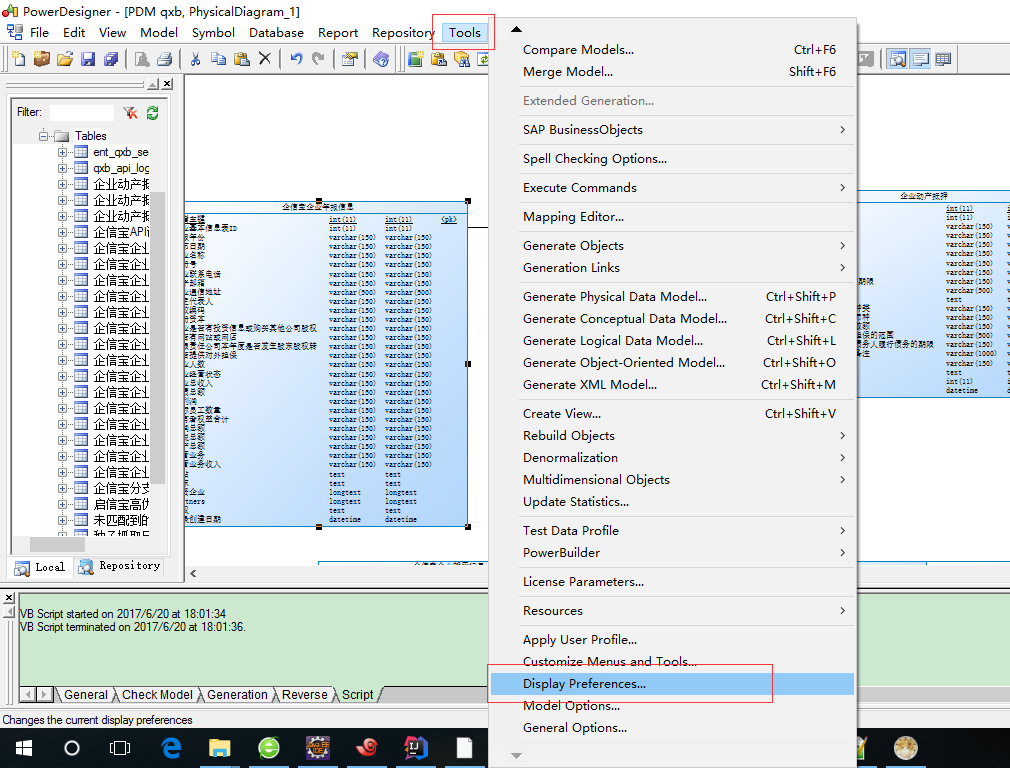 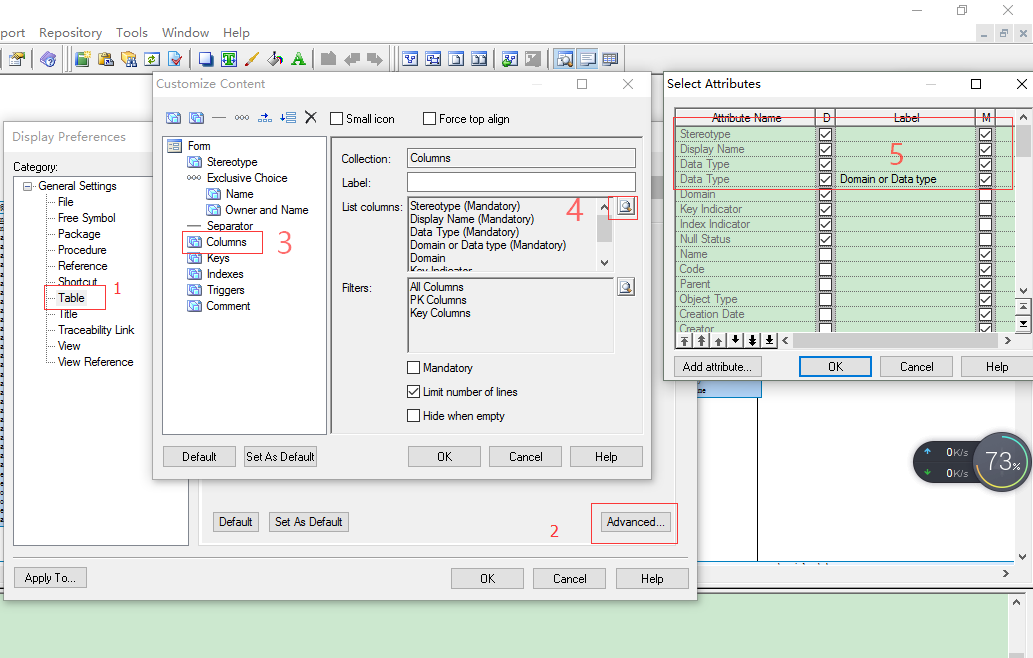 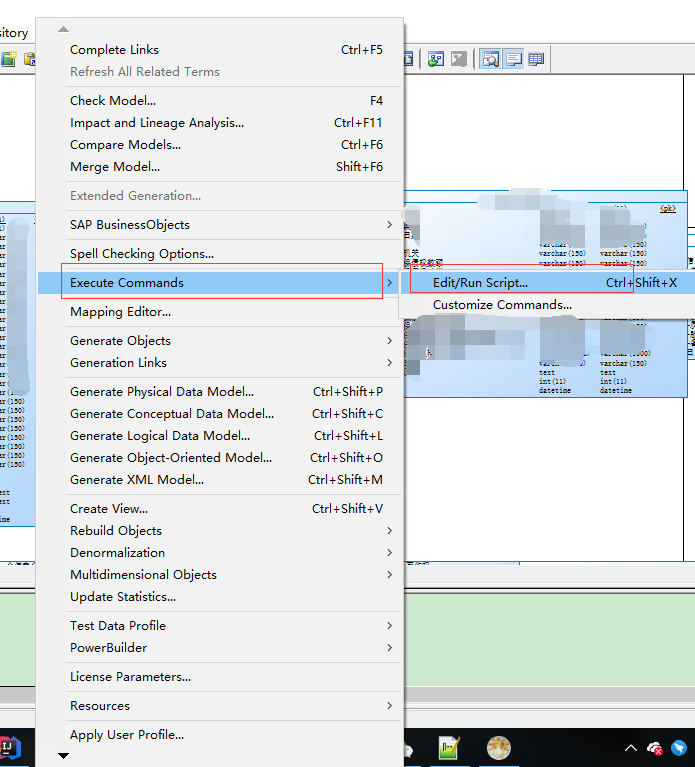 将comment转换为name: ``` Option Explicit ValidationMode = True InteractiveMode = im_Batch Dim mdl ' the current model ' get the current active model Set mdl = ActiveModel If (mdl Is Nothing) Then MsgBox "There is no current Model " ElseIf Not mdl.IsKindOf(PdPDM.cls_Model) Then MsgBox "The current model is not an Physical Data model. " Else ProcessFolder mdl End If Private sub ProcessFolder(folder) On Error Resume Next Dim Tab 'running table for each Tab in folder.tables if not tab.isShortcut then tab.name = tab.comment Dim col ' running column for each col in tab.columns if col.comment="" then else col.name= col.comment end if next end if next Dim view 'running view for each view in folder.Views if not view.isShortcut then view.name = view.comment end if next ' go into the sub-packages Dim f ' running folder For Each f In folder.Packages if not f.IsShortcut then ProcessFolder f end if Next end sub ``` 从name替换回comment ``` Option Explicit ValidationMode = True InteractiveMode = im_Batch Dim mdl ' the current model ' get the current active model Set mdl = ActiveModel If (mdl Is Nothing) Then MsgBox "There is no current Model " ElseIf Not mdl.IsKindOf(PdPDM.cls_Model) Then MsgBox "The current model is not an Physical Data model. " Else ProcessFolder mdl End If ' This routine copy name into comment for each table, each column and each view ' of the current folder Private sub ProcessFolder(folder) Dim Tab 'running table for each Tab in folder.tables if not tab.isShortcut then tab.comment = tab.name Dim col ' running column for each col in tab.columns col.comment= col.name next end if next Dim view 'running view for each view in folder.Views if not view.isShortcut then view.comment = view.name end if next ' go into the sub-packages Dim f ' running folder For Each f In folder.Packages if not f.IsShortcut then ProcessFolder f end if Next end sub ``` 这样就会将comment替换为name了,就会显示中文
作者:じ☆ve宝贝
本文由 **ImportNew - Jyy **翻译自 **javacodegeeks**。欢迎加入翻译小组。 日志记录是在软件开发过程中常常需要考虑的关键因素。 当产品运行出错时,日志文件通常是我们进行错误分析的首要选择。 而且,在很多情况下,它们是我们手上唯一可以用来查明发生状况和问题根本原因的信息。 可见,正确记录需要的信息是极其重要的。 以下5条日志规则,让我们可以检查和改进在代码中操作日志记录的方式。 同时也请注意,我们既不会讨论怎么配置一个日志引擎,也不会相互比较。 ##规则1、日志是面向读者的 日志消息不仅要对书写(日志)代码的人有意义,也应该对日志文件的读者有意义。 这似乎是一条很明显但却经常违背的规则。 ` ERROR: Save failure - SQLException ..... ` 保存什么呢?这条消息在开发者看来是能说明一些问题的,但是对于正在苦苦查看产品问题的可怜家伙来说,却毫无用处。 更合适的信息是这样的: ``` RROR: Save failure- Entity=Person, Data=[id=123 surname="Mario"] - SQLException.... ``` 这就解释了你想要存储的东西(这里是一个 Person,是一个 JPA 实体)以及这个 Person 实例相关的内容。 请注意相关这个单词,并不是指泛泛的全体:我们不应该让无价值的信息使日志文件变得乱糟糟,比如说完整打印所有的实体字段。 通常,实体名字和其逻辑关键字足以识别在表格中的一条记录了。 ##规则2、匹配日志等级和执行环境 在 Java 系统中提供的所有日志管理工具和引擎都有日志等级(ERROR、INFO……)的概念,这将有可能过滤掉等级过低的消息。 例如,Java util logging 使用如下的等级:SEVERE、WARN、INFO、FINE、FINER、FINEST(+ CONFIG 和 OFF)。相反,两个最受欢迎的日志管理工具, Apache Commons Logging 和 SLFJ 更倾向于如下的等级:FATAL、ERROR、WARN、INFO、DEBUG、TRACE。 日志过滤等级则需要取决于代码的开发阶段:成品与仍处在测试、集成环境下的代码日志等级就不能相同。 更具体的来说,日志等级也应该参考代码的归属情况。 一般而言,我们自己的应用程序代码应该比使用的任何第三方开发库拥有更详细的日志记录。 比如说,Apache 的通用调试消息出现在我们的日志文件中,就没有多大意义。 我通常像这样配置日志记录: 成品阶段: 我的代码是 INFO 等级,第三方库是 WARN。 测试、集成阶段:我的代码是 DEBUG 等级,第三方库是 WARN(或者如果需要的话是 INFO)。 开发阶段:任何有意义的信息。 注意:个人而言,我不建议使用 TRACE/FINEST 等级(我并不是唯一持这种观点的人,可以参考 这里 的例子)。 我并没有发现 DEBUG 和 TRACE 有多大的区别,而年轻团队的成员常常苦恼于到底是使用 DEBUG 还是 TRACE 。 根据 KISS 原则,我建议只使用 RROR、WARN、INFO 和 DEBUG 等级。 ##规则3、提交前去除编码帮助日志 编码时,我们常常会使用 logger 或是 System.out 在代码中添加日志消息,来更好地掌握应用程序在执行、调试期间发生的状况。 ``` void aMethod(String aParam) { LOGGER.debug(“Enter in aMethod”); if (“no”.equals(aParam)) { LOGGER.debug(“User says no”); …. ``` 比如这样的代码: ``` void aMethod(String aParam) { LOGGER.debug(“Enter in aMethod”); if (“no”.equals(aParam)) { LOGGER.debug(“User says no”); …… ``` 这些消息显示被调用的方法并且备份内部变量及方法参数值,主要是为了追踪应用程序的行为。这在非测试驱动开发中相当受欢迎。 但糟糕的是,一旦代码发布(测试之后成为成品)这些消息通常就无用武之地了。 所以,这条规则简单来说就是:一旦你已经完成开发工作,在将代码提交到使用中的 SCM 系统(git、svn……)之前,要去除所有临时的和不必要的日志消息。 这条规则并不是要求去除所有的 DEBUG 消息,只是针对那些在应用程序完成和发布后就没有意义的消息,或者是说当我们有理由相信应用程序能正确运行时就失去意义的那些消息。 ##规则4、log DEBUG消息之前检查日志等级 根据第2条规则,在产品日志中,我们只会显示 ERROR、WARN、INFO 等级的消息,但是在代码中我们也可以使用一些不会影响产品运行的 DEBUG 消息。 ``` if ( LOGGER.isDebugEnabled((){ LOGGER.debug (…….) } ``` 每次你想要 log 一个 DEBUG 消息时(在使用了规则3后的留下的所有消息),需要在前面添加一个检查来明确是否启用了 DEBUG 日志: ``` if ( LOGGER.isDebugEnabled((){ LOGGER.debug (…….) } ``` 这种做法可以阻止代码去创建日志消息和调用 logger,提高产品运行程序的效率。 ##规则5、了解你的 logger 我们使用 logger 方法的方式可能会带来巨大的开销: 1. 创建消息字符串 2. 组织包含在消息字符串中的数据 我们应该查阅所选择的日志管理工具、引擎的 javadoc 文档,了解使用它们 logger 的最有效的方法。 例如,我们可以创建一条这样的消息: ``` LOGGER.info(“Person name is “ + person.getName()); ``` 这就创建了不必要的字符串实例。 ``` LOGGER.info(“Person name is {}“, person.getName()); 使用SLF4J,正确的用法应该是: ``` 这里的格式化字符串是常量,不可变消息只有在允许 logging 的情况下才会被创建。