作者:微信小助手
<p style="box-sizing: border-box;font-size: 14px;color: rgb(62, 62, 62);margin-bottom: 15px;line-height: 2em;white-space: normal;"><img class="" data-ratio="0.5625" src="/upload/e6cbd1c8682a360f534ce4f6e3145d64.jpg" data-type="jpeg" data-w="720" style="box-sizing: border-box;border-width: 0px;border-style: initial;border-color: initial;"></p> <h2 style="box-sizing: border-box;margin-top: 2rem;margin-bottom: 1rem;color: rgb(21, 153, 87);white-space: normal;"><span style="font-size: 18px;"><strong>前言</strong></span></h2> <p style="box-sizing: border-box;font-size: 14px;color: rgb(62, 62, 62);margin-bottom: 15px;margin-top: 15px;line-height: 2em;white-space: normal;">在一个阳光明媚的下午,电脑右下角传来一片片邮件提醒,同时伴随着微信钉钉的震动,打开一看,应用各种出错,天兔告警,数据库服务器内存爆红,MySql 数据库实例挂掉了。</p> <h2 style="box-sizing: border-box;margin-top: 2rem;margin-bottom: 1rem;color: rgb(21, 153, 87);white-space: normal;"><span style="font-size: 18px;"><strong>排查</strong></span></h2> <p style="box-sizing: border-box;font-size: 14px;color: rgb(62, 62, 62);margin-bottom: 15px;margin-top: 15px;line-height: 2em;white-space: normal;">先交代一下数据库版本:</p> <pre class="prettyprint linenums prettyprinted" style="box-sizing: border-box;overflow: auto;font-family: Consolas, Menlo, Courier, monospace;font-size: 10px;background-color: rgb(29, 31, 33);border-width: 1px;border-style: solid;border-color: rgb(136, 136, 136);padding: 2px;color: rgb(80, 97, 109);line-height: 12px;"> <ol class="linenums list-paddingleft-2" style=""> <li><p><code style="box-sizing: border-box;font-family: monospace, monospace;display: inline;max-width: initial;overflow: initial;line-height: 12px;overflow-wrap: normal;background-color: transparent;border-width: 0px;border-style: initial;border-color: initial;"><span class="pln" style="box-sizing: border-box;color: rgb(197, 200, 198);">mysql</span><span class="pun" style="box-sizing: border-box;color: rgb(197, 200, 198);">></span><span class="pln" style="box-sizing: border-box;color: rgb(197, 200, 198);"> status</span></code></p></li> <li><p><code style="box-sizing: border-box;font-family: monospace, monospace;display: inline;max-width: initial;overflow: initial;line-height: 12px;overflow-wrap: normal;background-color: transparent;border-width: 0px;border-style: initial;border-color: initial;"><span class="pun" style="box-sizing: border-box;color: rgb(197, 200, 198);">--------------</span></code></p></li> <li><p><code style="box-sizing: border-box;font-family: monospace, monospace;display: inline;max-width: initial;overflow: initial;line-height: 12px;overflow-wrap: normal;background-color: transparent;border-width: 0px;border-style: initial;border-color: initial;"><span class="pln" style="box-sizing: border-box;color: rgb(197, 200, 198);">mysql </span><span class="typ" style="box-sizing: border-box;color: rgb(129, 162, 190);">Ver</span><span class="pln" style="box-sizing: border-box;color: rgb(197, 200, 198);"> </span><span class="lit" style="box-sizing: border-box;color: rgb(222, 147, 95);">14.14</span><span class="pln" style="box-sizing: border-box;color: rgb(197, 200, 198);"> </span><span class="typ" style="box-sizing: border-box;color: rgb(129, 162, 190);">Distrib</span><span class="pln" style="box-sizing: border-box;color: rgb(197, 200, 198);">
作者:じ☆ve宝贝
jfinal增加文件上传功能后其他参数值为null!在表单中增加enctype="multipart/form-data"后,前台往后台传参为null的情况? 解决办法: ` 在后台接受参数前必须先处理文件上传 ` ``` UploadFile uploadFile = getFile(); if(null != uploadFile){ String directory = uploadFile.getSaveDirectory(); String name = uploadFile.getFileName(); String path = "/"+ UUID.randomUUID().toString().replaceAll("-", "") + name.substring(name.lastIndexOf("."), name.length()); uploadFile.getFile().renameTo(new File(directory + path)); } News news = getModel(News.class); news.update(); ```
作者:微信小助手
<section style="box-sizing: border-box;"> <section class="V5" style="box-sizing: border-box;" powered-by="xiumi.us"> <section style="margin-top: 10px;margin-bottom: 10px;box-sizing: border-box;"> <section style="padding-top: 10px;padding-right: 10px;padding-left: 10px;box-sizing: border-box;background-color: rgb(239, 239, 239);"> <span style="display: inline-block;width: 5%;line-height: 0.8;font-weight: bolder;font-size: 48px;box-sizing: border-box;"> <section style="box-sizing: border-box;"> “ </section></span> <section style="display: inline-block;vertical-align: top;float: right;width: 90%;line-height: 1.5;font-size: 15px;color: rgb(89, 89, 89);box-sizing: border-box;"> <p style="box-sizing: border-box;"><span style="letter-spacing: 1px;">在上篇文章<a href="http://mp.weixin.qq.com/s?__biz=MjM5ODI5Njc2MA==&mid=2655817476&idx=1&sn=0a50d49549e3efbeb7a7cf4903e410f3&chksm=bd74c2d38a034bc53b808d9dcba840f958c2c856a256cb21702a2945b7e02f86b9e2702eb671&scene=21#wechat_redirect" target="_blank">《深入学习 Redis 高可用的基石:主从复制》</a>中曾提到,Redis 主从复制的作用有数据热备、负载均衡、故障恢复等;但主从复制存在的一个问题是故障恢复无法自动化。</span></p> </section> <section style="clear: both;box-sizing: border-box;"></section> </section> </section> </section> </section> <p style="line-height: 1.75em;"><br></p> <p style="text-align: center;margin-left: 8px;margin-right: 8px;margin-bottom: 5px;"><img class="" data-copyright="0" data-ratio="0.5593667546174143" data-s="300,640" src="/upload/adc89af5c55d348b0e99b7cb9166fb93.png" data-type="png" data-w="758" style=""></p> <p style="text-align: justify;margin-left: 8px;margin-right: 8px;line-height: 1.75em;"><span style="font-size: 15px;color: rgb(89, 89, 89);letter-spacing: 1px;">本文将要介绍的哨兵,它基于 Redis 主从复制,主要作用便是解决主节点故障恢复的自动化问题,进一步提高系统的高可用性。</span></p> <p style="line-height: normal;"><br></p> <p style="text-align: justify;margin-left: 8px;margin-right: 8px;line-height: 1.75em;"><span style="font-size: 15px;color: rgb(89, 89, 89);letter-spacing: 1px;">文章将首先介绍哨兵的作用和架构;然后讲述哨兵系统的部署方法,以及通过客户端访问哨兵系统的方法;然后简要说明哨兵实现的基本原理;最后给出关于哨兵实践的一些建议。(注:文章内容基于 Redis 3.0 版本<span style="letter-spacing: 1px;color: rgb(89, 89, 89);font-size: 15px;line-height: 25.6px;">)</span></span></p> <p style="line-height: normal;"><br></p> <section style="box-sizing: border-box;"> <section class="V5" style="box-sizing: border-box;" powered-by="xiumi.us"> <section style="border-bottom-width: 1px;border-bottom-style: solid;border-bottom-color: black;margin-top: 0.5em;margin-bottom: 0.5em;line-height: 1.2;box-sizing: border-box;"> <section style="display: inline-block;border-bottom-width: 6px;border-bottom-style: solid;border-color: rgb(89, 89, 89);margin-bottom: -1px;font-size: 20px;color: rgb(89, 89, 89);box-sizing: border-box;"> <p style="box-sizing: border-box;">哨兵的作用和架构</p> </section> </section> </section> </section> <p style="line-height: normal;"><br></p> <section style="box-sizing: border-box;"> <section class="V5" style="box-sizing: border-box;" powered-by="xiumi.us"> <section style="margin-top: 10px;margin-bottom: 10px;box-sizing: border-box;"> <section style="width: 0.6em;display: inline-block;vertical-align: middle;box-sizing: border-box;"> <span style="width: 0.6em;height: 0.6em;display: block;opacity: 0.2;box-sizing: border-box;background-color: rgb(89, 89, 89);"></span> <strong><span style="width: 0.6em;height: 0.6em;display: block;opacity: 0.6;margin-top: 2px;margin-bottom: 2px;box-sizing: border-box;background-color: rgb(89, 89, 89);"></span> <span style="width: 0.6em;height: 0.6em;display: block;opacity: 1;box-sizing: border-box;background-color: rgb(89, 89, 89);"></span> </strong> </section> <section style="display: inline-block;vertical-align: middle;font-size: 18px;padding-left: 5px;color: rgb(89, 89, 89);box-sizing: border-box;"> <p style="box-sizing: border-box;"><strong>哨兵的作用</strong></p> </section> </section> </section> </section> <p style="line-height: normal;"><br></p> <p style="text-align: justify;margin-left: 8px;margin-right: 8px;line-height: 1.75em;"><span style="font-size: 15px;color: rgb(89, 89, 89);letter-spacing: 1px;">在介绍哨兵之前,首先从宏观角度回顾一下 Redis 实现高可用相关的技术。</span></p> <p style="line-height: normal;"><br></p> <p style="text-align: justify;margin-left: 8px;margin-right: 8px;line-height: 1.75em;"><span style="font-size: 15px;letter-spacing: 1px;color: rgb(71, 193, 168);">它们包括:持久化、复制、哨兵和集群,其主要作用和解决的问题是:</span></p> <ul class=" list-paddingleft-2" style="list-style-type: disc;margin-left: 8px;margin-right: 8px;"> <li><p style="text-align: justify;line-height: 1.75em;"><strong><span style="font-size: 15px;color: rgb(89, 89, 89);letter-spacing: 1px;">持久化:</span></strong><span style="font-size: 15px;color: rgb(89, 89, 89);letter-spacing: 1px;">持久化是最简单的高可用方法(有时甚至不被归为高可用的手段),主要作用是数据备份,即将数据存储在硬盘,保证数据不会因进程退出而丢失。</span></p></li> <li><p style="text-align: justify;line-height: 1.75em;"><strong><span style="font-size: 15px;color: rgb(89, 89, 89);letter-spacing: 1px;">复制:</span></strong><span style="font-size: 15px;color: rgb(89, 89, 89);letter-spacing: 1px;">复制是高可用 Redis 的基础,哨兵和集群都是在复制基础上实现高可用的。</span></p><p style="text-align: justify;line-height: 1.75em;"><span style="font-size: 15px;color: rgb(89, 89, 89);letter-spacing: 1px;">复制主要实现了数据的多机备份,以及对于读操作的负载均衡和简单的故障恢复。缺陷:故障恢复无法自动化;写操作无法负载均衡;存储能力受到单机的限制。</span></p></li> <li><p style="text-align: justify;line-height: 1.75em;"><strong><span style="font-size: 15px;color: rgb(89, 89, 89);letter-spacing: 1px;">哨兵:</span></strong><span style="font-size: 15px;color: rgb(89, 89, 89);letter-spacing: 1px;">在复制的基础上,哨兵实现了自动化的故障恢复。缺陷:写操作无法负载均衡;存储能力受到单机的限制。</span></p></li> <li><p style="text-align: justify;line-height: 1.75em;"><strong><span style="font-size: 15px;color: rgb(89, 89, 89);letter-spacing: 1px;">集群:</span></strong><span style="font-size: 15px;color: rgb(89, 89, 89);letter-spacing: 1px;">通过集群,Redis 解决了写操作无法负载均衡,以及存储能力受到单机限制的问题,实现了较为完善的高可用方案。</span></p></li> </ul> <p style="line-height: normal;"><br></p> <p style="text-align: justify;margin-left: 8px;margin-right: 8px;line-height: 1.75em;"><span style="font-size: 15px;color: rgb(89, 89, 89);letter-spacing: 1px;">下面说回哨兵,<span style="letter-spacing: 1px;color: rgb(89, 89, 89);font-size: 15px;line-height: 1.6;">Redis Sentinel,即 Redis 哨兵,在 Redis 2.8 版本开始引入。哨兵的核心功能是主节点的自动故障转移。</span></span></p> <p style="line-height: normal;"><br></p> <p style="text-align: justify;margin-left: 8px;margin-right: 8px;line-height: 1.75em;"><span style="font-size: 15px;line-height: 1.6;letter-spacing: 1px;color: rgb(71, 193, 168);">下面是 Redis 官方文档对于哨兵功能的描述:</span></p> <ul class=" list-paddingleft-2" style="list-style-type: disc;margin-left: 8px;margin-right: 8px;"> <li><p style="text-align: justify;line-height: 1.75em;"><strong><span style="font-size: 15px;color: rgb(89, 89, 89);letter-spacing: 1px;">监控(Monitoring):</span></strong><span style="font-size: 15px;color: rgb(89, 89, 89);letter-spacing: 1px;">哨兵会不断地检查主节点和从节点是否运作正常。</span></p></li> <li><p style="text-align: justify;line-height: 1.75em;"><strong><span style="font-size: 15px;color: rgb(89, 89, 89);letter-spacing: 1px;">自动故障转移(Automatic failover):</span></strong><span style="font-size: 15px;color: rgb(89, 89, 89);letter-spacing: 1px;">当主节点不能正常工作时,哨兵会开始自动故障转移操作,它会将失效主节点的其中一个从节点升级为新的主节点,并让其他从节点改为复制新的主节点。</span></p></li> <li><p style="text-align: justify;line-height: 1.75em;"><strong><span style="font-size: 15px;color: rgb(89, 89, 89);letter-spacing: 1px;">配置提供者(Configurationprovider):</span></strong><span style="font-size: 15px;color: rgb(89, 89, 89);letter-spacing: 1px;">客户端在初始化时,通过连接哨兵来获得当前 Redis 服务的主节点地址。</span></p></li> <li><p style="text-align: justify;line-height: 1.75em;"><strong><span style="font-size: 15px;color: rgb(89, 89, 89);letter-spacing: 1px;">通知(Notification):</span></strong><span style="font-size: 15px;color: rgb(89, 89, 89);letter-spacing: 1px;">哨兵可以将故障转移的结果发送给客户端。</span></p></li> </ul> <p style="line-height: normal;"><br></p> <p style="text-align: justify;margin-left: 8px;margin-right: 8px;line-height: 1.75em;"><span style="font-size: 15px;color: rgb(89, 89, 89);letter-spacing: 1px;">其中,监控和自动故障转移功能,使得哨兵可以及时发现主节点故障并完成转移;而配置提供者和通知功能,则需要在与客户端的交互中才能体现。</span></p> <p style="line-height: normal;"><br></p> <p style="text-align: justify;margin-left: 8px;margin-right: 8px;line-height: 1.75em;"><strong><span style="font-size: 15px;color: rgb(89, 89, 89);letter-spacing: 1px;">这里对“客户端”一词在本文的用法做一个说明:</span></strong><span style="font-size: 15px;color: rgb(89, 89, 89);letter-spacing: 1px;">在前面的文章中,只要通过 API 访问 Redis 服务器,都会称作客户端,包括 redis-cli、Java 客户端 Jedis 等。</span></p> <p style="line-height: normal;"><br></p> <p style="text-align: justify;margin-left: 8px;margin-right: 8px;line-height: 1.75em;"><span style="font-size: 15px;color: rgb(89, 89, 89);letter-spacing: 1px;">为了便于区分说明,本文中的客户端并不包括 redis-cli,而是比 redis-cli 更加复杂。</span></p> <p style="line-height: normal;"><br></p> <p style="text-align: justify;margin-left: 8px;margin-right: 8px;line-height: 1.75em;"><span style="font-size: 15px;color: rgb(89, 89, 89);letter-spacing: 1px;">redis-cli 使用的是 Redis 提供的底层接口,而客户端则对这些接口、功能进行了封装,以便充分利用哨兵的配置提供者和通知功能。</span></p> <p style="line-height: normal;"><br></p> <section style="box-sizing: border-box;"> <section class="V5" style="box-sizing: border-box;" powered-by="xiumi.us"> <section style="margin-top: 10px;margin-bottom: 10px;box-sizing: border-box;"> <section style="width: 0.6em;display: inline-block;vertical-align: middle;box-sizing: border-box;"> <span style="width: 0.6em;height: 0.6em;display: block;opacity: 0.2;box-sizing: border-box;background-color: rgb(89, 89, 89);"></span> <strong><span style="width: 0.6em;height: 0.6em;display: block;opacity: 0.6;margin-top: 2px;margin-bottom: 2px;box-sizing: border-box;background-color: rgb(89, 89, 89);"></span> <span style="width: 0.6em;height: 0.6em;display: block;opacity: 1;box-sizing: border-box;background-color: rgb(89, 89, 89);"></span> </strong> </section> <section style="display: inline-block;vertical-align: middle;font-size: 18px;padding-left: 5px;color: rgb(89, 89, 89);box-sizing: border-box;"> <p style="box-sizing: border-box;"><strong>哨兵的架构</strong></p> </section> </section> </section> </section> <p style="line-height: normal;"><br></p> <p style="text-align: justify;margin-left: 8px;margin-right: 8px;line-height: 1.75em;margin-bottom: 5px;"><span style="font-size: 15px;letter-spacing: 1px;color: rgb(71, 193, 168);">典型的哨兵架构图如下所示:</span></p> <p style="text-align: center;margin-left: 8px;margin-right: 8px;line-height: 1.75em;margin-bottom: 5px;"><img class="" data-copyright="0" data-ratio="0.7688888888888888" data-s="300,640" src="/upload/3e0966a7937411e89b4a818a307d5938.png" data-type="png" data-w="450" style=""></p> <p style="text-align: justify;margin-left: 8px;margin-right: 8px;line-height: 1.75em;"><span style="font-size: 15px;letter-spacing: 1px;color: rgb(71, 193, 168);">它由两部分组成,哨兵节点和数据节点:</span></p> <ul class=" list-paddingleft-2" style="list-style-type: disc;margin-left: 8px;margin-right: 8px;"> <li><p style="text-align: justify;line-height: 1.75em;"><strong><span style="font-size: 15px;color: rgb(89, 89, 89);letter-spacing: 1px;">哨兵节点:</span></strong><span style="font-size: 15px;color: rgb(89, 89, 89);letter-spacing: 1px;">哨兵系统由一个或多个哨兵节点组成,哨兵节点是特殊的 Redis 节点,不存储数据。</span></p></li> <li><p style="text-align: justify;line-height: 1.75em;"><strong><span style="font-size: 15px;color: rgb(89, 89, 89);letter-spacing: 1px;">数据节点:</span></strong><span style="font-size: 15px;color: rgb(89, 89, 89);letter-spacing: 1px;">主节点和从节点都是数据节点。</span></p></li> </ul> <p style="line-height: normal;"><br></p> <section style="box-sizing: border-box;"> <section class="V5" style="box-sizing: border-box;" powered-by="xiumi.us"> <section style="border-bottom-width: 1px;border-bottom-style: solid;border-bottom-color: black;margin-top: 0.5em;margin-bottom: 0.5em;line-height: 1.2;box-sizing: border-box;"> <section style="display: inline-block;border-bottom-width: 6px;border-bottom-style: solid;border-color: rgb(89, 89, 89);margin-bottom: -1px;font-size: 20px;color: rgb(89, 89, 89);box-sizing: border-box;"> <p style="box-sizing: border-box;">哨兵系统的部署方法</p> </section> </section> </section> </section> <p style="line-height: normal;"><br></p> <p style="text-align: justify;margin-left: 8px;margin-right: 8px;line-height: 1.75em;"><span style="font-size: 15px;color: rgb(89, 89, 89);letter-spacing: 1px;">这一部分将部署一个简单的哨兵系统,包含 1 个主节点、2 个从节点和 3 个哨兵节点。</span></p> <p style="line-height: normal;"><br></p> <p style="text-align: justify;margin-left: 8px;margin-right: 8px;line-height: 1.75em;"><strong><span style="font-size: 15px;color: rgb(89, 89, 89);letter-spacing: 1px;">方便起见:</span></strong><span style="font-size: 15px;color: rgb(89, 89, 89);letter-spacing: 1px;">所有这些节点都部署在一台机器上(局域网 IP:192.168.92.128),使用端口号区分;节点的配置尽可能简化。</span></p> <p style="line-height: normal;"><br></p> <section style="box-sizing: border-box;"> <section class="V5" style="box-sizing: border-box;" powered-by="xiumi.us"> <section style="margin-top: 10px;margin-bottom: 10px;box-sizing: border-box;"> <section style="width: 0.6em;display: inline-block;vertical-align: middle;box-sizing: border-box;"> <span style="width: 0.6em;height: 0.6em;display: block;opacity: 0.2;box-sizing: border-box;background-color: rgb(89, 89, 89);"></span> <span style="width: 0.6em;height: 0.6em;display: block;opacity: 0.6;margin-top: 2px;margin-bottom: 2px;box-sizing: border-box;background-color: rgb(89, 89, 89);"></span> <span style="width: 0.6em;height: 0.6em;display: block;opacity: 1;box-sizing: border-box;background-color: rgb(89, 89, 89);"></span> </section> <section style="display: inline-block;vertical-align: middle;font-size: 18px;padding-left: 5px;color: rgb(89, 89, 89);box-sizing: border-box;"> <p style="box-sizing: border-box;"><strong>部署主从节点</strong></p> </section> </section> </section> </section> <p style="line-height: normal;"><br></p> <p style="text-align: justify;margin-left: 8px;margin-right: 8px;line-height: 1.75em;"><span style="font-size: 15px;color: rgb(89, 89, 89);letter-spacing: 1px;">哨兵系统中的主从节点,与普通的主从节点配置是一样的,并不需要做任何额外配置。</span></p> <p style="line-height: normal;"><br></p> <p style="text-align: justify;margin-left: 8px;margin-right: 8px;line-height: 1.75em;margin-bottom: 5px;"><span style="font-size: 15px;color: rgb(89, 89, 89);letter-spacing: 1px;">下面分别是主节点(port=6379)和 2 个从节点(port=6380/6381)的配置文件,配置都比较简单,不再详述。</span></p> <section class="output_wrapper" style="font-size: 16px;color: rgb(62, 62, 62);line-height: 1.6;letter-spacing: 0px;"> <pre style="font-size: inherit;color: inherit;line-height: inherit;margin-top: 0px;margin-bottom: 0px;padding: 0px;"><code class="hljs css" style="margin-right: 2px;margin-left: 2px;line-height: 18px;font-size: 14px;letter-spacing: 0px;font-family: Consolas, Inconsolata, Courier, monospace;border-radius: 0px;color: rgb(169, 183, 198);padding: 0.5em;display: block !important;word-wrap: normal !important;word-break: normal !important;overflow: auto !important;background: rgb(40, 43, 46);"><span class="hljs-selector-id" style="font-size: inherit;color: inherit;line-height: inherit;word-wrap: inherit !important;word-break: inherit !important;">#redis-6379</span><span class="hljs-selector-class" style="font-size: inherit;line-height: inherit;color: rgb(165, 218, 45);word-wrap: inherit !important;word-break: inherit !important;">.conf</span><br><span class="hljs-selector-tag" style="font-size: inherit;line-height: inherit;color: rgb(248, 35, 117);word-wrap: inherit !important;word-break: inherit !important;">port</span> 6379<br><span class="hljs-selector-tag" style="font-size: inherit;line-height: inherit;color: rgb(248, 35, 117);word-wrap: inherit !important;word-break: inherit !important;">daemonize</span> <span class="hljs-selector-tag" style="font-size: inherit;line-height: inherit;color: rgb(248, 35, 117);word-wrap: inherit !important;word-break: inherit !important;">yes</span><br><span class="hljs-selector-tag" style="font-size: inherit;line-height: inherit;color: rgb(248, 35, 117);word-wrap: inherit !important;word-break: inherit !important;">logfile</span> "6379<span class="hljs-selector-class" style="font-size: inherit;line-height: inherit;color: rgb(165, 218, 45);word-wrap: inherit !important;word-break: inherit !important;">.log</span>"<br><span class="hljs-selector-tag" style="font-size: inherit;line-height: inherit;color: rgb(248, 35, 117);word-wrap: inherit !important;word-break: inherit !important;">dbfilename</span> "<span class="hljs-selector-tag" style="font-size: inherit;line-height: inherit;color: rgb(248, 35, 117);word-wrap: inherit !important;word-break: inherit !important;">dump-6379</span><span class="hljs-selector-class" style="font-size: inherit;line-height: inherit;color: rgb(165, 218, 45);word-wrap: inherit !important;word-break: inherit !important;">.rdb</span>"<br><br><span class="hljs-selector-id" style="font-size: inherit;color: inherit;line-height: inherit;word-wrap: inherit !important;word-break: inherit !important;">#redis-6380</span><span class="hljs-selector-class" style="font-size: inherit;line-height: inherit;color: rgb(165, 218, 45);word-wrap: inherit !important;word-break: inherit !important;">.conf</span><br><span class="hljs-selector-tag" style="font-size: inherit;line-height: inherit;color: rgb(248, 35, 117);word-wrap: inherit !important;word-break: inherit !important;">port</span> 6380<br><span class="hljs-selector-tag" style="font-size: inherit;line-height: inherit;color: rgb(248, 35, 117);word-wrap: inherit !important;word-break: inherit !important;">daemonize</span> <span class="hljs-selector-tag" style="font-size: inherit;line-height: inherit;color: rgb(248, 35, 117);word-wrap: inherit !important;word-break: inherit !important;">yes</span><br><span class="hljs-selector-tag" style="font-size: inherit;line-height: inherit;color: rgb(248, 35, 117);word-wrap: inherit !important;word-break: inherit !important;">logfile</span> "6380<span class="hljs-selector-class" style="font-size: inherit;line-height: inherit;color: rgb(165, 218, 45);word-wrap: inherit !important;word-break: inherit !important;">.log</span>"<br><span class="hljs-selector-tag" style="font-size: inherit;line-height: inherit;color: rgb(248, 35, 117);word-wrap: inherit !important;word-break: inherit !important;">dbfilename</span> "<span class="hljs-selector-tag" style="font-size: inherit;line-height: inherit;color: rgb(248, 35, 117);word-wrap: inherit !important;word-break: inherit !important;">dump-6380</span><span class="hljs-selector-class" style="font-size: inherit;line-height: inherit;color: rgb(165, 218, 45);word-wrap: inherit !important;word-break: inherit !important;">.rdb</span>"<br><span class="hljs-selector-tag" style="font-size: inherit;line-height: inherit;color: rgb(248, 35, 117);word-wrap: inherit !important;word-break: inherit !important;">slaveof</span> 192<span class="hljs-selector-class" style="font-size: inherit;line-height: inherit;color: rgb(165, 218, 45);word-wrap: inherit !important;word-break: inherit !important;">.168.92.128</span> 6379<br><br><span class="hljs-selector-id" style="font-size: inherit;color: inherit;line-height: inherit;word-wrap: inherit !important;word-break: inherit !important;">#redis-6381</span><span class="hljs-selector-class" style="font-size: inherit;line-height: inherit;color: rgb(165, 218, 45);word-wrap: inherit !important;word-break: inherit !important;">.conf</span><br><span class="hljs-selector-tag" style="font-size: inherit;line-height: inherit;color: rgb(248, 35, 117);word-wrap: inherit !important;word-break: inherit !important;">port</span> 6381<br><span class="hljs-selector-tag" style="font-size: inherit;line-height: inherit;color: rgb(248, 35, 117);word-wrap: inherit !important;word-break: inherit !important;">daemonize</span> <span class="hljs-selector-tag" style="font-size: inherit;line-height: inherit;color: rgb(248, 35, 117);word-wrap: inherit !important;word-break: inherit !important;">yes</span><br><span class="hljs-selector-tag" style="font-size: inherit;line-height: inherit;color: rgb(248, 35, 117);word-wrap: inherit !important;word-break: inherit !important;">logfile</span> "6381<span class="hljs-selector-class" style="font-size: inherit;line-height: inherit;color: rgb(165, 218, 45);word-wrap: inherit !important;word-break: inherit !important;">.log</span>"<br><span class="hljs-selector-tag" style="font-size: inherit;line-height: inherit;color: rgb(248, 35, 117);word-wrap: inherit !important;word-break: inherit !important;">dbfilename</span> "<span class="hljs-selector-tag" style="font-size: inherit;line-height: inherit;color: rgb(248, 35, 117);word-wrap: inherit !important;word-break: inherit !important;">dump-6381</span><span class="hljs-selector-class" style="font-size: inherit;line-height: inherit;color: rgb(165, 218, 45);word-wrap: inherit !important;word-break: inherit !important;">.rdb</span>"<br><span class="hljs-selector-tag" style="font-size: inherit;line-height: inherit;color: rgb(248, 35, 117);word-wrap: inherit !important;word-break: inherit !important;">slaveof</span> 192<span class="hljs-selector-class" style="font-size: inherit;line-height: inherit;color: rgb(165, 218, 45);word-wrap: inherit !important;word-break: inherit !important;">.168.92.128</span> 6379<br></code></pre> </section> <p style="line-height: normal;"><br></p> <p style="text-align: justify;margin-left: 8px;margin-right: 8px;line-height: 1.75em;margin-bottom: 5px;"><span style="font-size: 15px;color: rgb(89, 89, 89);letter-spacing: 1px;">配置完成后,依次启动主节点和从节点:</span></p> <section class="output_wrapper" style="font-size: 16px;color: rgb(62, 62, 62);line-height: 1.6;letter-spacing: 0px;"> <pre style="font-size: inherit;color: inherit;line-height: inherit;margin-top: 0px;margin-bottom: 0px;padding: 0px;"><code class="hljs css" style="margin-right: 2px;margin-left: 2px;line-height: 18px;font-size: 14px;letter-spacing: 0px;font-family: Consolas, Inconsolata, Courier, monospace;border-radius: 0px;color: rgb(169, 183, 198);padding: 0.5em;display: block !important;word-wrap: normal !important;word-break: normal !important;overflow: auto !important;background: rgb(40, 43, 46);"><span class="hljs-selector-tag" style="font-size: inherit;line-height: inherit;color: rgb(248, 35, 117);word-wrap: inherit !important;word-break: inherit !important;">redis-server</span> <span class="hljs-selector-tag" style="font-size: inherit;line-height: inherit;color: rgb(248, 35, 117);word-wrap: inherit !important;word-break: inherit !important;">redis-6379</span><span class="hljs-selector-class" style="font-size: inherit;line-height: inherit;color: rgb(165, 218, 45);word-wrap: inherit !important;word-break: inherit !important;">.conf</span><br><span class="hljs-selector-tag" style="font-size: inherit;line-height: inherit;color: rgb(248, 35, 117);word-wrap: inherit !important;word-break: inherit !important;">redis-server</span> <span class="hljs-selector-tag" style="font-size: inherit;line-height: inherit;color: rgb(248, 35, 117);word-wrap: inherit !important;word-break: inherit !important;">redis-6380</span><span class="hljs-selector-class" style="font-size: inherit;line-height: inherit;color: rgb(165, 218, 45);word-wrap: inherit !important;word-break: inherit !important;">.conf</span><br><span class="hljs-selector-tag" style="font-size: inherit;line-height: inherit;color: rgb(248, 35, 117);word-wrap: inherit !important;word-break: inherit !important;">redis-server</span> <span class="hljs-selector-tag" style="font-size: inherit;line-height: inherit;color: rgb(248, 35, 117);word-wrap: inherit !important;word-break: inherit !important;">redis-6381</span><span class="hljs-selector-class" style="font-size: inherit;line-height: inherit;color: rgb(165, 218, 45);word-wrap: inherit !important;word-break: inherit !important;">.conf</span><br></code></pre> </section> <p style="line-height: normal;"><br></p> <p style="text-align: justify;margin-left: 8px;margin-right: 8px;line-height: 1.75em;margin-bottom: 5px;"><span style="font-size: 15px;color: rgb(89, 89, 89);letter-spacing: 1px;">节点启动后,连接主节点查看主从状态是否正常,如下图所示:</span></p> <p style="text-align: center;margin-left: 8px;margin-right: 8px;line-height: 1.75em;"><img class="" data-copyright="0" data-ratio="0.324459234608985" data-s="300,640" src="/upload/4bed95bb7b442adcd243533409302a48.png" data-type="png" data-w="601" style=""></p> <section style="box-sizing: border-box;"> <section class="V5" style="box-sizing: border-box;" powered-by="xiumi.us"> <section style="margin-top: 10px;margin-bottom: 10px;box-sizing: border-box;"> <section style="width: 0.6em;display: inline-block;vertical-align: middle;box-sizing: border-box;"> <span style="width: 0.6em;height: 0.6em;display: block;opacity: 0.2;box-sizing: border-box;background-color: rgb(89, 89, 89);"></span> <strong><span style="width: 0.6em;height: 0.6em;display: block;opacity: 0.6;margin-top: 2px;margin-bottom: 2px;box-sizing: border-box;background-color: rgb(89, 89, 89);"></span> <span style="width: 0.6em;height: 0.6em;display: block;opacity: 1;box-sizing: border-box;background-color: rgb(89, 89, 89);"></span> </strong> </section> <section style="display: inline-block;vertical-align: middle;font-size: 18px;padding-left: 5px;color: rgb(89, 89, 89);box-sizing: border-box;"> <p style="box-sizing: border-box;"><strong>部署哨兵节点</strong></p> </section> </section> </section> </section> <p style="line-height: normal;"><br></p> <p style="text-align: justify;margin-left: 8px;margin-right: 8px;line-height: 1.75em;"><span style="font-size: 15px;color: rgb(89, 89, 89);letter-spacing: 1px;">哨兵节点本质上是特殊的 Redis 节点。<span style="letter-spacing: 1px;color: rgb(89, 89, 89);font-size: 15px;line-height: 1.6;">3 个哨兵节点的配置几乎是完全一样的,主要区别在于端口号的不同(26379/26380/26381)。</span></span></p> <p style="line-height: normal;"><br></p> <p style="text-align: justify;margin-left: 8px;margin-right: 8px;line-height: 1.75em;margin-bottom: 5px;"><span style="font-size: 15px;line-height: 1.6;color: rgb(89, 89, 89);letter-spacing: 1px;">下面以 26379 节点为例,介绍节点的配置和启动方式,配置部分尽量简化,更多配置会在后面介绍。</span></p> <section class="output_wrapper" style="font-size: 16px;color: rgb(62, 62, 62);line-height: 1.6;letter-spacing: 0px;"> <pre style="font-size: inherit;color: inherit;line-height: inherit;margin-top: 0px;margin-bottom: 0px;padding: 0px;"><code class="hljs css" style="margin-right: 2px;margin-left: 2px;line-height: 18px;font-size: 14px;letter-spacing: 0px;font-family: Consolas, Inconsolata, Courier, monospace;border-radius: 0px;color: rgb(169, 183, 198);padding: 0.5em;display: block !important;word-wrap: normal !important;word-break: normal !important;overflow: auto !important;background: rgb(40, 43, 46);"><span class="hljs-selector-id" style="font-size: inherit;color: inherit;line-height: inherit;word-wrap: inherit !important;word-break: inherit !important;">#sentinel-26379</span><span class="hljs-selector-class" style="font-size: inherit;line-height: inherit;color: rgb(165, 218, 45);word-wrap: inherit !important;word-break: inherit !important;">.conf</span><br><span class="hljs-selector-tag" style="font-size: inherit;line-height: inherit;color: rgb(248, 35, 117);word-wrap: inherit !important;word-break: inherit !important;">port</span> 26379<br><span class="hljs-selector-tag" style="font-size: inherit;line-height: inherit;color: rgb(248, 35, 117);word-wrap: inherit !important;word-break: inherit !important;">daemonize</span> <span class="hljs-selector-tag" style="font-size: inherit;line-height: inherit;color: rgb(248, 35, 117);word-wrap: inherit !important;word-break: inherit !important;">yes</span><br><span class="hljs-selector-tag" style="font-size: inherit;line-height: inherit;color: rgb(248, 35, 117);word-wrap: inherit !important;word-break: inherit !important;">logfile</span> "26379<span class="hljs-selector-class" style="font-size: inherit;line-height: inherit;color: rgb(165, 218, 45);word-wrap: inherit !important;word-break: inherit !important;">.log</span>"<br><span class="hljs-selector-tag" style="font-size: inherit;line-height: inherit;color: rgb(248, 35, 117);word-wrap: inherit !important;word-break: inherit !important;">sentinel</span> <span class="hljs-selector-tag" style="font-size: inherit;line-height: inherit;color: rgb(248, 35, 117);word-wrap: inherit !important;word-break: inherit !important;">monitor</span> <span class="hljs-selector-tag" style="font-size: inherit;line-height: inherit;color: rgb(248, 35, 117);word-wrap: inherit !important;word-break: inherit !important;">mymaster</span> 192<span class="hljs-selector-class" style="font-size: inherit;line-height: inherit;color: rgb(165, 218, 45);word-wrap: inherit !important;word-break: inherit !important;">.168.92.128</span> 6379 2<br></code></pre> </section> <p style="line-height: normal;"><br></p> <p style="text-align: justify;margin-left: 8px;margin-right: 8px;line-height: 1.75em;"><span style="font-size: 15px;color: rgb(89, 89, 89);letter-spacing: 1px;">其中,sentinel monitor mymaster 192.168.92.128 6379 2 配置的含义是:该哨兵节点监控 192.168.92.128:6379 这个主节点。</span></p> <p style="line-height: normal;"><br></p> <p style="text-align: justify;margin-left: 8px;margin-right: 8px;line-height: 1.75em;"><span style="font-size: 15px;color: rgb(89, 89, 89);letter-spacing: 1px;">该主节点的名称是 mymaster,最后的 2 的含义与主节点的故障判定有关:至少需要 2 个哨兵节点同意,才能判定主节点故障并进行故障转移。</span></p> <p style="line-height: normal;"><br></p> <p style="text-align: justify;margin-left: 8px;margin-right: 8px;line-height: 1.75em;margin-bottom: 5px;"><span style="font-size: 15px;color: rgb(89, 89, 89);letter-spacing: 1px;">哨兵节点的启动有两种方式,二者作用是完全相同的:</span></p> <section class="output_wrapper" style="font-size: 16px;color: rgb(62, 62, 62);line-height: 1.6;letter-spacing: 0px;"> <pre style="font-size: inherit;color: inherit;line-height: inherit;margin-top: 0px;margin-bottom: 0px;padding: 0px;"><code class="hljs css" style="margin-right: 2px;margin-left: 2px;line-height: 18px;font-size: 14px;letter-spacing: 0px;font-family: Consolas, Inconsolata, Courier, monospace;border-radius: 0px;color: rgb(169, 183, 198);padding: 0.5em;display: block !important;word-wrap: normal !important;word-break: normal !important;overflow: auto !important;background: rgb(40, 43, 46);"><span class="hljs-selector-tag" style="font-size: inherit;line-height: inherit;color: rgb(248, 35, 117);word-wrap: inherit !important;word-break: inherit !important;">redis-sentinel</span> <span class="hljs-selector-tag" style="font-size: inherit;line-height: inherit;color: rgb(248, 35, 117);word-wrap: inherit !important;word-break: inherit !important;">sentinel-26379</span><span class="hljs-selector-class" style="font-size: inherit;line-height: inherit;color: rgb(165, 218, 45);word-wrap: inherit !important;word-break: inherit !important;">.conf</span><br><span class="hljs-selector-tag" style="font-size: inherit;line-height: inherit;color: rgb(248, 35, 117);word-wrap: inherit !important;word-break: inherit !important;">redis-server</span> <span class="hljs-selector-tag" style="font-size: inherit;line-height: inherit;color: rgb(248, 35, 117);word-wrap: inherit !important;word-break: inherit !important;">sentinel-26379</span><span class="hljs-selector-class" style="font-size: inherit;line-height: inherit;color: rgb(165, 218, 45);word-wrap: inherit !important;word-break: inherit !important;">.conf</span> <span class="hljs-selector-tag" style="font-size: inherit;line-height: inherit;color: rgb(248, 35, 117);word-wrap: inherit !important;word-break: inherit !important;">--sentinel</span><br></code></pre> </section> <p style="line-height: normal;"><br></p> <p style="text-align: justify;margin-left: 8px;margin-right: 8px;line-height: 1.75em;"><span style="font-size: 15px;color: rgb(89, 89, 89);letter-spacing: 1px;">按照上述方式配置和启动之后,整个哨兵系统就启动完毕了,可以通过 redis-cli 连接哨兵节点进行验证。</span></p> <p style="line-height: normal;"><br></p> <p style="text-align: justify;margin-left: 8px;margin-right: 8px;line-height: 1.75em;margin-bottom: 5px;"><span style="font-size: 15px;color: rgb(89, 89, 89);letter-spacing: 1px;">如下图所示:可以看出 26379 哨兵节点已经在监控 mymaster 主节点(即192.168.92.128:6379),并发现了其 2 个从节点和另外 2 个哨兵节点。</span></p> <p style="text-align: center;margin-left: 8px;margin-right: 8px;line-height: 1.75em;margin-bottom: 5px;"><img class="" data-copyright="0" data-ratio="0.1881720430107527" data-s="300,640" src="/upload/c5bddf2bc92552bbf6670d03bd904bb8.png" data-type="png" data-w="" style=""></p> <p style="text-align: justify;margin-left: 8px;margin-right: 8px;line-height: 1.75em;margin-bottom: 5px;"><span style="font-size: 15px;color: rgb(89, 89, 89);letter-spacing: 1px;">此时如果查看哨兵节点的配置文件,会发现一些变化,以 26379 为例:</span></p> <p style="text-align: center;margin-left: 8px;margin-right: 8px;line-height: 1.75em;margin-bottom: 5px;"><img class="" data-copyright="0" data-ratio="0.3100358422939068" data-s="300,640" src="/upload/fbcff1243c79d510a3ed876f453da048.png" data-type="png" data-w="" style=""></p> <p style="text-align: justify;margin-left: 8px;margin-right: 8px;line-height: 1.75em;"><span style="font-size: 15px;color: rgb(89, 89, 89);letter-spacing: 1px;">其中,dir 只是显式声明了数据和日志所在的目录(在哨兵语境下只有日志);known-slave 和 known-sentinel 显示哨兵已经发现了从节点和其他哨兵。</span></p> <p style="line-height: normal;"><br></p> <p style="text-align: justify;margin-left: 8px;margin-right: 8px;line-height: 1.75em;"><span style="font-size: 15px;color: rgb(89, 89, 89);letter-spacing: 1px;">带有 epoch 的参数与配置纪元有关(配置纪元是一个从 0 开始的计数器,每进行一次领导者哨兵选举,都会 +1;领导者哨兵选举是故障转移阶段的一个操作,在后文原理部分会介绍)。</span></p> <p style="line-height: normal;"><br></p> <section style="box-sizing: border-box;"> <section class="V5" style="box-sizing: border-box;" powered-by="xiumi.us"> <section style="margin-top: 10px;margin-bottom: 10px;box-sizing: border-box;"> <section style="width: 0.6em;display: inline-block;vertical-align: middle;box-sizing: border-box;"> <span style="width: 0.6em;height: 0.6em;display: block;opacity: 0.2;box-sizing: border-box;background-color: rgb(89, 89, 89);"></span> <strong><span style="width: 0.6em;height: 0.6em;display: block;opacity: 0.6;margin-top: 2px;margin-bottom: 2px;box-sizing: border-box;background-color: rgb(89, 89, 89);"></span> <span style="width: 0.6em;height: 0.6em;display: block;opacity: 1;box-sizing: border-box;background-color: rgb(89, 89, 89);"></span> </strong> </section> <section style="display: inline-block;vertical-align: middle;font-size: 18px;padding-left: 5px;color: rgb(89,
作者:じ☆ve宝贝
使用纯真ip的qqwry.dat作为库来验证ip地址的具体位置信息 ``` package cn.studyjava; import java.io.ByteArrayOutputStream; import java.io.IOException; import java.io.RandomAccessFile; import java.net.URL; public final class IPParser { private static final String DATA_PATH = "cn/studyjava/qqwry.dat"; // 获取指定IP的城市 public static String getCountry(String ip) { return new SubIPParser(DATA_PATH).seek(ip).getCountry(); } // 获取指定IP的位置 public static String getLocal(String ip) { return new SubIPParser(DATA_PATH).seek(ip).getLocation(); } // 获取指定IP的城市+位置 public static String getForSeparator(String ip, String sep) { SubIPParser parser = new SubIPParser(DATA_PATH).seek(ip); return parser.getCountry() + sep + parser.getLocation(); } private IPParser() {} // 对原版代码做了重构,逻辑保持不变; static class SubIPParser { private String dataClasspath; private String country; private String location; private int recordCount, countryFlag; private long rangE, rangB, offSet, startIP, endIP, firstStartIP, lastStartIP, endIPOff; public SubIPParser(String classpath) { dataClasspath = classpath; } public SubIPParser seek(String ip) { RandomAccessFile fis = null; byte[] buff = null; long ipn; try { ipn = ipToLong(ip); fis = new RandomAccessFile(getDataPath().getFile(), "r"); buff = new byte[4]; fis.seek(0); fis.read(buff); firstStartIP = this.byteToLong(buff); fis.read(buff); lastStartIP = this.byteToLong(buff); recordCount = (int) ((lastStartIP - firstStartIP) / 7); if (recordCount <= 1) { location = country = "未知"; return this; } rangB = 0; rangE = recordCount; long RecNo; do { RecNo = (rangB + rangE) / 2; loadStartIP(RecNo, fis); if (ipn == startIP) { rangB = RecNo; break; } if (ipn > startIP) rangB = RecNo; else rangE = RecNo; } while (rangB < rangE - 1); loadStartIP(rangB, fis); loadEndIP(fis); loadCountry(ipn, fis); } catch (Exception e) { throw new RuntimeException(e); } finally { if (fis != null) { try { fis.close(); } catch (IOException e) { } } } return this; } public String getLocation() { return this.location; } public String getCountry() { return this.country; } private long byteToLong(byte[] b) { long ret = 0; for (int i = 0; i < b.length; i++) { long t = 1L; for (int j = 0; j < i; j++) { t = t * 256L; } ret += ((b[i] < 0) ? 256 + b[i] : b[i]) * t; } return ret; } private long ipToLong(String ip) { String[] arr = ip.split("\\."); long ret = 0; for (int i = 0; i < arr.length; i++) { long l = 1; for (int j = 0; j < i; j++) l *= 256; try { ret += Long.parseLong(arr[arr.length - i - 1]) * l; } catch (Exception e) { ret += 0; } } return ret; } private URL getDataPath() { URL url = null; url = Thread.currentThread().getContextClassLoader().getResource(dataClasspath); if (url == null) { url = IPParser.class.getClassLoader().getResource(dataClasspath); } return url; } private String getFlagStr(long OffSet, RandomAccessFile fis) throws IOException { int flag = 0; byte[] buff = null; do { fis.seek(OffSet); buff = new byte[1]; fis.read(buff); flag = (buff[0] < 0) ? 256 + buff[0] : buff[0]; if (flag == 1 || flag == 2) { buff = new byte[3]; fis.read(buff); if (flag == 2) { countryFlag = 2; endIPOff = OffSet - 4; } OffSet = this.byteToLong(buff); } else break; } while (true); if (OffSet < 12) { return ""; } else { fis.seek(OffSet); return getText(fis); } } private String getText(RandomAccessFile fis) throws IOException { long len = fis.length(); ByteArrayOutputStream byteout = new ByteArrayOutputStream(); byte ch = fis.readByte(); do { byteout.write(ch); ch = fis.readByte(); } while (ch != 0 && fis.getFilePointer() < len); return byteout.toString("gbk"); } private void loadCountry(long ipn, RandomAccessFile fis) throws IOException { if (countryFlag == 1 || countryFlag == 2) { country = getFlagStr(endIPOff + 4, fis); if (countryFlag == 1) { location = getFlagStr(fis.getFilePointer(), fis); if (ipn >= ipToLong("255.255.255.0") && ipn <= ipToLong("255.255.255.255")) { location = getFlagStr(endIPOff + 21, fis); country = getFlagStr(endIPOff + 12, fis); } } else { location = getFlagStr(endIPOff + 8, fis); } } else { country = getFlagStr(endIPOff + 4, fis); location = getFlagStr(fis.getFilePointer(), fis); } } private long loadEndIP(RandomAccessFile fis) throws IOException { byte[] buff = null; fis.seek(endIPOff); buff = new byte[4]; fis.read(buff); endIP = this.byteToLong(buff); buff = new byte[1]; fis.read(buff); countryFlag = (buff[0] < 0) ? 256 + buff[0] : buff[0]; return endIP; } private long loadStartIP(long RecNo, RandomAccessFile fis) throws IOException { byte[] buff = null; offSet = firstStartIP + RecNo * 7; fis.seek(offSet); buff = new byte[4]; fis.read(buff); startIP = this.byteToLong(buff); buff = new byte[3]; fis.read(buff); endIPOff = this.byteToLong(buff); return startIP; } } public static void main(String[] args) throws Exception { long initUsedMemory = (Runtime.getRuntime().totalMemory() - Runtime.getRuntime().freeMemory()); long start = System.currentTimeMillis(); // 查询IP地址 System.out.println(IPParser.getForSeparator("125.34.19.135", ", ")); long end = System.currentTimeMillis(); long endUsedMemory = (Runtime.getRuntime().totalMemory() - Runtime.getRuntime().freeMemory()); // 性能测试 System.out.println("time spent:" + (end - start) + " ms"); System.out.println("memory consumes:" + (endUsedMemory - initUsedMemory) / 1024 + " kb"); } } ```
作者:微信小助手
<p style="box-sizing: border-box;margin: 0px 0px 1.125em;color: rgb(51, 51, 51);font-family: "-apple-system Helvetica", Arial, "PingFang SC", "Hiragino Sans GB", "Microsoft YaHei", sans-serif;font-size: 1em;font-style: normal;font-variant-ligatures: normal;font-variant-caps: normal;font-weight: normal;letter-spacing: normal;orphans: 2;text-align: left;text-indent: 0px;text-transform: none;white-space: normal;widows: 2;word-spacing: 0px;-webkit-text-stroke-width: 0px;text-decoration-style: initial;text-decoration-color: initial;">前言</p> <p style="box-sizing: border-box;margin: 0px 0px 1.125em;color: rgb(51, 51, 51);font-family: "-apple-system Helvetica", Arial, "PingFang SC", "Hiragino Sans GB", "Microsoft YaHei", sans-serif;font-size: 1em;font-style: normal;font-variant-ligatures: normal;font-variant-caps: normal;font-weight: normal;letter-spacing: normal;orphans: 2;text-align: left;text-indent: 0px;text-transform: none;white-space: normal;widows: 2;word-spacing: 0px;-webkit-text-stroke-width: 0px;text-decoration-style: initial;text-decoration-color: initial;">今日早读文章由阿里妈妈@紫云飞授权分享。</p> <blockquote style="box-sizing: border-box;margin: 0px 0px 1.125em;padding: 0px 15px 0px 20px;color: rgb(102, 102, 102);border-left: 4px solid rgb(221, 221, 221);font-size: 14px;font-style: italic;font-family: "-apple-system Helvetica", Arial, "PingFang SC", "Hiragino Sans GB", "Microsoft YaHei", sans-serif;font-variant-ligatures: normal;font-variant-caps: normal;font-weight: normal;letter-spacing: normal;orphans: 2;text-align: left;text-indent: 0px;text-transform: none;white-space: normal;widows: 2;word-spacing: 0px;-webkit-text-stroke-width: 0px;text-decoration-style: initial;text-decoration-color: initial;"> <p style="box-sizing: border-box;margin: 0px 0px 1.125em;font-size: 1em;">本文首发于阿里妈妈前端快爆</p> </blockquote> <p style="box-sizing: border-box;margin: 0px 0px 1.125em;color: rgb(51, 51, 51);font-family: "-apple-system Helvetica", Arial, "PingFang SC", "Hiragino Sans GB", "Microsoft YaHei", sans-serif;font-size: 1em;font-style: normal;font-variant-ligatures: normal;font-variant-caps: normal;font-weight: normal;letter-spacing: normal;orphans: 2;text-align: left;text-indent: 0px;text-transform: none;white-space: normal;widows: 2;word-spacing: 0px;-webkit-text-stroke-width: 0px;text-decoration-style: initial;text-decoration-color: initial;">正文从这开始~~</p> <p style="box-sizing: border-box;margin: 0px 0px 1.125em;color: rgb(51, 51, 51);font-family: "-apple-system Helvetica", Arial, "PingFang SC", "Hiragino Sans GB", "Microsoft YaHei", sans-serif;font-size: 1em;font-style: normal;font-variant-ligatures: normal;font-variant-caps: normal;font-weight: normal;letter-spacing: normal;orphans: 2;text-align: left;text-indent: 0px;text-transform: none;white-space: normal;widows: 2;word-spacing: 0px;-webkit-text-stroke-width: 0px;text-decoration-style: initial;text-decoration-color: initial;">在 HTTP 客户端(浏览器或者缓存服务器)上,如果某个 URL 对应的缓存过期了,客户端会再次向该 URL 发送一个条件请求(带有If-Modified-Since/If-None-Match请求头),如果服务端(缓存服务器或者源站)返回的状态码是 304(没有响应体),则客户端会根据该304响应所包含的一些响应头(Date、Last-Modified、Cache-Control等)重新计算出这条缓存的过期时间,比如:</p> <pre class="prettyprint prettyprinted" style="box-sizing: border-box;font-family: Consolas, Menlo, Courier, monospace;font-size: 13.6px;margin-top: 0px;margin-bottom: 16px;overflow: auto;padding: 10px;line-height: 1.6;background: rgb(246, 246, 246) none repeat scroll 0% 0%;border-radius: 3px;overflow-wrap: break-word;border-color: rgb(221, 221, 221);border-style: solid;border-width: 1px;white-space: pre-wrap;color: rgb(51, 51, 51);font-style: normal;font-variant-ligatures: normal;font-variant-caps: normal;font-weight: normal;letter-spacing: normal;text-align: left;text-indent: 0px;text-transform: none;word-spacing: 0px;-webkit-text-stroke-width: 0px;text-decoration-style: initial;text-decoration-color: initial;"><code style="box-sizing: border-box;font-family: Consolas, "Liberation Mono", Menlo, Courier, monospace;font-size: 13.6px;padding: 0px;margin: 0px;background: transparent none repeat scroll 0% 0%;border-radius: 3px;border-color: currentcolor;border-style: none;border-width: 0px;word-break: normal;white-space: pre;display: inline;max-width: initial;overflow: initial;line-height: inherit;overflow-wrap: normal;"><span class="pln" style="box-sizing: border-box;color: rgb(0, 0, 0);">HTTP</span><span class="pun" style="box-sizing: border-box;color: rgb(102, 102, 0);">/</span><span class="lit" style="box-sizing: border-box;color: rgb(0, 102, 102);">2</span><span class="pln" style="box-sizing: border-box;color: rgb(0, 0, 0);"> </span><span class="lit" style="box-sizing: border-box;color: rgb(0, 102, 102);">304</span><span class="pln" style="box-sizing: border-box;color: rgb(0, 0, 0);"><br style="box-sizing: border-box;"></span><span class="typ" style="box-sizing: border-box;color: rgb(102, 0, 102);">Cache</span><span class="pun" style="box-sizing: border-box;color: rgb(102, 102, 0);">-</span><span class="typ" style="box-sizing: border-box;color: rgb(102, 0, 102);">Control</span><span class="pun" style="box-sizing: border-box;color: rgb(102, 102, 0);">:</span><span class="pln" style="box-sizing: border-box;color: rgb(0, 0, 0);"> max</span><span class="pun" style="box-sizing: border-box;color: rgb(102, 102, 0);">-</span><span class="pln" style="box-sizing: border-box;color: rgb(0, 0, 0);">age</span><span class="pun" style="box-sizing: border-box;color: rgb(102, 102, 0);">=</span><span class="lit" style="box-sizing: border-box;color: rgb(0, 102, 102);">86400</span></code></pre> <p style="box-sizing: border-box;margin: 0px 0px 1.125em;color: rgb(51, 51, 51);font-family: "-apple-system Helvetica", Arial, "PingFang SC", "Hiragino Sans GB", "Microsoft YaHei", sans-serif;font-size: 1em;font-style: normal;font-variant-ligatures: normal;font-variant-caps: normal;font-weight: normal;letter-spacing: normal;orphans: 2;text-align: left;text-indent: 0px;text-transform: none;white-space: normal;widows: 2;word-spacing: 0px;-webkit-text-stroke-width: 0px;text-decoration-style: initial;text-decoration-color: initial;">这样的 304响应,就能让这条缓存重新续命一天;如果返回的状态码是 200,则整条缓存会被新返回的响应体替换掉。无论是哪种情况,这条缓存都重新变的有效了,HTTP 规范里把这一“让过期的缓存重新变的有效”过程,叫做 revalidate,英语翻译过来应该是“使重新生效”。</p> <p style="box-sizing: border-box;margin: 0px 0px 1.125em;color: rgb(51, 51, 51);font-family: "-apple-system Helvetica", Arial, "PingFang SC", "Hiragino Sans GB", "Microsoft YaHei", sans-serif;font-size: 1em;font-style: normal;font-variant-ligatures: normal;font-variant-caps: normal;font-weight: normal;letter-spacing: normal;orphans: 2;text-align: left;text-indent: 0px;text-transform: none;white-space: normal;widows: 2;word-spacing: 0px;-webkit-text-stroke-width: 0px;text-decoration-style: initial;text-decoration-color: initial;">不过使动用法总是让人不好记忆,你也可以把 revalidate 理解成“再次校验”的意思:再次校验看看缓存是不是真的过期了,真过期了的话返回 200,假过期(客户端判断为过期了,但服务端说并没有)的话返回 304。</p> <p style="box-sizing: border-box;margin: 0px 0px 1.125em;color: rgb(51, 51, 51);font-family: "-apple-system Helvetica", Arial, "PingFang SC", "Hiragino Sans GB", "Microsoft YaHei", sans-serif;font-size: 1em;font-style: normal;font-variant-ligatures: normal;font-variant-caps: normal;font-weight: normal;letter-spacing: normal;orphans: 2;text-align: left;text-indent: 0px;text-transform: none;white-space: normal;widows: 2;word-spacing: 0px;-webkit-text-stroke-width: 0px;text-decoration-style: initial;text-decoration-color: initial;">所以现在知道了,revalidate 是个常见的动作,缓存过期就会 revalidate ,缓存过期就会 revalidate ,缓存过期就会 revalidate ,说三遍,revalidate 不需要专门的指令。</p> <p style="box-sizing: border-box;margin: 0px 0px 1.125em;color: rgb(51, 51, 51);font-family: "-apple-system Helvetica", Arial, "PingFang SC", "Hiragino Sans GB", "Microsoft YaHei", sans-serif;font-size: 1em;font-style: normal;font-variant-ligatures: normal;font-variant-caps: normal;font-weight: normal;letter-spacing: normal;orphans: 2;text-align: left;text-indent: 0px;text-transform: none;white-space: normal;widows: 2;word-spacing: 0px;-webkit-text-stroke-width: 0px;text-decoration-style: initial;text-decoration-color: initial;">搞清楚了 revalidate 这个词的含义,那么再来推测一下 must-revalidate是用来做什么的。must-revalidate直译过来是“必须再次校验”,那是不是说每次使用缓存前都要先校验一遍?即便没有过期?于是很多人按照这样的推测,写出了如下的 Cache-Control头:</p> <pre class="prettyprint prettyprinted" style="box-sizing: border-box;font-family: Consolas, Menlo, Courier, monospace;font-size: 13.6px;margin-top: 0px;margin-bottom: 16px;overflow: auto;padding: 10px;line-height: 1.6;background: rgb(246, 246, 246) none repeat scroll 0% 0%;border-radius: 3px;overflow-wrap: break-word;border-color: rgb(221, 221, 221);border-style: solid;border-width: 1px;white-space: pre-wrap;color: rgb(51, 51, 51);font-style: normal;font-variant-ligatures: normal;font-variant-caps: normal;font-weight: normal;letter-spacing: normal;text-align: left;text-indent: 0px;text-transform: none;word-spacing: 0px;-webkit-text-stroke-width: 0px;text-decoration-style: initial;text-decoration-color: initial;"><code style="box-sizing: border-box;font-family: Consolas, "Liberation Mono", Menlo, Courier, monospace;font-size: 13.6px;padding: 0px;margin: 0px;background: transparent none repeat scroll 0% 0%;border-radius: 3px;border-color: currentcolor;border-style: none;border-width: 0px;word-break: normal;white-space: pre;display: inline;max-width: initial;overflow: initial;line-height: inherit;overflow-wrap: normal;"><span class="typ" style="box-sizing: border-box;color: rgb(102, 0, 102);">Cache</span><span class="pun" style="box-sizing: border-box;color: rgb(102, 102, 0);">-</span><span class="typ" style="box-sizing: border-box;color: rgb(102, 0, 102);">Control</span><span class="pun" style="box-sizing: border-box;color: rgb(102, 102, 0);">:</span><span class="pln" style="box-sizing: border-box;color: rgb(0, 0, 0);"> max</span><span class="pun" style="box-sizing: border-box;color: rgb(102, 102, 0);">-</span><span class="pln" style="box-sizing: border-box;color: rgb(0, 0, 0);">age</span><span class="pun" style="box-sizing: border-box;color: rgb(102, 102, 0);">=</span><span class="lit" style="box-sizing: border-box;color: rgb(0, 102, 102);">86400</span><span class="pun" style="box-sizing: border-box;color: rgb(102, 102, 0);">,</span><span class="pln" style="box-sizing: border-box;color: rgb(0, 0, 0);"> must</span><span class="pun" style="box-sizing: border-box;color: rgb(102, 102, 0);">-</span><span class="pln" style="box-sizing: border-box;color: rgb(0, 0, 0);">revalidate</span></code></pre> <p style="box-sizing: border-box;margin: 0px 0px 1.125em;color: rgb(51, 51, 51);font-family: "-apple-system Helvetica", Arial, "PingFang SC", "Hiragino Sans GB", "Microsoft YaHei", sans-serif;font-size: 1em;font-style: normal;font-variant-ligatures: normal;font-variant-caps: normal;font-weight: normal;letter-spacing: normal;orphans: 2;text-align: left;text-indent: 0px;text-transform: none;white-space: normal;widows: 2;word-spacing: 0px;-webkit-text-stroke-width: 0px;text-decoration-style: initial;text-decoration-color: initial;">写这个配置的人想表示的是:该缓存有效期为一天,在这一天内,每次使用缓存前要先校验一遍才能使用。可试试就知道了,这里的must-revalidate 并不会生效,这条缓存仍然是直接读取了本地。</p> <p style="box-sizing: border-box;margin: 0px 0px 1.125em;color: rgb(51, 51, 51);font-family: "-apple-system Helvetica", Arial, "PingFang SC", "Hiragino Sans GB", "Microsoft YaHei", sans-serif;font-size: 1em;font-style: normal;font-variant-ligatures: normal;font-variant-caps: normal;font-weight: normal;letter-spacing: normal;orphans: 2;text-align: left;text-indent: 0px;text-transform: none;white-space: normal;widows: 2;word-spacing: 0px;-webkit-text-stroke-width: 0px;text-decoration-style: initial;text-decoration-color: initial;">这是为什么呢?是因为must-revalidate生效有个前提,前提就是这个缓存必须已经过期,也就是说,必须一天以后,这个must-revalidate才可能发挥作用,规范里说的原话是:</p> <blockquote style="box-sizing: border-box;margin: 0px 0px 1.125em;padding: 0px 15px 0px 20px;color: rgb(102, 102, 102);border-left: 4px solid rgb(221, 221, 221);font-size: 14px;font-style: italic;font-family: "-apple-system Helvetica", Arial, "PingFang SC", "Hiragino Sans GB", "Microsoft YaHei", sans-serif;font-variant-ligatures: normal;font-variant-caps: normal;font-weight: normal;letter-spacing: normal;orphans: 2;text-align: left;text-indent: 0px;text-transform: none;white-space: normal;widows: 2;word-spacing: 0px;-webkit-text-stroke-width: 0px;text-decoration-style: initial;text-decoration-color: initial;"> <p style="box-sizing: border-box;margin: 0px 0px 1.125em;font-size: 1em;">The “must-revalidate” response directive indicates that once it has become stale, a cache MUST NOT use the response to satisfy subsequent requests without successful validation on the origin server.</p> </blockquote> <p style="box-sizing: border-box;margin: 0px 0px 1.125em;color: rgb(51, 51, 51);font-family: "-apple-system Helvetica", Arial, "PingFang SC", "Hiragino Sans GB", "Microsoft YaHei", sans-serif;font-size: 1em;font-style: normal;font-variant-ligatures: normal;font-variant-caps: normal;font-weight: normal;letter-spacing: normal;orphans: 2;text-align: left;text-indent: 0px;text-transform: none;white-space: normal;widows: 2;word-spacing: 0px;-webkit-text-stroke-width: 0px;text-decoration-style: initial;text-decoration-color: initial;">翻译过来大概就是,must-revalidate指令是用来表示在一个缓存过期之后,不能直接使用这个过期的缓存,必须校验之后才能使用。哎?What?回忆一下刚才重复三遍的话:“缓存过期就会 revalidate”,revalidate 是缓存过期后自然而然的表现,怎么还需要专门的指令呢?</p> <p style="box-sizing: border-box;margin: 0px 0px 1.125em;color: rgb(51, 51, 51);font-family: "-apple-system Helvetica", Arial, "PingFang SC", "Hiragino Sans GB", "Microsoft YaHei", sans-serif;font-size: 1em;font-style: normal;font-variant-ligatures: normal;font-variant-caps: normal;font-weight: normal;letter-spacing: normal;orphans: 2;text-align: left;text-indent: 0px;text-transform: none;white-space: normal;widows: 2;word-spacing: 0px;-webkit-text-stroke-width: 0px;text-decoration-style: initial;text-decoration-color: initial;">再细读规范就知道了,原来 must-revalidate生效的场景还有一个大前提,那就是 HTTP 规范是允许客户端在某些特殊情况下直接使用过期缓存的,比如校验请求发送失败的时候,还比如有配置一些特殊指令(stale-while-revalidate、stale-if-error等)的时候,原文是这样的:</p> <blockquote style="box-sizing: border-box;margin: 0px 0px 1.125em;padding: 0px 15px 0px 20px;color: rgb(102, 102, 102);border-left: 4px solid rgb(221, 221, 221);font-size: 14px;font-style: italic;font-family: "-apple-system Helvetica", Arial, "PingFang SC", "Hiragino Sans GB", "Microsoft YaHei", sans-serif;font-variant-ligatures: normal;font-variant-caps: normal;font-weight: normal;letter-spacing: normal;orphans: 2;text-align: left;text-indent: 0px;text-transform: none;white-space: normal;widows: 2;word-spacing: 0px;-webkit-text-stroke-width: 0px;text-decoration-style: initial;text-decoration-color: initial;"> <p style="box-sizing: border-box;margin: 0px 0px 1.125em;font-size: 1em;">A cache MUST NOT send stale responses unless it is disconnected (i.e., it cannot contact the origin server or otherwise find a forward path) or doing so is explicitly allowed</p> </blockquote> <p style="box-sizing: border-box;margin: 0px 0px 1.125em;color: rgb(51, 51, 51);font-family: "-apple-system Helvetica", Arial, "PingFang SC", "Hiragino Sans GB", "Microsoft YaHei", sans-serif;font-size: 1em;font-style: normal;font-variant-ligatures: normal;font-variant-caps: normal;font-weight: normal;letter-spacing: normal;orphans: 2;text-align: left;text-indent: 0px;text-transform: none;white-space: normal;widows: 2;word-spacing: 0px;-webkit-text-stroke-width: 0px;text-decoration-style: initial;text-decoration-color: initial;">而must-revalidate的作用就是让那个“unless”失效 ,带有 must-revalidate 的缓存,在任何情况下,都必须成功 revalidate 后才能使用,没有例外。</p> <p style="box-sizing: border-box;margin: 0px 0px 1.125em;color: rgb(51, 51, 51);font-family: "-apple-system Helvetica", Arial, "PingFang SC", "Hiragino Sans GB", "Microsoft YaHei", sans-serif;font-size: 1em;font-style: normal;font-variant-ligatures: normal;font-variant-caps: normal;font-weight: normal;letter-spacing: normal;orphans: 2;text-align: left;text-indent: 0px;text-transform: none;white-space: normal;widows: 2;word-spacing: 0px;-webkit-text-stroke-width: 0px;text-decoration-style: initial;text-decoration-color: initial;">各种缓存服务器软件,比如 NGINX、Vanish、Squid 都或多或少的允许通过Cache-Control指令或者修改软件配置的方式返回过期缓存,同时它们也都遵循了 HTTP 规范,加上must-revalidate的确能阻止返回过期缓存的行为。国内各大 CDN 厂商应该用的都是自研软件,不确定支持不支持返回过期缓存,所以 must-revalidate在国内网络环境能不能派上用场也不太确定。</p> <p style="box-sizing: border-box;margin: 0px 0px 1.125em;color: rgb(51, 51, 51);font-family: "-apple-system Helvetica", Arial, "PingFang SC", "Hiragino Sans GB", "Microsoft YaHei", sans-serif;font-size: 1em;font-style: normal;font-variant-ligatures: normal;font-variant-caps: normal;font-weight: normal;letter-spacing: normal;orphans: 2;text-align: left;text-indent: 0px;text-transform: none;white-space: normal;widows: 2;word-spacing: 0px;-webkit-text-stroke-width: 0px;text-decoration-style: initial;text-decoration-color: initial;">更加不确定的是,很多用了 must-revalidate 指令的人真的知道它的作用是什么吗?现在回到我前面举的那个希望每次使用缓存前先校验一遍的例子:</p> <blockquote style="box-sizing: border-box;margin: 0px 0px 1.125em;padding: 0px 15px 0px 20px;color: rgb(102, 102, 102);border-left: 4px solid rgb(221, 221, 221);font-size: 14px;font-style: italic;font-family: "-apple-system Helvetica", Arial, "PingFang SC", "Hiragino Sans GB", "Microsoft YaHei", sans-serif;font-variant-ligatures: normal;font-variant-caps: normal;font-weight: normal;letter-spacing: normal;orphans: 2;text-align: left;text-indent: 0px;text-transform: none;white-space: normal;widows: 2;word-spacing: 0px;-webkit-text-stroke-width: 0px;text-decoration-style: initial;text-decoration-color: initial;"> <p style="box-sizing: border-box;margin: 0px 0px 1.125em;font-size: 1em;">Cache-Control: max-age=86400, must-revalidate</p> </blockquote> <p style="box-sizing: border-box;margin: 0px 0px 1.125em;color: rgb(51, 51, 51);font-family: "-apple-system Helvetica", Arial, "PingFang SC", "Hiragino Sans GB", "Microsoft YaHei", sans-serif;font-size: 1em;font-style: normal;font-variant-ligatures: normal;font-variant-caps: normal;font-weight: normal;letter-spacing: normal;orphans: 2;text-align: left;text-indent: 0px;text-transform: none;white-space: normal;widows: 2;word-spacing: 0px;-webkit-text-stroke-width: 0px;text-decoration-style: initial;text-decoration-color: initial;">写出这个配置的人其实真正想要的是Cache-Control: no-cache。Cache-Control的几个指令特别容易混淆,不能望文生义。比如no-cache,并不是指不能用 cache,客户端仍会把带有 no-cache 的响应缓存下来,只不过每次不会直接用缓存,而得先 revalidate 一下,所以其实no-cache真正合适的名字才是 must-revalidate。而现在的must-revalidate更合适的名字可能是 never-return-stale。如果你想让客户端完全不缓存响应,应该用no-store,带有no-store的响应不会被缓存到任意的磁盘或者内存里,它才是真正的 no-cache。</p> <p style="box-sizing: border-box;margin: 0px 0px 1.125em;color: rgb(51, 51, 51);font-family: "-apple-system Helvetica", Arial, "PingFang SC", "Hiragino Sans GB", "Microsoft YaHei", sans-serif;font-size: 1em;font-style: normal;font-variant-ligatures: normal;font-variant-caps: normal;font-weight: normal;letter-spacing: normal;orphans: 2;text-align: left;text-indent: 0px;text-transform: none;white-space: normal;widows: 2;word-spacing: 0px;-webkit-text-stroke-width: 0px;text-decoration-style: initial;text-decoration-color: initial;">计算机领域有个名言警句:</p> <blockquote style="box-sizing: border-box;margin: 0px 0px 1.125em;padding: 0px 15px 0px 20px;color: rgb(102, 102, 102);border-left: 4px solid rgb(221, 221, 221);font-size: 14px;font-style: italic;font-family: "-apple-system Helvetica", Arial, "PingFang SC", "Hiragino Sans GB", "Microsoft YaHei", sans-serif;font-variant-ligatures: normal;font-variant-caps: normal;font-weight: normal;letter-spacing: normal;orphans: 2;text-align: left;text-indent: 0px;text-transform: none;white-space: normal;widows: 2;word-spacing: 0px;-webkit-text-stroke-width: 0px;text-decoration-style: initial;text-decoration-color: initial;"> <p style="box-sizing: border-box;margin: 0px 0px 1.125em;font-size: 1em;">There are only two hard problems in Computer Science: cache invalidation, and naming things.(计算机领域只有有两大难题,“让缓存失效”和“给东西命名”)</p> </blockquote> <p style="box-sizing: border-box;margin: 0px 0px 1.125em;color: rgb(51, 51, 51);font-family: "-apple-system Helvetica", Arial, "PingFang SC", "Hiragino Sans GB", "Microsoft YaHei", sans-serif;font-size: 1em;font-style: normal;font-variant-ligatures: normal;font-variant-caps: normal;font-weight: normal;letter-spacing: normal;orphans: 2;text-align: left;text-indent: 0px;text-transform: none;white-space: normal;widows: 2;word-spacing: 0px;-webkit-text-stroke-width: 0px;text-decoration-style: initial;text-decoration-color: initial;">而给上面讲的这些 Cache-Control指令命名,就是在给 HTTP 缓存失效相关的东西命名,恰好是两个难题撞到一起了,难上加难,才造成了这乱糟糟的局面。</p> <p style="box-sizing: border-box;margin: 0px 0px 1.125em;color: rgb(51, 51, 51);font-family: "-apple-system Helvetica", Arial, "PingFang SC", "Hiragino Sans GB", "Microsoft YaHei", sans-serif;font-size: 1em;font-style: normal;font-variant-ligatures: normal;font-variant-caps: normal;font-weight: normal;letter-spacing: normal;orphans: 2;text-align: left;text-indent: 0px;text-transform: none;white-space: normal;widows: 2;word-spacing: 0px;-webkit-text-stroke-width: 0px;text-decoration-style: initial;text-decoration-color: initial;">读到这里你可能已经晕了,但本文才讲了一半。我上面只讲了must-revalidate在缓存服务器上的作用,还没说在浏览器上的作用。既然我说了must-revalidate更合适的名字是 never-return-stale,那浏览器有没有 return stale 的情况呢,也就是说浏览器会不会使用过期缓存呢?</p> <p style="box-sizing: border-box;margin: 0px 0px 1.125em;color: rgb(51, 51, 51);font-family: "-apple-system Helvetica", Arial, "PingFang SC", "Hiragino Sans GB", "Microsoft YaHei", sans-serif;font-size: 1em;font-style: normal;font-variant-ligatures: normal;font-variant-caps: normal;font-weight: normal;letter-spacing: normal;orphans: 2;text-align: left;text-indent: 0px;text-transform: none;white-space: normal;widows: 2;word-spacing: 0px;-webkit-text-stroke-width: 0px;text-decoration-style: initial;text-decoration-color: initial;">还真有,那就是浏览器的后退前进功能。当点击 back/forwrad 按钮时,浏览器会尽量用本地缓存来重新打开页面,即便缓存已经过期了,也不会 revalidate。那must-revalidate能阻止这一行为,强迫该缓存 revalidate 吗?答案是并不能,甚至no-cache也不行,只有比no-cache更强劲的no-store才可以,因为硬盘上都没有缓存,浏览器想用也没法用啊。</p> <p style="box-sizing: border-box;margin: 0px 0px 1.125em;color: rgb(51, 51, 51);font-family: "-apple-system Helvetica", Arial, "PingFang SC", "Hiragino Sans GB", "Microsoft YaHei", sans-serif;font-size: 1em;font-style: normal;font-variant-ligatures: normal;font-variant-caps: normal;font-weight: normal;letter-spacing: normal;orphans: 2;text-align: left;text-indent: 0px;text-transform: none;white-space: normal;widows: 2;word-spacing: 0px;-webkit-text-stroke-width: 0px;text-decoration-style: initial;text-decoration-color: initial;">另外值得注意的是,如果真有上面这个需求,未来可能no-store也帮不了你,因为 Chrome 目前在实现 bfcache,如果实现了,在页面前进后退时,页面内容会直接从内存缓存里读取,页面甚至都不会重新加载,连 JS 变量都保存着上次的值。</p> <p style="box-sizing: border-box;margin: 0px 0px 1.125em;color: rgb(51, 51, 51);font-family: "-apple-system Helvetica", Arial, "PingFang SC", "Hiragino Sans GB", "Microsoft YaHei", sans-serif;font-size: 1em;font-style: normal;font-variant-ligatures: normal;font-variant-caps: normal;font-weight: normal;letter-spacing: normal;orphans: 2;text-align: left;text-indent: 0px;text-transform: none;white-space: normal;widows: 2;word-spacing: 0px;-webkit-text-stroke-width: 0px;text-decoration-style: initial;text-decoration-color: initial;">上面三段总结一下就是,must-revalidate的本职工作在浏览器端并没有发挥作用。那是不是说浏览器们就完全就不认什么 must-revalidate,连解析都没解析它?在 Firefox 和 Safari 里可能还真是这样的,但在 Chrome 里,不知道什么人手贱给 must-revalidate实现了一个规范里并没有要求的功能,下面我来说说到底是什么功能。</p> <p style="box-sizing: border-box;margin: 0px 0px 1.125em;color: rgb(51, 51, 51);font-family: "-apple-system Helvetica", Arial, "PingFang SC", "Hiragino Sans GB", "Microsoft YaHei", sans-serif;font-size: 1em;font-style: normal;font-variant-ligatures: normal;font-variant-caps: normal;font-weight: normal;letter-spacing: normal;orphans: 2;text-align: left;text-indent: 0px;text-transform: none;white-space: normal;widows: 2;word-spacing: 0px;-webkit-text-stroke-width: 0px;text-decoration-style: initial;text-decoration-color: initial;">想让一个资源能缓存,有三种方式,按照解析优先级排序如下:</p> <ul style="margin-left: 0px;margin-right: 0px;" class=" list-paddingleft-2"> <li><p>HTTP 1.1 风格的Cache-Control 响应头中的 max-age指令</p></li> <li><p>HTTP 1.0 风格的 Expires 响应头</p></li> <li><p style="box-sizing: border-box;margin: 0px 0px 1.125em;color: rgb(51, 51, 51);font-family: "-apple-system Helvetica", Arial, "PingFang SC", "Hiragino Sans GB", "Microsoft YaHei", sans-serif;font-size: 1em;font-style: normal;font-variant-ligatures: normal;font-variant-caps: normal;font-weight: normal;letter-spacing: normal;orphans: 2;text-align: left;text-indent: 0px;text-transform: none;white-space: normal;widows: 2;word-spacing: 0px;-webkit-text-stroke-width: 0px;text-decoration-style: initial;text-decoration-color: initial;">Last-Modified响应头</p></li> </ul> <p style="box-sizing: border-box;margin: 0px 0px 1.125em;color: rgb(51, 51, 51);font-family: "-apple-system Helvetica", Arial, "PingFang SC", "Hiragino Sans GB", "Microsoft YaHei", sans-serif;font-size: 1em;font-style: normal;font-variant-ligatures: normal;font-variant-caps: normal;font-weight: normal;letter-spacing: normal;orphans: 2;text-align: left;text-indent: 0px;text-transform: none;white-space: normal;widows: 2;word-spacing: 0px;-webkit-text-stroke-width: 0px;text-decoration-style: initial;text-decoration-color: initial;">很多人只知道前两个,还知道 1 比 2 优先级高,但不知道第 3 个,我举个例子:</p> <blockquote style="box-sizing: border-box;margin: 0px 0px 1.125em;padding: 0px 15px 0px 20px;color: rgb(102, 102, 102);border-left: 4px solid rgb(221, 221, 221);font-size: 14px;font-style: italic;font-family: "-apple-system Helvetica", Arial, "PingFang SC", "Hiragino Sans GB", "Microsoft YaHei", sans-serif;font-variant-ligatures: normal;font-variant-caps: normal;font-weight: normal;letter-spacing: normal;orphans: 2;text-align: left;text-indent: 0px;text-transform: none;white-space: normal;widows: 2;word-spacing: 0px;-webkit-text-stroke-width: 0px;text-decoration-style: initial;text-decoration-color: initial;"> <p style="box-sizing: border-box;margin: 0px 0px 1.125em;font-size: 1em;">HTTP/2 200<br style="box-sizing: border-box;">Date: Wed, 27 Mar 2019 22:00:00 GMT<br style="box-sizing: border-box;">Last-Modified: Wed, 27 Mar 2019 12:00:00 GMT</p> </blockquote> <p style="box-sizing: border-box;margin: 0px 0px 1.125em;color: rgb(51, 51, 51);font-family: "-apple-system Helvetica", Arial, "PingFang SC", "Hiragino Sans GB", "Microsoft YaHei", sans-serif;font-size: 1em;font-style: normal;font-variant-ligatures: normal;font-variant-caps: normal;font-weight: normal;letter-spacing: normal;orphans: 2;text-align: left;text-indent: 0px;text-transform: none;white-space: normal;widows: 2;word-spacing: 0px;-webkit-text-stroke-width: 0px;text-decoration-style: initial;text-decoration-color: initial;">上面这个响应,没有Cache-Control,也没有 Expires,但它其实也可以被缓存,可缓存时长是用 Date响应头的时间减去Last-Modified的时间,得出的时长再除以10,用汉语描述的话,就是用这个文件最近一次更新到现在的十分之一时长作为可缓存时长,这个例子的话,计算出的可缓存时长是一小时。</p> <p style="box-sizing: border-box;margin: 0px 0px 1.125em;color: rgb(51, 51, 51);font-family: "-apple-system Helvetica", Arial, "PingFang SC", "Hiragino Sans GB", "Microsoft YaHei", sans-serif;font-size: 1em;font-style: normal;font-variant-ligatures: normal;font-variant-caps: normal;font-weight: normal;letter-spacing: normal;orphans: 2;text-align: left;text-indent: 0px;text-transform: none;white-space: normal;widows: 2;word-spacing: 0px;-webkit-text-stroke-width: 0px;text-decoration-style: initial;text-decoration-color: initial;">这种可缓存时长的算法用代码表示是 (date_value - last_modified_value) <em style="box-sizing: border-box;">0.10, 它是由 HTTP 规范推荐的算法,但规范中仅仅是推荐而已,并没有做强制要求,比如 Firefox 中就在这个算法的基础上还和 7 天时长取了一次最小值,是 min(one-week, (date_value - last_modified_value) </em>0.10) 。</p> <p style="box-sizing: border-box;margin: 0px 0px 1.125em;color: rgb(51, 51, 51);font-family: "-apple-system Helvetica", Arial, "PingFang SC", "Hiragino Sans GB", "Microsoft YaHei", sans-serif;font-size: 1em;font-style: normal;font-variant-ligatures: normal;font-variant-caps: normal;font-weight: normal;letter-spacing: normal;orphans: 2;text-align: left;text-indent: 0px;text-transform: none;white-space: normal;widows: 2;word-spacing: 0px;-webkit-text-stroke-width: 0px;text-decoration-style: initial;text-decoration-color: initial;">扯远了,我们把这第 3 种缓存方式叫做启发式的(heuristic)缓存,你可以理解是没有显示的用前两种方式设置缓存时长的话,浏览器就会用这种隐式的缓存方式。</p> <p style="box-sizing: border-box;margin: 0px 0px 1.125em;color: rgb(51, 51, 51);font-family: "-apple-system Helvetica", Arial, "PingFang SC", "Hiragino Sans GB", "Microsoft YaHei", sans-serif;font-size: 1em;font-style: normal;font-variant-ligatures: normal;font-variant-caps: normal;font-weight: normal;letter-spacing: normal;orphans: 2;text-align: left;text-indent: 0px;text-transform: none;white-space: normal;widows: 2;word-spacing: 0px;-webkit-text-stroke-width: 0px;text-decoration-style: initial;text-decoration-color: initial;">如果你想禁用由 Last-Modified响应头造成的启发式缓存,正确的做法是要加上 Cache-Control: no-cache,但在 Chrome 中,Cache-Control: must-revalidate也有同样的功效。很多人在 Chrome 里开发和测试,所以误以为这是 must-revalidate的正规作用,从而推断其它浏览器也是支持的,但其实规范里并没有指出 must-revalidate有关闭启发式缓存的功效,其它浏览器也都不支持这种用法。Chrome 里的这行代码加于 2008 年,看注释像是 Chrome 最早的开发工程师,现在 Chrome 的 VP Darin Fisher 写的。</p> <p style="box-sizing: border-box;margin: 0px 0px 1.125em;color: rgb(51, 51, 51);font-family: "-apple-system Helvetica", Arial, "PingFang SC", "Hiragino Sans GB", "Microsoft YaHei", sans-serif;font-size: 1em;font-style: normal;font-variant-ligatures: normal;font-variant-caps: normal;font-weight: normal;letter-spacing: normal;orphans: 2;text-align: left;text-indent: 0px;text-transform: none;white-space: normal;widows: 2;word-spacing: 0px;-webkit-text-stroke-width: 0px;text-decoration-style: initial;text-decoration-color: initial;">好了,差不多讲完了, 再来句总结:must-revalidate在缓存服务器上有一点点作用,但比较小众;在浏览器端几乎没有任何作用。绝大多数情况,人们都是把它误用为 no-cache了。或者是完全没细研究,直接把max-age=0, no-cache, no-store, must-revalidate一坨都塞进去了,反正能 work 就不管了。</p> <p style="box-sizing: border-box;margin: 0px 0px 1.125em;color: rgb(51, 51, 51);font-family: "-apple-system Helvetica", Arial, "PingFang SC", "Hiragino Sans GB", "Microsoft YaHei", sans-serif;font-size: 1em;font-style: normal;font-variant-ligatures: normal;font-variant-caps: normal;font-weight: normal;letter-spacing: normal;orphans: 2;text-align: left;text-indent: 0px;text-transform: none;white-space: normal;widows: 2;word-spacing: 0px;-webkit-text-stroke-width: 0px;text-decoration-style: initial;text-decoration-color: initial;"><span style="font-size: 14px;color: rgb(136, 136, 136);">关于本文</span><br style="box-sizing: border-box;"><span style="font-size: 14px;color: rgb(136, 136, 136);">作者:</span><span style="font-size: 14px;color: rgb(136, 136, 136);">@紫云飞</span><br style="box-sizing: border-box;"><span style="font-size: 14px;color: rgb(136, 136, 136);">原文:</span><span style="font-size: 14px;color: rgb(136, 136, 136);">https://zhuanlan.zhihu.com/p/60357719</span></p> <p style="text-align: center;"><img class="rich_pages" data-copyright="0" data-ratio="0.4166666666666667" data-s="300,640" src="/upload/1bb4d078513bcbd403618fb04848b24d.jpg" data-type="jpeg" data-w="720" style=""></p> <p>他曾分享过</p> <p><br></p> <p><a href="http://mp.weixin.qq.com/s?__biz=MjM5MTA1MjAxMQ==&mid=2651231826&idx=2&sn=0e61312763acb0f7fb027f90f0288d5b&chksm=bd494fd68a3ec6c0a0bdb48d89937aa2fb30eaad60022097baabd7dd6ad3408b8218927238ca&scene=21#wechat_redirect" target="_blank" data-itemshowtype="0" data-linktype="2">【第1565期】浏览器中的画中画(Picture-in-Picture)模式及其 API</a></p> <p><br></p> <p>为你推荐</p> <p><br></p> <p><a href="http://mp.weixin.qq.com/s?__biz=MjM5MTA1MjAxMQ==&mid=2651231917&idx=2&sn=26b93810ab043e64f71f882f35d912c3&chksm=bd494f298a3ec63fc9b015c37e63756e75d8813d5b1b6984a9e27bcd9625d915e1ba06a84cc2&scene=21#wechat_redirect" target="_blank" data-itemshowtype="0" data-linktype="2">【第1574期】浏览器帧原理剖析</a></p> <p><br></p> <p><a href="http://mp.weixin.qq.com/s?__biz=MjM5MTA1MjAxMQ==&mid=2651231568&idx=2&sn=c2cf30060f3b58cd9cc2a00b413922c1&chksm=bd494cd48a3ec5c2f86e9729538e7827ae147608bb35800b27a1d44a28406f89dfb538bdaf2c&scene=21#wechat_redirect" target="_blank" data-itemshowtype="0" data-linktype="2">【第1541期】资源优先级 – 让浏览器助您一臂之力</a></p> <p><br></p> <p><a href="http://mp.weixin.qq.com/s?__biz=MjM5MTA1MjAxMQ==&mid=2651228726&idx=1&sn=a4bb943ec27ab7abeab73f2df45d953b&chksm=bd4953b28a3edaa439cad3f3d73e55d13dc045308400b48929bb64bfdc7148b4c0ac772a1686&scene=21#wechat_redirect" target="_blank" data-itemshowtype="0" data-linktype="2">【第1285期】我知道的HTTP请求</a><br></p>
作者:微信小助手
<p style="background-color: transparent;clear: both;color: rgb(51, 51, 51);"><span style="font-size: 14px;letter-spacing: 1px;margin-bottom: 0px;margin-left: 0px;margin-right: 0px;margin-top: 0px;padding-bottom: 0px;padding-left: 0px;padding-right: 0px;padding-top: 0px;">群聊是多人社交的基本诉求,一个群友在群内发了一条消息,期望做到:</span></p> <p style="background-color: transparent;clear: both;color: rgb(51, 51, 51);"><span style="font-size: 14px;letter-spacing: 1px;margin-bottom: 0px;margin-left: 0px;margin-right: 0px;margin-top: 0px;padding-bottom: 0px;padding-left: 0px;padding-right: 0px;padding-top: 0px;">(1)<strong>在线的群友</strong>能</span><span style="margin: 0px;padding: 0px;color: rgb(255, 76, 0);letter-spacing: 1px;font-size: 14px;">第一时间收到</span><span style="font-size: 14px;letter-spacing: 1px;margin-bottom: 0px;margin-left: 0px;margin-right: 0px;margin-top: 0px;padding-bottom: 0px;padding-left: 0px;padding-right: 0px;padding-top: 0px;">消息;</span></p> <p style="background-color: transparent;clear: both;color: rgb(51, 51, 51);"><span style="font-size: 14px;letter-spacing: 1px;margin-bottom: 0px;margin-left: 0px;margin-right: 0px;margin-top: 0px;padding-bottom: 0px;padding-left: 0px;padding-right: 0px;padding-top: 0px;">(2)<strong>离线的群友</strong>能在</span><span style="margin: 0px;padding: 0px;color: rgb(255, 76, 0);letter-spacing: 1px;font-size: 14px;">登陆后收到</span><span style="font-size: 14px;letter-spacing: 1px;margin-bottom: 0px;margin-left: 0px;margin-right: 0px;margin-top: 0px;padding-bottom: 0px;padding-left: 0px;padding-right: 0px;padding-top: 0px;">消息;</span></p> <p style="background-color: transparent;clear: both;color: rgb(51, 51, 51);"><span style="font-size: 14px;letter-spacing: 1px;margin-bottom: 0px;margin-left: 0px;margin-right: 0px;margin-top: 0px;padding-bottom: 0px;padding-left: 0px;padding-right: 0px;padding-top: 0px;">群消息的实时性、可达性、离线消息<span style="background-color: transparent;color: rgb(51, 51, 51);display: inline;float: none;margin-bottom: 0px;margin-left: 0px;margin-right: 0px;margin-top: 0px;padding-bottom: 0px;padding-left: 0px;padding-right: 0px;padding-top: 0px;" px="px" none="none" justify="justify" normal="normal" yahei="yahei" ui="ui" gb="gb" sans="sans" sc="sc" neue="neue" helvetica="helvetica">的复杂度,要远高于单对单消息。</span></span></p> <p style="background-color: transparent;clea
作者:じ☆ve宝贝
### 安装依赖 ``` sudo yum install curl openssh-server postfix cronie #邮件服务器 sudo service postfix start sudo chkconfig postfix on ``` ### 邮件配置 ``` GitLab中使用postfix进行邮件发送。因此,可以卸载系统中自带的sendmail。 使用yum list installed查看系统中是否存在sendmail,若存在,则使用yum remove sendmail指令进行卸载。 ``` ``` 测试系统是否可以正常发送邮件。 echo "Test mail from postfix" | mail -s "Test Postfix" zsljava@studyjava.cn 注:上面的zsljava@studyjava.cn为你希望收到邮件的邮箱地址。当邮箱收到系统发送来的邮件时,将系统地址复制下来 例如:root@iZ23syflhhzZ.localdomain, 打开/etc/gitlab/gitlab.rb,将# gitlab_rails['gitlab_email_from'] = 'gitlab@example.com' ``` ### 安装 rpm -ivh gitlab-ee-8.0.4-ee.1.el6.x86_64.rpm 修改配置文件 vi /etc/gitlab/gitlab.rb, # gitlab_rails['gitlab_email_from'] = 'gitlab@example.com' 改为 gitlab_rails['gitlab_email_from'] = 'root@iZ23syflhhzZ.localdomain' 修改访问地址:external_url 'https://git.studyjava.cn' sudo gitlab-ctl reconfigure ### 配置nginx的https nginx 配置文件 cd /var/opt/gitlab/ 启用https 只需要修改nginx为https就行 在 /etc/gitlab/ssl 上传 和你域名一样的key和crt 例如git.studyjava.cn.crt git.studyjava.cn.key 启动nginx等服务 cd /opt/gitlab/init ./nginx start | stop ### 完成 通过浏览器访问GitLab,下面是默认的账号和密码 Username: root Password: 5iveL!fe ### 常见问题 1.配置了如上还是不能发送邮件 ``` #var/opt/gitlab/.gitconfig修改user [user] name = GitLab # email = gitlab@git.studyjava.cn email = root@iZ23syflhhzZ.localdomain [core] autocrlf = input ```
作者:じ☆ve宝贝
MySQL 5.7以上版本,如果使用group by 去重可能会出现 this is incompatible with sql_mode=only_full_group_by,其实是如果有些值并非一行,不会默认取第一行,因此会发生此异常! ``` Caused by: com.mysql.jdbc.exceptions.jdbc4.MySQLSyntaxErrorException: Expression #1 of SELECT list is not in GROUP BY clause and contains nonaggregated column 'test.id' which is not functionally dependent on columns in GROUP BY clause; this is incompatible with sql_mode=only_full_group_by ``` 解决办法: ``` SELECT any_value(p.id) id,any_value(p.name) NAME,…… FROM wm_plate p GROUP BY …… ```
作者:じ☆ve宝贝
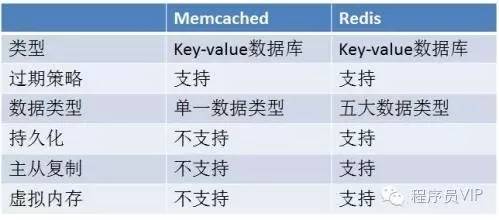 ## 一、问题: 数据库表数据量极大(千万条),要求让服务器更加快速地响应用户的需求。 ## 二、解决方案: 1.通过高速服务器Cache缓存数据库数据 2.内存数据库 (这里仅从数据缓存方面考虑,当然,后期可以采用Hadoop+HBase+Hive等分布式存储分析平台) ## 三、主流解Cache和数据库对比: 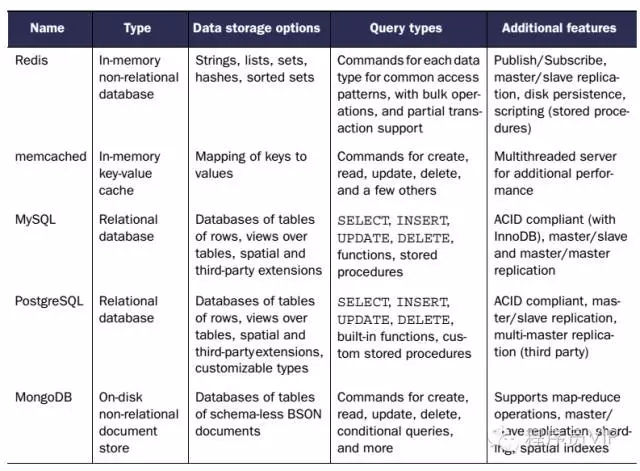 上述技术基本上代表了当今在数据存储方面所有的实现方案,其中主要涉及到了普通关系型数据库(MySQL/PostgreSQL),NoSQL数据库(MongoDB),内存数据库(Redis),内存Cache(Memcached),我们现在需要的是对大数据表仍保持高效的查询速度,普通关系型数据库是无法满足的。而MongoDB其实只是一种非关系型数据库,其优势在于可以存储海量数据,具备强大的查询功能,因此不宜用于缓存数据的场景。 从以上各数据可知,对于我们产品最可行的技术方案有两种: 1.**Memcached** 内存Key-Value Cache 2.**Redis** 内存数据库 #### 四、下面重点分析Memcached和Redis两种方案: ###### 4.1 Memcached介绍 Memcached 是一个高性能的分布式内存对象缓存系统,用于动态Web应用以减轻数据库负载。它通过在内存中缓存数据和对象来减少读取数据库的次数,从而提供动态、数据库驱动网站的速度,现在已被LiveJournal、hatena、Facebook、Vox、LiveJournal等公司所使用。 ###### 4.2 Memcached工作方式分析 许多Web应用都将数据保存到 RDBMS中,应用服务器从中读取数据并在浏览器中显示。 但随着数据量的增大、访问的集中,就会出现RDBMS的负担加重、数据库响应恶化、 网站显示延迟等重大影响。Memcached是高性能的分布式内存缓存服务器,通过缓存数据库查询结果,减少数据库访问次数,以提高动态Web等应用的速度、 提高可扩展性。下图展示了memcache与数据库端协同工作情况: 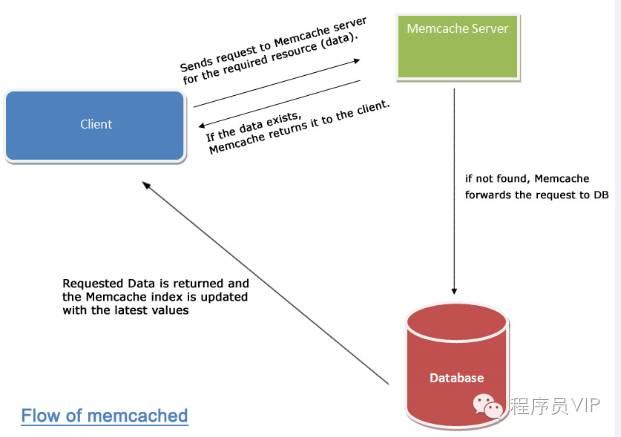 其中的过程是这样的: 1.检查用户请求的数据是缓存中是否有存在,如果有存在的话,只需要直接把请求的数据返回,无需查询数据库。 2.如果请求的数据在缓存中找不到,这时候再去查询数据库。返回请求数据的同时,把数据存储到缓存中一份。 3.保持缓存的“新鲜性”,每当数据发生变化的时候(比如,数据有被修改,或被删除的情况下),要同步的更新缓存信息,确保用户不会在缓存取到旧的数据。 Memcached作为高速运行的分布式缓存服务器,具有以下的特点: 协议简单 基于libevent的事件处理 内置内存存储方式 memcached不互相通信的分布式 ###### 4.3 如何实现分布式可拓展性? Memcached的分布式不是在服务器端实现的,而是在客户端应用中实现的,即通过内置算法制定目标数据的节点,如下图所示: 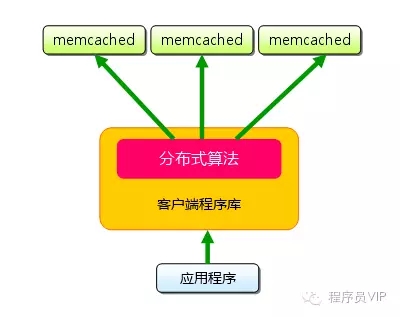 ###### 4.4 Redis 介绍 Redis是一个key-value存储系统。和Memcached类似,它支持存储的value类型相对更多,包括string(字符串)、 list(链表)、set(集合)和zset(有序集合)。这些数据类型都支持push/pop、add/remove及取交集并集和差集及更丰富的操作,而且这些操作都是原子性的。在此基础上,redis支持各种不同方式的排序。与memcached一样,为了保证效率,数据都是缓存在内存中。区别的是redis会周期性的把更新的数据写入磁盘或者把修改操作写入追加的记录文件,并且在此基础上实现了master-slave(主从)同步,当前 Redis的应用已经非常广泛,国内像新浪、淘宝,国外像 Flickr、Github等均在使用Redis的缓存服务。 ###### 4.5 Redis 工作方式分析 Redis作为一个高性能的key-value数据库具有以下特征: 多样的数据模型 持久化 主从同步 Redis支持丰富的数据类型,最为常用的数据类型主要由五种:String、Hash、List、Set和Sorted Set。Redis通常将数据存储于内存中,或被配置为使用虚拟内存。Redis有一个很重要的特点就是它可以实现持久化数据,通过两种方式可以实现数据持久化:使用RDB快照的方式,将内存中的数据不断写入磁盘;或使用类似MySQL的AOF日志方式,记录每次更新的日志。前者性能较高,但是可能会引起一定程度的数据丢失;后者相反。 Redis支持将数据同步到多台从数据库上,这种特性对提高读取性能非常有益。 ###### 4.6 Redis如何实现分布式可拓展性? 2.8以前的版本:与Memcached一致,可以在客户端实现,也可以使用代理,twitter已开发出用于Redis和Memcached的代理Twemproxy 。 3.0 以后的版本:相较于Memcached只能采用客户端实现分布式存储,Redis则在服务器端构建分布式存储。Redis Cluster是一个实现了分布式且允许单点故障的Redis高级版本,它没有中心节点,各个节点地位一致,具有线性可伸缩的功能。如图给出Redis Cluster的分布式存储架构,其中节点与节点之间通过二进制协议进行通信,节点与客户端之间通过ascii协议进行通信。在数据的放置策略上,Redis Cluster将整个 key的数值域分成16384个哈希槽,每个节点上可以存储一个或多个哈希槽,也就是说当前Redis Cluster支持的最大节点数就是16384。  ## 五、综合结论 应该说Memcached和Redis都能很好的满足解决我们的问题,它们性能都很高,总的来说,可以把Redis理解为是对Memcached的拓展,是更加重量级的实现,提供了更多更强大的功能。具体来说: ###### 1.性能上: 性能上都很出色,具体到细节,由于Redis只使用单核,而Memcached可以使用多核,所以平均每一个核上Redis在存储小数据时比 Memcached性能更高。而在100k以上的数据中,Memcached性能要高于Redis,虽然Redis最近也在存储大数据的性能上进行优化,但是比起 Memcached,还是稍有逊色。 ###### 2.内存空间和数据量大小: MemCached可以修改最大内存,采用LRU算法。Redis增加了VM的特性,突破了物理内存的限制。 ###### 3.操作便利上: MemCached数据结构单一,仅用来缓存数据,而Redis支持更加丰富的数据类型,也可以在服务器端直接对数据进行丰富的操作,这样可以减少网络IO次数和数据体积。 ###### 4.可靠性上: MemCached不支持数据持久化,断电或重启后数据消失,但其稳定性是有保证的。Redis支持数据持久化和数据恢复,允许单点故障,但是同时也会付出性能的代价。 ###### 5.应用场景: Memcached:动态系统中减轻数据库负载,提升性能;做缓存,适合多读少写,大数据量的情况(如人人网大量查询用户信息、好友信息、文章信息等)。 Redis:适用于对读写效率要求都很高,数据处理业务复杂和对安全性要求较高的系统(如新浪微博的计数和微博发布部分系统,对数据安全性、读写要求都很高)。 ## 六、需要慎重考虑的部分 1.Memcached单个key-value大小有限,一个value最大只支持1MB,而Redis最大支持512MB 2.Memcached只是个内存缓存,对可靠性无要求;而Redis更倾向于内存数据库,因此对对可靠性方面要求比较高 3.从本质上讲,Memcached只是一个单一key-value内存Cache;而Redis则是一个数据结构内存数据库,支持五种数据类型,因此Redis除单纯缓存作用外,还可以处理一些简单的逻辑运算,Redis不仅可以缓存,而且还可以作为数据库用 4.新版本(3.0)的Redis是指集群分布式,也就是说集群本身均衡客户端请求,各个节点可以交流,可拓展行、可维护性更强大。
作者:微信小助手
<p style="white-space: normal;max-width: 100%;min-height: 1em;font-family: "Helvetica Neue", Helvetica, "Hiragino Sans GB", "Microsoft YaHei", Arial, sans-serif;font-size: 15px;text-align: center;box-sizing: border-box !important;overflow-wrap: break-word !important;"><span style="max-width: 100%;font-family: Optima-Regular, PingFangTC-light;box-sizing: border-box !important;overflow-wrap: break-word !important;"><span style="max-width: 100%;font-size: 16px;background-color: rgb(255, 255, 255);letter-spacing: 0.544px;box-sizing: border-box !important;overflow-wrap: break-word !important;"><span style="color: rgb(127, 127, 127);max-width: 100%;font-size: 14px;line-height: 1.75em;box-sizing: border-box !important;overflow-wrap: break-word !important;">点击上方“</span><span style="max-width: 100%;font-size: 14px;line-height: 1.75em;box-sizing: border-box !important;overflow-wrap: break-word !important;"><span style="color: rgb(0, 176, 240);">服务端思维</span></span><span style="color: rgb(127, 127, 127);max-width: 100%;font-size: 14px;line-height: 1.75em;box-sizing: border-box !important;overflow-wrap: break-word !important;">”,选择“</span></span><span style="color: rgb(136, 136, 136);max-width: 100%;font-size: 14px;box-sizing: border-box !important;overflow-wrap: break-word !important;">设为星标</span><span style="color: rgb(127, 127, 127);max-width: 100%;background-color: rgb(255, 255, 255);letter-spacing: 0.544px;font-size: 14px;box-sizing: border-box !important;overflow-wrap: break-word !important;">”</span></span></p> <p style="white-space: normal;max-width: 100%;min-height: 1em;color: rgb(62, 62, 62);font-family: "Helvetica Neue", Helvetica, "Hiragino Sans GB", "Microsoft YaHei", Arial, sans-serif;font-size: 15px;text-align: center;box-sizing: border-box !important;overflow-wrap: break-word !important;"><span style="max-width: 100%;font-family: Optima-Regular, PingFangTC-light;box-sizing: border-box !important;overflow-wrap: break-word !important;"><span style="max-width: 100%;background-color: rgb(255, 255, 255);letter-spacing: 0.544px;color: rgb(127, 127, 127);font-size: 14px;box-sizing: border-box !important;overflow-wrap: break-word !important;">回复”</span><span style="max-width: 100%;background-color: rgb(255, 255, 255);letter-spacing: 0.544px;font-size: 14px;color: rgb(0, 122, 170);box-sizing: border-box !important;overflow-wrap: break-word !important;">669</span><span style="max-width: 100%;background-color: rgb(255, 255, 255);letter-spacing: 0.544px;color: rgb(127, 127, 127);font-size: 14px;box-sizing: border-box !important;overflow-wrap: break-word !important;">“获取独家整理的精选资料集</span></span></p> <p style="white-space: normal;max-width: 100%;min-height: 1em;color: rgb(62, 62, 62);font-family: "Helvetica Neue", Helvetica, "Hiragino Sans GB", "Microsoft YaHei", Arial, sans-serif;font-size: 15px;text-align: center;box-sizing: border-box !important;overflow-wrap: break-word !important;"><span style="max-width: 100%;font-family: Optima-Regular, PingFangTC-light;box-sizing: border-box !important;overflow-wrap: break-word !important;"><span style="max-width: 100%;background-color: rgb(255, 255, 255);letter-spacing: 0.544px;color: rgb(127, 127, 127);font-size: 14px;box-sizing: border-box !important;overflow-wrap: break-word !important;"><span style="max-width: 100%;letter-spacing: 0.544px;box-sizing: border-box !important;overflow-wrap: break-word !important;">回复”</span><span style="max-width: 100%;letter-spacing: 0.544px;color: rgb(0, 122, 170);box-sizing: border-box !important;overflow-wrap: break-word !important;">加群</span><span style="max-width: 100%;letter-spacing: 0.544px;box-sizing: border-box !important;overflow-wrap: break-word !important;">“加入全国服务端高端社群「后端圈」</span></span></span></p> <p style="white-space: normal;max-width: 100%;min-height: 1em;box-sizing: border-box !important;overflow-wrap: break-word !important;"><br style="max-width: 100%;font-family: -apple-system-font, system-ui, "Helvetica Neue", "PingFang SC", "Hiragino Sans GB", "Microsoft YaHei UI", "Microsoft YaHei", Arial, sans-serif;letter-spacing: 0.544px;background-color: rgb(255, 255, 255);box-sizing: border-box !important;overflow-wrap: break-word !important;"></p> <section powered-by="xiumi.us" style="white-space: normal;"> <section> <section> <section> <p style="text-align: center;"><img class="" data-cropselx1="0" data-cropselx2="562" data-cropsely1="0" data-cropsely2="375" data-ratio="0.6666666666666666" src="/upload/752f2357abb18ffb47778a69733f4575.jpg" data-type="jpeg" data-w="510" style="height: 375px;color: rgb(80, 97, 109);font-family: Helvetica, Arial, sans-serif;font-size: 15px;text-align: start;box-sizing: border-box;border-width: 2px;border-style: solid;border-color: rgb(238, 238, 238);border-radius: 6px;width: 563px;"></p> <p><span style="max-width: 100%;color: rgb(136, 136, 136);font-size: 12px;letter-spacing: 0.7px;font-family: "Tahoma For Number", "Chinese Quote", -apple-system, system-ui, "Segoe UI", Roboto, "PingFang SC", "Hiragino Sans GB", "Microsoft YaHei", "Helvetica Neue", Helvetica, Arial, sans-serif;text-align: start;box-sizing: border-box !important;overflow-wrap: break-word !important;">作者 | 呼延十</span><br></p> <p style="max-width: 100%;min-height: 1em;letter-spacing: 0.544px;box-sizing: border-box !important;overflow-wrap: break-word !important;"><span style="color: rgb(136, 136, 136);font-size: 12px;letter-spacing: 0.7px;font-family: "Tahoma For Number", "Chinese Quote", -apple-system, system-ui, "Segoe UI", Roboto, "PingFang SC", "Hiragino Sans GB", "Microsoft YaHei", "Helvetica Neue", Helvetica, Arial, sans-serif;text-align: start;">出品 | http://h5ip.cn/mPaC</span></p> <p style="max-width: 100%;min-height: 1em;letter-spacing: 0.544px;box-sizing: border-box !important;overflow-wrap: break-word !important;"><br></p> <p style="max-width: 100%;min-height: 1em;font-family: -apple-system-font, system-ui, "Helvetica Neue", "PingFang SC", "Hiragino Sans GB", "Microsoft YaHei UI", "Microsoft YaHei", Arial, sans-serif;letter-spacing: 0.544px;white-space: normal;background-color: rgb(255, 255, 255);box-sizing: border-box !important;overflow-wrap: break-word !important;"><span style="max-width: 100%;color: rgb(171, 25, 66);line-height: inherit;font-family: "Helvetica Neue", Helvetica, "Hiragino Sans GB", "Microsoft YaHei", Arial, sans-serif;font-weight: bold;letter-spacing: 0.544px;text-align: start;box-sizing: border-box !important;overflow-wrap: break-word !important;">前言</span><br style="max-width: 100%;box-sizing: border-box !important;overflow-wrap: break-word !important;"></p> <p style="margin-top: 1.5em;margin-bottom: 1.5em;max-width: 100%;min-height: 1em;letter-spacing: 0.544px;white-space: normal;background-color: rgb(255, 255, 255);font-size: 16px;color: rgb(62, 62, 62);line-height: inherit;font-family: "Helvetica Neue", Helvetica, "Hiragino Sans GB", "Microsoft YaHei", Arial, sans-serif;text-align: start;box-sizing: border-box !important;overflow-wrap: break-word !important;"><span style="max-width: 100%;font-size: 15px;box-sizing: border-box !important;overflow-wrap: break-word !important;">本文主要受众为开发人员,所以不涉及到MySQL的服务部署等操作,且内容较多,大家准备好耐心和瓜子矿泉水.</span></p> <p style="margin-top: 1.5em;margin-bottom: 1.5em;max-width: 100%;min-height: 1em;letter-spacing: 0.544px;white-space: normal;background-color: rgb(255, 255, 255);font-size: 16px;color: rgb(62, 62, 62);line-height: inherit;font-family: "Helvetica Neue", Helvetica, "Hiragino Sans GB", "Microsoft YaHei", Arial, sans-serif;text-align: start;box-sizing: border-box !important;overflow-wrap: break-word !important;"><span style="max-width: 100%;font-size: 15px;box-sizing: border-box !important;overflow-wrap: break-word !important;">前一阵系统的学习了一下MySQL,也有一些实际操作经验,偶然看到一篇和MySQL相关的面试文章,发现其中的一些问题自己也回答不好,虽然知识点大部分都知道,但是无法将知识串联起来.</span></p> <p style="margin-top: 1.5em;margin-bottom: 1.5em;max-width: 100%;min-height: 1em;letter-spacing: 0.544px;white-space: normal;background-color: rgb(255, 255, 255);font-size: 16px;color: rgb(62, 62, 62);line-height: inherit;font-family: "Helvetica Neue", Helvetica, "Hiragino Sans GB", "Microsoft YaHei", Arial, sans-serif;text-align: start;box-sizing: border-box !important;overflow-wrap: break-word !important;"><span style="max-width: 100%;font-size: 15px;box-sizing: border-box !important;overflow-wrap: break-word !important;">因此决定搞一个MySQL灵魂100问,试着用回答问题的方式,让自己对知识点的理解更加深入一点.</span></p> <p style="margin-top: 1.5em;margin-bottom: 1.5em;max-width: 100%;min-height: 1em;letter-spacing: 0.544px;white-space: normal;background-color: rgb(255, 255, 255);font-size: 16px;color: rgb(62, 62, 62);line-height: inherit;font-family: "Helvetica Neue", Helvetica, "Hiragino Sans GB", "Microsoft YaHei", Arial, sans-serif;text-align: start;box-sizing: border-box !important;overflow-wrap: break-word !important;"><span style="max-width: 100%;font-size: 15px;box-sizing: border-box !important;overflow-wrap: break-word !important;">此文不会事无巨细的从select的用法开始讲解mysql,主要针对的是开发人员需要知道的一些MySQL的知识点,主要包括索引,事务,优化等方面,以在面试中高频的问句形式给出答案.</span></p> <h2 style="margin-top: 1.5em;margin-bottom: 1.5em;font-weight: bold;font-size: 1.4em;max-width: 100%;letter-spacing: 0.544px;white-space: normal;background-color: rgb(255, 255, 255);color: rgb(0, 184, 212);line-height: inherit;font-family: "Helvetica Neue", Helvetica, "Hiragino Sans GB", "Microsoft YaHei", Arial, sans-serif;text-align: start;box-sizing: border-box !important;overflow-wrap: break-word !important;"><span style="max-width: 100%;line-height: inherit;font-size: 17px;color: rgb(171, 25, 66);box-sizing: border-box !important;overflow-wrap: break-word !important;">索引相关</span><span style="max-width: 100%;color: inherit;line-height: inherit;font-size: 15px;box-sizing: border-box !important;overflow-wrap: break-word !important;"></span></h2> <p style="margin-top: 1.5em;margin-bottom: 1.5em;max-width: 100%;min-height: 1em;letter-spacing: 0.544px;white-space: normal;background-color: rgb(255, 255, 255);font-size: 16px;color: rgb(62, 62, 62);line-height: inherit;font-family: "Helvetica Neue", Helvetica, "Hiragino Sans GB", "Microsoft YaHei", Arial, sans-serif;text-align: start;box-sizing: border-box !important;overflow-wrap: break-word !important;"><span style="max-width: 100%;font-size: 15px;box-sizing: border-box !important;overflow-wrap: break-word !important;">关于MySQL的索引,曾经进行过一次总结,文章链接在这里 Mysql索引原理及其优化.</span></p> <p style="max-width: 100%;min-height: 1em;font-family: -apple-system-font, system-ui, "Helvetica Neue", "PingFang SC", "Hiragino Sans GB", "Microsoft YaHei UI", "Microsoft YaHei", Arial, sans-serif;letter-spacing: 0.544px;white-space: normal;background-color: rgb(255, 255, 255);box-sizing: border-box !important;overflow-wrap: break-word !important;"><span style="max-width: 100%;font-size: 15px;box-sizing: border-box !important;overflow-wrap: break-word !important;"><strong style="max-width: 100%;box-sizing: border-box !important;overflow-wrap: break-word !important;"><span style="max-width: 100%;color: rgb(0, 0, 0);box-sizing: border-box !important;overflow-wrap: break-word !important;">1. 什么是索引?</span></strong></span></p> <p style="margin-top: 1.5em;margin-bottom: 1.5em;max-width: 100%;min-height: 1em;letter-spacing: 0.544px;white-space: normal;background-color: rgb(255, 255, 255);font-size: 16px;color: rgb(62, 62, 62);line-height: inherit;font-family: "Helvetica Neue", Helvetica, "Hiragino Sans GB", "Microsoft YaHei", Arial, sans-serif;text-align: start;box-sizing: border-box !important;overflow-wrap: break-word !important;"><span style="max-width: 100%;font-size: 15px;box-sizing: border-box !important;overflow-wrap: break-word !important;">索引是一种数据结构,可以帮助我们快速的进行数据的查找.</span></p> <p style="max-width: 100%;min-height: 1em;font-family: -apple-system-font, system-ui, "Helvetica Neue", "PingFang SC&q