作者:じ☆ve宝贝
##安装 首先去下载最新的pycharm 5,进行安装。可以直接在官网下载。 PyCharm 的激活方式: 1,推荐购买正版。 2,可以选择试用,免费试用30天。 3,网上找激活码。 ##配置pycharm 1,点击Create New Project. 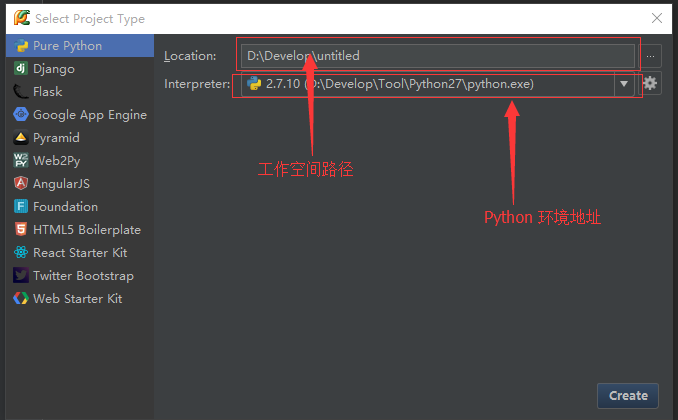 2.pyCharm风格(配色方案)的调整,可以在:【File】-->【Settings】 的 Editor的子选项里进行设置。 比如我这个配色方案,选择的是Dracula(吸血鬼德库拉伯爵),如下图:  3.显示行号 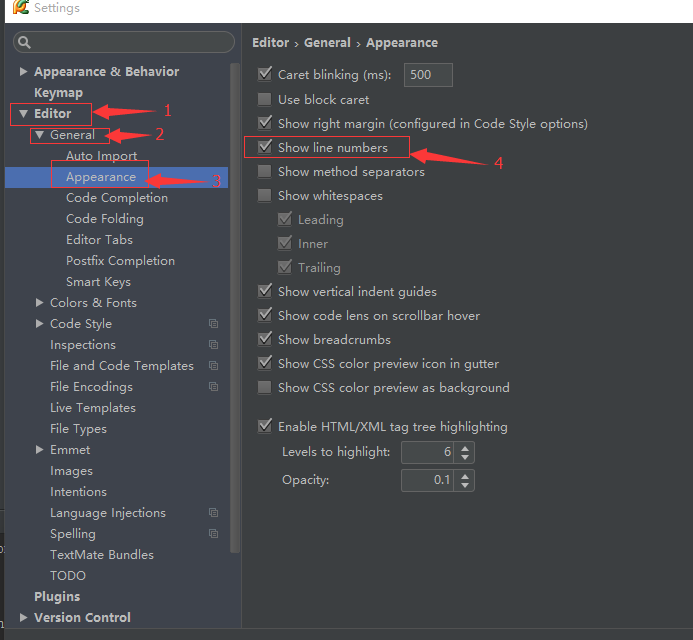 4.关闭phpstorm的拼写检查  ##Hello Word 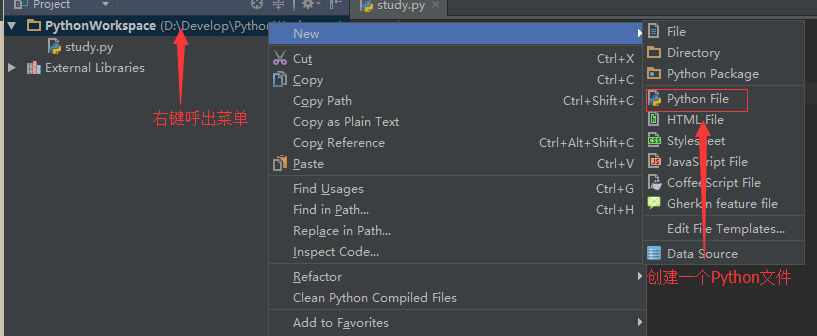 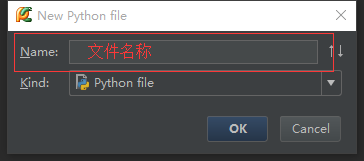 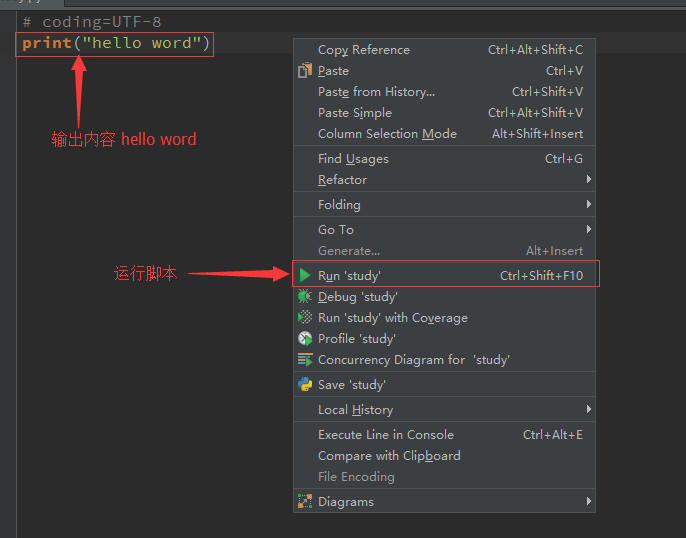 ####输出 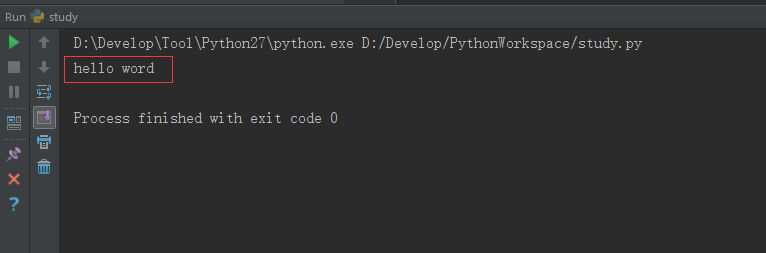 ##结束 pycharm的安装和使用,圆满完成。
作者:じ☆ve宝贝
#### 去掉字符串中的空格 ``` public class Test{ /** * 去掉字符串中的空格 * @param str * @return String */ public static String removeBlank(String str){ StringBuilder sb = new StringBuilder(); char c = ' '; for(int i = 0 ; i < str.length() ; i++){ char ch = str.charAt(i); if(ch != c){ sb.append(ch); } } return sb.toString(); } ```
作者:じ☆ve宝贝
web.xml总是报cvc-complex-type.2.4.a: Invalid content was found starting with element 错误 在eclipse中的web.xml添加: 1、 http://www.springmodules.org/schema/cache/springmodules-cache.xsd 2、http://www.springmodules.org/schema/cache/springmodules-ehcache.xsd 如下面代码: ``` <?xml version="1.0" encoding="UTF-8"?> <web-app xmlns:xsi="http://www.w3.org/2001/XMLSchema-instance" xmlns="http://java.sun.com/xml/ns/javaee" xmlns:web="http://java.sun.com/xml/ns/javaee/web-app_2_5.xsd" xsi:schemaLocation="http://java.sun.com/xml/ns/javaee http://www.springmodules.org/schema/cache/springmodules-cache.xsd http://www.springmodules.org/schema/cache/springmodules-ehcache.xsd http://java.sun.com/xml/ns/javaee/web-app_2_5.xsd" id="WebApp_ID" version="2.5"> <!-- Spring MVC --> <servlet> <servlet-name>springMVC</servlet-name> <servlet-class>org.springframework.web.servlet.DispatcherServlet </servlet-class> <init-param> <param-name>contextConfigLocation</param-name> <param-value>classpath:/cn/studyjava/context/spring-mvc.xml </param-value> </init-param> <load-on-startup>1</load-on-startup> <async-supported>true</async-supported> </servlet> <servlet-mapping> <servlet-name>springMVC</servlet-name> <url-pattern>*.do</url-pattern> </servlet-mapping> </web-app> ```
作者:微信小助手
<p><img class="rich_pages" data-backh="383" data-backw="574" data-before-oversubscription-url="/upload/3a04dc24d541fffc3089809c61422a79.jpg" data-copyright="0" data-cropselx1="0" data-cropselx2="574" data-cropsely1="0" data-cropsely2="288" data-ratio="0.6669776119402985" data-s="300,640" src="/upload/3a04dc24d541fffc3089809c61422a79.jpg" data-type="jpeg" data-w="1072" style="font-size: 14px;letter-spacing: 0.544px;background-color: rgb(255, 255, 255);font-family: -apple-system-font, BlinkMacSystemFont, "Helvetica Neue", "PingFang SC", "Hiragino Sans GB", "Microsoft YaHei UI", "Microsoft YaHei", Arial, sans-serif;text-align: center;width: 100%;box-sizing: border-box !important;word-wrap: break-word !important;visibility: visible !important;"><br></p> <section class="" powered-by="xiumi.us" style="white-space: normal;max-width: 100%;font-family: -apple-system-font, BlinkMacSystemFont, "Helvetica Neue", "PingFang SC", "Hiragino Sans GB", "Microsoft YaHei UI", "Microsoft YaHei", Arial, sans-serif;letter-spacing: 0.544px;line-height: 27.2px;background-color: rgb(255, 255, 255);box-sizing: border-box !important;word-wrap: break-word !important;overflow-wrap: break-word !important;"> <section style="max-width: 100%;box-sizing: border-box !important;word-wrap: break-word !important;overflow-wrap: break-word !important;"> <section style="max-width: 100%;box-sizing: border-box !important;word-wrap: break-word !important;overflow-wrap: break-word !important;"> <section class="" powered-by="xiumi.us" style="max-width: 100%;letter-spacing: 0.544px;box-sizing: border-box !important;word-wrap: break-word !important;overflow-wrap: break-word !important;"> <section class="" style="max-width: 100%;box-sizing: border-box !important;word-wrap: break-word !important;overflow-wrap: break-word !important;"> <section label="Copyright Reserved by PLAYHUDONG." donone="shifuMouseDownCard('shifu_c_008')" style="max-width: 100%;box-sizing: border-box !important;word-wrap: break-word !important;overflow-wrap: break-word !important;"> <section class="" powered-by="xiumi.us" style="max-width: 100%;letter-spacing: 0.612px;box-sizing: border-box !important;word-wrap: break-word !important;overflow-wrap: break-word !important;"> <section style="max-width: 100%;box-sizing: border-box !important;word-wrap: break-word !important;overflow-wrap: break-word !important;"> <section style="max-width: 100%;box-sizing: border-box !important;word-wrap: break-word !important;overflow-wrap: break-word !important;"> <section class="" powered-by="xiumi.us" style="max-width: 100%;box-sizing: border-box !important;word-wrap: break-word !important;overflow-wrap: break-word !important;"> <section class="" powered-by="xiumi.us" style="max-width: 100%;box-sizing: border-box !important;word-wrap: break-word !important;overflow-wrap: break-word !important;"> <section label="Copyright Reserved by PLAYHUDONG." donone="shifuMouseDownCard('shifu_c_008')" style="max-width: 100%;box-sizing: border-box !important;word-wrap: break-word !important;overflow-wrap: break-word !important;"> <section class="" powered-by="xiumi.us" style="max-width: 100%;box-sizing: border-box !important;word-wrap: break-word !important;overflow-wrap: break-word !important;"> <section style="max-width: 100%;box-sizing: border-box !important;word-wrap: break-word !important;overflow-wrap: break-word !important;"> <section style="max-width: 100%;box-sizing: border-box !important;word-wrap: break-word !important;overflow-wrap: break-word !important;"> <section class="" powered-by="xiumi.us" style="max-width: 100%;box-sizing: border-box !important;word-wrap: break-word !important;overflow-wrap: break-word !important;"> <section class="" powered-by="xiumi.us" style="max-width: 100%;box-sizing: border-box !important;word-wrap: break-word !important;overflow-wrap: break-word !important;"> <section label="Copyright Reserved by PLAYHUDONG." donone="shifuMouseDownCard('shifu_c_008')" style="margin-right: 0em;margin-left: 0em;padding: 0.5em 1em;max-width: 100%;border-style: none;background-color: rgb(235, 235, 235);box-sizing: border-box !important;word-wrap: break-word !important;overflow-wrap: break-word !important;"> <p style="max-width: 100%;min-height: 1em;text-align: left;line-height: 1.75em;box-sizing: border-box !important;word-wrap: break-word !important;overflow-wrap: break-word !important;"><span style="max-width: 100%;color: rgb(136, 136, 136);font-size: 15px;letter-spacing: 0.612px;box-sizing: border-box !important;word-wrap: break-word !important;overflow-wrap: break-word !important;">阿里妹导读:之前上学的时候有一个梗,说在食堂里吃饭,吃完把餐盘端走清理的是 C++ 程序员,吃完直接就走的是 Java 程序员。确实,在 Java 的世界里,似乎我们不用对垃圾回收那么的关注。很多初学者不懂 GC,也能写出一个能用甚至还不错的程序或系统。但其实这并不代表 Java 的 GC 就不重要。相反,它是那么的重要和复杂,以至于出了问题,那些初学者除了打开 GC 日志,看着一堆0101的天</span><span style="max-width: 100%;color: rgb(136, 136, 136);font-size: 15px;letter-spacing: 0.612px;box-sizing: border-box !important;word-wrap: break-word !important;overflow-wrap: break-word !important;">文,啥也做不了。</span><span style="max-width: 100%;color: rgb(136, 136, 136);font-size: 15px;letter-spacing: 0.612px;box-sizing: border-box !important;word-wrap: break-word !important;overflow-wrap: break-word !important;">今天,新零售技术事业群的率鸽(花名)就从头到尾,完整地聊一聊 Java 的垃圾回收。</span><span style="max-width: 100%;color: rgb(136, 136, 136);font-size: 15px;letter-spacing: 0.612px;box-sizing: border-box !important;word-wrap: break-word !important;overflow-wrap: break-word !important;"></span></p> </section> </section> </section> </section> </section> </section> </section> </section> </section> </section> </section> </section> </section> </section> </section> </section> </section> </section> <section style="white-space: normal;text-align: left;line-height: 1.75em;"> <br> </section> <p><a class="weapp_image_link" data-miniprogram-appid="wx8053ee31f42155ab" data-miniprogram-path="/pages/index/index?url=https://developer.aliyun.com/special/tech-java" data-miniprogram-nickname="ALI开发者" href="" data-miniprogram-type="image" data-miniprogram-servicetype=""><img class="rich_pages" data-ratio="0.2702104097452935" data-s="300,640" src="/upload/a729125208de9a3bfe347cfc357c0076.jpg" data-type="jpeg" data-w="1806" style=""></a></p> <section style="white-space: normal;text-align: left;line-height: 1.75em;"> <br> </section> <section dir="ltr" style="white-space: normal;text-align: left;line-height: 1.75em;"> <span style="color: rgb(255, 104, 39);"><strong><span style="font-size: 15px;">什么是垃圾回收</span></strong></span> <br style="max-width: 100%;box-sizing: border-box !important;word-wrap: break-word !important;overflow-wrap: break-word !important;"> </section> <p dir="ltr" style="white-space: normal;"><br style="max-width: 100%;box-sizing: border-box !important;word-wrap: break-word !important;"></p> <section style="white-space: normal;text-align: left;line-height: 1.75em;"> <span style="font-size: 15px;color: rgb(62, 62, 62);">垃圾回收(Garbage Collection,GC),顾名思义就是释放垃圾占用的空间,防止内存泄露。有效的使用可以使用的内存,对内存堆中已经死亡的或者长时间没有使用的对象进行清除和回收。</span> </section> <p style="white-space: normal;"><br></p> <section style="white-space: normal;text-align: left;line-height: 1.75em;"> <span style="font-size: 15px;color: rgb(62, 62, 62);">Java 语言出来之前,大家都在拼命的写 C 或者 C++ 的程序,而此时存在一个很大的矛盾,C++ 等语言创建对象要不断的去开辟空间,不用的时候又需要不断的去释放控件,既要写构造函数,又要写析构函数,很多时候都在重复的 allocated,然后不停的析构。于是,有人就提出,能不能写一段程序实现这块功能,每次创建,释放控件的时候复用这段代码,而无需重复的书写呢?</span> </section> <p style="white-space: normal;"><br style="max-width: 100%;box-sizing: border-box !important;word-wrap: break-word !important;"></p> <section style="white-space: normal;text-align: left;line-height: 1.75em;"> <span style="font-size: 15px;color: rgb(62, 62, 62);">1960年,基于 MIT 的 Lisp 首先提出了垃圾回收的概念,而这时 Java 还没有出世呢!所以实际上 GC 并不是Java的专利,GC 的历史远远大于 Java 的历史!</span> </section> <section style="white-space: normal;text-align: left;line-height: 1.75em;"> <br> </section> <section dir="ltr" style="white-space: normal;text-align: left;line-height: 1.75em;"> <strong><span style="font-size: 15px;color: rgb(255, 104, 39);">怎么定义垃圾</span></strong> <br style="max-width: 100%;box-sizing: border-box !important;word-wrap: break-word !important;overflow-wrap: break-word !important;"> </section> <p dir="ltr" style="white-space: normal;"><br style="max-width: 100%;box-sizing: border-box !important;word-wrap: break-word !important;"></p> <section style="white-space: normal;text-align: left;line-height: 1.75em;"> <span style="font-size: 15px;color: rgb(62, 62, 62);">既然我们要做垃圾回收,首先我们得搞清楚垃圾的定义是什么,哪些内存是需要回收的。</span> </section> <section style="white-space: normal;text-align: left;line-height: 1.75em;"> <span style="font-size: 15px;color: rgb(62, 62, 62);"><br></span> </section> <section style="white-space: normal;text-align: left;line-height: 1.75em;"></section> <section style="white-space: normal;text-align: left;line-height: 1.75em;"> <strong><span style="color: rgb(62, 62, 62);font-size: 15px;">引用计数算法</span></strong> </section> <section style="white-space: normal;text-align: left;line-height: 1.75em;"> <strong><span style="color: rgb(62, 62, 62);font-size: 15px;"><br></span></strong> </section> <section style="white-space: normal;text-align: left;line-height: 1.75em;"></section> <section style="white-space: normal;text-align: left;line-height: 1.75em;"> <span style="font-size: 15px;color: rgb(62, 62, 62);">引用计数算法(Reachability Counting)是通过在对象头中分配一个空间来保存该对象被引用的次数(Reference Count)。如果该对象被其它对象引用,则它的引用计数加1,如果删除对该对象的引用,那么它的引用计数就减1,当该对象的引用计数为0时,那么该对象就会被回收。</span> </section> <section style="white-space: normal;text-align: left;line-height: 1.75em;"> <span style="font-size: 15px;color: rgb(62, 62, 62);"><br></span> </section> <section style="white-space: normal;text-align: left;line-height: 1.75em;"></section> <pre class="" style="text-align: left;"> <section class="code-snippet__fix code-snippet__js"> <ul class="code-snippet__line-index code-snippet__js"> <li></li> </ul> <pre class="code-snippet__js" data-lang="javascript"><code><span class="code-snippet_outer"><span class="code-snippet__built_in">String</span> m = <span class="code-snippet__keyword">new</span> <span class="code-snippet__built_in">String</span>(<span class="code-snippet__string">"jack"</span>);</span></code></pre> </section> <section style="line-height: 1.75em;"> <br> </section></pre> <section style="white-space: normal;text-align: left;line-height: 1.75em;"> <span style="font-size: 15px;color: rgb(62, 62, 62);">先创建一个字符串,这时候"jack"有一个引用,就是 m。</span> </section> <section style="white-space: normal;text-align: left;line-height: 1.75em;"> <span style="font-size: 15px;color: rgb(62, 62, 62);"><br></span> </section> <section style="white-space: normal;text-align: center;line-height: 1.75em;"> <img class="" data-ratio="0.35018050541516244" data-type="png" data-w="554" width="300" src="/upload/a03c61f3b902e87fac56f42cfa97aba2.png" style="box-sizing: content-box;border-width: 0px;border-style: none;border-color: initial;vertical-align: middle;word-wrap: break-word !important;width: 300px !important;visibility: visible !important;"> <br style="max-width: 100%;box-sizing: border-box;word-wrap: break-word !important;"> </section> <p style="white-space: normal;"><br style="max-width: 100%;box-sizing: border-box !important;word-wrap: break-word !important;"></p> <section style="white-space: normal;text-align: left;line-height: 1.75em;"> <span style="font-size: 15px;color: rgb(62, 62, 62);">然后将 m 设置为 null,这时候"jack"的引用次数就等于0了,在引用计数算法中,意味着这块内容就需要被回收了。</span> </section> <section style="white-space: normal;text-align: left;line-height: 1.75em;"> <span style="font-size: 15px;color: rgb(62, 62, 62);"><br></span> </section> <section style="white-space: normal;text-align: left;line-height: 1.75em;"></section> <pre class="" style="text-align: left;"> <section class="code-snippet__fix code-snippet__js"> <ul class="code-snippet__line-index code-snippet__js"> <li></li> </ul> <pre class="code-snippet__js" data-lang="ini"><code><span class="code-snippet_outer"><span class="code-snippet__attr">m</span> = null;</span></code></pre> </section> <section style="line-height: 1.75em;"> <br> </section></pre> <section style="white-space: normal;text-align: left;line-height: 1.75em;"> <img class="" data-ratio="0.2753303964757709" data-type="png" data-w="908" width="500" src="/upload/3baab151fdba316b342e49da6ef6ab53.png" style="box-sizing: content-box;border-width: 0px;border-style: none;border-color: initial;vertical-align: middle;word-wrap: break-word !important;width: 500px !important;visibility: visible !important;"> <br style="max-width: 100%;box-sizing: border-box;word-wrap: break-word !important;"> </section> <p style="white-space: normal;"><br style="max-width: 100%;box-sizing: border-box !important;word-wrap: break-word !important;"></p> <section style="white-space: normal;text-align: left;line-height: 1.75em;"> <span style="font-size: 15px;color: rgb(62, 62, 62);">引用计数算法是将垃圾回收分摊到整个应用程序的运行当中了,而不是在进行垃圾收集时,要挂起整个应用的运行,直到对堆中所有对象的处理都结束。因此,采用引用计数的垃圾收集不属于严格意义上的"Stop-The-World"的垃圾收集机制。</span> </section> <p style="white-space: normal;"><br style="max-width: 100%;box-sizing: border-box !important;word-wrap: break-word !important;"></p> <section style="white-space: normal;text-align: left;line-height: 1.75em;"> <span style="font-size: 15px;color: rgb(62, 62, 62);">看似很美好,但我们知道JVM的垃圾回收就是"Stop-The-World"的,那是什么原因导致我们最终放弃了引用计数算法呢?看下面的例子。</span> </section> <section style="white-space: normal;text-align: left;line-height: 1.75em;"> <br> </section> <pre class="" style="text-align: left;"> <section class="code-snippet__fix code-snippet__js"> <ul class="code-snippet__line-index code-snippet__js"> <li></li> <li></li> <li></li> <li></li> <li></li> <li></li> <li></li> <li></li> <li></li> <li></li> <li></li> <li></li> <li></li> <li></li> <li></li> <li></li> <li></li> <li></li> </ul> <pre class="code-snippet__js" data-lang="cs"><code><span class="code-snippet_outer"><span class="code-snippet__keyword">public</span> <span class="code-snippet__keyword">class</span> <span class="code-snippet__title">ReferenceCountingGC</span> {</span></code><code><span class="code-snippet_outer"><br></span></code><code><span class="code-snippet_outer"> <span class="code-snippet__keyword">public</span> Object instance;</span></code><code><span class="code-snippet_outer"><br></span></code><code><span class="code-snippet_outer"> <span class="code-snippet__function"><span class="code-snippet__keyword">public</span> <span class="code-snippet__title">ReferenceCountingGC</span>(<span class="code-snippet__params">String name</span>)</span>{}</span></code><code><span class="code-snippet_outer">}</span></code><code><span class="code-snippet_outer"><br></span></code><code><span class="code-snippet_outer"><span class="code-snippet__function"><span class="code-snippet__keyword">public</span> <span class="code-snippet__keyword">static</span> <span class="code-snippet__keyword">void</span> <span class="code-snippet__title">testGC</span>(<span class="code-snippet__params"></span>)</span>{</span></code><code><span class="code-snippet_outer"><br></span></code><code><span class="code-snippet_outer"> ReferenceCountingGC a = <span class="code-snippet__keyword">new</span> ReferenceCountingGC(<span class="code-snippet__string">"objA"</span>);</span></code><code><span class="code-snippet_outer"> ReferenceCountingGC b = <span class="code-snippet__keyword">new</span> ReferenceCountingGC(<span class="code-snippet__string">"objB"</span>);</span></code><code><span class="code-snippet_outer"><br></span></code><code><span class="code-snippet_outer"> a.instance = b;</span></code><code><span class="code-snippet_outer"> b.instance = a;</span></code><code><span class="code-snippet_outer"><br></span></code><code><span class="code-snippet_outer"> a = <span class="code-snippet__literal">null</span>;</span></code><code><span class="code-snippet_outer"> b = <span class="code-snippet__literal">null</span>;</span></code><code><span class="code-snippet_outer">}</span></code></pre> </section> <section style="line-height: 1.75em;"> <br> <span style="font-size: 15px;color: rgb(62, 62, 62);"></span> </section></pre> <section class="" data-style-type="6" data-tools="新媒体排版" data-id="9166" style="white-space: normal;"> <section class="" data-source="bj.96weixin.com"> <section> <section data-css="background-color: rgb(239, 239, 239);box-sizing: border-box;margin-top: -4px;padding: 10px"> <section> <section> <section style="text-align: left;line-height: 1.75em;"> <span style="font-size: 15px;color: rgb(62, 62, 62);">1. 定义2个对象</span> </section> <section style="text-align: left;line-height: 1.75em;"> <span style="font-size: 15px;color: rgb(62, 62, 62);">2. 相互引用</span> <br style="max-width: 100%;box-sizing: border-box;word-wrap: break-word !important;"> <span style="font-size: 15px;color: rgb(62, 62, 62);">3. 置空各自的声明引用</span> </section> <section style="text-align: left;line-height: 1.75em;"></section> </section> </section> </section> </section> </section> </section> <section style="white-space: normal;text-align: center;line-height: 1.75em;"> <br> </section> <section style="white-space: normal;text-align: center;line-height: 1.75em;"> <img class="" data-ratio="0.28825622775800713" data-type="png" data-w="2248" title="image.png" src="/upload/b833049b91dd51431fe44ace0d3bd13d.png" style="box-sizing: content-box;border-width: 0px;border-style: none;border-color: initial;vertical-align: middle;top: 0px;left: 0px;right: 0px;bottom: 0px;word-wrap: break-word !important;width: 677px !important;visibility: visible !important;"> <br style="max-width: 100%;box-sizing: border-box;word-wrap: break-word !important;"> </section> <section style="white-space: normal;text-align: left;line-height: 1.75em;"> <br> </section> <section style="white-space: normal;text-align: left;line-height: 1.75em;"> <span style="font-size: 15px;color: rgb(62, 62, 62);">我们可以看到,最后这2个对象已经不可能再被访问了,但由于他们相互引用着对方,导致它们的引用计数永远都不会为0,通过引用计数算法,也就永远无法通知GC收集器回收它们。</span> </section> <p style="white-space: normal;"><br></p> <section style="white-space: normal;text-align: left;line-height: 1.75em;"> <strong><span style="font-size: 15px;color: rgb(62, 62, 62);">可达性分析算法</span></strong> </section> <section style="white-space: normal;text-align: left;line-height: 1.75em;"> <strong><span style="font-size: 15px;color: rgb(62, 62, 62);"><br></span></strong> </section> <section style="white-sp
作者:じ☆ve宝贝
### 设置编码: Window -> Preferences —> General —> Content Types —> Text —> Java Source File 下面的 Default encoding设置为UTF-8 点击Update Window -> Preferences —> General —> Workspace 中Text File encoding 选择other下拉框中选择UTF-8 Window -> Preferences —> Web —> JSP Files 中Encoding 下拉框中选择UTF-8 ### 注释代码格式化: Window -> Preferences —> Java —> Code Style —> Code Templates —> Improt 选择 —> 我的codetemplates.xml ### 代码格式化: Window -> Preferences —> Java —> Code Style —> Formatter 选择 —> java.code.style.xml ### 设置html/jsp文件的自动格式化配置: Window -> Preferences-> Web -> HTML Files-> Editor 中Line width加个0以后保存。 ### 设置XML文件的自动格式化配置: Window -> Preferences -> XML -> XML Files -> Editor : ### 通用配置的解释 设置每行宽度 Line width 设定为80到100个字符。 标签的每个属性都单独一行显示: 选中Split multiple attributes each on a new line 标签结束符不单独占用一行: 不选中Align final bracket in multi-line element tags 去掉所有空行: 选中Clear all blank lines 在标签结束符前添加空格: 选中Insert whitespace before closing empty end-tags 缩进使用空格代替tab: 选中Indent using spaces 设定缩进宽度 Indentation size 设定为4,即缩进4个空格。
作者:じ☆ve宝贝
由于Django工程的运行是这样的: ``` $ python3 ./manage.py runserver ``` 所以这里要对其进行配置。 选择菜单 [Run] --> [Edit Configurations...] 弹出如下对话框。 点左上角的 + 号,添加一个Debug配置,并如下配置 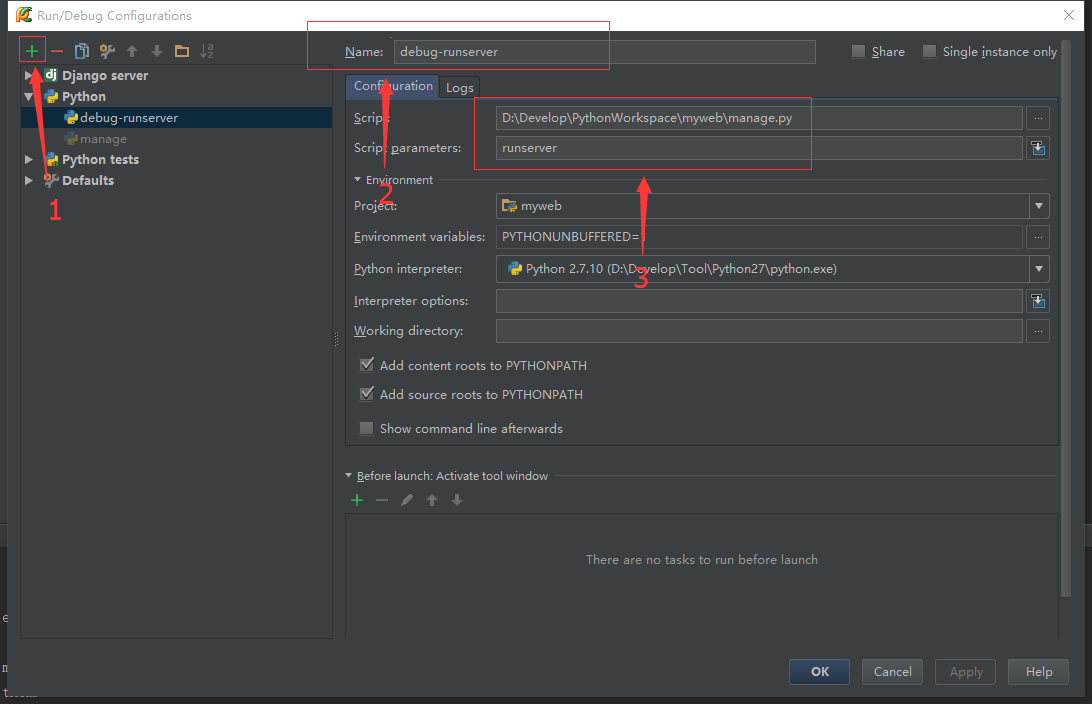
作者:じ☆ve宝贝
Codelf 由前网易前端工程师知名移动前端调试工具MIHTool的作者基于searchcode和有道词典开发完成。目前开源在Github上。 Codelf: http://unbug.github.io/codelf/ Codelf 的 github repo: https://github.com/unbug/codelf
作者:微信小助手
<section style="box-sizing: border-box;background-color: rgb(255, 255, 255);"> <section class="Powered-by-XIUMI V5" style="box-sizing: border-box;" powered-by="xiumi.us"> <section class="" style="margin-top: 10px;margin-bottom: 10px;box-sizing: border-box;"> <section class="" style="padding-top: 10px;padding-right: 10px;padding-left: 10px;box-sizing: border-box;background-color: rgb(239, 239, 239);"> <span style="display: inline-block;width: 5%;line-height: 0.8;font-weight: bolder;font-size: 48px;box-sizing: border-box;" class=""> <section style="box-sizing: border-box;"> “ </section></span> <section class="" style="display: inline-block;vertical-align: top;float: right;width: 90%;line-height: 1.5;font-size: 15px;color: rgb(89, 89, 89);box-sizing: border-box;"> <p style="box-sizing: border-box;"><span style="letter-spacing: 1px;">Redis 是目前最火爆的内存数据库之一,通过在内存中读写数据,大大提高了读写速度,可以说 Redis 是实现网站高并发不可或缺的一部分。</span></p> </section> <section style="clear: both;box-sizing: border-box;"></section> </section> </section> </section> </section> <p style="line-height: 1.75em;"><br></p> <p style="text-align: center;margin-left: 8px;margin-right: 8px;margin-bottom: 5px;"><img class="" data-copyright="0" data-ratio="0.58" data-s="300,640" src="/upload/67bc9d0f43332b4d0f291b70d7496f95.png" data-type="png" data-w="700" style=""></p> <p style="text-align: justify;margin-left: 8px;margin-right: 8px;line-height: 1.75em;"><span style="font-size: 15px;color: rgb(89, 89, 89);letter-spacing: 1px;">我们使用 Redis 时,会接触 Redis 的 5 种对象类型(字符串、哈希、列表、集合、有序集合),丰富的类型是 Redis 相对于 Memcached 等的一大优势。</span></p> <p style="line-height: normal;"><br></p> <p style="text-align: justify;margin-left: 8px;margin-right: 8px;line-height: 1.75em;"><span style="font-size: 15px;letter-spacing: 1px;color: rgb(71, 193, 168);">在了解 Redis 的 5 种对象类型的用法和特点的基础上,进一步了解 Redis 的内存模型,对 Redis 的使用有很大帮助,例如:</span></p> <ul class=" list-paddingleft-2" style="list-style-type: disc;"> <li><p style="text-align: justify;margin-left: 8px;margin-right: 8px;line-height: 1.75em;"><strong><span style="font-size: 15px;color: rgb(89, 89, 89);letter-spacing: 1px;">估算 Redis 内存使用量。</span></strong><span style="font-size: 15px;color: rgb(89, 89, 89);letter-spacing: 1px;">目前为止,内存的使用成本仍然相对较高,使用内存不能无所顾忌;根据需求合理的评估 Redis 的内存使用量,选择合适的机器配置,可以在满足需求的情况下节约成本。</span></p></li> <li><p style="text-align: justify;margin-left: 8px;margin-right: 8px;line-height: 1.75em;"><strong><span style="font-size: 15px;color: rgb(89, 89, 89);letter-spacing: 1px;">优化内存占用。</span></strong><span style="font-size: 15px;color: rgb(89, 89, 89);letter-spacing: 1px;">了解 Redis 内存模型可以选择更合适的数据类型和编码,更好的利用 Redis 内存。</span></p></li> <li><p style="text-align: justify;margin-left: 8px;margin-right: 8px;line-height: 1.75em;"><strong><span style="font-size: 15px;color: rgb(89, 89, 89);letter-spacing: 1px;">分析解决问题。</span></strong><span style="font-size: 15px;color: rgb(89, 89, 89);letter-spacing: 1px;">当 Redis 出现阻塞、内存占用等问题时,尽快发现导致问题的原因,便于分析解决问题。</span></p></li> </ul> <p style="line-height: normal;"><br></p> <p style="text-align: justify;margin-left: 8px;margin-right: 8px;line-height: 1.75em;"><span style="font-size: 15px;color: rgb(89, 89, 89);letter-spacing: 1px;">这篇文章主要介绍 Redis 的内存模型(以 3.0 为例),包括 Redis 占用内存的情况及如何查询、不同的对象类型在内存中的编码方式、内存分配器(jemalloc)、简单动态字符串(SDS)、RedisObject 等;然后在此基础上介绍几个 Redis 内存模型的应用。</span></p> <p style="line-height: normal;"><br></p> <h1 style="text-align: justify;margin-left: 8px;margin-right: 8px;line-height: 1.75em;"><span style="font-size: 15px;color: rgb(89, 89, 89);letter-spacing: 1px;"></span></h1> <section style="box-sizing: border-box;background-color: rgb(255, 255, 255);"> <section class="Powered-by-XIUMI V5" style="box-sizing: border-box;" powered-by="xiumi.us"> <section class="" style="border-bottom-width: 1px;border-bottom-style: solid;border-bottom-color: black;margin-top: 0.5em;margin-bottom: 0.5em;line-height: 1.2;box-sizing: border-box;"> <section class="" style="display: inline-block;border-bottom-width: 6px;border-bottom-style: solid;border-color: rgb(89, 89, 89);margin-bottom: -1px;font-size: 20px;color: rgb(89, 89, 89);box-sizing: border-box;"> <p style="box-sizing: border-box;">Redis 内存统计</p> </section> </section> </section> </section> <p style="line-height: normal;"><span style="font-size: 15px;color: rgb(89, 89, 89);letter-spacing: 1px;"><br></span></p> <p style="text-align: justify;margin-left: 8px;margin-right: 8px;line-height: 1.75em;"><span style="font-size: 15px;color: rgb(89, 89, 89);letter-spacing: 1px;">工欲善其事必先利其器,在说明 Redis 内存之前首先说明如何统计 Redis 使用内存的情况。</span></p> <p style="line-height: normal;"><br></p> <p style="text-align: justify;margin-left: 8px;margin-right: 8px;line-height: 1.75em;margin-bottom: 10px;"><span style="font-size: 15px;color: rgb(89, 89, 89);letter-spacing: 1px;">在客户端通过 redis-cli 连接服务器后(后面如无特殊说明,客户端一律使用redis-cli),通过 info 命令可以查看内存使用情况:info memory。</span></p> <p style="text-align: center;margin-left: 8px;margin-right: 8px;line-height: 1.75em;margin-bottom: 5px;"><img data-ratio="0.5907473309608541" src="/upload/fc2d97fa85d78948616b553e131c6146.null" data-type="png" data-w="281" style="border-width: 0px;white-space: normal;max-width: 700px;width: auto !important;visibility: visible !important;"></p> <p style="text-align: justify;margin-left: 8px;margin-right: 8px;line-height: 1.75em;"><span style="font-size: 15px;color: rgb(89, 89, 89);letter-spacing: 1px;">其中,info 命令可以显示 Redis 服务器的许多信息,包括服务器基本信息、CPU、内存、持久化、客户端连接信息等等;Memory 是参数,表示只显示内存相关的信息。</span></p> <p style="line-height: normal;"><br></p> <p style="text-align: justify;margin-left: 8px;margin-right: 8px;line-height: 1.75em;"><span style="font-size: 15px;letter-spacing: 1px;color: rgb(71, 193, 168);">返回结果中比较重要的几个说明如下:</span></p> <p style="line-height: normal;"><br></p> <p style="text-align: justify;line-height: 1.75em;margin-left: 8px;margin-right: 8px;"><span style="font-size: 15px;color: rgb(89, 89, 89);letter-spacing: 1px;"></span></p> <section style="box-sizing: border-box;background-color: rgb(255, 255, 255);"> <section class="Powered-by-XIUMI V5" style="box-sizing: border-box;" powered-by="xiumi.us"> <section class="" style="margin-top: 10px;margin-bottom: 10px;box-sizing: border-box;"> <section class="" style="width: 0.6em;display: inline-block;vertical-align: middle;box-sizing: border-box;"> <span style="width: 0.6em;height: 0.6em;display: block;opacity: 0.2;box-sizing: border-box;background-color: rgb(89, 89, 89);"></span> <span style="width: 0.6em;height: 0.6em;display: block;opacity: 0.6;margin-top: 2px;margin-bottom: 2px;box-sizing: border-box;background-color: rgb(89, 89, 89);"></span> <span style="width: 0.6em;height: 0.6em;display: block;opacity: 1;box-sizing: border-box;background-color: rgb(89, 89, 89);"></span> </section> <section class="" style="display: inline-block;vertical-align: middle;font-size: 18px;padding-left: 5px;color: rgb(89, 89, 89);box-sizing: border-box;"> <p style="box-sizing: border-box;"><strong>used_memory</strong></p> </section> </section> </section> </section> <p style="line-height: normal;"><br></p> <p style="text-align: justify;line-height: 1.75em;margin-left: 8px;margin-right: 8px;"><span style="font-size: 15px;color: rgb(89, 89, 89);letter-spacing: 1px;">Redis 分配器分配的内存总量(单位是字节),包括使用的虚拟内存(即 swap);Redis 分配器后面会介绍。used_memory_human 只是显示更友好。</span></p> <p style="line-height: normal;"><br></p> <p style="text-align: justify;line-height: 1.75em;margin-left: 8px;margin-right: 8px;"><span style="font-size: 15px;color: rgb(89, 89, 89);letter-spacing: 1px;"></span></p> <section style="box-sizing: border-box;background-color: rgb(255, 255, 255);"> <section class="Powered-by-XIUMI V5" style="box-sizing: border-box;" powered-by="xiumi.us"> <section class="" style="margin-top: 10px;margin-bottom: 10px;box-sizing: border-box;"> <section class="" style="width: 0.6em;display: inline-block;vertical-align: middle;box-sizing: border-box;"> <span style="width: 0.6em;height: 0.6em;display: block;opacity: 0.2;box-sizing: border-box;background-color: rgb(89, 89, 89);"></span> <strong><
作者:微信小助手
<p style="margin-bottom: 5px;max-width: 100%;min-height: 1em;letter-spacing: 0.544px;white-space: normal;background-color: rgb(255, 255, 255);color: rgb(62, 62, 62);font-size: 16px;widows: 1;text-size-adjust: auto;text-align: center;line-height: normal;font-family: Optima-Regular, PingFangTC-light;box-sizing: border-box !important;overflow-wrap: break-word !important;"><span style="max-width: 100%;font-size: 12px;box-sizing: border-box !important;overflow-wrap: break-word !important;"><span style="max-width: 100%;color: rgb(136, 136, 136);font-family: -apple-system-font, BlinkMacSystemFont, "Helvetica Neue", "PingFang SC", "Hiragino Sans GB", "Microsoft YaHei UI", "Microsoft YaHei", Arial, sans-serif;letter-spacing: 0.544px;box-sizing: border-box !important;overflow-wrap: break-word !important;">点击上方</span><span style="max-width: 100%;font-family: -apple-system-font, BlinkMacSystemFont, "Helvetica Neue", "PingFang SC", "Hiragino Sans GB", "Microsoft YaHei UI", "Microsoft YaHei", Arial, sans-serif;letter-spacing: 0.544px;box-sizing: border-box !important;overflow-wrap: break-word !important;"><span style="max-width: 100%;box-sizing: border-box !important;overflow-wrap: break-word !important;"><span style="max-width: 100%;color: rgb(51, 51, 51);box-sizing: border-box !important;overflow-wrap: break-word !important;">“</span><span style="max-width: 100%;color: rgb(0, 82, 255);box-sizing: border-box !important;overflow-wrap: break-word !important;">IT平头哥联盟</span></span><span style="max-width: 100%;color: rgb(51, 51, 51);box-sizing: border-box !important;overflow-wrap: break-word !important;">”,</span></span><span style="max-width: 100%;color: rgb(136, 136, 136);font-family: -apple-system-font, BlinkMacSystemFont, "Helvetica Neue", "PingFang SC", "Hiragino Sans GB", "Microsoft YaHei UI", "Microsoft YaHei", Arial, sans-serif;letter-spacing: 0.544px;box-sizing: border-box !important;overflow-wrap: break-word !important;">选择“</span></span><span style="max-width: 100%;font-family: -apple-system-font, BlinkMacSystemFont, "Helvetica Neue", "PingFang SC", "Hiragino Sans GB", "Microsoft YaHei UI", "Microsoft YaHei", Arial, sans-serif;letter-spacing: 0.544px;font-size: 12px;color: rgb(255, 41, 65);box-sizing: border-box !important;overflow-wrap: break-word !important;">置顶或者星标</span><span style="max-width: 100%;font-size: 12px;color: rgb(136, 136, 136);font-family: -apple-system-font, BlinkMacSystemFont, "Helvetica Neue", "PingFang SC", "Hiragino Sans GB", "Microsoft YaHei UI", "Microsoft YaHei", Arial, sans-serif;letter-spacing: 0.544px;box-sizing: border-box !important;overflow-wrap: break-word !important;">”<br style="max-width: 100%;box-sizing: border-box !important;overflow-wrap: break-word !important;"></span></p> <section class="" powered-by="xiumi.us" style="max-width: 100%;box-sizing: border-box;white-space: normal;background-color: rgb(255, 255, 255);color: rgb(62, 62, 62);font-family: "Helvetica Neue", Helvetica, "Hiragino Sans GB", "Microsoft YaHei", Arial, sans-serif;widows: 1;font-size: 14px;text-size-adjust: auto;letter-spacing: 1px;overflow-wrap: break-word !important;"> <section style="max-width: 100%;box-sizing: border-box;overflow-wrap: break-word !important;"> <section style="max-width: 100%;box-sizing: border-box;text-align: center;overflow-wrap: break-word !important;"> <h1 style="margin-top: 5px;margin-bottom: 5px;max-width: 100%;letter-spacing: 0.544px;line-height: normal;font-family: Optima-Regular, PingFangTC-light;box-sizing: border-box !important;overflow-wrap: break-word !important;"><span style="max-width: 100%;color: rgb(136, 136, 136);font-size: 12px;box-sizing: border-box !important;overflow-wrap: break-word !important;">与你一起成长~</span></h1> </section> </section> </section> <p><br></p> <p style="margin-bottom: 20px;padding-left: 10px;max-width: 100%;overflow-wrap: break-word;min-height: 1em;letter-spacing: 0.544px;border-width: 0px 0px 0px 2px;border-top-style: initial;border-right-style: initial;border-bottom-style: initial;border-left-style: solid;border-top-color: initial;border-right-color: initial;border-bottom-color: initial;border-left-color: rgb(221, 221, 221);font-size: 14px;white-space: pre-wrap;word-break: break-all;hyphens: auto;color: rgb(153, 153, 153);font-family: Optima-Regular, PingFangTC-light;line-height: normal;box-sizing: border-box !important;"><span style="font-size: 12px;">本文转载自掘金专栏,作者 呆恋小喵 </span></p> <p style="margin-top: 1.8em;margin-bottom: 1.8em;max-width: 100%;overflow-wrap: break-word;min-height: 1em;letter-spacing: 0.544px;border-width: 0px;border-style: initial;border-color: initial;font-size: 15px;white-space: pre-wrap;word-break: break-all;hyphens: auto;line-height: 2em;font-family: Optima-Regular, PingFangTC-light;box-sizing: border-box !important;"><span style="font-size: 15px;">埋点即监控用户在应用表现层的行为,于产品迭代而言至关重要。埋点数据分析是产品需求的 <strong style="max-width: 100%;border-width: 0px;border-style: initial;border-color: initial;box-sizing: border-box !important;overflow-wrap: break-word !important;">来源</strong>,检验功能是否达预期的 <strong style="max-width: 100%;border-width: 0px;border-style: initial;border-color: initial;box-sizing: border-box !important;overflow-wrap: break-word !important;">佐证</strong>。前端较服务端更接近用户,本小白将在此对前端埋点统计方案述说一二。</span></p> <p style="margin-top: 1.8em;margin-bottom: 1.8em;max-width: 100%;overflow-wrap: break-word;min-height: 1em;letter-spacing: 0.544px;border-width: 0px;border-style: initial;border-color: initial;font-size: 15px;white-space: pre-wrap;word-break: break-all;hyphens: auto;line-height: 2em;font-family: Optima-Regular, PingFangTC-light;box-sizing: border-box !important;"><span style="font-size: 15px;">采集埋点数据可做如下分析(以百度统计为例):</span></p> <p style="margin: 15px auto;max-width: 100%;overflow-wrap: break-word;min-height: 1em;letter-spacing: 0.544px;border-width: 0px;border-style: initial;border-color: initial;font-size: 15px;text-align: center;white-space: pre-wrap;word-break: break-all;hyphens: auto;overflow: hidden;line-height: 2em;font-family: Optima-Regular, PingFangTC-light;box-sizing: border-box !important;"><img class="" data-ratio="3.5945017182130585" src="/upload/4e179aae8cc167caf061f11c17e4ad3a.other" data-type="other" data-w="291" style="border-width: 0px;border-style: initial;border-color: initial;vertical-align: middle;box-sizing: border-box !important;overflow-wrap: break-word !important;width: 291px !important;visibility: visible !important;"></p> <p style="margin-top: 1.8em;margin-bottom: 1.8em;max-width: 100%;overflow-wrap: break-word;min-height: 1em;letter-spacing: 0.544px;border-width: 0px;border-style: initial;border-color: initial;font-size: 15px;white-space: pre-wrap;word-break: break-all;hyphens: auto;line-height: 2em;font-family: Optima-Regular, PingFangTC-light;box-sizing: border-box !important;"><span style="font-size: 15px;">将 <strong style="max-width: 100%;border-width: 0px;border-style: initial;border-color: initial;box-sizing: border-box !important;overflow-wrap: break-word !important;">用户属性</strong>、<strong style="max-width: 100%;border-width: 0px;border-style: initial;border-color: initial;box-sizing: border-box !important;overflow-wrap: break-word !important;">用户行为</strong> 转化各类可视化图表:</span></p> <p style="margin: 15px auto;max-width: 100%;overflow-wrap: break-word;min-height: 1em;letter-spacing: 0.544px;border-width: 0px;border-style: initial;border-color: initial;font-size: 15px;text-align: center;white-space: pre-wrap;word-break: break-all;hyphens: auto;overflow: hidden;line-height: 2em;font-family: Optima-Regular, PingFangTC-light;box-sizing: border-box !important;"><img class="" data-ratio="0.18359375" src="/upload/f7730ef0a8ef545b172328d7487eda0.other" data-type="other" data-w="1280" style="background-color: rgb(238, 237, 235);border-width: 0px;border-style: initial;border-color: initial;background-size: 22px;background-position: center center;background-repeat: no-repeat;vertical-align: middle;height: 124.293px !important;box-sizing: border-box !important;overflow-wrap: break-word !important;width: 677px !important;"></p> <p style="margin: 15px auto;max-width: 100%;overflow-wrap: break-word;min-height: 1em;letter-spacing: 0.544px;border-width: 0px;border-style: initial;border-color: initial;font-size: 15px;text-align: center;white-space: pre-wrap;word-break: break-all;hyphens: auto;overflow: hidden;line-height: 2em;font-family: Optima-Regular, PingFangTC-light;box-sizing: border-box !important;"><img class="" data-ratio="0.24977777777777777" src="/upload/4f157ac203b3717070195a8c8b2b5e7d.other" data-type="other" data-w="1125" style="background-color: rgb(238, 237, 235);border-width: 0px;border-style: initial;border-color: initial;background-size: 22px;background-position: center center;background-repeat: no-repeat;vertical-align: middle;height: 169.1px !important;box-sizing: border-box !important;overflow-wrap: break-word !important;width: 677px !important;"></p> <p style="margin-top: 1.8em;margin-bottom: 1.8em;max-width: 100%;overflow-wrap: break-word;min-height: 1em;letter-spacing: 0.544px;border-width: 0px;border-style: initial;border-color: initial;font-size: 15px;white-space: pre-wrap;word-break: break-all;hyphens: auto;line-height: 2em;font-family: Optima-Regular, PingFangTC-light;box-sizing: border-box !important;"><span style="font-size: 15px;">不同产品对数据的关注角度不同,可按需采集。如信息流产品对停留时长的关注度更高(统计页面访问 & 跳出时间),商城类较注重“复购率”(统计新老用户),广告类更追求最大限度。</span></p> <p style="margin-top: 1.8em;margin-bottom: 1.8em;max-width: 100%;overflow-wrap: break-word;min-height: 1em;letter-spacing: 0.544px;border-width: 0px;border-style: initial;border-color: initial;font-size: 15px;white-space: pre-wrap;word-break: break-all;hyphens: auto;line-height: 2em;font-family: Optima-Regular, PingFangTC-light;box-sizing: border-box !important;"><span style="font-size: 15px;">埋点统计通常分两类:</span></p> <ul class=" list-paddingleft-2" style=""> <li><p style="max-width: 100%;overflow-wrap: break-word;min-height: 1em;border-width: 0px;border-style: initial;border-color: initial;white-space: pre-wrap;word-break: break-all;hyphens: auto;line-height: 2em;font-family: Optima-Regular, PingFangTC-light;box-sizing: border-box !important;"><span style="font-size: 15px;">页面访问量统计</span></p></li> <li><p style="max-width: 100%;overflow-wrap: break-word;min-height: 1em;border-width: 0px;border-style: initial;border-color: initial;white-space: pre-wrap;word-break: break-all;hyphens: auto;line-height: 2em;font-family: Optima-Regular, PingFangTC-light;box-sizing: border-box !important;"><span style="font-size: 15px;">功能点击量统计</span></p><p style="max-width: 100%;overflow-wrap: break-word;min-height: 1em;border-width: 0px;border-style: initial;border-color: initial;line-height: 1.9;white-space: pre-wrap;word-break: break-all;hyphens: auto;box-sizing: border-box !important;"><br style="max-width: 100%;box-sizing: border-box !important;overflow-wrap: break-word !important;"></p></li> </ul> <h3 style="margin-top: 20px;margin-bottom: 20px;padding-left: 25px;font-weight: bold;max-width: 100%;overflow-wrap: break-word;letter-spacing: 0.544px;white-space: normal;border-width: 0px;border-style: initial;border-color: initial;word-break: break-all;background-image: url("https://mmbiz.qpic.cn/mmbiz_png/MpGQUHiaib4ib6j9X9s2kibfaicBLmIm6dUBqor8qjBj66mDs0V98xzicMIaHT0lv8c30WsIR3MNHeCGz091kCp7CqVg/640?wx_fmt=png");background-position: 0px 8px;background-size: 20px 16px;background-repeat: no-repeat;background-attachment: initial;background-origin: initial;background-clip: initial;color: rgb(100, 159, 12);line-height: 2em;font-family: Optima-Regular, PingFangTC-light;box-sizing: border-box !important;"><span style="font-size: 15px;">页面访问量统计</span></h3> <p style="margin-top: 8px;margin-bottom: 1.8em;max-width: 100%;overflow-wrap: break-word;min-height: 1em;letter-spacing: 0.544px;border-width: 0px;border-style: initial;border-color: initial;font-size: 15px;white-space: pre-wrap;word-break: break-all;hyphens: auto;line-height: 2em;font-family: Optima-Regular, PingFangTC-light;box-sizing: border-box !important;"><span style="font-size: 15px;">页面访问量统计通常分两类:</span></p> <ul class=" list-paddingleft-2" style=""> <li><p style="max-width: 100%;overflow-wrap: break-word;min-height: 1em;border-width: 0px;border-style: initial;border-color: initial;white-space: pre-wrap;word-break: break-all;hyphens: auto;line-height: 2em;font-family: Optima-Regular, PingFangTC-light;box-sizing: border-box !important;"><span style="font-size: 15px;"><strong style="max-width: 100%;border-width: 0px;border-style: initial;border-color: initial;box-sizing: border-box !important;overflow-wrap: break-word !important;">PV</strong>:页面访问人次</span></p></li> <li><p style="max-width: 100%;overflow-wrap: break-word;min-height: 1em;border-width: 0px;border-style: initial;border-color: initial;white-space: pre-wrap;word-break: break-all;hyphens: auto;line-height: 2em;font-family: Optima-Regular, PingFangTC-light;box-sizing: border-box !important;"><span style="font-size: 15px;"><strong style="max-width: 100%;border-width: 0px;border-style: initial;border-color: initial;box-sizing: border-box !important;overflow-wrap: break-word !important;">UV</strong>:页面访问人数</span></p><p style="max-width: 100%;overflow-wrap: break-word;min-height: 1em;border-width: 0px;border-style: initial;border-color: initial;line-height: 1.9;white-space: pre-wrap;word-break: break-all;hyphens: auto;box-sizing: border-box !important;"><br style="max-width: 100%;box-sizing: border-box !important;overflow-wrap: break-word !important;"></p></li> </ul> <p style="margin-top: 1.8em;margin-bottom: 1.8em;max-width: 100%;overflow-wrap: break-word;min-height: 1em;letter-spacing: 0.544px;border-width: 0px;border-style: initial;border-color: initial;font-size: 15px;white-space: pre-wrap;word-break: break-all;hyphens: auto;line-height: 2em;font-family: Optima-Regular, PingFangTC-light;box-sizing: border-box !important;"><span style="font-size: 15px;">页面访问量,并非仅仅取决于其内容吸引力,影响因素包含入口 <strong style="max-width: 100%;border-width: 0px;border-style: initial;border-color: initial;box-sizing: border-box !important;overflow-wrap: break-word !important;">外观</strong>、<strong style="max-width: 100%;border-width: 0px;border-style: initial;border-color: initial;box-sizing: border-box !important;overflow-wrap: break-word !important;">位置</strong>、<strong style="max-width: 100%;border-width: 0px;border-style: initial;border-color: initial;box-sizing: border-box !important;overflow-wrap: break-word !important;">深度</strong> 等等(在此不考虑刚需)。入口外观属 UI 设计范畴,入口位置可通过分析用户点击热力图调整,入口深度可通过分析用户访问路径调整。</span></p> <p style="margin-top: 1.8em;margin-bottom: 1.8em;max-width: 100%;overflow-wrap: break-word;min-height: 1em;letter-spacing: 0.544px;border-width: 0px;border-style: initial;border-color: initial;font-size: 15px;white-space: pre-wrap;word-break: break-all;hyphens: auto;line-height: 2em;font-family: Optima-Regular, PingFangTC-light;box-sizing: border-box !important;"><span style="font-size: 15px;">用户点击 <strong style="max-width: 100%;border-width: 0px;border-style: initial;border-color: initial;box-sizing: border-box !important;overflow-wrap: break-word !important;">热力图</strong> 形如:</span></p> <p style="margin: 15px auto;max-width: 100%;overflow-wrap: break-word;min-height: 1em;letter-spacing: 0.544px;border-width: 0px;border-style: initial;border-color: initial;font-size: 15px;text-align: center;white-space: pre-wrap;word-break: break-all;hyphens: auto;overflow: hidden;line-height: 2em;font-family: Optima-Regular, PingFangTC-light;box-sizing: border-box !important;"><img class="" data-ratio="0.4913194444444444" src="/upload/a8b7a4e649277ef409e4169281013f82.other" data-type="other" data-w="576" style="border-width: 0px;border-style: initial;border-color: initial;vertical-align: middle;box-sizing: border-box !important;overflow-wrap: break-word !important;width: 576px !important;visibility: visible !important;"></p> <p style="margin-top: 1.8em;margin-bottom: 1.8em;max-width: 100%;overflow-wrap: break-word;min-height: 1em;letter-spacing: 0.544px;border-width: 0px;border-style: initial;border-color: initial;font-size: 15px;white-space: pre-wrap;word-break: break-all;hyphens: auto;line-height: 2em;font-family: Optima-Regular, PingFangTC-light;box-sizing: border-box !important;"><span style="font-size: 15px;">将核心页面入口置于热力图红色区域?</span></p> <p style="margin-top: 1.8em;margin-bottom: 1.8em;max-width: 100%;overflow-wrap: break-word;min-height: 1em;letter-spacing: 0.544px;border-width: 0px;border-style: initial;border-color: initial;font-size: 15px;white-space: pre-wrap;word-break: break-all;hyphens: auto;line-height: 2em;font-family: Optima-Regular, PingFangTC-light;box-sizing: border-box !important;"><span style="font-size: 15px;">采集页面加载 <strong style="max-width: 100%;border-width: 0px;border-style: initial;border-color: initial;box-sizing: border-box !important;overflow-wrap: break-word !important;">from</strong>、<strong style="max-width: 100%;border-width: 0px;border-style: initial;border-color: initial;box-sizing: border-box !important;overflow-wrap: break-word !important;">to</strong> 以获知用户访问路径:</span></p> <p style="margin: 15px auto;max-width: 100%;overflow-wrap: break-word;min-height: 1em;letter-spacing: 0.544px;border-width: 0px;border-style: initial;border-color: initial;font-size: 15px;text-align: center;white-space: pre-wrap;word-break: break-all;hyphens: auto;overflow: hidden;line-height: 2em;font-family: Optima-Regular, PingFangTC-light;box-sizing: border-box !important;"><img class="" data-ratio="0.8771626297577855" src="/upload/93b4e2050c5bef8a4a6db8ac027b21b4.other" data-type="other" data-w="578" style="background-color: rgb(238, 237, 235);border-width: 0px;border-style: initial;border-color: initial;background-size: 22px;background-position: center center;background-repeat: no-repeat;vertical-align: middle;height: 507px !important;box-sizing: border-box !important;overflow-wrap: break-word !important;width: 578px !important;"></p> <p style="margin-top: 1.8em;margin-bottom: 1.8em;max-width: 100%;overflow-wrap: break-word;min-height: 1em;letter-spacing: 0.544px;border-width: 0px;border-style: initial;border-color: initial;font-size: 15px;white-space: pre-wrap;word-break: break-all;hyphens: auto;line-height: 2em;font-family: Optima-Regular, PingFangTC-light;box-sizing: border-box !important;"><span style="font-size: 15px;">分析可知用户普遍 <strong style="max-width: 100%;border-width: 0px;border-style: initial;border-color: initial;box-sizing: border-box !important;overflow-wrap: break-word !important;">访问深度</strong>、每一深度 & 每一页面的 <strong style="max-width: 100%;border-width: 0px;border-style: initial;border-color: initial;box-sizing: border-box !important;overflow-wrap: break-word !important;">流失率</strong> 等,依照结果调整核心页面入口源、入口深度?</span></p> <p style="margin-top: 1.8em;margin-bottom: 1.8em;max-width: 100%;overflow-wrap: break-word;min-height: 1em;letter-spacing: 0.544px;border-width: 0px;border-style: initial;border-color: initial;font-size: 15px;white-space: pre-wrap;word-break: break-all;hyphens: auto;line-height: 2em;font-family: Optima-Regular, PingFangTC-light;box-sizing: border-box !important;"><span style="font-size: 15px;">页面访问量,也并非仅仅取决于产品设计。假若 PV 稳定的页面访问量 <strong style="max-width: 100%;border-width: 0px;border-style: initial;border-color: initial;box-sizing: border-box !important;overflow-wrap: break-word !important;">爆跌</strong>,便需考虑其加载成功率了(或许是枚技术 bug)。</span></p> <h3 style="margin-top: 20px;margin-bottom: 20px;padding-left: 25px;font-weight: bold;max-width: 100%;overflow-wrap: break-word;letter-spacing: 0.544px;white-space: normal;border-width: 0px;border-style: initial;border-color: initial;word-break: break-all;background-image: url("https://mmbiz.qpic.cn/mmbiz_png/MpGQUHiaib4ib6j9X9s2kibfaicBLmIm6dUBqor8qjBj66mDs0V98xzicMIaHT0lv8c30WsIR3MNHeCGz091kCp7CqVg/640?wx_fmt=png");background-position: 0px 8px;background-size: 20px 16px;background-repeat: no-repeat;background-attachment: initial;background-origin: initial;background-clip: initial;color: rgb(100, 159, 12);line-height: 2em;font-family: Optima-Regular, PingFangTC-light;box-sizing: border-box !important;"><span style="font-size: 15px;">前端如何实现全局 PV 统计,以 Vue 应用为例。</span></h3> <h4 style="margin-top: 8px;margin-bottom: 5px;font-weight: bold;max-width: 100%;overflow-wrap: break-word;letter-spacing: 0.544px;white-space: normal;border-width: 0px;border-style: initial;border-color: initial;word-break: break-all;line-height: 2em;font-family: Optima-Regular, PingFangTC-light;box-sizing: border-box !important;"><span style="font-size: 15px;">方案一</span></h4> <p style="margin-top: 8px;margin-bottom: 1.8em;max-width: 100%;overflow-wrap: break-word;min-height: 1em;letter-spacing: 0.544px;border-width: 0px;border-style: initial;border-color: initial;font-size: 15px;white-space: pre-wrap;word-break: break-all;hyphens: auto;line-height: 2em;font-family: Optima-Regular, PingFangTC-light;box-sizing: border-box !important;"><span style="font-size: 15px;">通过在入口文件 index.js 全局定义 <strong style="max-width: 100%;border-width: 0px;border-style: initial;border-color: initial;box-sizing: border-box !important;overflow-wrap: break-word !important;">Router.beforeEach</strong>:</span></p> <blockquote class="" style="padding-left: 0px;max-width: 100%;border-width: 0px;border-style: initial;border-color: initial;letter-spacing: 0.544px;white-space: normal;box-sizing: border-box !important;overflow-wrap: break-word !important;"> <pre class="" style="margin-top: 0px;margin-bottom: 0px;padding: 1em;max-width: 100%;overflow-wrap: normal;border-width: 0px;border-style: initial;border-color: initial;overflow: auto;background-color: rgb(45, 45, 45);color: rgb(204, 204, 204);font-family: Consolas, Monaco, "Andale Mono", "Ubuntu Mono", monospace;word-spacing: normal;word-break: normal;line-height: 1.5;tab-size: 4;hyphens: none;box-sizing: border-box !important;"><p style="margin-top: 3px;margin-bottom: 3px;max-width: 100%;overflow-wrap: break-word;min-height: 1em;border-width: 0px;border-style: initial;border-color: initial;font-size: 12px;word-break: break-all;hyphens: auto;line-height: 2em;font-family: Optima-Regular, PingFangTC-light;box-sizing: border-box !important;white-space: nowrap !important;"><span style="font-size: 15px;"><span class="" style="font-size: 15px;max-width: 100%;border-width: 0px;border-style: initial;border-color: initial;color: rgb(204, 153, 205);box-sizing: border-box !important;overflow-wrap: break-word !important;">import</span> App <span class="" style="font-size: 15px;max-width: 100%;border-width: 0px;border-style: initial;border-color: initial;color: rgb(204, 153, 205);box-sizing: border-box !important;overflow-wrap: break-word !important;">from</span> <span class="" style="font-size: 15px;max-width: 100%;border-width: 0px;border-style: initial;border-color: initial;color: rgb(126, 198, 153);box-sizing: border-box !important;overflow-wrap: break-word !important;">'./app'</span></span></p><p style="margin-top: 3px;margin-bottom: 3px;max-width: 100%;overflow-wrap: break-word;min-height: 1em;border-width: 0px;border-style: initial;border-color: initial;font-size: 12px;word-break: break-all;hyphens: auto;line-height: 2em;font-family: Optima-Regular, PingFangTC-light;box-sizing: border-box !important;white-space: nowrap !important;"><span style="font-size: 15px;"><span class="" style="font-size: 15px;max-width: 100%;border-width: 0px;border-style: initial;border-color: initial;color: rgb(204, 153, 205);box-sizing: border-box !important;overflow-wrap: break-word !important;">import</span> Router <span class="" style="font-size: 15px;max-width: 100%;border-width: 0px;border-style: initial;border-color: initial;color: rgb(204, 153, 205);box-sizing: border-box !important;overflow-wrap: break-word !important;">from</span> <span class="" style="font-size: 15px;max-width: 100%;border-width: 0px;border-style: initial;border-color: initial;color: rgb(126, 198, 153);box-sizing: border-box !important;overflow-wrap: break-word !important;">'./router'</span></span></p><p class="" style="margin-top: 3px;margin-bottom: 3px;max-width: 100%;overflow-wrap: break-word;min-height: 1em;border-width: 0px;border-style: initial;border-color: initial;line-height: 0;font-size: 12px;word-break: break-all;hyphens: auto;height: 6px;box-sizing: border-box !important;white-space: nowrap !important;"><br style="max-width: 100%;border-width: 0px;border-style: initial;border-color: initial;box-sizing: border-box !important;overflow-wrap: break-word !important;"></p><p style="margin-top: 3px;margin-bottom: 3px;max-width: 100%;overflow-wrap: break-word;min-height: 1em;border-width: 0px;border-style: initial;border-color: initial;font-size: 12px;word-break: break-all;hyphens: auto;line-height: 2em;font-family: Optima-Regular, PingFangTC-light;box-sizing: border-box !important;white-space: nowrap !important;"><span style="font-size: 15px;">Router<span class="" style="font-size: 15px;max-width: 100%;border-width: 0px;border-style: initial;border-color: initial;box-sizing: border-box !important;overflow-wrap: break-word !important;">.</span><span class="" style="font-size: 15px;max-width: 100%;border-width: 0px;border-style: initial;border-color: initial;color: rgb(240, 141, 73);box-sizing: border-box !important;overflow-wrap: break-word !important;">beforeEach</span><span class="" style="font-size: 15px;max-width: 100%;border-width: 0px;border-style: initial;border-color: initial;box-sizing: border-box !important;overflow-wrap: break-word !important;">((</span>to<span class="" style="font-size: 15px;max-width: 100%;border-width: 0px;border-style: initial;border-color: initial;box-sizing: border-box !important;overflow-wrap: break-word !important;">,</span> <span class="" style="font-size: 15px;max-width: 100%;border-width: 0px;border-style: initial;border-color: initial;color: rgb(204, 153, 205);box-sizing: border-box !important;overflow-wrap: break-word !important;">from</span><span class="" style="font-size: 15px;max-width: 100%;border-width: 0px;border-style: initial;border-color: initial;box-sizing: border-box !important;overflow-wrap: break-word !important;">,</span> next<span class="" style="font-size: 15px;max-width: 100%;border-width: 0px;border-style: initial;border-color: initial;box-sizing: border-box !important;overflow-wrap: break-word !important;">)</span> <span class="" style="font-size: 15px;max-width: 100%;border-width: 0px;border-style: initial;border-color: initial;color: rgb(103, 205, 204);box-sizing: border-box !important;overflow-wrap: break-word !important;">=></span> <span class="" style="font-size: 15px;max-width: 100%;border-width: 0px;border-style: initial;border-color: initial;box-sizing: border-box !important;overflow-wrap: break-word !important;">{</span></span></p><p style="margin-top: 3px;margin-bottom: 3px;max-width: 100%;overflow-wrap: break-word;min-height: 1em;border-width: 0px;border-style: initial;border-color: initial;font-size: 12px;word-break: break-all;hyphens: auto;line-height: 2em;font-family: Optima-Regular, PingFangTC-light;box-sizing: border-box !important;white-space: nowrap !important;"><span style="font-size: 15px;"> App<span class="" style="font-size: 15px;max-width: 100%;border-width: 0px;border-style: initial;border-color: initial;box-sizing: border-box !important;overflow-wrap: break-word !important;">.</span><span class="" style="font-size: 15px;max-width: 100%;border-width: 0px;border-style: initial;border-color: initial;color: rgb(240, 141, 73);box-sizing: border-box !important;overflow-wrap: break-word !important;">logEvent</span><span class="" style="font-size: 15px;max-width: 100%;border-width: 0px;border-style: initial;border-color: initial;box-sizing: border-box !important;overflow-wrap: break-word !important;">({</span></span></p><p style="margin-top: 3px;margin-bottom: 3px;max-width: 100%;overflow-wrap: break-word;min-height: 1em;border-width: 0px;border-style: initial;border-color: initial;font-size: 12px;word-break: break-all;hyphens: auto;line-height: 2em;font-family: Optima-Regular, PingFangTC-light;box-sizing: border-box !important;white-space: nowrap !important;"><span style="font-size: 15px;"> type<span class="" style="font-size: 15px;max-width: 100%;border-width: 0px;border-style: initial;border-color: initial;box-sizing: border-box !important;overflow-wrap: break-word !important;">:</span> <span class="" style="font-size: 15px;max-width: 100%;border-width: 0px;border-style: initial;border-color: initial;color: rgb(126, 198, 153);box-sizing: border-box !important;overflow-wrap: break-word !important;">'visit'</span><span class="" style="font-size: 15px;max-width: 100%;border-width: 0px;border-style: initial;border-color: initial;box-sizing: border-box !important;overflow-wrap: break-word !important;">,</span></span></p><p style="margin-top: 3px;margin-bottom: 3px;max-width: 100%;overflow-wrap: break-word;min-height: 1em;border-width: 0px;border-style: initial;border-color: initial;font-size: 12px;word-break: break-all;hyphens: auto;line-height: 2em;font-family: Optima-Regular, PingFangTC-light;box-sizing: border-box !important;white-space: nowrap !important;"><span style="font-size: 15px;"> name<span class="" style="font-size: 15px;max-width: 100%;border-width: 0px;border-style: initial;border-color: initial;box-sizing: border-box !important;overflow-wrap: break-word !important;">:</span> to<span class="" style="font-size: 15px;max-width: 100%;border-width: 0px;border-style: initial;border
作者:じ☆ve宝贝
> maven项目导入的时候经常会遇到一些问题,接下来从下面几个点帮助大家调整一下 #### 1.ClassNotFoundException 这个错误大家经常会出现,但是在maven中我的pom.xml中明明已经出现了,为什么还是会提示这个错误呢?请打击查看一下打出的war包或者部署在tomcat路径下的项目中lib包又没有pom中的jar包,肯定时空的(废话要不怎么会出现ClassNotFoundException)。 解决方案: ``` 右键项目——>Deployment Assembly——>properties——>Deployment Assembly——>Add——>Java Build Path Entries——>Maven Dependencies——>Ok ``` 大功告成,这样tomcat肯定就不会出现类似错误 #### 2.导入tomcat中出现一些很奇怪的错误 例如:提示类不能实例化或者提示了一些其他项目的错误 解决方案: ``` 1.确保eclipse中仅加载了当前一个项目 2.Project——>Clean... 3.删除tomcat目录work\Catalina\中的全部内容(或者删除当前tomcat重新解压一个tomcat,以为之前项目的一些缓存导致该问题) ``` #### 3.Cannot change version of project facet Dynamic web module to 2.5 ``` 1.找到项目目录,打开项目中的 .setting文件夹 2.编辑org.eclipse.wst.common.project.facet.core.xml 3.修改 <installed facet="jst.web" version="3.0"/>为<installed facet="jst.web" version="2.5"/> 4.刷新eclipse中的项目或者clean一下就好了 ```