作者:じ☆ve不哭
## 依赖 - Java:安装 Java 17 或更高版本(Kafka 4.0+ 要求) ## 下载kafka ``` wget https://downloads.apache.org/kafka/4.0.0/kafka_2.13-4.0.0.tgz tar -xzf kafka_2.13-4.0.0.tgz cd kafka_2.13-4.0.0 ``` ## 开始安装 **1、生成集群唯一标识符(Cluster ID)** Kafka 4.0 完全移除了对 ZooKeeper 的依赖,因此我们只需要配置 KRaft。 ``` ./bin/kafka-storage.sh random-uuid # 输出类似:cELBcqLNQAuEvTfQgdX4_A # 复制这个 UUID,下一步会用到。 ``` **2、修改config/server.properties** 最终配置如下 ``` broker.id=1 process.roles=broker,controller node.id=1 controller.quorum.voters=1@localhost:9093 listeners=PLAINTEXT://0.0.0.0:9092,CONTROLLER://0.0.0.0:9093 inter.broker.listener.name=PLAINTEXT advertised.listeners=PLAINTEXT://123.56.190.57:9092 controller.listener.names=CONTROLLER listener.security.protocol.map=CONTROLLER:PLAINTEXT,PLAINTEXT:PLAINTEXT,SSL:SSL,SASL_PLAINTEXT:SASL_PLAINTEXT,SASL_SSL:SASL_SSL num.network.threads=3 num.io.threads=8 socket.send.buffer.bytes=102400 socket.receive.buffer.bytes=102400 socket.request.max.bytes=104857600 log.dirs=/tmp/kraft-combined-logs num.partitions=1 num.recovery.threads.per.data.dir=1 offsets.topic.replication.factor=1 share.coordinator.state.topic.replication.factor=1 share.coordinator.state.topic.min.isr=1 transaction.state.log.replication.factor=1 transaction.state.log.min.isr=1 log.retention.hours=168 log.segment.bytes=1073741824 log.retention.check.interval.ms=300000 ``` **3、使用上一步生成的 UUID 来初始化存储元数据的日志目录。** ``` ./bin/kafka-storage.sh format -t <uuid> -c ./config/server.properties # 例如: ./bin/kafka-storage.sh format -t QDK7gwhnQT-w_iputukn6w -c ./config/server.properties ``` **4、启动** ``` # 后台启动 bin/kafka-server-start.sh -daemon config/server.properties # 或者前台启动(查看日志) bin/kafka-server-start.sh config/server.properties ``` ## 验证 **1. 创建一个 Topic** 打开另一个终端,执行: ``` ./bin/kafka-topics.sh --create --topic test-topic --bootstrap-server localhost:9092 --partitions 1 --replication-factor 1 ``` **2. 生产一些消息** ``` ./bin/kafka-console-producer.sh --topic test-topic --bootstrap-server localhost:9092 > Hello Kafka 4.0! > This is KRaft mode. ``` **3. 消费这些消息** ``` ./bin/kafka-console-consumer.sh --topic test-topic --from-beginning --bootstrap-server localhost:9092 ```
作者:じ☆ve不哭
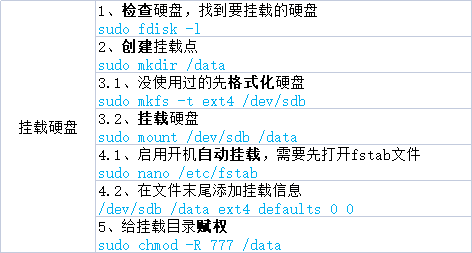 # Ubuntu挂载硬盘 ``` // 1. 检查硬盘,找到要挂载的硬盘 fdisk -l // 2. 创建挂载点 mkdir /data // 3.1 没使用过的先格式化硬盘 mkfs -t ext4 /dev/sdb // 3.2 挂载硬盘 mount /dev/sdb /data // 4.1 启用开机自动挂载 nano /etc/fstab // 4.2 在文件结尾添加挂载信息 /dev/sdb /data ext4 defaults 0 0 ```
作者:微信小助手
<section style="font-size: 15px;box-sizing: border-box;font-style: normal;font-weight: 400;text-align: justify;color: rgb(62, 62, 62);" data-pm-slice="0 0 []"> <section style="margin: 10px 0% 8px;text-align: left;justify-content: flex-start;display: flex;flex-flow: row;width: 100%;border-left: 3px solid rgb(219, 219, 219);border-bottom-left-radius: 0px;padding: 0px 0px 0px 8px;align-self: flex-start;box-sizing: border-box;"> <section style="color: rgba(0, 0, 0, 0.5);font-size: 14px;text-align: justify;width: 100%;box-sizing: border-box;"> <p style="white-space: normal;margin: 0px;padding: 0px;box-sizing: border-box;"><span leaf="">作者:vivo 互联网存储团队 - Lin Haiwen、Xu Xingbao</span></p> </section> </section> <p style="white-space: normal;margin: 0px;padding: 0px;box-sizing: border-box;"><span leaf=""><br></span></p> <section style="margin: 10px 0%;text-align: left;justify-content: flex-start;display: flex;flex-flow: row;box-sizing: border-box;"> <section style="display: inline-block;width: 100%;vertical-align: top;border-bottom: 1px dashed rgb(65, 95, 255);border-bottom-right-radius: 0px;border-right: 1px dashed rgb(65, 95, 255);border-top-right-radius: 0px;border-left-width: 0px;align-self: flex-start;flex: 0 0 auto;box-sizing: border-box;"> <section style="margin: 0px 0% 10px;box-sizing: border-box;"> <section style="display: inline-block;width: 96%;border-style: solid;border-width: 1px 0px 0px 10px;padding: 0px 10px;box-shadow: rgb(0, 0, 0) 0px 0px 0px;border-color: rgb(65, 95, 255);box-sizing: border-box;"> <section style="margin: 10px 0% 0px;box-sizing: border-box;"> <section style="color: rgb(65, 95, 255);box-sizing: border-box;"> <p style="margin: 0px;padding: 0px;box-sizing: border-box;"><strong style="box-sizing: border-box;"><span leaf="">目录</span></strong></p> </section> </section> </section> </section> <section style="transform: translate3d(20px, 0px, 0px);-webkit-transform: translate3d(20px, 0px, 0px);-moz-transform: translate3d(20px, 0px, 0px);-o-transform: translate3d(20px, 0px, 0px);box-sizing: border-box;"> <section style="text-align: justify;color: rgb(65, 95, 255);padding: 0px;box-sizing: border-box;"> <p style="white-space: normal;margin: 0px;padding: 0px;box-sizing: border-box;"><span leaf="">01. 问题描述</span></p> <p style="white-space: normal;margin: 0px;padding: 0px;box-sizing: border-box;"><span leaf="">02. 问题定位</span></p> <p style="white-space: normal;margin: 0px;padding: 0px;box-sizing: border-box;"><span leaf="">03. 问题解决</span></p> <p style="white-space: normal;margin: 0px;padding: 0px;box-sizing: border-box;"><span leaf="">04. 总 结</span></p> </section> </section> <section style="transform: scale(0.9);-webkit-transform: scale(0.9);-moz-transform: scale(0.9);-o-transform: scale(0.9);transform-origin: center center;-webkit-transform-origin: center center;-moz-transform-origin: center center;-o-transform-origin: center center;margin-top: 0px;margin-bottom: 0px;box-sizing: border-box;"> <section style="display: flex;flex-flow: row;margin: 10px 0%;justify-content: flex-start;box-sizing: border-box;"> <section style="display: inline-block;vertical-align: middle;width: auto;flex: 100 100 0%;align-self: center;height: auto;border-width: 0px;box-sizing: border-box;"> <section style="margin: 0px 0%;box-sizing: border-box;"> <section style="background-color: rgb(226, 226, 226);height: 1px;box-sizing: border-box;"> <svg viewbox="0 0 1 1" style="float:left;line-height:0;width:0;vertical-align:top;"></svg> </section> </section> </section> <section style="display: inline-block;vertical-align: middle;width: auto;align-self: center;min-width: 10%;max-width: 100%;flex: 0 0 auto;line-height: 0;letter-spacing: 0px;height: auto;box-sizing: border-box;"> <section style="text-align: center;box-sizing: border-box;"> <section style="display: inline-block;width: 5px;height: 5px;vertical-align: top;overflow: hidden;border-width: 0px;border-radius: 50%;border-style: none;border-color: rgb(62, 62, 62);background-color: rgb(65, 95, 255);box-sizing: border-box;"> <svg viewbox="0 0 1 1" style="float:left;line-height:0;width:0;vertical-align:top;"></svg> </section> </section> </section> <section style="display: inline-block;vertical-align: middle;width: auto;align-self: center;flex: 100 100 0%;box-sizing: border-box;"> <section style="margin: 0px 0%;box-sizing: border-box;"> <section style="background-color: rgb(226, 226, 226);height: 1px;box-sizing: border-box;"> <svg viewbox="0 0 1 1" style="float:left;line-height:0;width:0;vertical-align:top;"></svg> </section> </section> </section> </section> </section> <section style="text-align: justify;justify-content: flex-start;display: flex;flex-flow: row;box-sizing: border-box;"> <section style="display: inline-block;width: 100%;vertical-align: top;align-self: flex-start;flex: 0 0 auto;padding: 5px 20px;box-sizing: border-box;"> <section style="margin: 8px 0%;box-sizing: border-box;"> <section style="color: rgb(62, 62, 62);text-align: left;padding: 0px;box-sizing: border-box;"> <p style="margin: 0px;padding: 0px;box-sizing: border-box;"><span leaf="">本文从一次生产环境业务服务报错,逐步对问题进行定位,深入分析之后发现导致问题的原因,给出相应的优化方法,提升业务可用性。</span></p> </section> </section> </section> </section> </section> </section> <p style="white-space: normal;margin: 0px;padding: 0px;box-sizing: border-box;"><span leaf=""><br></span></p> <section style="text-align: center;box-sizing: border-box;"> <p style="margin: 0px;padding: 0px;box-sizing: border-box;"><span leaf="">1分钟看图掌握核心观点👇</span></p> </section> <section style="text-align: center;margin: 10px 0% 20px;justify-content: center;display: flex;flex-flow: row;box-sizing: border-box;"> <section style="display: inline-block;width: 97%;vertical-align: top;box-shadow: rgb(140, 140, 140) 0px 0px 3px;align-self: flex-start;flex: 0 0 auto;box-sizing: border-box;"> <section style="margin: 6px 0% 0px;line-height: 0;box-sizing: border-box;"> <section style="max-width: 100%;vertical-align: middle;display: inline-block;line-height: 0;width: 96%;box-shadow: rgb(0, 0, 0) 0px 0px 0px;box-sizing: border-box;" nodeleaf=""> <img src="https://mmecoa.qpic.cn/sz_mmecoa_gif/4g5IMGibSxt44zrScVX9tJNkEvqHfGqficAjEGOy4KyykQibCs9TAc4OKfk7bUb94lnT8QFcMyZfuXZbLNTo7VEGw/640?wx_fmt=gif&from=appmsg" class="rich_pages wxw-img" data-ratio="0.996875" data-type="gif" data-w="640" style="vertical-align: middle;max-width: 100%;width: 100%;box-sizing: border-box;" src="/upload/aab2db9ea251cec3779c2a6821c666b6.png" data-cropselx2="538" data-cropsely2="359" data-imgfileid="100021978"> </section> </section> <section style="margin: 0px 0% -22px;line-height: 0;box-sizing: border-box;"> <section style="max-width: 100%;vertical-align: middle;display: inline-block;line-height: 0;box-shadow: rgb(0, 0, 0) 0px 0px 0px;box-sizing: border-box;" nodeleaf=""> <img src="/upload/6bfbfa93f623b7478ed0ae31d8147ff1.png" class="rich_pages wxw-img" data-ratio="0.078125" data-s="300,640" data-type="png" data-w="640" style="vertical-align: middle;max-width: 100%;width: 100%;box-sizing: border-box;" data-imgfileid="100021903"> </section> </section> </section> </section> <p style="white-space: normal;margin: 0px;padding: 0px;box-sizing: border-box;"><span leaf=""><br></span></p> <p style="white-space: normal;margin: 0px;padding: 0px;box-sizing: border-box;"><span leaf=""><br></span></p> <section style="display: flex;flex-flow: row;margin: 10px 0px;text-align: center;justify-content: center;box-sizing: border-box;"> <section style="display: inline-block;vertical-align: bottom;width: auto;flex: 0 0 0%;height: auto;align-self: flex-end;margin: 0px 4px 0px 0px;box-sizing: border-box;"> <section style="transform: perspective(0px);-webkit-transform: perspective(0px);-moz-transform: perspective(0px);-o-transform: perspective(0px);transform-style: flat;box-sizing: border-box;"> <section style="transform: rotateX(180deg);-webkit-transform: rotateX(180deg);-moz-transform: rotateX(180deg);-o-transform: rotateX(180deg);box-sizing: border-box;"> <section style="display: inline-block;width: 3px;height: 10px;vertical-align: top;overflow: hidden;background-color: rgb(65, 95, 255);box-sizing: border-box;"> <svg viewbox="0 0 1 1" style="float:left;line-height:0;width:0;vertical-align:top;"></svg> </section> </section> </section> </section> <section style="display: inline-block;vertical-align: bottom;width: auto;flex: 0 0 0%;height: auto;align-self: flex-end;box-sizing: border-box;"> <section style="transform: perspective(0px);-webkit-transform: perspective(0px);-moz-transform: perspective(0px);-o-transform: perspective(0px);transform-style: flat;box-sizing: border-box;"> <section style="transform: rotateX(180deg);-webkit-transform: rotateX(180deg);-moz-transform: rotateX(180deg);-o-transform: rotateX(180deg);margin: 0px;box-sizing: border-box;"> <section style="display: inline-block;width: 3px;height: 16px;vertical-align: top;overflow: hidden;background-color: rgb(65, 95, 255);box-sizing: border-box;"> <svg viewbox="0 0 1 1" style="float:left;line-height:0;width:0;vertical-align:top;"></svg> </section> </section> </section> </section> <section style="display: inline-block;vertical-align: bottom;width: auto;border-bottom: 0px solid rgb(169, 207, 245);border-bottom-right-radius: 0px;flex: 0 0 auto;align-self: flex-end;min-width: 10%;max-width: 100%;height: auto;padding: 0px 12px;margin: 0px;box-sizing: border-box;"> <section style="font-size: 20px;box-sizing: border-box;"> <p style="margin: 0px;padding: 0px;box-sizing: border-box;"><em style="box-sizing: border-box;"><strong style="box-sizing: border-box;"><span leaf="">01</span></strong></em></p> </section> <section style="margin: 2px 0px 0px;box-sizing: border-box;"> <section style="background-color: rgb(65, 95, 255);height: 1px;box-sizing: border-box;"> <svg viewbox="0 0 1 1" style="float:left;line-height:0;width:0;vertical-align:top;"></svg> </section> </section> </section> <section style="display: inline-block;vertical-align: bottom;width: auto;flex: 0 0 0%;height: auto;align-self: flex-end;margin: 0px 4px 0px 0px;box-sizing: border-box;"> <section style="transform: perspective(0px);-webkit-transform: perspective(0px);-moz-transform: perspective(0px);-o-transform: perspective(0px);transform-style: flat;box-sizing: border-box;"> <section style="transform: rotateX(180deg);-webkit-transform: rotateX(180deg);-moz-transform: rotateX(180deg);-o-transform: rotateX(180deg);box-sizing: border-box;"> <section style="display: inline-block;width: 3px;height: 16px;vertical-align: top;overflow: hidden;background-color: rgb(65, 95, 255);box-sizing: border-box;"> <svg viewbox="0 0 1 1" style="float:left;line-height:0;width:0;vertical-align:top;"></svg> </section> </section> </section> </section> <section style="display: inline-block;vertical-align: bottom;width: auto;flex: 0 0 0%;height: auto;align-self: flex-end;box-sizing: border-box;"> <section style="transform: perspective(0px);-webkit-transform: perspective(0px);-moz-transform: perspective(0px);-o-transform: perspective(0px);transform-style: flat;box-sizing: border-box;"> <section style="transform: rotateX(180deg);-webkit-transform: rotateX(180deg);-moz-transform: rotateX(180deg);-o-transform: rotateX(180deg);margin: 0px;box-sizing: border-box;"> <section style="display: inline-block;width: 3px;height: 10px;vertical-align: top;overflow: hidden;background-color: rgb(65, 95, 255);box-sizing: border-box;"> <svg viewbox="0 0 1 1" style="float:left;line-height:0;width:0;vertical-align:top;"></svg> </section> </section> </section> </section> </section> <section style="text-align: center;font-size: 18px;color: rgb(65, 95, 255);box-sizing: border-box;"> <p style="margin: 0px;padding: 0px;box-sizing: border-box;"><span leaf="">问题描述</span></p> </section> <p style="white-space: normal;margin: 0px;padding: 0px;box-sizing: border-box;"><span leaf=""><br></span></p> <section style="text-align: left;justify-content: flex-start;display: flex;flex-flow: row;margin: 10px 0px;box-sizing: border-box;"> <section style="display: inline-block;vertical-align: bottom;width: auto;align-self: flex-end;background-color: rgb(65, 95, 255);min-width: 5%;max-width: 100%;flex: 0 0 auto;height: auto;padding: 0px 6px;border-top-left-radius: 6px;border-top-right-radius: 6px;border-bottom-left-radius: 6px;overflow: hidden;box-sizing: border-box;"> <section style="text-align: center;box-sizing: border-box;"> <section style="color: rgb(255, 255, 255);box-sizing: border-box;"> <p style="margin: 0px;padding: 0px;box-sizing: border-box;"><span leaf="">1.1</span></p> </section> </section> </section> <section style="display: inline-block;vertical-align: bottom;width: auto;line-height: 0;align-self: flex-end;min-width: 5%;max-width: 100%;flex: 0 0 auto;height: auto;padding: 0px 4px 0px 0px;box-sizing: border-box;"> <section style="text-align: center;margin: 3px 0px;box-sizing: border-box;"> <section style="text-align: justify;line-height: 1;padding: 0px 4px;box-sizing: border-box;"> <p style="text-align: center;white-space: normal;margin: 0px;padding: 0px;box-sizing: border-box;"><strong style="box-sizing: border-box;"><span leaf="">报错信息</span></strong></p> </section> </section> </section> <section style="display: inline-block;vertical-align: bottom;width: auto;align-self: flex-end;flex: 0 0 0%;height: auto;padding: 0px 2px 0px 0px;box-sizing: border-box;"> <svg viewbox="0 0 1 1" style="float:left;line-height:0;width:0;vertical-align:top;"></svg> </section> <section style="display: inline-block;vertical-align: bottom;width: auto;align-self: flex-end;flex: 0 0 0%;height: auto;padding: 0px 2px 0px 0px;box-sizing: border-box;"> <svg viewbox="0 0 1 1" style="float:left;line-height:0;width:0;vertical-align:top;"></svg> </section> <section style="display: inline-block;vertical-align: bottom;width: auto;align-self: flex-end;flex: 0 0 0%;height: auto;padding: 0px 2px 0px 0px;box-sizing: border-box;"> <svg viewbox="0 0 1 1" style="float:left;line-height:0;width:0;vertical-align:top;"></svg> </section> </section> <p style="white-space: normal;margin: 0px;padding: 0px;box-sizing: border-box;"><span leaf="">应用服务报错,通过监控日志发现凌晨2点的时候,应用报错获取不到Redis key。</span></p> <p style="white-space: normal;margin: 0px;padding: 0px;box-sizing: border-box;"><span leaf=""><br></span></p> <section style="text-align: left;justify-content: flex-start;display: flex;flex-flow: row;margin: 10px 0px;box-sizing: border-box;"> <section style="display: inline-block;vertical-align: bottom;width: auto;align-self: flex-end;background-color: rgb(65, 95, 255);min-width: 5%;max-width: 100%;flex: 0 0 auto;height: auto;padding: 0px 6px;border-top-left-radius: 6px;border-top-right-radius: 6px;border-bottom-left-radius: 6px;overflow: hidden;box-sizing: border-box;"> <section style="text-align: center;box-sizing: border-box;"> <section style="color: rgb(255, 255, 255);box-sizing: border-box;"> <p style="margin: 0px;padding: 0px;box-sizing: border-box;"><span leaf="">1.2</span></p> </section> </section> </section> <section style="display: inline-block;vertical-align: bottom;width: auto;line-height: 0;align-self: flex-end;min-width: 5%;max-width: 100%;flex: 0 0 auto;height: auto;padding: 0px 4px 0px 0px;box-sizing: border-box;"> <section style="text-align: center;margin: 3px 0px;box-sizing: border-box;"> <section style="text-align: justify;line-height: 1;padding: 0px 4px;box-sizing: border-box;"> <p style="text-align: center;white-space: normal;margin: 0px;padding: 0px;box-sizing: border-box;"><strong style="box-sizing: border-box;"><span leaf="">告警与监控信息</span></strong></p> </section> </section> </section> <section style="display: inline-block;vertical-align: bottom;width: auto;align-self: flex-end;flex: 0 0 0%;height: auto;padding: 0px 2px 0px 0px;box-sizing: border-box;"> <svg viewbox="0 0 1 1" style="float:left;line-height:0;width:0;vertical-align:top;"></svg> </section> <section style="display: inline-block;vertical-align: bottom;width: auto;align-self: flex-end;flex: 0 0 0%;height: auto;padding: 0px 2px 0px 0px;box-sizing: border-box;"> <svg viewbox="0 0 1 1" style="float:left;line-height:0;width:0;vertical-align:top;"></svg> </section> <section style="display: inline-block;vertical-align: bottom;width: auto;align-self: flex-end;flex: 0 0 0%;height: auto;padding: 0px 2px 0px 0px;box-sizing: border-box;"> <svg viewbox="0 0 1 1" style="float:left;line-height:0;width:0;vertical-align:top;"></svg> </section> </section> <p style="white-space: normal;margin: 0px;padding: 0px;box-sizing: border-box;"><span leaf="">首先想到是否由于内存满导致的key淘汰,生产的所有Redis都有设置内存告警,但没有收到内存告警信息;(内存告警需要每隔10秒,连续3次触发才会告警。)</span></p> <p style="white-space: normal;margin: 0px;padding: 0px;box-sizing: border-box;"><span leaf=""><br></span></p> <p style="white-space: normal;margin: 0px;padding: 0px;box-sizing: border-box;"><span leaf="">从监控图中,可以看到Redis内存稍有增长,但使用率一直偏低,并没有达到使用率告警。</span></p> <section style="text-align: center;" nodeleaf=""> <img src="/upload/e8094ea6b7831c790559a9178ddb5530.png" class="rich_pages wxw-img" data-ratio="0.828125" data-s="300,640" data-type="png" data-w="2304" type="block" data-imgfileid="100021909"> </section> <p style="white-space: normal;margin: 0px;padding: 0px;box-sizing: border-box;"><span leaf=""><br></span></p> <p style="white-space: normal;margin: 0px;padding: 0px;box-sizing: border-box;"><span leaf="">查看监控信息:在问题时间点,发生了大量的key过期,初步怀疑是由于key批量设置了过期时间,正好到期了导致大量key失效。</span></p> <p style="white-space: normal;margin: 0px;padding: 0px;box-sizing: border-box;"><span leaf=""><br></span></p> <section style="text-align: center;" nodeleaf=""> <img src="/upload/5338bf7824ef3e825ed7544e87364a85.png" class="rich_pages wxw-img" data-ratio="0.73984375" data-s="300,640" data-type="webp" data-w="1280" type="block" data-imgfileid="100021907"> </section> <p style="white-space: normal;margin: 0px;padding: 0px;box-sizing: border-box;"><span leaf=""><br></span></p> <p style="white-space: normal;margin: 0px;padding: 0px;box-sizing: border-box;"><span leaf="">查看Redis错误日志,没有发现异常。</span></p> <p style="white-space: normal;margin: 0px;padding: 0px;box-sizing: border-box;"><span leaf=""><br></span></p> <p style="white-space: normal;margin: 0px;padding: 0px;box-sizing: border-box;"><span leaf=""><br></span></p> <section style="display: flex;flex-flow: row;margin: 10px 0px;text-align: center;justify-content: center;box-sizing: border-box;"> <section style="display: inline-block;vertical-align: bottom;width: auto;flex: 0 0 0%;height: auto;align-self: flex-end;margin: 0px 4px 0px 0px;box-sizing: border-box;"> <section style="transform: perspective(0px);-webkit-transform: perspective(0px);-moz-transform: perspective(0px);-o-transform: perspective(0px);transform-style: flat;box-sizing: border-box;"> <section style="transform: rotateX(180deg);-webkit-transform: rotateX(180deg);-moz-transform: rotateX(180deg);-o-transform: rotateX(180deg);box-sizing: border-box;"> <section style="display: inline-block;width: 3px;height: 10px;vertical-align: top;overflow: hidden;background-color: rgb(65, 95, 255);box-sizing: border-box;"> <svg viewbox="0 0 1 1" style="float:left;line-height:0;width:0;vertical-align:top;"></svg> </section> </section> </section> </section> <section style="display: inline-block;vertical-align: bottom;width: auto;flex: 0 0 0%;height: auto;align-self: flex-end;box-sizing: border-box;"> <section style="transform: perspective(0px);-webkit-transform: perspective(0px);-moz-transform: perspective(0px);-o-transform: perspective(0px);transform-style: flat;box-sizing: border-box;"> <section style="transform: rotateX(180deg);-webkit-transform: rotateX(180deg);-moz-transform: rotateX(180deg);-o-transform: rotateX(180deg);margin: 0px;box-sizing: border-box;"> <section style="display: inline-block;width: 3px;height: 16px;vertical-align: top;overflow: hidden;background-color: rgb(65, 95, 255);box-sizing: border-box;"> <svg viewbox="0 0 1 1" style="float:left;line-height:0;width:0;vertical-align:top;"></svg> </section> </section> </section> </section> <section style="display: inline-block;vertical-align: bottom;width: auto;border-bottom: 0px solid rgb(169, 207, 245);border-bottom-right-radius: 0px;flex: 0 0 auto;align-self: flex-end;min-width: 10%;max-width: 100%;height: auto;padding: 0px 12px;margin: 0px;box-sizing: border-box;"> <section style="font-size: 20px;box-sizing: border-box;"> <p style="margin: 0px;padding: 0px;box-sizing: border-box;"><em style="box-sizing: border-box;"><strong style="box-sizing: border-box;"><span leaf="">02</span></strong></em></p> </section> <section style="margin: 2px 0px 0px;box-sizing: border-box;"> <section style="background-color: rgb(65, 95, 255);height: 1px;box-sizing: border-box;"> <svg viewbox="0 0 1 1" style="float:left;line-height:0;width:0;vertical-align:top;"></svg> </section> </section> </section> <section style="display: inline-block;vertical-align: bottom;width: auto;flex: 0 0 0%;height: auto;align-self: flex-end;margin: 0px 4px 0px 0px;box-sizing: border-box;"> <section style="transform: perspective(0px);-webkit-transform: perspective(0px);-moz-transform: perspective(0px);-o-transform: perspective(0px);transform-style: flat;box-sizing: border-box;"> <section style="transform: rotateX(180deg);-webkit-transform: rotateX(180deg);-moz-transform: rotateX(180deg);-o-transform: rotateX(180deg);box-sizing: border-box;"> <section style="display: inline-block;width: 3px;height: 16px;vertical-align: top;overflow: hidden;background-color: rgb(65, 95, 255);box-sizing: border-box;"> <svg viewbox="0 0 1 1" style="float:left;line-height:0;width:0;vertical-align:top;"></svg> </section> </section> </section> </section> <section style="display: inline-block;vertical-align: bottom;width: auto;flex: 0 0 0%;height: auto;align-self: flex-end;box-sizing: border-box;"> <section style="transform: perspective(0px);-webkit-transform: perspective(0px);-moz-transform: perspective(0px);-o-transform: perspective(0px);transform-style: flat;box-sizing: border-box;"> <section style="transform: rotateX(180deg);-webkit-transform: rotateX(180deg);-moz-transform: rotateX(180deg);-o-transform: rotateX(180deg);margin: 0px;box-sizing: border-box;"> <section style="display: inline-block;width: 3px;height: 10px;vertical-align: top;overflow: hidden;background-color: rgb(65, 95, 255);box-sizing: border-box;"> <svg viewbox="0 0 1 1" style="float:left;line-height:0;width:0;vertical-align:top;"></svg> </section> </section> </section> </section> </section> <section style="text-align: center;font-size: 18px;color: rgb(65, 95, 255);box-sizing: border-box;"> <p style="margin: 0px;padding: 0px;box-sizing: border-box;"><span leaf="">问题定位</span></p> </section> <p style="white-space: normal;margin: 0px;padding: 0px;box-sizing: border-box;"><span leaf=""><br></span></p> <section style="margin-bottom: -2.25em;margin-right: 5px;background-color: rgb(247, 247, 247);box-sizing: border-box;"> <section style="padding: 10px;margin-bottom: 5px;box-sizing: border-box;"> <section style="text-align: left;box-sizing: border-box;"> <ul style="list-style-type: disc;" class="list-paddingleft-1"> <li><p style="margin: 0px;padding: 0px;box-sizing: border-box;"><span leaf="">基于前面的监控,初步怀疑是key设置了过期时间导致失效。</span></p></li> </ul> <ul style="list-style-type: disc;" class="list-paddingleft-1"> <li><p style="margin: 0px;padding: 0px;box-sizing: border-box;"><span leaf="">是否有上线其他新功能导致?</span></p></li> </ul> </section> </section> </section> <section style="margin-left: auto;width: 2.25em;height: 2.25em;border-right: 5px solid transparent;border-bottom: 5px solid transparent;box-sizing: border-box;"> <svg viewbox="0 0 1 1" style="float:left;line-height:0;width:0;vertical-align:top;"></svg> </section> <p style="white-space: normal;margin: 0px;padding: 0px;box-sizing: border-box;"><span leaf=""><br></span></p> <p style="white-space: normal;margin: 0px;padding: 0px;box-sizing: border-box;"><span leaf="">但是业务反馈不是由于设置过期时间导致;并且第二天问题复现,因此继续深入定位。</span></p> <p style="white-space: normal;margin: 0px;padding: 0px;box-sizing: border-box;"><span leaf=""><br></span></p> <section style="text-align: left;justify-content: flex-start;display: flex;flex-flow: row;margin: 10px 0px;box-sizing: border-box;"> <section style="display: inline-block;vertical-align: bottom;width: auto;align-self: flex-end;background-color: rgb(65, 95, 255);min-width: 5%;max-width: 100%;flex: 0 0 auto;height: auto;padding: 0px 6px;border-top-left-radius: 6px;border-top-right-radius: 6px;border-bottom-left-radius: 6px;overflow: hidden;box-sizing: border-box;"> <section style="text-align: center;box-sizing: border-box;"> <section style="color: rgb(255, 255, 255);box-sizing: border-box;"> <p style="margin: 0px;padding: 0px;box-sizing: border-box;"><span leaf="">2.1</span></p> </section> </section> </section> <section style="display: inline-block;vertical-align: bottom;width: auto;line-height: 0;align-self: flex-end;min-width: 5%;max-width: 100%;flex: 0 0 auto;height: auto;padding: 0px 4px 0px 0px;box-sizing: border-box;"> <section style="text-align: center;margin: 3px 0px;box-sizing: border-box;"> <section style="text-align: justify;line-height: 1;padding: 0px 4px;box-sizing: border-box;"> <p style="text-align: center;white-space: normal;margin: 0px;padding: 0px;box-sizing: border-box;"><strong style="box-sizing: border-box;"><span leaf="">key是否过期</span></strong></p> </section> </section> </section> </section> <section style="margin-top: 10px;margin-bottom: 10px;box-sizing: border-box;"> <section style="margin-bottom: -2.25em;margin-right: 5px;background-color: rgb(247, 247, 247);box-sizing: border-box;"> <section style="padding: 10px;margin-bottom: 5px;box-sizing: border-box;"> <section style="text-align: left;box-sizing: border-box;"> <ul style="list-style-type: disc;" class="list-paddingleft-1"> <li><p style="margin: 0px;padding: 0px;box-sizing: border-box;"><span leaf="">查看淘汰策略</span></p></li> <li><p style="margin: 0px;padding: 0px;box-sizing: border-box;"><span leaf="">查看key过期时间</span></p></li> </ul> </section> </section> </section> <section style="margin-left: auto;width: 2.25em;height: 2.25em;border-right: 5px solid transparent;border-bottom: 5px solid transparent;box-sizing: border-box;"> <svg viewbox="0 0 1 1" style="float:left;line-height:0;width:0;vertical-align:top;"></svg> </section> </section> <p style="white-space: normal;margin: 0px;padding: 0px;box-sizing: border-box;"><span leaf=""><br></span></p> <p style="white-space: normal;margin: 0px;padding: 0px;box-sizing: border-box;"><span leaf="">初步判断确实不是因为key过期导致的大量淘汰,这里TTL接近5天,但是连着2天出现问题,因此不应该是过期时间到了导致。</span></p> <section class="code-snippet__fix code-snippet__js"> <ul class="code-snippet__line-index code-snippet__js"> </ul> <pre class="code-snippet__js" data-lang="sql"><code><span leaf="">xxx:xxx<span class="code-snippet__operator">></span> config <span class="code-snippet__keyword">get</span><span class="code-snippet__string">'maxmemory-policy'</span></span></code><code><span leaf=""><span class="code-snippet__number">1</span>)"maxmemory-policy"</span></code><code><span leaf=""><span class="code-snippet__number">2</span>)"volatile-lru"</span></code><code><span leaf="">xxx:xxx<span class="code-snippet__operator">></span> ttl finance:xxxx_cms_version_10000</span></code><code><span leaf=""><span class="code-snippet__operator">-></span> Redirected <span class="code-snippet__keyword">to</span> slot [<span class="code-snippet__number">9229</span>] located <span class="code-snippet__keyword">at</span> xxx:xxx</span></code><code><span leaf="">(<span class="code-snippet__type">integer</span>)<span class="code-snippet__number">387585</span></span></code><code><span leaf="">xxx:xxx<span class="code-snippet__operator">></span> ttl finance:xxxcms_basic_data_10423</span></code><code><span leaf="">(<span class="code-snippet__type">integer</span>)<span class="code-snippet__number">387574</span></span></code></pre> </section> <p style="white-space: normal;margin: 0px;padding: 0px;box-sizing: border-box;"><span leaf=""><br></span></p> <p style="white-space: normal;margin: 0px;padding: 0px;box-sizing: border-box;"><span leaf="">key是被删除还是淘汰?查看监控,发现存在key确实被淘汰,说明接下来需要考虑内存问题。</span></p> <p style="white-space: normal;margin: 0px;padding: 0px;box-sizing: border-box;"><span leaf=""><br></span></p> <section style="text-align: center;" nodeleaf=""> <img src="/upload/e374b63f35e36aed988c5d94dc4d659b.png" class="rich_pages wxw-img" data-ratio="0.5836298932384342" data-s="300,640" data-type="png" data-w="562" type="block" data-imgfileid="100021906"> </section> <p style="white-space: normal;margin: 0px;padding: 0px;box-sizing: border-box;"><span leaf=""><br></span></p> <p style="white-space: normal;margin: 0px;padding: 0px;box-sizing: border-box;"><span leaf=""><br></span></p> <section style="text-align: left;justify-content: flex-start;display: flex;flex-flow: row;margin: 10px 0px;box-sizing: border-box;"> <section style="display: inline-block;vertical-align: bottom;width: auto;align-self: flex-end;background-color: rgb(65, 95, 255);min-width: 5%;max-width: 100%;flex: 0 0 auto;height: auto;padding: 0px 6px;border-top-left-radius: 6px;border-top-right-radius: 6px;border-bottom-left-radius: 6px;overflow: hidden;box-sizing: border-box;"> <section style="text-align: center;box-sizing: border-box;"> <section style="color: rgb(255, 255, 255);box-sizing: border-box;"> <p style="margin: 0px;padding: 0px;box-sizing: border-box;"><span leaf="">2.2</span></p> </section> </section> </section> <section style="display: inline-block;vertical-align: bottom;width: auto;line-height: 0;align-self: flex-end;min-width: 5%;max-width: 100%;flex: 0 0 auto;height: auto;padding: 0px 4px 0px 0px;box-sizing: border-box;"> <section style="text-align: center;margin: 3px 0px;box-sizing: border-box;"> <section style="text-align: justify;line-height: 1;padding: 0px 4px;box-sizing: border-box;"> <p style="text-align: center;white-space: normal;margin: 0px;padding: 0px;box-sizing: border-box;"><strong style="box-sizing: border-box;"><span leaf="">是否内存满了</span></strong></p> </section> </section> </section> <section style="display: inline-block;vertical-align: bottom;width: auto;align-self: flex-end;flex: 0 0 0%;height: auto;padding: 0px 2px 0px 0px;box-sizing: border-box;"> <svg viewbox="0 0 1 1" style="float:left;line-height:0;width:0;vertical-align:top;"></svg> </section> <section style="display: inline-block;vertical-align: bottom;width: auto;align-self: flex-end;flex: 0 0 0%;height: auto;padding: 0px 2px 0px 0px;box-sizing: border-box;"> <svg viewbox="0 0 1 1" style="float:left;line-height:0;width:0;vertical-align:top;"></svg> </section> <section style="display: inline-block;vertical-align: bottom;width: auto;align-self: flex-end;flex: 0 0 0%;height: auto;padding: 0px 2px 0px 0px;box-sizing: border-box;"> <svg viewbox="0 0 1 1" style="float:left;line-height:0;width:0;vertical-align:top;"></svg> </section> </section> <p style="white-space: normal;margin: 0px;padding: 0px;box-sizing: border-box;"><span leaf="">发现确实短时间内存写满了,一开始查看监控由于时间拉的比较长,查看增长趋势没发现内存写满情况,但是由于没有达到告警条件,没有满足连着3次触发阈值,故没有触发告警。</span></p> <p style="white-space: normal;margin: 0px;padding: 0px;box-sizing: border-box;"><span leaf=""><br></span></p> <p style="white-space: normal;margin: 0px;padding: 0px;box-sizing: border-box;"><span leaf="">同时内存用满问题持续时间较短,约10分钟左右。</span></p> <section style="text-align: center;" nodeleaf=""> <img src="/upload/94faa30b682476eb0b23995d33a37273.png" class="rich_pages wxw-img" data-ratio="0.6503856041131105" data-s="300,640" data-type="webp" data-w="778" type="block" data-imgfileid="100021908"> </section> <p style="white-space: normal;margin: 0px;padding: 0px;box-sizing: border-box;"><span leaf=""><br></span></p> <p style="white-space: normal;margin: 0px;padding: 0px;box-sizing: border-box;"><span leaf="">其他指标检查,发现出现问题时client_longest_output_list指标存在明显突刺,该指标非常可疑。</span></p> <p style="white-space: normal;margin: 0px;padding: 0px;box-sizing: border-box;"><span leaf=""><br></span></p> <section style="text-align: center;" nodeleaf=""> <img src="/upload/7564088bb7bb85dd40d6c9643a7dfe4f.png" class="rich_pages wxw-img" data-ratio="0.4390625" data-s="300,640" data-type="webp" data-w="1280" type="block" data-imgfileid="100021911"> </section> <p style="white-space: normal;margin: 0px;padding: 0px;box-sizing: border-box;"><span leaf=""><br></span></p> <p style="white-space: normal;margin: 0px;padding: 0px;box-sizing: border-box;"><span leaf="">请求量的大涨,怀疑是请求堆积导致buffer增长使得内存写满。但是此时还有疑点:</span><em style="box-sizing: border-box;"><span leaf="">写入也上涨,是否是由于读请求积压导致,还是因为写入数据导致内存满?</span></em></p> <p style="white-space: normal;margin: 0px;padding: 0px;box-sizing: border-box;"><span leaf=""><br></span></p> <section style="text-align: left;justify-content: flex-start;display: flex;flex-flow: row;margin: 10px 0px;box-sizing: border-box;"> <section style="display: inline-block;vertical-align: bottom;width: auto;align-self: flex-end;background-color: rgb(65, 95, 255);min-width: 5%;max-width: 100%;flex: 0 0 auto;height: auto;padding: 0px 6px;border-top-left-radius: 6px;border-top-right-radius: 6px;border-bottom-left-radius: 6px;overflow: hidden;box-sizing: border-box;"> <section style="text-align: center;box-sizing: border-box;"> <section style="color: rgb(255, 255, 255);box-sizing: border-box;"> <p style="margin: 0px;padding: 0px;box-sizing: border-box;"><span leaf="">2.3</span></p> </section> </section> </section> <section style="display: inline-block;vertical-align: bottom;width: auto;line-height: 0;align-self: flex-end;min-width: 5%;max-width: 100%;flex: 0 0 auto;height: auto;padding: 0px 4px 0px 0px;box-sizing: border-box;"> <section style="text-align: center;margin: 3px 0px;box-sizing: border-box;"> <section style="text-align: justify;line-height: 1;padding: 0px 4px;box-sizing: border-box;"> <p style="text-align: center;white-space: normal;margin: 0px;padding: 0px;box-sizing: border-box;"><strong style="box-sizing: border-box;"><span leaf="">找出内存涨的来源</span></strong></p> </section> </section> </section> <section style="display: inline-block;vertical-align: bottom;width: auto;align-self: flex-end;flex: 0 0 0%;height: auto;padding: 0px 2px 0px 0px;box-sizing: border-box;"> <svg viewbox="0 0 1 1" style="float:left;line-height:0;width:0;vertical-align:top;"></svg> </section> <section style="display: inline-block;vertical-align: bottom;width: auto;align-self: flex-end;flex: 0 0 0%;height: auto;padding: 0px 2px 0px 0px;box-sizing: border-box;"> <svg viewbox="0 0 1 1" style="float:left;line-height:0;width:0;vertical-align:top;"></svg> </section> <section style="display: inline-block;vertical-align: bottom;width: auto;align-self: flex-end;flex: 0 0 0%;height: auto;padding: 0px 2px 0px 0px;box-sizing: border-box;"> <svg viewbox="0 0 1 1" style="float:left;line-height:0;width:0;vertical-align:top;"></svg> </section> </section> <p style="white-space: normal;margin: 0px;padding: 0px;box-sizing: border-box;"><span leaf="">设置定时任务,对出问题时间点前后20分钟这段时间进行抓包分析。</span></p> <p style="white-space: normal;margin: 0px;padding: 0px;box-sizing: border-box;"><span leaf=""><br></span></p> <p style="white-space: normal;margin: 0px;padding: 0px;box-sizing: border-box;"><span leaf="">对比出问题前后几分钟的请求,对应时间点请求量飙升,并且请求量来源基本是get请求,set请求也少量增长。</span></p> <section class="code-snippet__fix code-snippet__js"> <ul class="code-snippet__line-index code-snippet__js"> </ul> <pre class="code-snippet__js" data-lang="sql"><code><span leaf=""><span class="code-snippet__number">4860</span> <span class="code-snippet__keyword">get</span> finance:xxxx__10122</span></code><code><span leaf=""><span class="code-snippet__number">4925</span> <span class="code-snippet__keyword">get</span> finance:xxxx__10032</span></code><code><span leaf=""><span class="code-snippet__number">4945</span><span class="code-snippet__keyword">set</span> finance:xxxx_data_10013<span class="code-snippet__number">-0</span></span></code><code><span leaf=""><span class="code-snippet__number">4947</span> <span class="code-snippet__keyword">get</span> finance:xxxx_data_10013_cms_version_10000</span></code><code><span leaf=""><span class="code-snippet__number">4976</span> <span class="code-snippet__keyword">get</span> finance:xxxx__10251</span></code><code><span leaf=""><span class="code-snippet__number">5054</span><span class="code-snippet__keyword">set</span> finance:xxxx__undefined</span></code><code><span leaf=""><span class="code-snippet__number">5098</span> <span class="code-snippet__keyword">get</span> finance:xxxx__10018</span></code><code><span leaf=""><span class="code-snippet__number">8729</span> <span class="code-snippet__keyword">get</span> finance:xxxx_data_10415_cms_version_10000</span></code><code><span leaf=""><span class="code-snippet__number">9152</span> <span class="code-snippet__keyword">get</span> finance:xxxx_data_10401_cms_version_10000</span></code><code><span leaf=""><span class="code-snippet__number">9553</span> <span class="code-snippet__keyword">get</span> finance:xxxx_data_10228_cms_version_10000</span></code><code><span leaf=""><span class="code-snippet__number">9597</span> <span class="code-snippet__keyword">get</span> finance:xxxx_data_10213_cms_version_10000</span></code><code><span leaf=""><span class="code-snippet__number">9622</span> <span class="code-snippet__keyword">get</span> finance:xxxx_data_10032_cms_version_10000</span></code><code><span leaf=""><span class="code-snippet__number">9647</span> <span class="code-snippet__keyword">get</span> finance:xxxx_data_10347_cms_version_10000</span></code><code><span leaf=""><span class="code-snippet__number">9674</span> <span class="code-snippet__keyword">get</span> finance:xxxx_data_10182_cms_version_10000</span></code><code><span leaf=""><span class="code-snippet__number">9742</span> <span class="code-snippet__keyword">get</span> finance:xxxx_data_10251_cms_version_10000</span></code><code><span leaf=""><span class="code-snippet__number">10085</span> <span class="code-snippet__keyword">get</span> finance:xxxx_data_10019_cms_version_10000</span></code><code><span leaf=""><span class="code-snippet__number">23064</span> <span class="code-snippet__keyword">get</span> finance:xxxx__10423</span></code><code><span leaf=""><span class="code-snippet__number">45176</span> <span class="code-snippet__keyword">get</span> finance:xxxx_data_10423_cms_version_10000 </span></code><code><span leaf=""><br></span></code><code><span leaf="">[root<span class="code-snippet__variable">@db</span><span class="code-snippet__operator">-</span>prd<span class="code-snippet__operator">-</span>xxx.v<span class="code-snippet__operator">-</span>bj<span class="code-snippet__number">-3.</span>vivo.lan:<span class="code-snippet__operator">/</span>data<span class="code-snippet__operator">/</span>redis<span class="code-snippet__operator">/</span>scpdir]</span></code><code><span leaf=""><br></span></code><code><span leaf=""># cat <span class="code-snippet__number">0807.</span>cap <span class="code-snippet__operator">|</span> grep <span class="code-snippet__string">'2024-08-07 01:59'</span><span class="code-snippet__operator">|</span>awk <span class="code-snippet__string">'{print $8,$10}'</span><span class="code-snippet__operator">|</span>sort <span class="code-snippet__operator">|</span>uniq <span class="code-snippet__operator">-</span>c <span class="code-snippet__operator">|</span>sort <span class="code-snippet__operator">-</span>k <span class="code-snippet__number">1</span> <span class="code-snippet__operator">-</span>n</span></code></pre> </section> <p style="white-space: normal;margin: 0px;padding: 0px;box-sizing: border-box;"><span leaf=""><br></span></p> <section style="box-sizing: border-box;"> <p style="white-space: normal;margin: 0px;padding: 0px;box-sizing: border-box;"><span leaf="">同时也对set的内容进行分析,发现set的数据并不足使内存写满;且上面监控可以看到,内存写满问题持续时间很短,因此应该不是数据增长导致。</span></p> <p style="white-space: normal;margin: 0px;padding: 0px;box-sizing: border-box;"><span leaf=""><br></span></p> <p style="white-space: normal;margin: 0px;padding: 0px;box-sizing: border-box;"><span leaf="">进一步对get请求来源分析:</span></p> </section> <section style="min-height: 40px;margin: 10px 0%;box-sizing: border-box;"> <section style="width: 100%;margin: 0px auto -10px;box-sizing: border-box;"> <table style="border-collapse: collapse;box-sizing: border-box;margin-bottom: 10px;"> <tbody> <tr style="box-sizing: border-box;"> <td data-colwidth="40.0000%" width="40.0000%" style="border-width: 1px;border-color: rgb(62, 62, 62);border-style: solid;box-sizing: border-box;padding: 0px;"> <section style="margin: 5px 0%;box-sizing: border-box;"> <section style="padding: 0px 5px;box-sizing: border-box;"> <p style="text-align: center;white-space: normal;margin: 0px;padding: 0px;box-sizing: border-box;"><strong style="box-sizing: border-box;"><span leaf="">次数</span></strong></p> </section> </section></td> <td data-colwidth="60.0000%" width="60.0000%" style="border-width: 1px;border-color: rgb(62, 62, 62);border-style: solid;box-sizing: border-box;padding: 0px;"> <section style="margin: 5px 0%;box-sizing: border-box;"> <section style="text-align: center;padding: 0px 5px;box-sizing: border-box;"> <p style="margin: 0px;padding: 0px;box-sizing: border-box;"><strong style="box-sizing: border-box;"><span leaf="">IP来源</span></strong></p> </section> </section></td> </tr> <tr style="box-sizing: border-box;"> <td data-colwidth="40.0000%" width="40.0000%" style="border-width: 1px;border-color: rgb(62, 62, 62);border-style: solid;box-sizing: border-box;padding: 0px;"> <section style="margin: 5px 0%;box-sizing: border-box;"> <section style="padding: 0px 5px;box-sizing: border-box;"> <p style="text-align: center;white-space: normal;margin: 0px;padding: 0px;box-sizing: border-box;"><span leaf="">161179</span></p> </section> </section></td> <td data-colwidth="60.0000%" width="60.0000%" style="border-width: 1px;border-color: rgb(62, 62, 62);border-style: solid;box-sizing: border-box;padding: 0px;"> <section style="margin: 5px 0%;box-sizing: border-box;"> <section style="text-align: center;padding: 0px 5px;box-sizing: border-box;"> <p style="margin: 0px;padding: 0px;box-sizing: border-box;"><span leaf="">1xx.xx.xx.72</span></p> </section> </section></td> </tr> <tr style="box-sizing: border-box;"> <td data-colwidth="40.0000%" width="40.0000%" style="border-width: 1px;border-color: rgb(62, 62, 62);border-style: solid;box-sizing: border-box;padding: 0px;"> <section style="margin: 5px 0%;box-sizing: border-box;"> <section style="padding: 0px 5px;box-sizing: border-box;"> <p style="text-align: center;white-space: normal;margin: 0px;padding: 0px;box-sizing: border-box;"><span leaf="">138236</span></p> </section> </section></td> <td data-colwidth="60.0000%" width="60.0000%" style="border-width: 1px;border-color: rgb(62, 62, 62);border-style: solid;box-sizing: border-box;padding: 0px;"> <section style="margin: 5px 0%;box-sizing: border-box;"> <section style="text-align: center;padding: 0px 5px;box-sizing: border-box;"> <p style="margin: 0px;padding: 0px;box-sizing: border-box;"><span leaf="">1xx.xx.xx.215</span></p> </section> </section></td> </tr> <tr style="box-sizing: border-box;"> <td data-colwidth="40.0000%" width="40.0000%" style="border-width: 1px;border-color: rgb(62, 62, 62);border-style: solid;box-sizing: border-box;padding: 0px;"> <section style="margin: 5px 0%;box-sizing: border-box;"> <section style="padding: 0px 5px;box-sizing: border-box;"> <p style="text-align: center;white-space: normal;margin: 0px;padding: 0px;box-sizing: border-box;"><span leaf="">130110</span></p> </section> </section></td> <td data-colwidth="60.0000%" width="60.0000%" style="border-width: 1px;border-color: rgb(62, 62, 62);border-style: solid;box-sizing: border-box;padding: 0px;"> <section style="margin: 5px 0%;box-sizing: border-box;"> <section style="text-align: center;padding: 0px 5px;box-sizing: border-box;"> <p style="margin: 0px;padding: 0px;box-sizing: border-box;"><span leaf="">1xx.xx.xx.190</span></p> </section> </section></td> </tr> <tr style="box-sizing: border-box;"> <td data-colwidth="40.0000%" width="40.0000%" style="border-width: 1px;border-color: rgb(62, 62, 62);border-style: solid;box-sizing: border-box;padding: 0px;"> <section style="margin: 5px 0%;box-sizing: border-box;"> <section style="padding: 0px 5px;box-sizing: border-box;"> <p style="text-align: center;white-space: normal;margin: 0px;padding: 0px;box-sizing: border-box;"><span leaf="">101877</span></p> </section> </section></td> <td data-colwidth="60.0000%" width="60.0000%" style="border-width: 1px;border-color: rgb(62, 62, 62);border-style: solid;box-sizing: border-box;padding: 0px;"> <section style="margin: 5px 0%;box-sizing: border-box;"> <section style="text-align: center;padding: 0px 5px;box-sizing: border-box;"> <p style="margin: 0px;padding: 0px;box-sizing: border-box;"><span leaf="">1xx.xx.xx.185</span></p> </section> </section></td> </tr> </tbody> </table> </section> </section> <p style="white-space: normal;margin: 0px;padding: 0px;box-sizing: border-box;"><span leaf=""><br></span></p> <section style="box-sizing: border-box;"> <p style="white-space: normal;margin: 0px;padding: 0px;box-sizing: border-box;"><span leaf="">结合 IP来源以及 keyname;跟业务同学沟通确认:</span></p> <p style="white-space: normal;margin: 0px;padding: 0px;box-sizing: border-box;"><span leaf=""><br></span></p> <p style="white-space: normal;margin: 0px;padding: 0px;box-sizing: border-box;"><span leaf="">由于业务读请求量大涨导致,业务请求从每分钟27w左右上涨到70w左右,主要有:</span></p> </section> <section style="min-height: 40px;margin: 10px 0%;box-sizing: border-box;"> <section style="width: 100%;margin: 0px auto -10px;box-sizing: border-box;"> <table style="border-collapse:collapse;box-sizing:border-box;margin-bottom:10px;min-width:151px;"> <tbody> <tr style="box-sizing: border-box;"> <td data-colwidth="20.0000%" width="20.0000%" style="border-width: 1px;border-color: rgb(62, 62, 62);border-style: solid;box-sizing: border-box;padding: 0px;"> <section style="margin: 5px 0%;box-sizing: border-box;"> <section style="padding: 0px 5px;box-sizing: border-box;"> <p style="text-align: center;white-space: normal;margin: 0px;padding: 0px;box-sizing: border-box;"><strong style="box-sizing: border-box;"><span leaf="">次数</span></strong></p> </section> </section></td> <td data-colwidth="101" width="20.0000%" style="border-width: 1px;border-color: rgb(62, 62, 62);border-style: solid;box-sizing: border-box;padding: 0px;"> <section style="margin: 5px 0%;box-sizing: border-box;"> <section style="padding: 0px 5px;box-sizing: border-box;"> <p style="text-align: center;white-space: normal;margin: 0px;padding: 0px;box-sizing: border-box;"><strong style="box-sizing: border-box;"><span leaf="">IP来源</span></strong></p> </section> </section></td> <td data-colwidth="60.0000%" width="60.0000%" style="border-width: 1px;border-color: rgb(62, 62, 62);border-style: solid;box-sizing: border-box;padding: 0px;"> <section style="margin: 5px 0%;box-sizing: border-box;"> <section style="text-align: center;padding: 0px 5px;box-sizing: border-box;"> <p style="margin: 0px;padding: 0px;box-sizing: border-box;"><strong style="box-sizing: border-box;"><span leaf="">keyname</span></strong></p> </section> </section></td> </tr> <tr style="box-sizing: border-box;"> <td data-colwidth="20.0000%" width="20.0000%" style="border-width: 1px;border-color: rgb(62, 62, 62);border-style: solid;box-sizing: border-box;padding: 0px;"> <section style="margin: 5px 0%;box-sizing: border-box;"> <section style="padding: 0px 5px;box-sizing: border-box;"> <p style="text-align: center;white-space: normal;margin: 0px;padding: 0px;box-sizing: border-box;"><span leaf="">330660</span></p> </section> </section></td> <td data-colwidth="101" width="20.0000%" style="border-width: 1px;border-color: rgb(62, 62, 62);border-style: solid;box-sizing: border-box;padding: 0px;"> <section style="margin: 5px 0%;box-sizing: border-box;"> <section style="padding: 0px 5px;box-sizing: border-box;"> <p style="text-align: center;white-space: normal;margin: 0px;padding: 0px;box-sizing: border-box;"><span leaf="">get</span></p> </section> </section></td> <td data-colwidth="60.0000%" width="60.0000%" style="border-width: 1px;border-color: rgb(62, 62, 62);border-style: solid;box-sizing: border-box;padding: 0px;"> <section style="margin: 5px 0%;box-sizing: border-box;"> <section style="text-align: left;padding: 0px 5px;box-sizing: border-box;"> <p style="margin: 0px;padding: 0px;box-sizing: border-box;"><span leaf="">finance:f2e:xxx_cms_version_10000</span></p> </section> </section></td> </tr> <tr style="box-sizing: border-box;"> <td data-colwidth="20.0000%" width="20.0000%" style="border-width: 1px;border-color: rgb(62, 62, 62);border-style: solid;box-sizing: border-box;padding: 0px;"> <section style="margin: 5px 0%;box-sizing: border-box;"> <section style="padding: 0px 5px;box-sizing: border-box;"> <p style="text-align: center;white-space: normal;margin: 0px;padding: 0px;box-sizing: border-box;"><span leaf="">230735</span></p> </section> </section></td> <td data-colwidth="101" width="20.0000%" style="border-width: 1px;border-color: rgb(62, 62, 62);border-style: solid;box-sizing: border-box;padding: 0px;"> <section style="margin: 5px 0%;box-sizing: border-box;"> <section style="padding: 0px 5px;box-sizing: border-box;"> <p style="text-align: center;white-space: normal;margin: 0px;padding: 0px;box-sizing: border-box;"><span leaf="">get</span></p> </section> </section></td> <td data-colwidth="60.0000%" width="60.0000%" style="border-width: 1px;border-color: rgb(62, 62, 62);border-style: solid;box-sizing: border-box;padding: 0px;"> <section style="margin: 5px 0%;box-sizing: border-box;"> <section style="text-align: left;padding: 0px 5px;box-sizing: border-box;"> <p style="margin: 0px;padding: 0px;box-sizing: border-box;"><span leaf="">finance:f2e:xxx_data_10423</span></p> </section> </section></td> </tr> <tr style="box-sizing: border-box;"> <td data-colwidth="20.0000%" width="20.0000%" style="border-width: 1px;border-color: rgb(62, 62, 62);border-style: solid;box-sizing: border-box;padding: 0px;"> <section style="margin: 5px 0%;box-sizing: border-box;"> <section style="padding: 0px 5px;box-sizing: border-box;"> <p style="text-align: center;white-space: normal;margin: 0px;padding: 0px;box-sizing: border-box;"><span leaf="">36653</span></p> </section> </section></td> <td data-colwidth="101" width="20.0000%" style="border-width: 1px;border-color: rgb(62, 62, 62);border-style: solid;box-sizing: border-box;padding: 0px;"> <section style="margin: 5px 0%;box-sizing: border-box;"> <section style="padding: 0px 5px;box-sizing: border-box;"> <p style="text-align: center;white-space: normal;margin: 0px;padding: 0px;box-sizing: border-box;"><span leaf="">set</span></p> </section> </section></td> <td data-colwidth="60.0000%" width="60.0000%" style="border-width: 1px;border-color: rgb(62, 62, 62);border-style: solid;box-sizing: border-box;padding: 0px;"> <section style="margin: 5px 0%;box-sizing: border-box;"> <section style="text-align: left;padding: 0px 5px;box-sizing: border-box;"> <p style="margin: 0px;padding: 0px;box-sizing: border-box;"><span leaf="">finance:f2e:xxx_data_10423</span></p> </section> </section></td> </tr> <tr style="box-sizing: border-box;"> <td data-colwidth="20.0000%" width="20.0000%" style="border-width: 1px;border-color: rgb(62, 62, 62);border-style: solid;box-sizing: border-box;padding: 0px;"> <section style="margin: 5px 0%;box-sizing: border-box;"> <section style="padding: 0px 5px;box-sizing: border-box;"> <p style="text-align: center;white-space: normal;margin: 0px;padding: 0px;box-sizing: border-box;"><span leaf="">34251</span></p> </section> </section></td> <td data-colwidth="101" width="20.0000%" style="border-width: 1px;border-color: rgb(62, 62, 62);border-style: solid;box-sizing: border-box;padding: 0px;"> <section style="margin: 5px 0%;box-sizing: border-box;"> <section style="padding: 0px 5px;box-sizing: border-box;"> <p style="text-align: center;white-space: normal;margin: 0px;padding: 0px;box-sizing: border-box;"><span leaf="">set</span></p> </section> </section></td> <td data-colwidth="60.0000%" width="60.0000%" style="border-width: 1px;border-color: rgb(62, 62, 62);border-style: solid;box-sizing: border-box;padding: 0px;"> <section style="margin: 5px 0%;box-sizing: border-box;"> <section style="text-align: left;padding: 0px 5px;box-sizing: border-box;"> <p style="margin: 0px;padding: 0px;box-sizing: border-box;"><span leaf="">finance:f2e:xxx_cms_version_10000</span></p> </section> </section></td> </tr> </tbody> </table> </section> </section> <p style="white-space: normal;margin: 0px;padding: 0px;box-sizing: border-box;"><span leaf=""><br></span></p> <section style="text-align: left;justify-content: flex-start;display: flex;flex-flow: row;margin: 10px 0px;box-sizing: border-box;"> <section style="display: inline-block;vertical-align: bottom;width: auto;align-self: flex-end;background-color: rgb(65, 95, 255);min-width: 5%;max-width: 100%;flex: 0 0 auto;height: auto;padding: 0px 6px;border-top-left-radius: 6px;border-top-right-radius: 6px;border-bottom-left-radius: 6px;overflow: hidden;box-sizing: border-box;"> <section style="text-align: center;box-sizing: border-box;"> <section style="color: rgb(255, 255, 255);box-sizing: border-box;"> <p style="margin: 0px;padding: 0px;box-sizing: border-box;"><span leaf="">2.4</span></p> </section> </section> </section> <section style="display: inline-block;vertical-align: bottom;width: auto;line-height: 0;align-self: flex-end;min-width: 5%;max-width: 100%;flex: 0 0 auto;height: auto;padding: 0px 4px 0px 0px;box-sizing: border-box;"> <section style="text-align: center;margin: 3px 0px;box-sizing: border-box;"> <section style="text-align: justify;line-height: 1;padding: 0px 4px;box-sizing: border-box;"> <p style="text-align: center;white-space: normal;margin: 0px;padding: 0px;box-sizing: border-box;"><strong style="box-sizing: border-box;"><span leaf="">机制分析</span></strong></p> </section> </section> </section> <section style="display: inline-block;vertical-align: bottom;width: auto;align-self: flex-end;flex: 0 0 0%;height: auto;padding: 0px 2px 0px 0px;box-sizing: border-box;"> <svg viewbox="0 0 1 1" style="float:left;line-height:0;width:0;vertical-align:top;"></svg> </section> <section style="display: inline-block;vertical-align: bottom;width: auto;align-self: flex-end;flex: 0 0 0%;height: auto;padding: 0px 2px 0px 0px;box-sizing: border-box;"> <svg viewbox="0 0 1 1" style="float:left;line-height:0;width:0;vertical-align:top;"></svg> </section> <section style="display: inline-block;vertical-align: bottom;width: auto;align-self: flex-end;flex: 0 0 0%;height: auto;padding: 0px 2px 0px 0px;box-sizing: border-box;"> <svg viewbox="0 0 1 1" style="float:left;line-height:0;width:0;vertical-align:top;"></svg> </section> </section> <p style="white-space: normal;margin: 0px;padding: 0px;box-sizing: border-box;"><span leaf="">内存用量上涨超限会触发Redis节点基于已经配置的volatile-lru策略进行过期数据淘汰,所以需要找到内存上涨的来源。基于监控指标排查分析,基本确定了发生异常期间没有集中的大量数据写入,反而发现大量网络数据的输出,抓包也印证了此时节点主要是在处理get命令读请求。进一步地发现了client-output-buffer-limit这个指标出现异常上涨,才最终锁定到Redis的回包积压问题。</span></p> <p style="white-space: normal;margin: 0px;padding: 0px;box-sizing: border-box;"><span leaf=""><br></span></p> <p style="white-space: normal;margin: 0px;padding: 0px;box-sizing: border-box;"><span leaf="">关于Redis的结果回包逻辑,首先要了解Redis的结果存储空间设计。Redis针对每一个连接客户端都会初始化一个大小为16K的静态的buf区域和一个空的链表结果,相关声明代码如下:</span></p> <section class="code-snippet__fix code-snippet__js"> <ul class="code-snippet__line-index code-snippet__js"> </ul> <pre class="code-snippet__js" data-lang="cpp"><code><span leaf=""><span class="code-snippet__meta">#</span><span class="code-snippet__meta"><span class="code-snippet__keyword">define</span></span><span class="code-snippet__meta"> REDIS_REPLY_CHUNK_BYTES (16*1024) </span><span class="code-snippet__meta"><span class="code-snippet__comment">/* 16k output buffer */</span></span></span></code><code><span leaf=""><span class="code-snippet__type">char</span> buf[REDIS_REPLY_CHUNK_BYTES];</span></code><code><span leaf="">list *reply;</span></code><code><span leaf="">c->reply = <span class="code-snippet__built_in">listCreate</span>();</span></code></pre> </section> <p style="white-space: normal;margin: 0px;padding: 0px;box-sizing: border-box;"><span leaf=""><br></span></p> <p style="white-space: normal;margin: 0px;padding: 0px;box-sizing: border-box;"><span leaf="">对于Redis而言正常执行的命令都会有数据回包,而回包结果都需要在客户端中做暂存。Redis是如何结合以上两个数据进行结果存储的呢?主要逻辑是如果静态buf区域能够满足回包结果存储,即结果不大于16k,那么结果就会存储静态buf中,将结果不断插入reply链表中;同时我们都知道Redis支持丰富的数据类型和操作命令,有些批量数据读取命令的结果可能会有很多字段,这些字段也会作为一个个链表元素追加到reply链表中。正常情况下,我们在Redis节点上执行info clients命令可以获得如下客户端的统计信息:</span></p> <section class="code-snippet__fix code-snippet__js"> <ul class="code-snippet__line-index code-snippet__js"> </ul> <pre class="code-snippet__js" data-lang="shell"><code><span leaf=""><span class="code-snippet__meta"> ></span> info clients </span></code><code><span leaf=""><span class="code-snippet__meta"> #</span> Clients </span></code><code><span leaf=""> connected_clients: 1</span></code><code><span leaf=""> client_longest_output_list: 0</span></code><code><span leaf=""> client_biggest_input_buf: 0</span></code><code><span leaf=""> blocked_clients: </span></code></pre> </section> <p style="white-space: normal;margin: 0px;padding: 0px;box-sizing: border-box;"><span leaf=""><br></span></p> <p style="white-space: normal;margin: 0px;padding: 0px;box-sizing: border-box;"><span leaf="">其中的client_longest_output_list字段代表此时节点的所有连接客户端中回包结果的缓存情况。</span></p> <p style="white-space: normal;margin: 0px;padding: 0px;box-sizing: border-box;"><span leaf=""><br></span></p> <p style="white-space: normal;margin: 0px;padding: 0px;box-sizing: border-box;"><span leaf="">但是按照之前服务监控和抓包结果分析,具体执行的指令都是get,实际数据也没有超过16k大小,并没有满足将结果存储到链表的条件。这里有个经常被忽略的场景,就是Redis其实支持pipeline命令执行方式的,简单来说就是Redis支持一次性接收一个客户端的多个指令,具体执行过程中会把这些指令的结果不断暂存,然后在后续流程中集中回包,如果这时候不能及时地把数据通过网络发出去,就有可能出现reply链表长度激增的现象,进而导致客户端占用内存激增,这正是我们本次遇到的场景。</span></p> <p style="white-space: normal;margin: 0px;padding: 0px;box-sizing: border-box;"><span leaf=""><br></span></p> <section style="text-align: center;" nodeleaf=""> <img src="/upload/ae6a23e3711fca8ffa76e4df2234f9f7.png" class="rich_pages wxw-img" data-ratio="0.678125" data-s="300,640" data-type="webp" data-w="1280" type="block" data-imgfileid="100021910"> </section> <p style="white-space: normal;margin: 0px;padding: 0px;box-sizing: border-box;"><span leaf=""><br></span></p> <section style="box-sizing: border-box;"> <p style="white-space: normal;margin: 0px;padding: 0px;box-sizing: border-box;"><span leaf="">Redis的maxmemory参数限制的是Redis实例可以使用的最大内存,这部分内存主要包括以下几个部分:业务数据占用的内存、客户端连接的输入/输出缓冲区、复制积压缓冲区、AOF 缓冲区以及其他一些内部开销。</span></p> <p style="white-space: normal;margin: 0px;padding: 0px;box-sizing: border-box;"><span leaf=""><br></span></p> <p style="white-space: normal;margin: 0px;padding: 0px;box-sizing: border-box;"><span leaf="">具体来说,Redis 的maxmemory 限制包括:</span></p> </section> <section style="margin-top: 10px;margin-bottom: 10px;box-sizing: border-box;"> <section style="margin-bottom: -2.25em;margin-right: 5px;background-color: rgb(247, 247, 247);box-sizing: border-box;"> <section style="padding: 10px;margin-bottom: 5px;box-sizing: border-box;"> <section style="text-align: left;box-sizing: border-box;"> <ol style="list-style-type: decimal;" class="list-paddingleft-1"> <li><p style="margin: 0px;padding: 0px;box-sizing: border-box;"><span leaf="">业务数据占用的内存,这部分是用户在Redis中存储的数据。</span></p></li> <li><p style="margin: 0px;padding: 0px;box-sizing: border-box;"><span leaf="">客户端连接的输入/输出缓冲区,用于暂存客户端发送的命令和Redis 返回给客户端的数据。</span></p></li> <li><p style="margin: 0px;padding: 0px;box-sizing: border-box;"><span leaf="">复制积压缓冲区:用于主从复制,当从节点断线重连时,可以从这个缓冲区拉取丢失的数据。</span></p></li> <li><p style="margin: 0px;padding: 0px;box-sizing: border-box;"><span leaf="">AOF 缓冲区:用于持久化,当开启AOF 持久化时,Redis 会将写操作追加到AOF 缓冲区,然后异步地写入AOF 文件。</span></p></li> <li><p style="margin: 0px;padding: 0px;box-sizing: border-box;"><span leaf="">其他内部开销:包括Redis 进程本身的一些数据结构、对象、碎片内存等。</span></p></li> </ol> </section> </section> </section> <section style="margin-left: auto;width: 2.25em;height: 2.25em;border-right: 5px solid transparent;border-bottom: 5px solid transparent;box-sizing: border-box;"> <svg viewbox="0 0 1 1" style="float:left;line-height:0;width:0;vertical-align:top;"></svg> </section> </section> <p style="white-space: normal;margin: 0px;padding: 0px;box-sizing: border-box;"><span leaf=""><br></span></p> <p style="white-space: normal;margin: 0px;padding: 0px;box-sizing: border-box;"><span leaf="">因此,在设置Redis 的maxmemory 参数时,需要综合考虑业务数据的内存占用、各个缓冲区的大小以及内存碎片率等因素,合理地分配内存,避免出现内存溢出或性能下降的问题。</span></p> <p style="white-space: normal;margin: 0px;padding: 0px;box-sizing: border-box;"><span leaf=""><br></span></p> <p style="white-space: normal;margin: 0px;padding: 0px;box-sizing: border-box;"><span leaf=""><br></span></p> <section style="display: flex;flex-flow: row;margin: 10px 0px;text-align: center;justify-content: center;box-sizing: border-box;"> <section style="display: inline-block;vertical-align: bottom;width: auto;flex: 0 0 0%;height: auto;align-self: flex-end;margin: 0px 4px 0px 0px;box-sizing: border-box;"> <section style="transform: perspective(0px);-webkit-transform: perspective(0px);-moz-transform: perspective(0px);-o-transform: perspective(0px);transform-style: flat;box-sizing: border-box;"> <section style="transform: rotateX(180deg);-webkit-transform: rotateX(180deg);-moz-transform: rotateX(180deg);-o-transform: rotateX(180deg);box-sizing: border-box;"> <section style="display: inline-block;width: 3px;height: 10px;vertical-align: top;overflow: hidden;background-color: rgb(65, 95, 255);box-sizing: border-box;"> <svg viewbox="0 0 1 1" style="float:left;line-height:0;width:0;vertical-align:top;"></svg> </section> </section> </section> </section> <section style="display: inline-block;vertical-align: bottom;width: auto;flex: 0 0 0%;height: auto;align-self: flex-end;box-sizing: border-box;"> <section style="transform: perspective(0px);-webkit-transform: perspective(0px);-moz-transform: perspective(0px);-o-transform: perspective(0px);transform-style: flat;box-sizing: border-box;"> <section style="transform: rotateX(180deg);-webkit-transform: rotateX(180deg);-moz-transform: rotateX(180deg);-o-transform: rotateX(180deg);margin: 0px;box-sizing: border-box;"> <section style="display: inline-block;width: 3px;height: 16px;vertical-align: top;overflow: hidden;background-color: rgb(65, 95, 255);box-sizing: border-box;"> <svg viewbox="0 0 1 1" style="float:left;line-height:0;width:0;vertical-align:top;"></svg> </section> </section> </section> </section> <section style="display: inline-block;vertical-align: bottom;width: auto;border-bottom: 0px solid rgb(169, 207, 245);border-bottom-right-radius: 0px;flex: 0 0 auto;align-self: flex-end;min-width: 10%;max-width: 100%;height: auto;padding: 0px 12px;margin: 0px;box-sizing: border-box;"> <section style="font-size: 20px;box-sizing: border-box;"> <p style="margin: 0px;padding: 0px;box-sizing: border-box;"><em style="box-sizing: border-box;"><strong style="box-sizing: border-box;"><span leaf="">03</span></strong></em></p> </section> <section style="margin: 2px 0px 0px;box-sizing: border-box;"> <section style="background-color: rgb(65, 95, 255);height: 1px;box-sizing: border-box;"> <svg viewbox="0 0 1 1" style="float:left;line-height:0;width:0;vertical-align:top;"></svg> </section> </section> </section> <section style="display: inline-block;vertical-align: bottom;width: auto;flex: 0 0 0%;height: auto;align-self: flex-end;margin: 0px 4px 0px 0px;box-sizing: border-box;"> <section style="transform: perspective(0px);-webkit-transform: perspective(0px);-moz-transform: perspective(0px);-o-transform: perspective(0px);transform-style: flat;box-sizing: border-box;"> <section style="transform: rotateX(180deg);-webkit-transform: rotateX(180deg);-moz-transform: rotateX(180deg);-o-transform: rotateX(180deg);box-sizing: border-box;"> <section style="display: inline-block;width: 3px;height: 16px;vertical-align: top;overflow: hidden;background-color: rgb(65, 95, 255);box-sizing: border-box;"> <svg viewbox="0 0 1 1" style="float:left;line-height:0;width:0;vertical-align:top;"></svg> </section> </section> </section> </section> <section style="display: inline-block;vertical-align: bottom;width: auto;flex: 0 0 0%;height: auto;align-self: flex-end;box-sizing: border-box;"> <section style="transform: perspective(0px);-webkit-transform: perspective(0px);-moz-transform: perspective(0px);-o-transform: perspective(0px);transform-style: flat;box-sizing: border-box;"> <section style="transform: rotateX(180deg);-webkit-transform: rotateX(180deg);-moz-transform: rotateX(180deg);-o-transform: rotateX(180deg);margin: 0px;box-sizing: border-box;"> <section style="display: inline-block;width: 3px;height: 10px;vertical-align: top;overflow: hidden;background-color: rgb(65, 95, 255);box-sizing: border-box;"> <svg viewbox="0 0 1 1" style="float:left;line-height:0;width:0;vertical-align:top;"></svg> </section> </section> </section> </section> </section> <section style="text-align: center;font-size: 18px;color: rgb(65, 95, 255);box-sizing: border-box;"> <p style="margin: 0px;padding: 0px;box-sizing: border-box;"><span leaf="">问题解决</span></p> </section> <p style="white-space: normal;margin: 0px;padding: 0px;box-sizing: border-box;"><span leaf=""><br></span></p> <section style="text-align: left;justify-content: flex-start;display: flex;flex-flow: row;margin: 10px 0px;box-sizing: border-box;"> <section style="display: inline-block;vertical-align: bottom;width: auto;align-self: flex-end;background-color: rgb(65, 95, 255);min-width: 5%;max-width: 100%;flex: 0 0 auto;height: auto;padding: 0px 6px;border-top-left-radius: 6px;border-top-right-radius: 6px;border-bottom-left-radius: 6px;overflow: hidden;box-sizing: border-box;"> <section style="text-align: center;box-sizing: border-box;"> <section style="color: rgb(255, 255, 255);box-sizing: border-box;"> <p style="margin: 0px;padding: 0px;box-sizing: border-box;"><span leaf="">3.1</span></p> </section> </section> </section> <section style="display: inline-block;vertical-align: bottom;width: auto;line-height: 0;align-self: flex-end;min-width: 5%;max-width: 100%;flex: 0 0 auto;height: auto;padding: 0px 4px 0px 0px;box-sizing: border-box;"> <section style="text-align: center;margin: 3px 0px;box-sizing: border-box;"> <section style="text-align: justify;line-height: 1;padding: 0px 4px;box-sizing: border-box;"> <p style="text-align: center;white-space: normal;margin: 0px;padding: 0px;box-sizing: border-box;"><strong style="box-sizing: border-box;"><span leaf="">紧急修复</span></strong></p> </section> </section> </section> <section style="display: inline-block;vertical-align: bottom;width: auto;align-self: flex-end;flex: 0 0 0%;height: auto;padding: 0px 2px 0px 0px;box-sizing: border-box;"> <svg viewbox="0 0 1 1" style="float:left;line-height:0;width:0;vertical-align:top;"></svg> </section> <section style="display: inline-block;vertical-align: bottom;width: auto;align-self: flex-end;flex: 0 0 0%;height: auto;padding: 0px 2px 0px 0px;box-sizing: border-box;"> <svg viewbox="0 0 1 1" style="float:left;line-height:0;width:0;vertical-align:top;"></svg> </section> <section style="display: inline-block;vertical-align: bottom;width: auto;align-self: flex-end;flex: 0 0 0%;height: auto;padding: 0px 2px 0px 0px;box-sizing: border-box;"> <svg viewbox="0 0 1 1" style="float:left;line-height:0;width:0;vertical-align:top;"></svg> </section> </section> <p style="white-space: normal;margin: 0px;padding: 0px;box-sizing: border-box;"><span leaf=""><br></span></p> <section style="box-sizing: border-box;"> <ul style="list-style-type: disc;" class="list-paddingleft-1"> <li><p style="white-space: normal;margin: 0px;padding: 0px;box-sizing: border-box;"><span leaf="">临时扩大Redis集群内存,避免内存写满。</span></p></li> <li><p style="white-space: normal;margin: 0px;padding: 0px;box-sizing: border-box;"><span leaf="">限制client-output-buffer-limit大小,避免由于请求过大导致内存突增。</span></p></li> <li><p style="white-space: normal;margin: 0px;padding: 0px;box-sizing: border-box;"><span leaf="">业务限流&削峰,避免请求量突增。</span></p></li> <li><p style="white-space: normal;margin: 0px;padding: 0px;box-sizing: border-box;"><span leaf="">增加兜底机制,如果由于Redis key被淘汰,则去MySQL查询,避免业务直接报错。</span></p></li> </ul> <p style="white-space: normal;margin: 0px;padding: 0px;box-sizing: border-box;"><span leaf=""><br></span></p> </section> <section style="text-align: left;justify-content: flex-start;display: flex;flex-flow: row;margin: 10px 0px;box-sizing: border-box;"> <section style="display: inline-block;vertical-align: bottom;width: auto;align-self: flex-end;background-color: rgb(65, 95, 255);min-width: 5%;max-width: 100%;flex: 0 0 auto;height: auto;padding: 0px 6px;border-top-left-radius: 6px;border-top-right-radius: 6px;border-bottom-left-radius: 6px;overflow: hidden;box-sizing: border-box;"> <section style="text-align: center;box-sizing: border-box;"> <section style="color: rgb(255, 255, 255);box-sizing: border-box;"> <p style="margin: 0px;padding: 0px;box-sizing: border-box;"><span leaf="">3.2</span></p> </section> </section> </section> <section style="display: inline-block;vertical-align: bottom;width: auto;line-height: 0;align-self: flex-end;min-width: 5%;max-width: 100%;flex: 0 0 auto;height: auto;padding: 0px 4px 0px 0px;box-sizing: border-box;"> <section style="text-align: center;margin: 3px 0px;box-sizing: border-box;"> <section style="text-align: justify;line-height: 1;padding: 0px 4px;box-sizing: border-box;"> <p style="text-align: center;white-space: normal;margin: 0px;padding: 0px;box-sizing: border-box;"><strong style="box-sizing: border-box;"><span leaf="">根本解决</span></strong></p> </section> </section> </section> <section style="display: inline-block;vertical-align: bottom;width: auto;align-self: flex-end;flex: 0 0 0%;height: auto;padding: 0px 2px 0px 0px;box-sizing: border-box;"> <svg viewbox="0 0 1 1" style="float:left;line-height:0;width:0;vertical-align:top;"></svg> </section> <section style="display: inline-block;vertical-align: bottom;width: auto;align-self: flex-end;flex: 0 0 0%;height: auto;padding: 0px 2px 0px 0px;box-sizing: border-box;"> <svg viewbox="0 0 1 1" style="float:left;line-height:0;width:0;vertical-align:top;"></svg> </section> <section style="display: inline-block;vertical-align: bottom;width: auto;align-self: flex-end;flex: 0 0 0%;height: auto;padding: 0px 2px 0px 0px;box-sizing: border-box;"> <svg viewbox="0 0 1 1" style="float:left;line-height:0;width:0;vertical-align:top;"></svg> </section> </section> <p style="white-space: normal;margin: 0px;padding: 0px;box-sizing: border-box;"><span leaf=""><br></span></p> <p style="white-space: normal;margin: 0px;padding: 0px;box-sizing: border-box;"><span leaf="">业务进行业务逻辑优化,将请求打散,避免同一时间集中大量请求Redis。</span></p> <p style="white-space: normal;margin: 0px;padding: 0px;box-sizing: border-box;"><span leaf=""><br></span></p> <p style="white-space: normal;margin: 0px;padding: 0px;box-sizing: border-box;"><span leaf=""><br></span></p> <section style="display: flex;flex-flow: row;margin: 10px 0px;text-align: center;justify-content: center;box-sizing: border-box;"> <section style="display: inline-block;vertical-align: bottom;width: auto;flex: 0 0 0%;height: auto;align-self: flex-end;margin: 0px 4px 0px 0px;box-sizing: border-box;"> <section style="transform: perspective(0px);-webkit-transform: perspective(0px);-moz-transform: perspective(0px);-o-transform: perspective(0px);transform-style: flat;box-sizing: border-box;"> <section style="transform: rotateX(180deg);-webkit-transform: rotateX(180deg);-moz-transform: rotateX(180deg);-o-transform: rotateX(180deg);box-sizing: border-box;"> <section style="display: inline-block;width: 3px;height: 10px;vertical-align: top;overflow: hidden;background-color: rgb(65, 95, 255);box-sizing: border-box;"> <svg viewbox="0 0 1 1" style="float:left;line-height:0;width:0;vertical-align:top;"></svg> </section> </section> </section> </section> <section style="display: inline-block;vertical-align: bottom;width: auto;flex: 0 0 0%;height: auto;align-self: flex-end;box-sizing: border-box;"> <section style="transform: perspective(0px);-webkit-transform: perspective(0px);-moz-transform: perspective(0px);-o-transform: perspective(0px);transform-style: flat;box-sizing: border-box;"> <section style="transform: rotateX(180deg);-webkit-transform: rotateX(180deg);-moz-transform: rotateX(180deg);-o-transform: rotateX(180deg);margin: 0px;box-sizing: border-box;"> <section style="display: inline-block;width: 3px;height: 16px;vertical-align: top;overflow: hidden;background-color: rgb(65, 95, 255);box-sizing: border-box;"> <svg viewbox="0 0 1 1" style="float:left;line-height:0;width:0;vertical-align:top;"></svg> </section> </section> </section> </section> <section style="display: inline-block;vertical-align: bottom;width: auto;border-bottom: 0px solid rgb(169, 207, 245);border-bottom-right-radius: 0px;flex: 0 0 auto;align-self: flex-end;min-width: 10%;max-width: 100%;height: auto;padding: 0px 12px;margin: 0px;box-sizing: border-box;"> <section style="font-size: 20px;box-sizing: border-box;"> <p style="margin: 0px;padding: 0px;box-sizing: border-box;"><em style="box-sizing: border-box;"><strong style="box-sizing: border-box;"><span leaf="">04</span></strong></em></p> </section> <section style="margin: 2px 0px 0px;box-sizing: border-box;"> <section style="background-color: rgb(65, 95, 255);height: 1px;box-sizing: border-box;"> <svg viewbox="0 0 1 1" style="float:left;line-height:0;width:0;vertical-align:top;"></svg> </section> </section> </section> <section style="display: inline-block;vertical-align: bottom;width: auto;flex: 0 0 0%;height: auto;align-self: flex-end;margin: 0px 4px 0px 0px;box-sizing: border-box;"> <section style="transform: perspective(0px);-webkit-transform: perspective(0px);-moz-transform: perspective(0px);-o-transform: perspective(0px);transform-style: flat;box-sizing: border-box;"> <section style="transform: rotateX(180deg);-webkit-transform: rotateX(180deg);-moz-transform: rotateX(180deg);-o-transform: rotateX(180deg);box-sizing: border-box;"> <section style="display: inline-block;width: 3px;height: 16px;vertical-align: top;overflow: hidden;background-color: rgb(65, 95, 255);box-sizing: border-box;"> <svg viewbox="0 0 1 1" style="float:left;line-height:0;width:0;vertical-align:top;"></svg> </section> </section> </section> </section> <section style="display: inline-block;vertical-align: bottom;width: auto;flex: 0 0 0%;height: auto;align-self: flex-end;box-sizing: border-box;"> <section style="transform: perspective(0px);-webkit-transform: perspective(0px);-moz-transform: perspective(0px);-o-transform: perspective(0px);transform-style: flat;box-sizing: border-box;"> <section style="transform: rotateX(180deg);-webkit-transform: rotateX(180deg);-moz-transform: rotateX(180deg);-o-transform: rotateX(180deg);margin: 0px;box-sizing: border-box;"> <section style="display: inline-block;width: 3px;height: 10px;vertical-align: top;overflow: hidden;background-color: rgb(65, 95, 255);box-sizing: border-box;"> <svg viewbox="0 0 1 1" style="float:left;line-height:0;width:0;vertical-align:top;"></svg> </section> </section> </section> </section> </section> <section style="text-align: center;font-size: 18px;color: rgb(65, 95, 255);box-sizing: border-box;"> <p style="margin: 0px;padding: 0px;box-sizing: border-box;"><span leaf="">总 结</span></p> </section> <p style="white-space: normal;margin: 0px;padding: 0px;box-sizing: border-box;"><span leaf=""><br></span></p> <section style="box-sizing: border-box;"> <p style="white-space: normal;margin: 0px;padding: 0px;box-sizing: border-box;"><span leaf="">本次问题是由于业务集中请求Redis,导致缓存积压内存增长达到最大内存限制,触发Redis淘汰策略对key进行驱逐。key被淘汰丢失后,需要增加兜底机制去DB侧请求避免业务报错。虽然Redis性能比较好,但是也要尽量打散请求,合理评估存储侧的性能。</span></p> <p style="white-space: normal;margin: 0px;padding: 0px;box-sizing: border-box;"><span leaf=""><br></span></p> <p style="white-space: normal;margin: 0px;padding: 0px;box-sizing: border-box;"><span leaf="">同时,对于Redis淘汰策略,对于数据比较重要的集群,可以考虑使用不驱逐的方式。合理设置TTL保留时间,把Redis的内存使用率保持在安全的区域。</span></p> </section> <p style="white-space: normal;margin: 0px;padding: 0px;box-sizing: border-box;"><span leaf=""><br></span></p> <section style="text-align: center;justify-content: center;margin: 10px 0%;display: flex;flex-flow: row;box-sizing: border-box;"> <section style="display: inline-block;width: auto;vertical-align: top;min-width: 10%;max-width: 100%;flex: 0 0 auto;height: auto;border-bottom: 1px solid rgb(66, 94, 255);border-bottom-right-radius: 0px;line-height: 0;align-self: flex-start;box-sizing: border-box;"> <section style="margin: 0px 0%;box-sizing: border-box;"> <section style="letter-spacing: 0px;line-height: 1.3;font-size: 21px;color: rgb(66, 94, 255);padding: 0px 3px;box-sizing: border-box;"> <p style="margin: 0px;padding: 0px;box-sizing: border-box;"><span style=""><em style="box-sizing: border-box;"><strong style="box-sizing: border-box;"><span leaf="">END</span></strong></em></span></p> </section> </section> <section style="margin: 0px 0% -3px;box-sizing: border-box;"> <section style="display: inline-block;width: 5px;height: 5px;vertical-align: top;overflow: hidden;border-width: 0px;border-radius: 202px;border-style: none;border-color: rgb(62, 62, 62);background-color: rgb(66, 94, 255);box-sizing: border-box;"> <svg viewbox="0 0 1 1" style="float:left;line-height:0;width:0;vertical-align:top;"></svg> </section> </section> </section> </section> <p style="white-space: normal;margin: 0px;padding: 0px;box-sizing: border-box;"><span leaf=""><br></span></p> <p style="white-space: normal;margin: 0px;padding: 0px;box-sizing: border-box;"><span leaf=""><br></span></p> <section style="margin-top: 10px;margin-bottom: 10px;text-align: left;box-sizing: border-box;"> <section style="padding-left: 1em;padding-right: 1em;display: inline-block;text-align: center;box-sizing: border-box;"> <span style="display: inline-block;padding: 0.3em 0.5em;border-radius: 0.5em;background-color: rgb(65, 94, 255);color: rgb(255, 255, 255);box-sizing: border-box;" title=""><p style="margin: 0px;padding: 0px;box-sizing: border-box;"><span leaf="">猜你喜欢</span></p></span> </section> <section style="border: 1px solid transparent;margin-top: -1em;padding: 20px 10px 10px;background-color: rgb(239, 239, 239);text-align: center;box-sizing: border-box;"> <section style="font-size: 14px;text-align: left;box-sizing: border-box;"> <ul style="list-style-type: disc;" class="list-paddingleft-1"> <li><p><span leaf=""><a class="normal_text_link" target="_blank" style="" href="https://mp.weixin.qq.com/s?__biz=MzI4NjY4MTU5Nw==&mid=2247505621&idx=1&sn=975bfe15e9309e603047a48902921be8&scene=21#wechat_redirect" textvalue="vivo HDFS EC 大规模落地实践" data-itemshowtype="0" linktype="text" data-linktype="2">vivo HDFS EC 大规模落地实践</a></span></p></li> <li><p><span leaf=""><a class="normal_text_link" target="_blank" style="" href="https://mp.weixin.qq.com/s?__biz=MzI4NjY4MTU5Nw==&mid=2247505539&idx=1&sn=65e4cf34aa3f021fc296132a74eef8af&scene=21#wechat_redirect" textvalue="vivo 浏览器福利体系架构演进之路" data-itemshowtype="0" linktype="text" data-linktype="2">vivo 浏览器福利体系架构演进之路</a></span></p></li> <li><p><span leaf=""><a class="normal_text_link" target="_blank" style="" href="https://mp.weixin.qq.com/s?__biz=MzI4NjY4MTU5Nw==&mid=2247505420&idx=1&sn=132c60505e1d58cb5b1a48a55b700054&scene=21#wechat_redirect" textvalue="慢SQL优化实战:从一例线上慢SQL探究执行引擎工作过程" data-itemshowtype="0" linktype="text" data-linktype="2">慢SQL优化实战:从一例线上慢SQL探究执行引擎工作过程</a></span></p></li> </ul> </section> </section> </section> <p style="white-space: normal;margin: 0px;padding: 0px;box-sizing: border-box;"><span leaf=""><br></span></p> </section> <section class="mp_profile_iframe_wrp" nodeleaf=""> <mp-common-profile class="js_uneditable custom_select_card mp_profile_iframe" data-pluginname="mpprofile" data-nickname="vivo互联网技术" data-alias="vivoVMIC" data-from="0" data-headimg="http://mmbiz.qpic.cn/mmbiz_png/4g5IMGibSxt45QXJZicZ9gaNU2mRSlvqhQd94MJ7oQh4QFj1ibPV66xnUiaKoicSatwaGXepL5sBDSDLEckicX1ttibHg/0?wx_fmt=png" data-signature="分享 vivo 互联网技术干货与沙龙活动,推荐最新行业动态与热门会议。" data-id="MzI4NjY4MTU5Nw==" data-is_biz_ban="0" data-service_type="2" data-verify_status="2"></mp-common-profile> </section> <p style="display: none;"> <mp-style-type data-value="3"></mp-style-type></p>
作者:じ☆ve不哭
纯真(CZ88.NET)自2005年起一直为广大社区用户提供社区版IP地址库,只要获得纯真的授权就能免费使用,并不断获取后续更新的版本。如果有需要免费版IP库的朋友可以前往纯真的官网进行申请。 纯真除了免费的社区版IP库外,还提供数据更加准确、服务更加周全的商业版IP地址查询数据。纯真围绕IP地址,基于 网络空间拓扑测绘 + 移动位置大数据 方案,对IP地址定位、IP网络风险、IP使用场景、IP网络类型、秒拨侦测、VPN侦测、代理侦测、爬虫侦测、真人度等均有近20年丰富的数据沉淀。
作者:微信小助手
<section style="font-size: 15px;box-sizing: border-box;font-style: normal;font-weight: 400;text-align: justify;color: rgb(62, 62, 62);" data-pm-slice="0 0 []"> <section style="margin: 10px 0% 8px;text-align: left;justify-content: flex-start;display: flex;flex-flow: row;width: 100%;border-left: 3px solid rgb(219, 219, 219);border-bottom-left-radius: 0px;padding: 0px 0px 0px 8px;align-self: flex-start;box-sizing: border-box;"> <section style="color: rgba(0, 0, 0, 0.5);font-size: 14px;text-align: justify;width: 100%;box-sizing: border-box;"> <p style="white-space: normal;margin: 0px;padding: 0px;box-sizing: border-box;"><span leaf="">作者:互联网效能平台团队-Wu Qinghua</span></p> </section> </section> <p style="white-space: normal;margin: 0px;padding: 0px;box-sizing: border-box;"><span leaf=""><br></span></p> <section style="margin-top: 10px;margin-bottom: 10px;display: inline-block;width: 100%;border: 2px dotted rgb(192, 200, 209);padding: 10px;border-radius: 0.7em;box-sizing: border-box;"> <section style="color: rgb(51, 51, 51);font-size: 14px;width: 100%;box-sizing: border-box;"> <p style="margin: 0px;padding: 0px;box-sizing: border-box;"><span leaf="">本文为2025年 vivo 开发者大会互联网技术专场分享内容之一,在公众号对话框回复【2025VDC】获取 2025VDC 互联网技术会场议题相关资料。</span></p> </section> </section> <p style="white-space: normal;margin: 0px;padding: 0px;box-sizing: border-box;"><span leaf=""><br></span></p> <section style="margin: 10px 0%;text-align: left;justify-content: flex-start;display: flex;flex-flow: row;box-sizing: border-box;"> <section style="display: inline-block;width: 100%;vertical-align: top;border-bottom: 1px dashed rgb(65, 95, 255);border-bottom-right-radius: 0px;border-right: 1px dashed rgb(65, 95, 255);border-top-right-radius: 0px;border-left-width: 0px;align-self: flex-start;flex: 0 0 auto;box-sizing: border-box;"> <section style="margin: 0px 0% 10px;box-sizing: border-box;"> <section style="display: inline-block;width: 96%;border-style: solid;border-width: 1px 0px 0px 10px;padding: 0px 10px;box-shadow: rgb(0, 0, 0) 0px 0px 0px;border-color: rgb(65, 95, 255);box-sizing: border-box;"> <section style="margin: 10px 0% 0px;box-sizing: border-box;"> <section style="color: rgb(65, 95, 255);box-sizing: border-box;"> <p style="margin: 0px;padding: 0px;box-sizing: border-box;"><strong style="box-sizing: border-box;"><span leaf="">目录</span></strong></p> </section> </section> </section> </section> <section style="transform: translate3d(20px, 0px, 0px);-webkit-transform: translate3d(20px, 0px, 0px);-moz-transform: translate3d(20px, 0px, 0px);-o-transform: translate3d(20px, 0px, 0px);box-sizing: border-box;"> <section style="text-align: justify;color: rgb(65, 95, 255);padding: 0px;box-sizing: border-box;"> <p style="white-space: normal;margin: 0px;padding: 0px;box-sizing: border-box;"><span leaf="">01. 背景&问题</span></p> <p style="white-space: normal;margin: 0px;padding: 0px;box-sizing: border-box;"><span leaf="">02. 解决方案思路</span></p> <p style="white-space: normal;margin: 0px;padding: 0px;box-sizing: border-box;"><span leaf="">03. 关键技术实现</span></p> <p style="white-space: normal;margin: 0px;padding: 0px;box-sizing: border-box;"><span leaf="">04. 业务实践与效果</span></p> <p style="white-space: normal;margin: 0px;padding: 0px;box-sizing: border-box;"><span leaf="">05. 未来规划</span></p> </section> </section> <section style="transform: scale(0.9);-webkit-transform: scale(0.9);-moz-transform: scale(0.9);-o-transform: scale(0.9);transform-origin: center center;-webkit-transform-origin: center center;-moz-transform-origin: center center;-o-transform-origin: center center;margin-top: 0px;margin-bottom: 0px;box-sizing: border-box;"> <section style="display: flex;flex-flow: row;margin: 10px 0%;justify-content: flex-start;box-sizing: border-box;"> <section style="display: inline-block;vertical-align: middle;width: auto;flex: 100 100 0%;align-self: center;height: auto;border-width: 0px;box-sizing: border-box;"> <section style="margin: 0px 0%;box-sizing: border-box;"> <section style="background-color: rgb(226, 226, 226);height: 1px;box-sizing: border-box;"> <svg viewbox="0 0 1 1" style="float:left;line-height:0;width:0;vertical-align:top;"></svg> </section> </section> </section> <section style="display: inline-block;vertical-align: middle;width: auto;align-self: center;min-width: 10%;max-width: 100%;flex: 0 0 auto;line-height: 0;letter-spacing: 0px;height: auto;box-sizing: border-box;"> <section style="text-align: center;box-sizing: border-box;"> <section style="display: inline-block;width: 5px;height: 5px;vertical-align: top;overflow: hidden;border-width: 0px;border-radius: 50%;border-style: none;border-color: rgb(62, 62, 62);background-color: rgb(65, 95, 255);box-sizing: border-box;"> <svg viewbox="0 0 1 1" style="float:left;line-height:0;width:0;vertical-align:top;"></svg> </section> </section> </section> <section style="display: inline-block;vertical-align: middle;width: auto;align-self: center;flex: 100 100 0%;box-sizing: border-box;"> <section style="margin: 0px 0%;box-sizing: border-box;"> <section style="background-color: rgb(226, 226, 226);height: 1px;box-sizing: border-box;"> <svg viewbox="0 0 1 1" style="float:left;line-height:0;width:0;vertical-align:top;"></svg> </section> </section> </section> </section> </section> <section style="text-align: justify;justify-content: flex-start;display: flex;flex-flow: row;box-sizing: border-box;"> <section style="display: inline-block;width: 100%;vertical-align: top;align-self: flex-start;flex: 0 0 auto;padding: 5px 20px;box-sizing: border-box;"> <section style="margin: 8px 0%;box-sizing: border-box;"> <section style="color: rgb(62, 62, 62);text-align: left;padding: 0px;box-sizing: border-box;"> <p style="margin: 0px;padding: 0px;box-sizing: border-box;"><span leaf="">在软件研发过程中,“环境问题”是制约研发效能的关键瓶颈之一。环境不稳定、测试环境混乱、环境抢占严重等问题,显著影响开发与测试效率。本文系统介绍vivo通过“全链路多版本环境管理”模式,实现开发测试环境的快速构建与高效管理,使多版本环境能够像“平行宇宙”一般,实现安全、隔离、高效的并行测试与发布。</span></p> </section> </section> </section> </section> </section> </section> <p style="white-space: normal;margin: 0px;padding: 0px;box-sizing: border-box;"><span leaf=""><br></span></p> <section style="text-align: center;box-sizing: border-box;"> <p style="margin: 0px;padding: 0px;box-sizing: border-box;"><span leaf="">1分钟看图掌握核心观点👇</span></p> </section> <section style="font-size: 15px;box-sizing: border-box;font-style: normal;font-weight: 400;text-align: justify;color: rgb(62, 62, 62);" data-pm-slice="0 0 []"> <section style="text-align: center;justify-content: center;display: flex;flex-flow: row;margin: 10px 0px;box-sizing: border-box;"> <section style="display: inline-block;width: auto;vertical-align: top;align-self: flex-start;flex: 0 0 auto;min-width: 5%;max-width: 100%;height: auto;box-sizing: border-box;"> <section style="justify-content: center;display: flex;flex-flow: row;box-sizing: border-box;"> <section style="display: inline-block;width: 100%;vertical-align: top;align-self: flex-start;flex: 0 0 auto;border-style: solid;border-width: 2px;border-color: rgb(255, 255, 255);background-color: rgb(255, 255, 255);padding: 3px;height: auto;box-sizing: border-box;"> <section style="justify-content: center;display: flex;flex-flow: row;box-sizing: border-box;"> <section style="display: inline-block;width: 100%;vertical-align: top;align-self: flex-start;flex: 0 0 auto;border-style: solid;border-width: 1px;border-color: rgb(239, 239, 239);background-color: rgb(254, 255, 255);padding: 0px 5px;height: auto;box-sizing: border-box;"> <section style="display: inline-block;width: 100%;vertical-align: top;overflow-x: auto;box-sizing: border-box;"> <section style="overflow: hidden;width: 220%;max-width: 220% !important;box-sizing: border-box;"> <section style="display: inline-block;vertical-align: middle;width: 50%;box-sizing: border-box;"> <section style="text-align: left;margin: 20px 0px;line-height: 0;box-sizing: border-box;"> <section style="max-width: 100%;vertical-align: middle;display: inline-block;line-height: 0;border-style: solid;border-width: 2px;border-color: rgb(255, 255, 255);width: 90%;height: auto;box-sizing: border-box;" nodeleaf=""> <img src="https://mmecoa.qpic.cn/sz_mmecoa_gif/4g5IMGibSxt5U4ShibicAOWDKBib8LDWOHdgzJRvgb396iacTr85kwMcheknED8wTBm932m8PUcucazWtEPiaway88Vw/640?wx_fmt=gif&from=appmsg" class="rich_pages wxw-img" data-ratio="1.4259259259259258" data-type="gif" data-w="864" style="vertical-align: middle;max-width: 100%;width: 100%;box-sizing: border-box;" src="/upload/b3f1daf5c84dc9c3e04eebb870db171e.png" data-cropselx2="546" data-cropsely2="546" data-imgfileid="100022359" data-aistatus="1"> </section> </section> </section> <section style="display: inline-block;vertical-align: top;width: 50%;box-sizing: border-box;"> <section style="text-align: left;margin: 20px 0px;line-height: 0;box-sizing: border-box;"> <section style="max-width: 100%;vertical-align: middle;display: inline-block;line-height: 0;border-style: solid;border-width: 2px;border-color: rgb(255, 255, 255);width: 90%;height: auto;box-sizing: border-box;" nodeleaf=""> <img src="https://mmecoa.qpic.cn/sz_mmecoa_jpg/4g5IMGibSxt5U4ShibicAOWDKBib8LDWOHdgtXs5IEc0W8kdNicPPB8wdxAo3bibFRauicg3Iy6RXYwGZOE3o9DLPgYqw/640?wx_fmt=jpeg&from=appmsg" class="rich_pages wxw-img" data-ratio="1.42578125" data-s="300,640" data-type="jpeg" data-w="1280" style="vertical-align: middle;max-width: 100%;width: 100%;box-sizing: border-box;" src="/upload/f43f3c40f575bee6b28a1f779bbcbe2e.jpg" data-cropselx2="546" data-cropsely2="546" data-imgfileid="100022360" data-aistatus="1"> </section> </section> </section> </section> </section> <section style="text-align: left;justify-content: flex-start;display: flex;flex-flow: row;margin: 15px 0px;box-sizing: border-box;"> <section style="display: inline-block;vertical-align: middle;width: auto;align-self: center;flex: 100 100 0%;height: auto;padding: 0px;box-sizing: border-box;"> <section style="margin: 0.5em 0px;box-sizing: border-box;"> <section style="background-color: rgb(255, 255, 255);height: 2px;box-sizing: border-box;"> <svg viewbox="0 0 1 1" style="float:left;line-height:0;width:0;vertical-align:top;"></svg> </section> </section> </section> <section style="display: inline-block;vertical-align: middle;width: auto;min-width: 5%;max-width: 100%;flex: 0 0 auto;height: auto;align-self: center;padding: 0px 10px;box-sizing: border-box;"> <section style="text-align: justify;font-size: 14px;box-sizing: border-box;"> <p style="white-space: normal;margin: 0px;padding: 0px;box-sizing: border-box;"><span leaf="">左右滑动查看</span></p> </section> </section> <section style="display: inline-block;vertical-align: middle;width: auto;align-self: center;flex: 100 100 0%;height: auto;box-sizing: border-box;"> <section style="margin: 0.5em 0px;box-sizing: border-box;"> <section style="background-color: rgb(255, 255, 255);height: 2px;box-sizing: border-box;"> <svg viewbox="0 0 1 1" style="float:left;line-height:0;width:0;vertical-align:top;"></svg> </section> </section> </section> </section> </section> </section> </section> </section> <section style="text-align: justify;box-sizing: border-box;"> <p style="white-space: normal;margin: 0px;padding: 0px;box-sizing: border-box;"><span leaf=""><span textstyle="" style="font-size: 13px;color: rgb(136, 136, 136);font-style: italic;">图1 VS 图2,您更倾向于哪张图来辅助理解全文呢?</span></span></p> <p style="white-space: normal;margin: 0px;padding: 0px;box-sizing: border-box;"><span leaf=""><span textstyle="" style="font-size: 13px;color: rgb(136, 136, 136);font-style: italic;">欢迎在评论区留言,我们将在评论区精选1位精彩留言作者送上礼品1份。</span></span></p> </section> </section> </section> </section> <p style="white-space: normal;margin: 0px;padding: 0px;box-sizing: border-box;"><span leaf=""><br></span></p> <p style="white-space: normal;margin: 0px;padding: 0px;box-sizing: border-box;"><span leaf=""><br></span></p> <section style="display: flex;flex-flow: row;margin: 10px 0px;text-align: center;justify-content: center;box-sizing: border-box;"> <section style="display: inline-block;vertical-align: bottom;width: auto;flex: 0 0 0%;height: auto;align-self: flex-end;margin: 0px 4px 0px 0px;box-sizing: border-box;"> <section style="transform: perspective(0px);-webkit-transform: perspective(0px);-moz-transform: perspective(0px);-o-transform: perspective(0px);transform-style: flat;box-sizing: border-box;"> <section style="transform: rotateX(180deg);-webkit-transform: rotateX(180deg);-moz-transform: rotateX(180deg);-o-transform: rotateX(180deg);box-sizing: border-box;"> <section style="display: inline-block;width: 3px;height: 10px;vertical-align: top;overflow: hidden;background-color: rgb(65, 95, 255);box-sizing: border-box;"> <svg viewbox="0 0 1 1" style="float:left;line-height:0;width:0;vertical-align:top;"></svg> </section> </section> </section> </section> <section style="display: inline-block;vertical-align: bottom;width: auto;flex: 0 0 0%;height: auto;align-self: flex-end;box-sizing: border-box;"> <section style="transform: perspective(0px);-webkit-transform: perspective(0px);-moz-transform: perspective(0px);-o-transform: perspective(0px);transform-style: flat;box-sizing: border-box;"> <section style="transform: rotateX(180deg);-webkit-transform: rotateX(180deg);-moz-transform: rotateX(180deg);-o-transform: rotateX(180deg);margin: 0px;box-sizing: border-box;"> <section style="display: inline-block;width: 3px;height: 16px;vertical-align: top;overflow: hidden;background-color: rgb(65, 95, 255);box-sizing: border-box;"> <svg viewbox="0 0 1 1" style="float:left;line-height:0;width:0;vertical-align:top;"></svg> </section> </section> </section> </section> <section style="display: inline-block;vertical-align: bottom;width: auto;border-bottom: 0px solid rgb(169, 207, 245);border-bottom-right-radius: 0px;flex: 0 0 auto;align-self: flex-end;min-width: 10%;max-width: 100%;height: auto;padding: 0px 12px;margin: 0px;box-sizing: border-box;"> <section style="font-size: 20px;box-sizing: border-box;"> <p style="margin: 0px;padding: 0px;box-sizing: border-box;"><em style="box-sizing: border-box;"><strong style="box-sizing: border-box;"><span leaf="">01</span></strong></em></p> </section> <section style="margin: 2px 0px 0px;box-sizing: border-box;"> <section style="background-color: rgb(65, 95, 255);height: 1px;box-sizing: border-box;"> <svg viewbox="0 0 1 1" style="float:left;line-height:0;width:0;vertical-align:top;"></svg> </section> </section> </section> <section style="display: inline-block;vertical-align: bottom;width: auto;flex: 0 0 0%;height: auto;align-self: flex-end;margin: 0px 4px 0px 0px;box-sizing: border-box;"> <section style="transform: perspective(0px);-webkit-transform: perspective(0px);-moz-transform: perspective(0px);-o-transform: perspective(0px);transform-style: flat;box-sizing: border-box;"> <section style="transform: rotateX(180deg);-webkit-transform: rotateX(180deg);-moz-transform: rotateX(180deg);-o-transform: rotateX(180deg);box-sizing: border-box;"> <section style="display: inline-block;width: 3px;height: 16px;vertical-align: top;overflow: hidden;background-color: rgb(65, 95, 255);box-sizing: border-box;"> <svg viewbox="0 0 1 1" style="float:left;line-height:0;width:0;vertical-align:top;"></svg> </section> </section> </section> </section> <section style="display: inline-block;vertical-align: bottom;width: auto;flex: 0 0 0%;height: auto;align-self: flex-end;box-sizing: border-box;"> <section style="transform: perspective(0px);-webkit-transform: perspective(0px);-moz-transform: perspective(0px);-o-transform: perspective(0px);transform-style: flat;box-sizing: border-box;"> <section style="transform: rotateX(180deg);-webkit-transform: rotateX(180deg);-moz-transform: rotateX(180deg);-o-transform: rotateX(180deg);margin: 0px;box-sizing: border-box;"> <section style="display: inline-block;width: 3px;height: 10px;vertical-align: top;overflow: hidden;background-color: rgb(65, 95, 255);box-sizing: border-box;"> <svg viewbox="0 0 1 1" style="float:left;line-height:0;width:0;vertical-align:top;"></svg> </section> </section> </section> </section> </section> <section style="text-align: center;font-size: 18px;color: rgb(65, 95, 255);box-sizing: border-box;"> <p style="margin: 0px;padding: 0px;box-sizing: border-box;"><span leaf="">背景&问题</span></p> </section> <p style="white-space: normal;margin: 0px;padding: 0px;box-sizing: border-box;"><span leaf=""><br></span></p> <section style="text-align: left;justify-content: flex-start;display: flex;flex-flow: row;margin: 10px 0px;box-sizing: border-box;"> <section style="display: inline-block;vertical-align: bottom;width: auto;align-self: flex-end;background-color: rgb(65, 95, 255);min-width: 5%;max-width: 100%;flex: 0 0 auto;height: auto;padding: 0px 6px;border-top-left-radius: 6px;border-top-right-radius: 6px;border-bottom-left-radius: 6px;overflow: hidden;box-sizing: border-box;"> <section style="text-align: center;box-sizing: border-box;"> <section style="color: rgb(255, 255, 255);box-sizing: border-box;"> <p style="margin: 0px;padding: 0px;box-sizing: border-box;"><span leaf="">1.1</span></p> </section> </section> </section> <section style="display: inline-block;vertical-align: bottom;width: auto;line-height: 0;align-self: flex-end;min-width: 5%;max-width: 100%;flex: 0 0 auto;height: auto;padding: 0px 4px 0px 0px;box-sizing: border-box;"> <section style="text-align: center;margin: 3px 0px;box-sizing: border-box;"> <section style="text-align: justify;line-height: 1;padding: 0px 4px;box-sizing: border-box;"> <p style="text-align: center;white-space: normal;margin: 0px;padding: 0px;box-sizing: border-box;"><strong style="box-sizing: border-box;"><span leaf="">我们遇到的问题</span></strong></p> </section> </section> </section> <section style="display: inline-block;vertical-align: bottom;width: auto;align-self: flex-end;flex: 0 0 0%;height: auto;padding: 0px 2px 0px 0px;box-sizing: border-box;"> <svg viewbox="0 0 1 1" style="float:left;line-height:0;width:0;vertical-align:top;"></svg> </section> <section style="display: inline-block;vertical-align: bottom;width: auto;align-self: flex-end;flex: 0 0 0%;height: auto;padding: 0px 2px 0px 0px;box-sizing: border-box;"> <svg viewbox="0 0 1 1" style="float:left;line-height:0;width:0;vertical-align:top;"></svg> </section> <section style="display: inline-block;vertical-align: bottom;width: auto;align-self: flex-end;flex: 0 0 0%;height: auto;padding: 0px 2px 0px 0px;box-sizing: border-box;"> <svg viewbox="0 0 1 1" style="float:left;line-height:0;width:0;vertical-align:top;"></svg> </section> </section> <p style="white-space: normal;margin: 0px;padding: 0px;box-sizing: border-box;"><span leaf=""><br></span></p> <p style="white-space: normal;margin: 0px;padding: 0px;box-sizing: border-box;"><span leaf="">在软件研发过程中,环境问题常常成为关键路径上的阻塞点。2020年vivo某核心业务数据显示,因测试环境问题导致的转测延期占比高达67%,策划验收阶段因环境问题导致的延期超过10次。</span></p> <section style="text-align: center;" nodeleaf=""> <img src="/upload/742fe28fdae0cd861db56385f15d26e5.png" class="rich_pages wxw-img" data-ratio="0.4715909090909091" data-s="300,640" data-type="png" data-w="1232" type="block" data-imgfileid="100022301" data-aistatus="1"> </section> <p style="white-space: normal;margin: 0px;padding: 0px;box-sizing: border-box;"><span leaf=""><br></span></p> <p style="white-space: normal;margin: 0px;padding: 0px;box-sizing: border-box;"><span leaf="">这些数据背后,反映的是研发过程中常见的典型场景:</span></p> <section style="box-sizing: border-box;"> <ul style="list-style-type: disc;" class="list-paddingleft-1"> <li><p style="white-space: normal;margin: 0px;padding: 0px;box-sizing: border-box;"><span leaf="">场景一:急需联调时,依赖服务异常,导致研发阻塞;</span></p></li> <li><p style="white-space: normal;margin: 0px;padding: 0px;box-sizing: border-box;"><span leaf="">场景二:准备测试时,环境被其他版本占用,需求排期被迫延后;</span></p></li> <li><p style="white-space: normal;margin: 0px;padding: 0px;box-sizing: border-box;"><span leaf="">场景三:环境配置差异导致线上Bug漏测,引发更多问题。</span></p></li> </ul> </section> <p style="white-space: normal;margin: 0px;padding: 0px;box-sizing: border-box;"><span leaf=""><br></span></p> <p style="white-space: normal;margin: 0px;padding: 0px;box-sizing: border-box;"><span leaf="">深入分析该业务场景后,我们发现环境问题主要集中在以下几个方面:<span textstyle="" style="font-weight: bold;">环境不稳定、测试环境混乱、环境抢占严重、资源利用率低下</span>。这些问题并非单一项目特有,在微服务架构和快速迭代模式下,已成为多个团队共同面临的挑战。</span></p> <p style="white-space: normal;margin: 0px;padding: 0px;box-sizing: border-box;"><span leaf=""><br></span></p> <section style="text-align: left;justify-content: flex-start;display: flex;flex-flow: row;margin: 10px 0px;box-sizing: border-box;"> <section style="display: inline-block;vertical-align: bottom;width: auto;align-self: flex-end;background-color: rgb(65, 95, 255);min-width: 5%;max-width: 100%;flex: 0 0 auto;height: auto;padding: 0px 6px;border-top-left-radius: 6px;border-top-right-radius: 6px;border-bottom-left-radius: 6px;overflow: hidden;box-sizing: border-box;"> <section style="text-align: center;box-sizing: border-box;"> <section style="color: rgb(255, 255, 255);box-sizing: border-box;"> <p style="margin: 0px;padding: 0px;box-sizing: border-box;"><span leaf="">1.2</span></p> </section> </section> </section> <section style="display: inline-block;vertical-align: bottom;width: auto;line-height: 0;align-self: flex-end;min-width: 5%;max-width: 100%;flex: 0 0 auto;height: auto;padding: 0px 4px 0px 0px;box-sizing: border-box;"> <section style="text-align: center;margin: 3px 0px;box-sizing: border-box;"> <section style="text-align: justify;line-height: 1;padding: 0px 4px;box-sizing: border-box;"> <p style="text-align: center;white-space: normal;margin: 0px;padding: 0px;box-sizing: border-box;"><strong style="box-sizing: border-box;"><span leaf="">问题的挑战</span></strong></p> </section> </section> </section> <section style="display: inline-block;vertical-align: bottom;width: auto;align-self: flex-end;flex: 0 0 0%;height: auto;padding: 0px 2px 0px 0px;box-sizing: border-box;"> <svg viewbox="0 0 1 1" style="float:left;line-height:0;width:0;vertical-align:top;"></svg> </section> <section style="display: inline-block;vertical-align: bottom;width: auto;align-self: flex-end;flex: 0 0 0%;height: auto;padding: 0px 2px 0px 0px;box-sizing: border-box;"> <svg viewbox="0 0 1 1" style="float:left;line-height:0;width:0;vertical-align:top;"></svg> </section> <section style="display: inline-block;vertical-align: bottom;width: auto;align-self: flex-end;flex: 0 0 0%;height: auto;padding: 0px 2px 0px 0px;box-sizing: border-box;"> <svg viewbox="0 0 1 1" style="float:left;line-height:0;width:0;vertical-align:top;"></svg> </section> </section> <p style="white-space: normal;margin: 0px;padding: 0px;box-sizing: border-box;"><span leaf=""><br></span></p> <p style="white-space: normal;margin: 0px;padding: 0px;box-sizing: border-box;"><span leaf="">随着vivo互联网业务的快速发展,为满足更快发布需求,我们全面转向微服务架构。这一转变在提升灵活性与敏捷性的同时,也带来了新的管理挑战。</span></p> <section style="text-align: center;" nodeleaf=""> <img src="/upload/49ea549bfe13bd649742002d62eeab2c.png" class="rich_pages wxw-img" data-ratio="0.4724025974025974" data-s="300,640" data-type="png" data-w="1232" type="block" data-imgfileid="100022300" data-aistatus="1"> </section> <p style="white-space: normal;margin: 0px;padding: 0px;box-sizing: border-box;"><span leaf=""><br></span></p> <p style="white-space: normal;margin: 0px;padding: 0px;box-sizing: border-box;"><span leaf="">挑战主要来自两个维度:</span></p> <section style="box-sizing: border-box;"> <ul style="list-style-type: disc;" class="list-paddingleft-1"> <li><p style="white-space: normal;margin: 0px;padding: 0px;box-sizing: border-box;"><span leaf=""><span textstyle="" style="font-weight: bold;">架构层面:</span>服务拆分导致服务数量激增,各服务需独立部署维护,系统调用链路显著延长,任一环节故障都可能导致整体功能不可用。</span></p></li> <li><p style="white-space: normal;margin: 0px;padding: 0px;box-sizing: border-box;"><span leaf=""><span textstyle="" style="font-weight: bold;">流程层面:</span>业务快速迭代需求推动多版本并行推进,如版本A测试、版本B功能开发、版本C线上热修复等同步进行。</span></p></li> </ul> </section> <p style="white-space: normal;margin: 0px;padding: 0px;box-sizing: border-box;"><span leaf=""><br></span></p> <section style="box-sizing: border-box;"> <p style="white-space: normal;margin: 0px;padding: 0px;box-sizing: border-box;"><span leaf="">这些变化叠加,使得研发环境管理复杂度大幅提升,环境稳定性下降、资源浪费严重,最终导致整体研发效率受损。</span></p> <p style="white-space: normal;margin: 0px;padding: 0px;box-sizing: border-box;"><span leaf=""><br></span></p> <p style="white-space: normal;margin: 0px;padding: 0px;box-sizing: border-box;"><span leaf="">传统环境管理方式已难以满足当前需求,亟需一种创新方法,实现多版本像“平行宇宙”一样安全、隔离、高效地并行测试与发布。</span></p> </section> <p style="white-space: normal;margin: 0px;padding: 0px;box-sizing: border-box;"><span leaf=""><br></span></p> <p style="white-space: normal;margin: 0px;padding: 0px;box-sizing: border-box;"><span leaf=""><br></span></p> <section style="display: flex;flex-flow: row;margin: 10px 0px;text-align: center;justify-content: center;box-sizing: border-box;"> <section style="display: inline-block;vertical-align: bottom;width: auto;flex: 0 0 0%;height: auto;align-self: flex-end;margin: 0px 4px 0px 0px;box-sizing: border-box;"> <section style="transform: perspective(0px);-webkit-transform: perspective(0px);-moz-transform: perspective(0px);-o-transform: perspective(0px);transform-style: flat;box-sizing: border-box;"> <section style="transform: rotateX(180deg);-webkit-transform: rotateX(180deg);-moz-transform: rotateX(180deg);-o-transform: rotateX(180deg);box-sizing: border-box;"> <section style="display: inline-block;width: 3px;height: 10px;vertical-align: top;overflow: hidden;background-color: rgb(65, 95, 255);box-sizing: border-box;"> <svg viewbox="0 0 1 1" style="float:left;line-height:0;width:0;vertical-align:top;"></svg> </section> </section> </section> </section> <section style="display: inline-block;vertical-align: bottom;width: auto;flex: 0 0 0%;height: auto;align-self: flex-end;box-sizing: border-box;"> <section style="transform: perspective(0px);-webkit-transform: perspective(0px);-moz-transform: perspective(0px);-o-transform: perspective(0px);transform-style: flat;box-sizing: border-box;"> <section style="transform: rotateX(180deg);-webkit-transform: rotateX(180deg);-moz-transform: rotateX(180deg);-o-transform: rotateX(180deg);margin: 0px;box-sizing: border-box;"> <section style="display: inline-block;width: 3px;height: 16px;vertical-align: top;overflow: hidden;background-color: rgb(65, 95, 255);box-sizing: border-box;"> <svg viewbox="0 0 1 1" style="float:left;line-height:0;width:0;vertical-align:top;"></svg> </section> </section> </section> </section> <section style="display: inline-block;vertical-align: bottom;width: auto;border-bottom: 0px solid rgb(169, 207, 245);border-bottom-right-radius: 0px;flex: 0 0 auto;align-self: flex-end;min-width: 10%;max-width: 100%;height: auto;padding: 0px 12px;margin: 0px;box-sizing: border-box;"> <section style="font-size: 20px;box-sizing: border-box;"> <p style="margin: 0px;padding: 0px;box-sizing: border-box;"><em style="box-sizing: border-box;"><strong style="box-sizing: border-box;"><span leaf="">02</span></strong></em></p> </section> <section style="margin: 2px 0px 0px;box-sizing: border-box;"> <section style="background-color: rgb(65, 95, 255);height: 1px;box-sizing: border-box;"> <svg viewbox="0 0 1 1" style="float:left;line-height:0;width:0;vertical-align:top;"></svg> </section> </section> </section> <section style="display: inline-block;vertical-align: bottom;width: auto;flex: 0 0 0%;height: auto;align-self: flex-end;margin: 0px 4px 0px 0px;box-sizing: border-box;"> <section style="transform: perspective(0px);-webkit-transform: perspective(0px);-moz-transform: perspective(0px);-o-transform: perspective(0px);transform-style: flat;box-sizing: border-box;"> <section style="transform: rotateX(180deg);-webkit-transform: rotateX(180deg);-moz-transform: rotateX(180deg);-o-transform: rotateX(180deg);box-sizing: border-box;"> <section style="display: inline-block;width: 3px;height: 16px;vertical-align: top;overflow: hidden;background-color: rgb(65, 95, 255);box-sizing: border-box;"> <svg viewbox="0 0 1 1" style="float:left;line-height:0;width:0;vertical-align:top;"></svg> </section> </section> </section> </section> <section style="display: inline-block;vertical-align: bottom;width: auto;flex: 0 0 0%;height: auto;align-self: flex-end;box-sizing: border-box;"> <section style="transform: perspective(0px);-webkit-transform: perspective(0px);-moz-transform: perspective(0px);-o-transform: perspective(0px);transform-style: flat;box-sizing: border-box;"> <section style="transform: rotateX(180deg);-webkit-transform: rotateX(180deg);-moz-transform: rotateX(180deg);-o-transform: rotateX(180deg);margin: 0px;box-sizing: border-box;"> <section style="display: inline-block;width: 3px;height: 10px;vertical-align: top;overflow: hidden;background-color: rgb(65, 95, 255);box-sizing: border-box;"> <svg viewbox="0 0 1 1" style="float:left;line-height:0;width:0;vertical-align:top;"></svg> </section> </section> </section> </section> </section> <section style="text-align: center;font-size: 18px;color: rgb(65, 95, 255);box-sizing: border-box;"> <p style="margin: 0px;padding: 0px;box-sizing: border-box;"><span leaf="">解决方案思路</span></p> </section> <p style="white-space: normal;margin: 0px;padding: 0px;box-sizing: border-box;"><span leaf=""><br></span></p> <section style="text-align: left;justify-content: flex-start;display: flex;flex-flow: row;margin: 10px 0px;box-sizing: border-box;"> <section style="display: inline-block;vertical-align: bottom;width: auto;align-self: flex-end;background-color: rgb(65, 95, 255);min-width: 5%;max-width: 100%;flex: 0 0 auto;height: auto;padding: 0px 6px;border-top-left-radius: 6px;border-top-right-radius: 6px;border-bottom-left-radius: 6px;overflow: hidden;box-sizing: border-box;"> <section style="text-align: center;box-sizing: border-box;"> <section style="color: rgb(255, 255, 255);box-sizing: border-box;"> <p style="margin: 0px;padding: 0px;box-sizing: border-box;"><span leaf="">2.1</span></p> </section> </section> </section> <section style="display: inline-block;vertical-align: bottom;width: auto;line-height: 0;align-self: flex-end;min-width: 5%;max-width: 100%;flex: 0 0 auto;height: auto;padding: 0px 4px 0px 0px;box-sizing: border-box;"> <section style="text-align: center;margin: 3px 0px;box-sizing: border-box;"> <section style="text-align: justify;line-height: 1;padding: 0px 4px;box-sizing: border-box;"> <p style="text-align: center;white-space: normal;margin: 0px;padding: 0px;box-sizing: border-box;"><strong style="box-sizing: border-box;"><span leaf="">什么叫全链路多版本环境管理</span></strong></p> </section> </section> </section> <section style="display: inline-block;vertical-align: bottom;width: auto;align-self: flex-end;flex: 0 0 0%;height: auto;padding: 0px 2px 0px 0px;box-sizing: border-box;"> <svg viewbox="0 0 1 1" style="float:left;line-height:0;width:0;vertical-align:top;"></svg> </section> <section style="display: inline-block;vertical-align: bottom;width: auto;align-self: flex-end;flex: 0 0 0%;height: auto;padding: 0px 2px 0px 0px;box-sizing: border-box;"> <svg viewbox="0 0 1 1" style="float:left;line-height:0;width:0;vertical-align:top;"></svg> </section> <section style="display: inline-block;vertical-align: bottom;width: auto;align-self: flex-end;flex: 0 0 0%;height: auto;padding: 0px 2px 0px 0px;box-sizing: border-box;"> <svg viewbox="0 0 1 1" style="float:left;line-height:0;width:0;vertical-align:top;"></svg> </section> </section> <p style="white-space: normal;margin: 0px;padding: 0px;box-sizing: border-box;"><span leaf=""><br></span></p> <p style="white-space: normal;margin: 0px;padding: 0px;box-sizing: border-box;"><span leaf="">为解决环境管理难题,我们提出了“全链路多版本环境管理”理念,其核心基于三大关键能力:</span></p> <section style="text-align: center;" nodeleaf=""> <img src="/upload/389a319232dd0d8a0b2bb5de85807abf.png" class="rich_pages wxw-img" data-ratio="0.4121457489878543" data-s="300,640" data-type="png" data-w="1235" type="block" data-imgfileid="100022302" data-aistatus="1"> </section> <p style="white-space: normal;margin: 0px;padding: 0px;box-sizing: border-box;"><span leaf=""><br></span></p> <section style="box-sizing: border-box;"> <p style="white-space: normal;margin: 0px;padding: 0px;box-sizing: border-box;"><span leaf=""><span textstyle="" style="font-weight: bold;">1.全链路能力</span></span></p> <p style="white-space: normal;margin: 0px;padding: 0px;box-sizing: border-box;"><span leaf="">单一服务版本环境不足以保证整体功能验证。必须确保版本依赖的所有组件——从前端、网关到微服务,再到数据库、缓存和消息队列——整条链路能够一键拉起、快速就绪。以支付业务调试为例,无需手动启动账户、风控、结算等服务,通过一键操作即可分钟级生成完整环境,数据流、配置流与生产环境保持一致。</span></p> <p style="white-space: normal;margin: 0px;padding: 0px;box-sizing: border-box;"><span leaf=""><br></span></p> <p style="white-space: normal;margin: 0px;padding: 0px;box-sizing: border-box;"><span leaf=""><span textstyle="" style="font-weight: bold;">2.多版本并行</span></span></p> <p style="white-space: normal;margin: 0px;padding: 0px;box-sizing: border-box;"><span leaf="">支持同时创建多个“完整环境”,使各版本在独立“沙箱”中运行,彻底解决资源抢占问题。热修复版本可分钟级拉起独立环境,新功能开发同步进行,实现“分钟级响应,零等待协作”。</span></p> <p style="white-space: normal;margin: 0px;padding: 0px;box-sizing: border-box;"><span leaf=""><br></span></p> <p style="white-space: normal;margin: 0px;padding: 0px;box-sizing: border-box;"><span leaf=""><span textstyle="" style="font-weight: bold;">3.环境自动化管理</span></span></p> <p style="white-space: normal;margin: 0px;padding: 0px;box-sizing: border-box;"><span leaf="">通过全生命周期自动化——从环境搭建、弹性伸缩到闲置回收,减少人工干预,降低错误率,提升资源利用效率,实现降本增效。</span></p> <p style="white-space: normal;margin: 0px;padding: 0px;box-sizing: border-box;"><span leaf=""><br></span></p> <p style="white-space: normal;margin: 0px;padding: 0px;box-sizing: border-box;"><span leaf="">基于这三项核心能力,线上问题或紧急需求出现时,我们可在几分钟内创建独立环境进行验证,且不影响其他版本进程。</span></p> <p style="white-space: normal;margin: 0px;padding: 0px;box-sizing: border-box;"><span leaf=""><br></span></p> </section> <section style="text-align: left;justify-content: flex-start;display: flex;flex-flow: row;margin: 10px 0px;box-sizing: border-box;"> <section style="display: inline-block;vertical-align: bottom;width: auto;align-self: flex-end;background-color: rgb(65, 95, 255);min-width: 5%;max-width: 100%;flex: 0 0 auto;height: auto;padding: 0px 6px;border-top-left-radius: 6px;border-top-right-radius: 6px;border-bottom-left-radius: 6px;overflow: hidden;box-sizing: border-box;"> <section style="text-align: center;box-sizing: border-box;"> <section style="color: rgb(255, 255, 255);box-sizing: border-box;"> <p style="margin: 0px;padding: 0px;box-sizing: border-box;"><span leaf="">2.2</span></p> </section> </section> </section> <section style="display: inline-block;vertical-align: bottom;width: auto;line-height: 0;align-self: flex-end;min-width: 5%;max-width: 100%;flex: 0 0 auto;height: auto;padding: 0px 4px 0px 0px;box-sizing: border-box;"> <section style="text-align: center;margin: 3px 0px;box-sizing: border-box;"> <section style="text-align: justify;line-height: 1;padding: 0px 4px;box-sizing: border-box;"> <p style="text-align: center;white-space: normal;margin: 0px;padding: 0px;box-sizing: border-box;"><strong style="box-sizing: border-box;"><span leaf="">业务目标示意图</span></strong></p> </section> </section> </section> <section style="display: inline-block;vertical-align: bottom;width: auto;align-self: flex-end;flex: 0 0 0%;height: auto;padding: 0px 2px 0px 0px;box-sizing: border-box;"> <svg viewbox="0 0 1 1" style="float:left;line-height:0;width:0;vertical-align:top;"></svg> </section> <section style="display: inline-block;vertical-align: bottom;width: auto;align-self: flex-end;flex: 0 0 0%;height: auto;padding: 0px 2px 0px 0px;box-sizing: border-box;"> <svg viewbox="0 0 1 1" style="float:left;line-height:0;width:0;vertical-align:top;"></svg> </section> <section style="display: inline-block;vertical-align: bottom;width: auto;align-self: flex-end;flex: 0 0 0%;height: auto;padding: 0px 2px 0px 0px;box-sizing: border-box;"> <svg viewbox="0 0 1 1" style="float:left;line-height:0;width:0;vertical-align:top;"></svg> </section> </section> <p style="white-space: normal;margin: 0px;padding: 0px;box-sizing: border-box;"><span leaf=""><br></span></p> <p style="white-space: normal;margin: 0px;padding: 0px;box-sizing: border-box;"><span leaf="">理解全链路多版本环境管理理念后,我们的核心解决思路也从传统的“环境隔离”转向“流量隔离”模式。</span></p> <section style="text-align: center;" nodeleaf=""> <img src="/upload/8cf99c3ae7718690c4580897267a8daf.png" class="rich_pages wxw-img" data-ratio="0.4720194647201946" data-s="300,640" data-type="png" data-w="1233" type="block" data-imgfileid="100022303" data-aistatus="1"> </section> <p style="white-space: normal;margin: 0px;padding: 0px;box-sizing: border-box;"><span leaf=""><br></span></p> <section style="box-sizing: border-box;"> <p style="white-space: normal;margin: 0px;padding: 0px;box-sizing: border-box;"><span leaf="">传统方式为每个版本构建完整独立的测试环境,如同各自独立的烟囱。此方式隔离性好,但资源浪费严重,环境数量有限,扩展性差。</span></p> <p style="white-space: normal;margin: 0px;padding: 0px;box-sizing: border-box;"><span leaf=""><br></span></p> <p style="white-space: normal;margin: 0px;padding: 0px;box-sizing: border-box;"><span leaf="">全链路多版本环境管理方案则采用不同策略:首先维护稳定可靠的公用基线环境。当某版本需开发新功能时,无需从头搭建整套环境,仅需为实际发生变更的服务创建独立的“特性环境”。</span></p> <p style="white-space: normal;margin: 0px;padding: 0px;box-sizing: border-box;"><span leaf=""><br></span></p> <p style="white-space: normal;margin: 0px;padding: 0px;box-sizing: border-box;"><span leaf="">关键问题在于如何实现流量的精准路由。答案在于流量统一网关平台,该系统在流量入口识别每个请求的环境标签,根据标签将请求路由至对应版本的服务实例。</span></p> <p style="white-space: normal;margin: 0px;padding: 0px;box-sizing: border-box;"><span leaf=""><br></span></p> <p style="white-space: normal;margin: 0px;padding: 0px;box-sizing: border-box;"><span leaf="">未改动服务继续共享稳定基线环境,发生变更的服务则拥有独立环境——通过流量精准调度,既保证隔离性,又显著节约资源与成本。</span></p> <p style="white-space: normal;margin: 0px;padding: 0px;box-sizing: border-box;"><span leaf=""><br></span></p> <p style="white-space: normal;margin: 0px;padding: 0px;box-sizing: border-box;"><span leaf="">这一模式类似于单栋大楼内通过不同颜色手环区分访问区域,整栋楼共享基础设施,但各区域活动互不干扰。流量统一网关平台充当“智能前台”,负责识别“手环”、调度流量,使多版本并行开发井然有序。</span></p> <p style="white-space: normal;margin: 0px;padding: 0px;box-sizing: border-box;"><span leaf=""><br></span></p> <p style="white-space: normal;margin: 0px;padding: 0px;box-sizing: border-box;"><span leaf=""><span textstyle="" style="font-weight: bold;">“逻辑隔离”相较于“物理隔离”展现出显著优势:更弹性、更经济、更高效。</span></span></p> </section> <p style="white-space: normal;margin: 0px;padding: 0px;box-sizing: border-box;"><span leaf=""><br></span></p> <section style="text-align: left;justify-content: flex-start;display: flex;flex-flow: row;margin: 10px 0px;box-sizing: border-box;"> <section style="display: inline-block;vertical-align: bottom;width: auto;align-self: flex-end;background-color: rgb(65, 95, 255);min-width: 5%;max-width: 100%;flex: 0 0 auto;height: auto;padding: 0px 6px;border-top-left-radius: 6px;border-top-right-radius: 6px;border-bottom-left-radius: 6px;overflow: hidden;box-sizing: border-box;"> <section style="text-align: center;box-sizing: border-box;"> <section style="color: rgb(255, 255, 255);box-sizing: border-box;"> <p style="margin: 0px;padding: 0px;box-sizing: border-box;"><span leaf="">2.3</span></p> </section> </section> </section> <section style="display: inline-block;vertical-align: bottom;width: auto;line-height: 0;align-self: flex-end;min-width: 5%;max-width: 100%;flex: 0 0 auto;height: auto;padding: 0px 4px 0px 0px;box-sizing: border-box;"> <section style="text-align: center;margin: 3px 0px;box-sizing: border-box;"> <section style="text-align: justify;line-height: 1;padding: 0px 4px;box-sizing: border-box;"> <p style="text-align: center;white-space: normal;margin: 0px;padding: 0px;box-sizing: border-box;"><span leaf="">全链路多版本业务架构图</span></p> </section> </section> </section> <section style="display: inline-block;vertical-align: bottom;width: auto;align-self: flex-end;flex: 0 0 0%;height: auto;padding: 0px 2px 0px 0px;box-sizing: border-box;"> <svg viewbox="0 0 1 1" style="float:left;line-height:0;width:0;vertical-align:top;"></svg> </section> <section style="display: inline-block;vertical-align: bottom;width: auto;align-self: flex-end;flex: 0 0 0%;height: auto;padding: 0px 2px 0px 0px;box-sizing: border-box;"> <svg viewbox="0 0 1 1" style="float:left;line-height:0;width:0;vertical-align:top;"></svg> </section> <section style="display: inline-block;vertical-align: bottom;width: auto;align-self: flex-end;flex: 0 0 0%;height: auto;padding: 0px 2px 0px 0px;box-sizing: border-box;"> <svg viewbox="0 0 1 1" style="float:left;line-height:0;width:0;vertical-align:top;"></svg> </section> </section> <p style="white-space: normal;margin: 0px;padding: 0px;box-sizing: border-box;"><span leaf=""><br></span></p> <p style="white-space: normal;margin: 0px;padding: 0px;box-sizing: border-box;"><span leaf="">基于上述思路,我们构建了完整的技术架构,清晰展示系统核心组件及协同工作机制。</span></p> <section style="text-align: center;" nodeleaf=""> <img src="/upload/322e53c78c5f152f38c029e562bfa7d0.png" class="rich_pages wxw-img" data-ratio="0.4740680713128039" data-s="300,640" data-type="png" data-w="1234" type="block" data-imgfileid="100022304" data-aistatus="1"> </section> <p style="white-space: normal;margin: 0px;padding: 0px;box-sizing: border-box;"><span leaf=""><br></span></p> <section style="box-sizing: border-box;"> <p style="white-space: normal;margin: 0px;padding: 0px;box-sizing: border-box;"><span leaf="">全链路多版本环境的核心能力可归纳为四个关键部分:环境编排、流量隔离、容器部署与分布式链路系统。</span></p> <p style="white-space: normal;margin: 0px;padding: 0px;box-sizing: border-box;"><span leaf=""><br></span></p> <p style="white-space: normal;margin: 0px;padding: 0px;box-sizing: border-box;"><span leaf=""><span textstyle="" style="font-weight: bold;">环境编排:</span>负责组织软件从开发到部署各环节,确保每次代码变更快速部署至指定环境。在多版本环境中,编排系统自动识别不同版本,触发对应构建部署流程,保证各版本独立高效就绪。</span></p> <p style="white-space: normal;margin: 0px;padding: 0px;box-sizing: border-box;"><span leaf=""><br></span></p> <p style="white-space: normal;margin: 0px;padding: 0px;box-sizing: border-box;"><span leaf=""><span textstyle="" style="font-weight: bold;">流量隔离:</span>实现多版本并行的关键。通过灵活路由策略,精确控制各版本流量走向。无论是HTTP请求、Dubbo调用还是MQ消息,均能在各自服务实例间有序流转、互不干扰,如同智能交通系统确保不同“车流”各行其道。</span></p> <p style="white-space: normal;margin: 0px;padding: 0px;box-sizing: border-box;"><span leaf=""><br></span></p> <p style="white-space: normal;margin: 0px;padding: 0px;box-sizing: border-box;"><span leaf=""><span textstyle="" style="font-weight: bold;">容器部署:</span>为环境提供轻量、标准化封装方式,各服务及其依赖打包为独立镜像。借助容器技术,实现应用秒级启动与弹性伸缩。多版本场景下,各版本可快速拉起自身实例组,极大提升资源利用率与发布效率。</span></p> <p style="white-space: normal;margin: 0px;padding: 0px;box-sizing: border-box;"><span leaf=""><br></span></p> <p style="white-space: normal;margin: 0px;padding: 0px;box-sizing: border-box;"><span leaf=""><span textstyle="" style="font-weight: bold;">分布式链路系统:</span>架构的“可观测性”基础,实时追踪记录请求在微服务间的完整流动路径并传递环境标签。当请求进入系统,经多服务处理时,该系统完整记录其“足迹”——包括经过服务、携带标签、是否异常,为问题排查与性能优化提供关键支撑。</span></p> <p style="white-space: normal;margin: 0px;padding: 0px;box-sizing: border-box;"><span leaf=""><br></span></p> <p style="white-space: normal;margin: 0px;padding: 0px;box-sizing: border-box;"><span leaf="">接下来,我们将深入解析全链路多版本环境背后的三大关键技术实现。</span></p> </section> <p style="white-space: normal;margin: 0px;padding: 0px;box-sizing: border-box;"><span leaf=""><br></span></p> <p style="white-space: normal;margin: 0px;padding: 0px;box-sizing: border-box;"><span leaf=""><br></span></p> <section style="display: flex;flex-flow: row;margin: 10px 0px;text-align: center;justify-content: center;box-sizing: border-box;"> <section style="display: inline-block;vertical-align: bottom;width: auto;flex: 0 0 0%;height: auto;align-self: flex-end;margin: 0px 4px 0px 0px;box-sizing: border-box;"> <section style="transform: perspective(0px);-webkit-transform: perspective(0px);-moz-transform: perspective(0px);-o-transform: perspective(0px);transform-style: flat;box-sizing: border-box;"> <section style="transform: rotateX(180deg);-webkit-transform: rotateX(180deg);-moz-transform: rotateX(180deg);-o-transform: rotateX(180deg);box-sizing: border-box;"> <section style="display: inline-block;width: 3px;height: 10px;vertical-align: top;overflow: hidden;background-color: rgb(65, 95, 255);box-sizing: border-box;"> <svg viewbox="0 0 1 1" style="float:left;line-height:0;width:0;vertical-align:top;"></svg> </section> </section> </section> </section> <section style="display: inline-block;vertical-align: bottom;width: auto;flex: 0 0 0%;height: auto;align-self: flex-end;box-sizing: border-box;"> <section style="transform: perspective(0px);-webkit-transform: perspective(0px);-moz-transform: perspective(0px);-o-transform: perspective(0px);transform-style: flat;box-sizing: border-box;"> <section style="transform: rotateX(180deg);-webkit-transform: rotateX(180deg);-moz-transform: rotateX(180deg);-o-transform: rotateX(180deg);margin: 0px;box-sizing: border-box;"> <section style="display: inline-block;width: 3px;height: 16px;vertical-align: top;overflow: hidden;background-color: rgb(65, 95, 255);box-sizing: border-box;"> <svg viewbox="0 0 1 1" style="float:left;line-height:0;width:0;vertical-align:top;"></svg> </section> </section> </section> </section> <section style="display: inline-block;vertical-align: bottom;width: auto;border-bottom: 0px solid rgb(169, 207, 245);border-bottom-right-radius: 0px;flex: 0 0 auto;align-self: flex-end;min-width: 10%;max-width: 100%;height: auto;padding: 0px 12px;margin: 0px;box-sizing: border-box;"> <section style="font-size: 20px;box-sizing: border-box;"> <p style="margin: 0px;padding: 0px;box-sizing: border-box;"><em style="box-sizing: border-box;"><strong style="box-sizing: border-box;"><span leaf="">03</span></strong></em></p> </section> <section style="margin: 2px 0px 0px;box-sizing: border-box;"> <section style="background-color: rgb(65, 95, 255);height: 1px;box-sizing: border-box;"> <svg viewbox="0 0 1 1" style="float:left;line-height:0;width:0;vertical-align:top;"></svg> </section> </section> </section> <section style="display: inline-block;vertical-align: bottom;width: auto;flex: 0 0 0%;height: auto;align-self: flex-end;margin: 0px 4px 0px 0px;box-sizing: border-box;"> <section style="transform: perspective(0px);-webkit-transform: perspective(0px);-moz-transform: perspective(0px);-o-transform: perspective(0px);transform-style: flat;box-sizing: border-box;"> <section style="transform: rotateX(180deg);-webkit-transform: rotateX(180deg);-moz-transform: rotateX(180deg);-o-transform: rotateX(180deg);box-sizing: border-box;"> <section style="display: inline-block;width: 3px;height: 16px;vertical-align: top;overflow: hidden;background-color: rgb(65, 95, 255);box-sizing: border-box;"> <svg viewbox="0 0 1 1" style="float:left;line-height:0;width:0;vertical-align:top;"></svg> </section> </section> </section> </section> <section style="display: inline-block;vertical-align: bottom;width: auto;flex: 0 0 0%;height: auto;align-self: flex-end;box-sizing: border-box;"> <section style="transform: perspective(0px);-webkit-transform: perspective(0px);-moz-transform: perspective(0px);-o-transform: perspective(0px);transform-style: flat;box-sizing: border-box;"> <section style="transform: rotateX(180deg);-webkit-transform: rotateX(180deg);-moz-transform: rotateX(180deg);-o-transform: rotateX(180deg);margin: 0px;box-sizing: border-box;"> <section style="display: inline-block;width: 3px;height: 10px;vertical-align: top;overflow: hidden;background-color: rgb(65, 95, 255);box-sizing: border-box;"> <svg viewbox="0 0 1 1" style="float:left;line-height:0;width:0;vertical-align:top;"></svg> </section> </section> </section> </section> </section> <section style="text-align: center;font-size: 18px;color: rgb(65, 95, 255);box-sizing: border-box;"> <p style="margin: 0px;padding: 0px;box-sizing: border-box;"><span leaf="">关键技术实现</span></p> </section> <p style="white-space: normal;margin: 0px;padding: 0px;box-sizing: border-box;"><span leaf=""><br></span></p> <section style="box-sizing: border-box;"> <p style="white-space: normal;margin: 0px;padding: 0px;box-sizing: border-box;"><span leaf="">从实现视角聚焦,核心技术主要包括:</span></p> <ul style="list-style-type: disc;" class="list-paddingleft-1"> <li><p style="white-space: normal;margin: 0px;padding: 0px;box-sizing: border-box;"><span leaf="">环境编排 - 负责指挥与创造</span></p></li> <li><p style="white-space: normal;margin: 0px;padding: 0px;box-sizing: border-box;"><span leaf="">资源弹性 - 负责支撑与供给</span></p></li> <li><p style="white-space: normal;margin: 0px;padding: 0px;box-sizing: border-box;"><span leaf="">流量隔离 - 负责识别与路由</span></p></li> </ul> <p style="white-space: normal;margin: 0px;padding: 0px;box-sizing: border-box;"><span leaf=""><br></span></p> <p style="white-space: normal;margin: 0px;padding: 0px;box-sizing: border-box;"><span leaf="">三大技术形成有机整体,紧密协作,缺一不可。</span></p> </section> <section style="text-align: center;" nodeleaf=""> <img src="/upload/2210fd05621e01b48cf2149d07262e59.png" class="rich_pages wxw-img" data-ratio="0.46733668341708545" data-s="300,640" data-type="png" data-w="1990" type="block" data-imgfileid="100022305" data-aistatus="1"> </section> <p style="white-space: normal;margin: 0px;padding: 0px;box-sizing: border-box;"><span leaf=""><br></span></p> <section style="text-align: left;justify-content: flex-start;display: flex;flex-flow: row;margin: 10px 0px;box-sizing: border-box;"> <section style="display: inline-block;vertical-align: bottom;width: auto;align-self: flex-end;background-color: rgb(65, 95, 255);min-width: 5%;max-width: 100%;flex: 0 0 auto;height: auto;padding: 0px 6px;border-top-left-radius: 6px;border-top-right-radius: 6px;border-bottom-left-radius: 6px;overflow: hidden;box-sizing: border-box;"> <section style="text-align: center;box-sizing: border-box;"> <section style="color: rgb(255, 255, 255);box-sizing: border-box;"> <p style="margin: 0px;padding: 0px;box-sizing: border-box;"><span leaf="">3.1</span></p> </section> </section> </section> <section style="display: inline-block;vertical-align: bottom;width: auto;line-height: 0;align-self: flex-end;min-width: 5%;max-width: 100%;flex: 0 0 auto;height: auto;padding: 0px 4px 0px 0px;box-sizing: border-box;"> <section style="text-align: center;margin: 3px 0px;box-sizing: border-box;"> <section style="text-align: justify;line-height: 1;padding: 0px 4px;box-sizing: border-box;"> <p style="text-align: center;white-space: normal;margin: 0px;padding: 0px;box-sizing: border-box;"><strong style="box-sizing: border-box;"><span leaf="">环境编排</span></strong></p> </section> </section> </section> <section style="display: inline-block;vertical-align: bottom;width: auto;align-self: flex-end;flex: 0 0 0%;height: auto;padding: 0px 2px 0px 0px;box-sizing: border-box;"> <svg viewbox="0 0 1 1" style="float:left;line-height:0;width:0;vertical-align:top;"></svg> </section> <section style="display: inline-block;vertical-align: bottom;width: auto;align-self: flex-end;flex: 0 0 0%;height: auto;padding: 0px 2px 0px 0px;box-sizing: border-box;"> <svg viewbox="0 0 1 1" style="float:left;line-height:0;width:0;vertical-align:top;"></svg> </section> <section style="display: inline-block;vertical-align: bottom;width: auto;align-self: flex-end;flex: 0 0 0%;height: auto;padding: 0px 2px 0px 0px;box-sizing: border-box;"> <svg viewbox="0 0 1 1" style="float:left;line-height:0;width:0;vertical-align:top;"></svg> </section> </section> <p style="white-space: normal;margin: 0px;padding: 0px;box-sizing: border-box;"><span leaf=""><br></span></p> <section style="box-sizing: border-box;"> <section style="text-align: center;" nodeleaf=""> <img src="/upload/d8663621ea26f03775efb3ecb7297268.png" class="rich_pages wxw-img" data-ratio="0.4724025974025974" data-s="300,640" data-type="png" data-w="1232" type="block" data-imgfileid="100022306" data-aistatus="1"> </section> <p style="white-space: normal;margin: 0px;padding: 0px;box-sizing: border-box;"><span leaf=""><br></span></p> <p style="white-space: normal;margin: 0px;padding: 0px;box-sizing: border-box;"><span leaf="">实现多版本并行的第一步是高效、标准化地“创建环境”。</span></p> <p style="white-space: normal;margin: 0px;padding: 0px;box-sizing: border-box;"><span leaf=""><br></span></p> <p style="white-space: normal;margin: 0px;padding: 0px;box-sizing: border-box;"><span leaf="">这主要由CI/CD平台支撑,它不仅是自动化工具,更是强大的可视化环境编排器。开发人员在界面定义待部署服务,系统自动识别服务间依赖关系,判断哪些可并行部署、哪些需串行执行,最终实现“一键完成”环境编排。</span></p> <p style="white-space: normal;margin: 0px;padding: 0px;box-sizing: border-box;"><span leaf=""><br></span></p> <p style="white-space: normal;margin: 0px;padding: 0px;box-sizing: border-box;"><span leaf="">优势显而易见:无论是全新版本环境搭建,还是单一服务更新,均可通过单次点击,在分钟级别快速完成,使“秒级拉起独立完整环境”成为研发流程常态。</span></p> <p style="white-space: normal;margin: 0px;padding: 0px;box-sizing: border-box;"><span leaf=""><br></span></p> <p style="white-space: normal;margin: 0px;padding: 0px;box-sizing: border-box;"><span leaf="">具体而言,CI/CD平台在全链路多版本中提供两方面关键支撑:</span></p> <p style="white-space: normal;margin: 0px;padding: 0px;box-sizing: border-box;"><span leaf=""><br></span></p> <ul style="list-style-type: disc;" class="list-paddingleft-1"> <li><p style="white-space: normal;margin: 0px;padding: 0px;box-sizing: border-box;"><span leaf=""><span textstyle="" style="font-weight: bold;">全链路能力支持:</span>实现代码提交到自动化验证的端到端集成,确保各环境配置一致,大幅减少环境差异问题。同时精细管理微服务间依赖,支持串并行混合执行,使复杂部署流程井然有序。</span></p></li> <li><p style="white-space: normal;margin: 0px;padding: 0px;box-sizing: border-box;"><span leaf=""><span textstyle="" style="font-weight: bold;">多版本并行支持:</span>平台根据代码分支自动触发独立构建部署流程,为各版本创建隔离环境、添加环境标签,实现环境高效复用与隔离。底层对接强大容器化平台,为环境快速启动提供技术保障。</span></p></li> </ul> <p style="white-space: normal;margin: 0px;padding: 0px;box-sizing: border-box;"><span leaf=""><br></span></p> <p style="white-space: normal;margin: 0px;padding: 0px;box-sizing: border-box;"><span leaf="">CI/CD平台作为多版本环境体系的“指挥中心”,高效调度四大核心组件——为容器部署提供调度依据,为流量隔离准备环境标签,使分布式链路系统充分发挥跟踪与观测能力。</span></p> <p style="white-space: normal;margin: 0px;padding: 0px;box-sizing: border-box;"><span leaf=""><br></span></p> </section> <section style="text-align: left;justify-content: flex-start;display: flex;flex-flow: row;margin: 10px 0px;box-sizing: border-box;"> <section style="display: inline-block;vertical-align: bottom;width: auto;align-self: flex-end;background-color: rgb(65, 95, 255);min-width: 5%;max-width: 100%;flex: 0 0 auto;height: auto;padding: 0px 6px;border-top-left-radius: 6px;border-top-right-radius: 6px;border-bottom-left-radius: 6px;overflow: hidden;box-sizing: border-box;"> <section style="text-align: center;box-sizing: border-box;"> <section style="color: rgb(255, 255, 255);box-sizing: border-box;"> <p style="margin: 0px;padding: 0px;box-sizing: border-box;"><span leaf="">3.2</span></p> </section> </section> </section> <section style="display: inline-block;vertical-align: bottom;width: auto;line-height: 0;align-self: flex-end;min-width: 5%;max-width: 100%;flex: 0 0 auto;height: auto;padding: 0px 4px 0px 0px;box-sizing: border-box;"> <section style="text-align: center;margin: 3px 0px;box-sizing: border-box;"> <section style="text-align: justify;line-height: 1;padding: 0px 4px;box-sizing: border-box;"> <p style="text-align: center;white-space: normal;margin: 0px;padding: 0px;box-sizing: border-box;"><strong style="box-sizing: border-box;"><span leaf="">弹性资源</span></strong></p> </section> </section> </section> <section style="display: inline-block;vertical-align: bottom;width: auto;align-self: flex-end;flex: 0 0 0%;height: auto;padding: 0px 2px 0px 0px;box-sizing: border-box;"> <svg viewbox="0 0 1 1" style="float:left;line-height:0;width:0;vertical-align:top;"></svg> </section> <section style="display: inline-block;vertical-align: bottom;width: auto;align-self: flex-end;flex: 0 0 0%;height: auto;padding: 0px 2px 0px 0px;box-sizing: border-box;"> <svg viewbox="0 0 1 1" style="float:left;line-height:0;width:0;vertical-align:top;"></svg> </section> <section style="display: inline-block;vertical-align: bottom;width: auto;align-self: flex-end;flex: 0 0 0%;height: auto;padding: 0px 2px 0px 0px;box-sizing: border-box;"> <svg viewbox="0 0 1 1" style="float:left;line-height:0;width:0;vertical-align:top;"></svg> </section> </section> <p style="white-space: normal;margin: 0px;padding: 0px;box-sizing: border-box;"><span leaf=""><br></span></p> <section style="box-sizing: border-box;"> <section style="text-align: center;" nodeleaf=""> <img src="/upload/588074447982bf6f081d64566a47bce7.png" class="rich_pages wxw-img" data-ratio="0.4741100323624595" data-s="300,640" data-type="png" data-w="1236" type="block" data-imgfileid="100022307" data-aistatus="1"> </section> <p style="white-space: normal;margin: 0px;padding: 0px;box-sizing: border-box;"><span leaf=""><br></span></p> <p style="white-space: normal;margin: 0px;padding: 0px;box-sizing: border-box;"><span leaf="">指令发出后,需要强健的“执行体”高效落实。vivo容器化平台正是这一强大、可靠的实体。</span></p> <p style="white-space: normal;margin: 0px;padding: 0px;box-sizing: border-box;"><span leaf=""><br></span></p> <p style="white-space: normal;margin: 0px;padding: 0px;box-sizing: border-box;"><span leaf="">弹性资源能力由容器化平台核心支撑。全链路多版本环境中,我们能够轻松、快速创建大量隔离环境,背后依赖的正是容器技术。</span></p> <p style="white-space: normal;margin: 0px;padding: 0px;box-sizing: border-box;"><span leaf=""><br></span></p> <p style="white-space: normal;margin: 0px;padding: 0px;box-sizing: border-box;"><span leaf=""><span textstyle="" style="font-weight: bold;">容器化工作原理简述:</span>开发者将应用及其所有依赖打包为标准容器镜像。该镜像可在任何支持容器的环境中运行,确保开发、测试、预发和生产环境高度一致,真正实现“一次构建,随处运行”,从根源解决环境差异问题。</span></p> <p style="white-space: normal;margin: 0px;padding: 0px;box-sizing: border-box;"><span leaf=""><br></span></p> <p style="white-space: normal;margin: 0px;padding: 0px;box-sizing: border-box;"><span leaf="">资源利用率方面,容器技术优势明显。传统虚拟机部署中,单节点通常仅运行单一应用,资源利用率低。容器化部署允许多个容器共享节点操作系统内核,轻量高效。对多版本环境管理而言,这意味着可低成本、高效率创建大量隔离环境。以往需10台服务器支撑的多版本测试,现仅需3-4台,成本显著降低。</span></p> <p style="white-space: normal;margin: 0px;padding: 0px;box-sizing: border-box;"><span leaf=""><br></span></p> <p style="white-space: normal;margin: 0px;padding: 0px;box-sizing: border-box;"><span leaf="">此外,容器平台具备自动扩缩容能力,这在多版本场景中尤为重要:特性环境压力测试时,系统自动扩容保障稳定性;测试结束环境闲置时,资源自动缩容回收,真正实现按需使用、高效节能。</span></p> <p style="white-space: normal;margin: 0px;padding: 0px;box-sizing: border-box;"><span leaf=""><br></span></p> <p style="white-space: normal;margin: 0px;padding: 0px;box-sizing: border-box;"><span leaf="">容器化带来三大核心价值:环境标准化、资源高效化与伸缩自动化。这些能力组合使我们能够轻松维护多版本并行研发,加速产品迭代,提高系统稳定性,同时显著降低成本。</span></p> <p style="white-space: normal;margin: 0px;padding: 0px;box-sizing: border-box;"><span leaf=""><br></span></p> <p style="white-space: normal;margin: 0px;padding: 0px;box-sizing: border-box;"><span leaf="">对业务团队而言,这意味着更快功能交付、更稳定系统运行与更高资源利用率。这是全链路多版本环境支撑大量环境并行而无需担忧资源成本激增的根本原因。</span></p> </section> <p style="white-space: normal;margin: 0px;padding: 0px;box-sizing: border-box;"><span leaf=""><br></span></p> <section style="text-align: left;justify-content: flex-start;display: flex;flex-flow: row;margin: 10px 0px;box-sizing: border-box;"> <section style="display: inline-block;vertical-align: bottom;width: auto;align-self: flex-end;background-color: rgb(65, 95, 255);min-width: 5%;max-width: 100%;flex: 0 0 auto;height: auto;padding: 0px 6px;border-top-left-radius: 6px;border-top-right-radius: 6px;border-bottom-left-radius: 6px;overflow: hidden;box-sizing: border-box;"> <section style="text-align: center;box-sizing: border-box;"> <section style="color: rgb(255, 255, 255);box-sizing: border-box;"> <p style="margin: 0px;padding: 0px;box-sizing: border-box;"><span leaf="">3.3</span></p> </section> </section> </section> <section style="display: inline-block;vertical-align: bottom;width: auto;line-height: 0;align-self: flex-end;min-width: 5%;max-width: 100%;flex: 0 0 auto;height: auto;padding: 0px 4px 0px 0px;box-sizing: border-box;"> <section style="text-align: center;margin: 3px 0px;box-sizing: border-box;"> <section style="text-align: justify;line-height: 1;padding: 0px 4px;box-sizing: border-box;"> <p style="text-align: center;white-space: normal;margin: 0px;padding: 0px;box-sizing: border-box;"><strong style="box-sizing: border-box;"><span leaf="">流量隔离&流量染色</span></strong></p> </section> </section> </section> <section style="display: inline-block;vertical-align: bottom;width: auto;align-self: flex-end;flex: 0 0 0%;height: auto;padding: 0px 2px 0px 0px;box-sizing: border-box;"> <svg viewbox="0 0 1 1" style="float:left;line-height:0;width:0;vertical-align:top;"></svg> </section> <section style="display: inline-block;vertical-align: bottom;width: auto;align-self: flex-end;flex: 0 0 0%;height: auto;padding: 0px 2px 0px 0px;box-sizing: border-box;"> <svg viewbox="0 0 1 1" style="float:left;line-height:0;width:0;vertical-align:top;"></svg> </section> <section style="display: inline-block;vertical-align: bottom;width: auto;align-self: flex-end;flex: 0 0 0%;height: auto;padding: 0px 2px 0px 0px;box-sizing: border-box;"> <svg viewbox="0 0 1 1" style="float:left;line-height:0;width:0;vertical-align:top;"></svg> </section> </section> <p style="white-space: normal;margin: 0px;padding: 0px;box-sizing: border-box;"><span leaf=""><br></span></p> <p style="white-space: normal;margin: 0px;padding: 0px;box-sizing: border-box;"><span leaf="">环境与资源就绪后,确保流量“对号入座”是实现隔离性的关键。这引出两个核心概念:“流量隔离”与“流量染色”。</span></p> <p style="white-space: normal;margin: 0px;padding: 0px;box-sizing: border-box;"><span leaf=""><br></span></p> <section style="margin: 10px 0% 8px;text-align: left;justify-content: flex-start;display: flex;flex-flow: row;width: 100%;border-left: 3px solid rgb(65, 95, 255);border-bottom-left-radius: 0px;padding: 0px 0px 0px 8px;align-self: flex-start;box-sizing: border-box;"> <section style="color: rgb(62, 62, 62);text-align: justify;width: 100%;box-sizing: border-box;"> <p style="white-space: normal;margin: 0px;padding: 0px;box-sizing: border-box;"><span leaf="">3.3.1 流量隔离和流量染色的定义</span></p> </section> </section> <p style="white-space: normal;margin: 0px;padding: 0px;box-sizing: border-box;"><span leaf=""><br></span></p> <p style="white-space: normal;margin: 0px;padding: 0px;box-sizing: border-box;"><span leaf=""><span textstyle="" style="font-weight: bold;">流量隔离</span>指由统一流量网关平台维护智能路由表,记录“环境标签”与“服务实例地址”间映射关系。</span></p> <p style="white-space: normal;margin: 0px;padding: 0px;box-sizing: border-box;"><span leaf=""><br></span></p> <section style="text-align: center;" nodeleaf=""> <img src="/upload/828fd2a39fa64647b93f5c1d7dab523d.png" class="rich_pages wxw-img" data-ratio="0.4780439121756487" data-s="300,640" data-type="png" data-w="2004" type="block" data-imgfileid="100022308" data-aistatus="1"> </section> <p style="white-space: normal;margin: 0px;padding: 0px;box-sizing: border-box;"><span leaf=""><br></span></p> <section style="box-sizing: border-box;"> <p style="white-space: normal;margin: 0px;padding: 0px;box-sizing: border-box;"><span leaf="">如图示:Feature1环境流量仅路由至IP1、IP2实例;Feature2流量指向IP3、IP4实例,实现真正互不干扰。</span></p> <p style="white-space: normal;margin: 0px;padding: 0px;box-sizing: border-box;"><span leaf=""><br></span></p> <p style="white-space: normal;margin: 0px;padding: 0px;box-sizing: border-box;"><span leaf=""><span textstyle="" style="font-weight: bold;">流量染色</span>如同为每批流量分配“颜色标识”。请求进入网关前,为其添加明确环境标识,声明“属于Feature1”或“属于Feature2”。网关据此正确识别与路由。</span></p> <p style="white-space: normal;margin: 0px;padding: 0px;box-sizing: border-box;"><span leaf=""><br></span></p> <p style="white-space: normal;margin: 0px;padding: 0px;box-sizing: border-box;"><span leaf="">理解流量隔离与染色后,需将其应用于真实网络环境。微服务架构下,流量基本分为两类:南北流量与东西流量。</span></p> <p style="white-space: normal;margin: 0px;padding: 0px;box-sizing: border-box;"><span leaf=""><br></span></p> <p style="white-space: normal;margin: 0px;padding: 0px;box-sizing: border-box;"><span leaf="">图示说明:</span></p> <ul style="list-style-type: disc;" class="list-paddingleft-1"> <li><p style="white-space: normal;margin: 0px;padding: 0px;box-sizing: border-box;"><span leaf=""><span textstyle="" style="font-weight: bold;">南北流量:</span>外部客户端与服务器间流量,即“进出数据中心流量”;</span></p></li> <li><p style="white-space: normal;margin: 0px;padding: 0px;box-sizing: border-box;"><span leaf=""><span textstyle="" style="font-weight: bold;">东西流量:</span>数据中心内部服务器间流量,即微服务间调用。</span></p></li> </ul> <p style="white-space: normal;margin: 0px;padding: 0px;box-sizing: border-box;"><span leaf=""><br></span></p> <p style="white-space: normal;margin: 0px;padding: 0px;box-sizing: border-box;"><span leaf="">在vivo实践中:</span></p> <ul style="list-style-type: disc;" class="list-paddingleft-1"> <li><p style="white-space: normal;margin: 0px;padding: 0px;box-sizing: border-box;"><span leaf="">HTTP流量由vivo统一访问平台处理;</span></p></li> <li><p style="white-space: normal;margin: 0px;padding: 0px;box-sizing: border-box;"><span leaf="">Dubbo流量由Dubbo服务治理平台负责;</span></p></li> <li><p style="white-space: normal;margin: 0px;padding: 0px;box-sizing: border-box;"><span leaf="">MQ消息通过MQ消息网关平台路由。</span></p></li> </ul> </section> <p style="white-space: normal;margin: 0px;padding: 0px;box-sizing: border-box;"><span leaf=""><br></span></p> <section style="margin: 10px 0% 8px;text-align: left;justify-content: flex-start;display: flex;flex-flow: row;width: 100%;border-left: 3px solid rgb(65, 95, 255);border-bottom-left-radius: 0px;padding: 0px 0px 0px 8px;align-self: flex-start;box-sizing: border-box;"> <section style="color: rgb(62, 62, 62);text-align: justify;width: 100%;box-sizing: border-box;"> <p style="white-space: normal;margin: 0px;padding: 0px;box-sizing: border-box;"><span leaf="">3.3.2 流量隔离实现</span></p> </section> </section> <p style="white-space: normal;margin: 0px;padding: 0px;box-sizing: border-box;"><span leaf=""><br></span></p> <section style="box-sizing: border-box;"> <section style="text-align: center;" nodeleaf=""> <img src="/upload/eb8804622e7a8f7c5fc96880452ede4a.png" class="rich_pages wxw-img" data-ratio="0.47649918962722854" data-s="300,640" data-type="png" data-w="1234" type="block" data-imgfileid="100022309" data-aistatus="1"> </section> <p style="white-space: normal;margin: 0px;padding: 0px;box-sizing: border-box;"><span leaf=""><br></span></p> <p style="white-space: normal;margin: 0px;padding: 0px;box-sizing: border-box;"><span leaf=""><span textstyle="" style="font-weight: bold;">1.HTTP流量隔离</span></span><span leaf=""><br></span><span leaf=""><br></span></p> <p style="white-space: normal;margin: 0px;padding: 0px;box-sizing: border-box;"><span leaf="">过程如图绿色路径所示。始于环境编排阶段:通过流水线部署服务时,为各实例注入唯一环境标签。同时,vivo统一访问平台建立“环境标签”与后端服务实例组(Upstream)的绑定关系,触发创建相应CRD并实施监听。</span></p> <p style="white-space: normal;margin: 0px;padding: 0px;box-sizing: border-box;"><span leaf=""><br></span></p> <p style="white-space: normal;margin: 0px;padding: 0px;box-sizing: border-box;"><span leaf="">此后,无论是部署、实例扩容、缩容还是重启,只要实例IP和端口变化,变更都会被实时监听并动态更新至网关路由规则,形成高效自动化闭环,确保每个带环境标签的HTTP请求被网关精准路由至正确特性环境实例。</span></p> <p style="white-space: normal;margin: 0px;padding: 0px;box-sizing: border-box;"><span leaf=""><br></span></p> <p style="white-space: normal;margin: 0px;padding: 0px;box-sizing: border-box;"><span leaf=""><span textstyle="" style="font-weight: bold;">2.DUBBO协议隔离</span></span><span leaf=""><br></span><span leaf=""><br></span></p> <p style="white-space: normal;margin: 0px;padding: 0px;box-sizing: border-box;"><span leaf="">借助Dubbo官方原生标签路由能力实现。原理直观:将服务实例动态划分至不同逻辑分组,约束带特定标签流量仅能访问指定分组。vivo实践中,打标动作发生于部署环节。容器启动时,Init Container自动调用Dubbo服务治理平台,通过动态规则配置,无感地为当前服务实例添加环境标签。整个过程无需重启服务,配置实时生效,完美支持全链路多版本对灵活性与实时性要求。</span></p> <p style="white-space: normal;margin: 0px;padding: 0px;box-sizing: border-box;"><span leaf=""><br></span></p> <p style="white-space: normal;margin: 0px;padding: 0px;box-sizing: border-box;"><span leaf=""><span textstyle="" style="font-weight: bold;">3.消息队列(MQ)隔离</span></span><span leaf=""><br></span><span leaf=""><br></span></p> <p style="white-space: normal;margin: 0px;padding: 0px;box-sizing: border-box;"><span leaf="">与前两者不同,MQ组件本身缺乏完善隔离机制。我们基于MQ消息网关平台mq-proxy组件实现。</span></p> <p style="white-space: normal;margin: 0px;padding: 0px;box-sizing: border-box;"><span leaf=""><br></span></p> <p style="white-space: normal;margin: 0px;padding: 0px;box-sizing: border-box;"><span leaf="">实现方式巧妙:生产者与消费者启动并与mq-proxy建立连接时,在连接属性中携带自身环境标签。消息生产时,mq-proxy拦截消息,将环境标签写入消息user-property中。消费时,mq-proxy根据消息中标签与消费者自身环境标签进行匹配过滤,确保消息不会被跨环境消费。整个过程对业务代码完全透明,实现无侵入隔离。</span></p> </section> <p style="white-space: normal;margin: 0px;padding: 0px;box-sizing: border-box;"><span leaf=""><br></span></p> <section style="margin: 10px 0% 8px;text-align: left;justify-content: flex-start;display: flex;flex-flow: row;width: 100%;border-left: 3px solid rgb(65, 95, 255);border-bottom-left-radius: 0px;padding: 0px 0px 0px 8px;align-self: flex-start;box-sizing: border-box;"> <section style="color: rgb(62, 62, 62);text-align: justify;width: 100%;box-sizing: border-box;"> <p style="white-space: normal;margin: 0px;padding: 0px;box-sizing: border-box;"><span leaf="">3.3.3 流量染色实现</span></p> </section> </section> <p style="white-space: normal;margin: 0px;padding: 0px;box-sizing: border-box;"><span leaf=""><br></span></p> <section style="box-sizing: border-box;"> <section style="text-align: center;" nodeleaf=""> <img src="/upload/8d72ff9faf56640d9e94084a11f90fad.png" class="rich_pages wxw-img" data-ratio="0.472636815920398" data-s="300,640" data-type="png" data-w="2010" type="block" data-imgfileid="100022310" data-aistatus="1"> </section> <p style="white-space: normal;margin: 0px;padding: 0px;box-sizing: border-box;"><span leaf=""><br></span></p> <p style="white-space: normal;margin: 0px;padding: 0px;box-sizing: border-box;"><span leaf=""><span textstyle="" style="font-weight: bold;">南北流量染色:</span>客户端至服务器端流量染色实现方式如下。</span></p> <p style="white-space: normal;margin: 0px;padding: 0px;box-sizing: border-box;"><span leaf=""><br></span></p> <ul style="list-style-type: disc;" class="list-paddingleft-1"> <li><p style="white-space: normal;margin: 0px;padding: 0px;box-sizing: border-box;"><span leaf=""><span textstyle="" style="font-weight: bold;">HTTP请求:</span>在请求头中添加环境信息,推荐使用ModHeader等浏览器插件,便捷地在请求头中添加env_tag=feature1等信息。</span></p></li> </ul> <ul style="list-style-type: disc;" class="list-paddingleft-1"> <li><p style="white-space: normal;margin: 0px;padding: 0px;box-sizing: border-box;"><span leaf=""><span textstyle="" style="font-weight: bold;">Dubbo调用:</span>将环境标签置于Attachment中,提供简洁API,开发者只需在发起调用前,通过RpcContext.setAttachment("dubbo.tag","feature1")代码即可设置环境标签,对业务代码侵入性极低。</span></p></li> </ul> <ul style="list-style-type: disc;" class="list-paddingleft-1"> <li><p style="white-space: normal;margin: 0px;padding: 0px;box-sizing: border-box;"><span leaf=""><span textstyle="" style="font-weight: bold;">MQ流量染色:</span>对业务方完全透明,由前述mq-proxy组件自动完成,业务代码无感知。</span></p></li> </ul> </section> <p style="white-space: normal;margin: 0px;padding: 0px;box-sizing: border-box;"><span leaf=""><br></span></p> <section style="text-align: center;" nodeleaf=""> <img src="/upload/2b920e652b30db25ce1e6a10045ad757.png" class="rich_pages wxw-img" data-ratio="0.4741100323624595" data-s="300,640" data-type="png" data-w="1236" type="block" data-imgfileid="100022311" data-aistatus="1"> </section> <p style="white-space: normal;margin: 0px;padding: 0px;box-sizing: border-box;"><span leaf=""><br></span></p> <section style="box-sizing: border-box;"> <p style="white-space: normal;margin: 0px;padding: 0px;box-sizing: border-box;"><span leaf=""><span textstyle="" style="font-weight: bold;">具体实现:</span>生产者与消费者启动时,与mq-proxy建立连接,使用连接属性v-env-tag存放环境标签,即图示中间启动部分。消息生产消费环节中,生产者生产消息时,mq-proxy拦截消息,将环境标签写入消息user-property中。</span></p> <p style="white-space: normal;margin: 0px;padding: 0px;box-sizing: border-box;"><span leaf=""><br></span></p> <p style="white-space: normal;margin: 0px;padding: 0px;box-sizing: border-box;"><span leaf="">消息消费端,mq-proxy拉取消息时,获取消息中环境标签信息并进行过滤,推送至对应环境服务实例,确保仅消费属于当前环境的消息。通过此机制,保证消息在整个生命周期携带环境标识,实现MQ流量染色。</span></p> </section> <p style="white-space: normal;margin: 0px;padding: 0px;box-sizing: border-box;"><span leaf=""><br></span></p> <section style="margin: 10px 0% 8px;text-align: left;justify-content: flex-start;display: flex;flex-flow: row;width: 100%;border-left: 3px solid rgb(65, 95, 255);border-bottom-left-radius: 0px;padding: 0px 0px 0px 8px;align-self: flex-start;box-sizing: border-box;"> <section style="color: rgb(62, 62, 62);text-align: justify;width: 100%;box-sizing: border-box;"> <p style="white-space: normal;margin: 0px;padding: 0px;box-sizing: border-box;"><span leaf="">3.3.4 标签的传递</span></p> </section> </section> <p style="white-space: normal;margin: 0px;padding: 0px;box-sizing: border-box;"><span leaf=""><br></span></p> <section style="text-align: center;" nodeleaf=""> <img src="/upload/241616602bf86313a91d65920eda954e.png" class="rich_pages wxw-img" data-ratio="0.4761133603238866" data-s="300,640" data-type="png" data-w="1235" type="block" data-imgfileid="100022312" data-aistatus="1"> </section> <p style="white-space: normal;margin: 0px;padding: 0px;box-sizing: border-box;"><span leaf=""><br></span></p> <section style="box-sizing: border-box;"> <p style="white-space: normal;margin: 0px;padding: 0px;box-sizing: border-box;"><span leaf="">最复杂部分在于环境标签在整条调用链中<span textstyle="" style="font-weight: bold;">自动传递</span>。通过vivo分布式链路系统实现,核心技术为javaagent,通过调用链Agent透明完成此项“接力”工作。</span></p> <p style="white-space: normal;margin: 0px;padding: 0px;box-sizing: border-box;"><span leaf=""><br></span></p> <p style="white-space: normal;margin: 0px;padding: 0px;box-sizing: border-box;"><span leaf="">示例如下:来自客户端的HTTP请求携带env_tag=feature1,网关将其路由至feature1环境的用户中心。用户中心需调用积分中心时,调用链Agent拦截此次Dubbo调用,从HTTP请求头中获取env_tag,并注入Dubbo调用的Attachment中,积分中心因此收到该标签。积分中心处理完毕,需发送MQ消息通知活动中心。此时Agent再次拦截,从Dubbo Attachment中获取标签,写入MQ消息属性。最终,仅标注feature1的活动中心实例消费此消息。整条链路中,如有环节未匹配环境标签,流量则回退至基线环境。</span></p> <p style="white-space: normal;margin: 0px;padding: 0px;box-sizing: border-box;"><span leaf=""><br></span></p> <p style="white-space: normal;margin: 0px;padding: 0px;box-sizing: border-box;"><span leaf="">如此,环境标签在HTTP→Dubbo→MQ完整链路中自动传递,确保全链路环境隔离,真正实现“一次染色,全程生效”。</span></p> <p style="white-space: normal;margin: 0px;padding: 0px;box-sizing: border-box;"><span leaf=""><br></span></p> <p style="white-space: normal;margin: 0px;padding: 0px;box-sizing: border-box;"><span leaf="">回顾关键技术部分:<span textstyle="" style="font-weight: bold;">环境编排是指挥中心,负责调度与创造;弹性资源是执行实体,负责支撑与运行;流量隔离与染色是传导系统,负责精准识别与路由。</span>三者有机结合,构成全链路多版本环境管理的稳固架构,缺一不可。</span></p> </section> <p style="white-space: normal;margin: 0px;padding: 0px;box-sizing: border-box;"><span leaf=""><br></span></p> <p style="white-space: normal;margin: 0px;padding: 0px;box-sizing: border-box;"><span leaf=""><br></span></p> <section style="display: flex;flex-flow: row;margin: 10px 0px;text-align: center;justify-content: center;box-sizing: border-box;"> <section style="display: inline-block;vertical-align: bottom;width: auto;flex: 0 0 0%;height: auto;align-self: flex-end;margin: 0px 4px 0px 0px;box-sizing: border-box;"> <section style="transform: perspective(0px);-webkit-transform: perspective(0px);-moz-transform: perspective(0px);-o-transform: perspective(0px);transform-style: flat;box-sizing: border-box;"> <section style="transform: rotateX(180deg);-webkit-transform: rotateX(180deg);-moz-transform: rotateX(180deg);-o-transform: rotateX(180deg);box-sizing: border-box;"> <section style="display: inline-block;width: 3px;height: 10px;vertical-align: top;overflow: hidden;background-color: rgb(65, 95, 255);box-sizing: border-box;"> <svg viewbox="0 0 1 1" style="float:left;line-height:0;width:0;vertical-align:top;"></svg> </section> </section> </section> </section> <section style="display: inline-block;vertical-align: bottom;width: auto;flex: 0 0 0%;height: auto;align-self: flex-end;box-sizing: border-box;"> <section style="transform: perspective(0px);-webkit-transform: perspective(0px);-moz-transform: perspective(0px);-o-transform: perspective(0px);transform-style: flat;box-sizing: border-box;"> <section style="transform: rotateX(180deg);-webkit-transform: rotateX(180deg);-moz-transform: rotateX(180deg);-o-transform: rotateX(180deg);margin: 0px;box-sizing: border-box;"> <section style="display: inline-block;width: 3px;height: 16px;vertical-align: top;overflow: hidden;background-color: rgb(65, 95, 255);box-sizing: border-box;"> <svg viewbox="0 0 1 1" style="float:left;line-height:0;width:0;vertical-align:top;"></svg> </section> </section> </section> </section> <section style="display: inline-block;vertical-align: bottom;width: auto;border-bottom: 0px solid rgb(169, 207, 245);border-bottom-right-radius: 0px;flex: 0 0 auto;align-self: flex-end;min-width: 10%;max-width: 100%;height: auto;padding: 0px 12px;margin: 0px;box-sizing: border-box;"> <section style="font-size: 20px;box-sizing: border-box;"> <p style="margin: 0px;padding: 0px;box-sizing: border-box;"><em style="box-sizing: border-box;"><strong style="box-sizing: border-box;"><span leaf="">04</span></strong></em></p> </section> <section style="margin: 2px 0px 0px;box-sizing: border-box;"> <section style="background-color: rgb(65, 95, 255);height: 1px;box-sizing: border-box;"> <svg viewbox="0 0 1 1" style="float:left;line-height:0;width:0;vertical-align:top;"></svg> </section> </section> </section> <section style="display: inline-block;vertical-align: bottom;width: auto;flex: 0 0 0%;height: auto;align-self: flex-end;margin: 0px 4px 0px 0px;box-sizing: border-box;"> <section style="transform: perspective(0px);-webkit-transform: perspective(0px);-moz-transform: perspective(0px);-o-transform: perspective(0px);transform-style: flat;box-sizing: border-box;"> <section style="transform: rotateX(180deg);-webkit-transform: rotateX(180deg);-moz-transform: rotateX(180deg);-o-transform: rotateX(180deg);box-sizing: border-box;"> <section style="display: inline-block;width: 3px;height: 16px;vertical-align: top;overflow: hidden;background-color: rgb(65, 95, 255);box-sizing: border-box;"> <svg viewbox="0 0 1 1" style="float:left;line-height:0;width:0;vertical-align:top;"></svg> </section> </section> </section> </section> <section style="display: inline-block;vertical-align: bottom;width: auto;flex: 0 0 0%;height: auto;align-self: flex-end;box-sizing: border-box;"> <section style="transform: perspective(0px);-webkit-transform: perspective(0px);-moz-transform: perspective(0px);-o-transform: perspective(0px);transform-style: flat;box-sizing: border-box;"> <section style="transform: rotateX(180deg);-webkit-transform: rotateX(180deg);-moz-transform: rotateX(180deg);-o-transform: rotateX(180deg);margin: 0px;box-sizing: border-box;"> <section style="display: inline-block;width: 3px;height: 10px;vertical-align: top;overflow: hidden;background-color: rgb(65, 95, 255);box-sizing: border-box;"> <svg viewbox="0 0 1 1" style="float:left;line-height:0;width:0;vertical-align:top;"></svg> </section> </section> </section> </section> </section> <section style="text-align: center;font-size: 18px;color: rgb(65, 95, 255);box-sizing: border-box;"> <p style="margin: 0px;padding: 0px;box-sizing: border-box;"><span leaf="">业务实践与效果</span></p> </section> <p style="white-space: normal;margin: 0px;padding: 0px;box-sizing: border-box;"><span leaf=""><br></span></p> <p style="white-space: normal;margin: 0px;padding: 0px;box-sizing: border-box;"><span leaf="">全链路多版本环境落地实践后,成效显著:</span></p> <p style="white-space: normal;margin: 0px;padding: 0px;box-sizing: border-box;"><span leaf=""><br></span></p> <section style="text-align: center;" nodeleaf=""> <img src="/upload/96057bd5c3e1bced20b44e0aa24a2724.png" class="rich_pages wxw-img" data-ratio="0.47562189054726367" data-s="300,640" data-type="png" data-w="2010" type="block" data-imgfileid="100022313" data-aistatus="1"> </section> <p style="white-space: normal;margin: 0px;padding: 0px;box-sizing: border-box;"><span leaf=""><br></span></p> <section style="box-sizing: border-box;"> <ul style="list-style-type: disc;" class="list-paddingleft-1"> <li><p style="white-space: normal;margin: 0px;padding: 0px;box-sizing: border-box;"><span leaf=""><span textstyle="" style="font-weight: bold;">环境搭建效率提升:</span>从过去多团队沟通、手动配置、平均耗时2人天,转变为开发者一键触发、分钟级自动完成。</span></p></li> </ul> <p style="white-space:normal;margin:0px;padding:0px;box-sizing:border-box;"><span leaf=""><br></span></p> <ul style="list-style-type: disc;" class="list-paddingleft-1"> <li><p style="white-space: normal;margin: 0px;padding: 0px;box-sizing: border-box;"><span leaf=""><span textstyle="" style="font-weight: bold;">版本并发能力增强:</span>以往受资源限制,仅支持2-3个版本串行测试;现可轻松支持9个以上特性环境并行开发测试。</span></p></li> </ul> <p style="white-space: normal;margin: 0px;padding: 0px;box-sizing: border-box;"><span leaf=""><br></span></p> <p style="white-space: normal;margin: 0px;padding: 0px;box-sizing: border-box;"><span leaf="">这不仅带来效率提升,更实现研发节奏全面加速与业务响应能力质的飞跃。</span></p> </section> <p style="white-space: normal;margin: 0px;padding: 0px;box-sizing: border-box;"><span leaf=""><br></span></p> <p style="white-space: normal;margin: 0px;padding: 0px;box-sizing: border-box;"><span leaf=""><br></span></p> <section style="display: flex;flex-flow: row;margin: 10px 0px;text-align: center;justify-content: center;box-sizing: border-box;"> <section style="display: inline-block;vertical-align: bottom;width: auto;flex: 0 0 0%;height: auto;align-self: flex-end;margin: 0px 4px 0px 0px;box-sizing: border-box;"> <section style="transform: perspective(0px);-webkit-transform: perspective(0px);-moz-transform: perspective(0px);-o-transform: perspective(0px);transform-style: flat;box-sizing: border-box;"> <section style="transform: rotateX(180deg);-webkit-transform: rotateX(180deg);-moz-transform: rotateX(180deg);-o-transform: rotateX(180deg);box-sizing: border-box;"> <section style="display: inline-block;width: 3px;height: 10px;vertical-align: top;overflow: hidden;background-color: rgb(65, 95, 255);box-sizing: border-box;"> <svg viewbox="0 0 1 1" style="float:left;line-height:0;width:0;vertical-align:top;"></svg> </section> </section> </section> </section> <section style="display: inline-block;vertical-align: bottom;width: auto;flex: 0 0 0%;height: auto;align-self: flex-end;box-sizing: border-box;"> <section style="transform: perspective(0px);-webkit-transform: perspective(0px);-moz-transform: perspective(0px);-o-transform: perspective(0px);transform-style: flat;box-sizing: border-box;"> <section style="transform: rotateX(180deg);-webkit-transform: rotateX(180deg);-moz-transform: rotateX(180deg);-o-transform: rotateX(180deg);margin: 0px;box-sizing: border-box;"> <section style="display: inline-block;width: 3px;height: 16px;vertical-align: top;overflow: hidden;background-color: rgb(65, 95, 255);box-sizing: border-box;"> <svg viewbox="0 0 1 1" style="float:left;line-height:0;width:0;vertical-align:top;"></svg> </section> </section> </section> </section> <section style="display: inline-block;vertical-align: bottom;width: auto;border-bottom: 0px solid rgb(169, 207, 245);border-bottom-right-radius: 0px;flex: 0 0 auto;align-self: flex-end;min-width: 10%;max-width: 100%;height: auto;padding: 0px 12px;margin: 0px;box-sizing: border-box;"> <section style="font-size: 20px;box-sizing: border-box;"> <p style="margin: 0px;padding: 0px;box-sizing: border-box;"><em style="box-sizing: border-box;"><strong style="box-sizing: border-box;"><span leaf="">05</span></strong></em></p> </section> <section style="margin: 2px 0px 0px;box-sizing: border-box;"> <section style="background-color: rgb(65, 95, 255);height: 1px;box-sizing: border-box;"> <svg viewbox="0 0 1 1" style="float:left;line-height:0;width:0;vertical-align:top;"></svg> </section> </section> </section> <section style="display: inline-block;vertical-align: bottom;width: auto;flex: 0 0 0%;height: auto;align-self: flex-end;margin: 0px 4px 0px 0px;box-sizing: border-box;"> <section style="transform: perspective(0px);-webkit-transform: perspective(0px);-moz-transform: perspective(0px);-o-transform: perspective(0px);transform-style: flat;box-sizing: border-box;"> <section style="transform: rotateX(180deg);-webkit-transform: rotateX(180deg);-moz-transform: rotateX(180deg);-o-transform: rotateX(180deg);box-sizing: border-box;"> <section style="display: inline-block;width: 3px;height: 16px;vertical-align: top;overflow: hidden;background-color: rgb(65, 95, 255);box-sizing: border-box;"> <svg viewbox="0 0 1 1" style="float:left;line-height:0;width:0;vertical-align:top;"></svg> </section> </section> </section> </section> <section style="display: inline-block;vertical-align: bottom;width: auto;flex: 0 0 0%;height: auto;align-self: flex-end;box-sizing: border-box;"> <section style="transform: perspective(0px);-webkit-transform: perspective(0px);-moz-transform: perspective(0px);-o-transform: perspective(0px);transform-style: flat;box-sizing: border-box;"> <section style="transform: rotateX(180deg);-webkit-transform: rotateX(180deg);-moz-transform: rotateX(180deg);-o-transform: rotateX(180deg);margin: 0px;box-sizing: border-box;"> <section style="display: inline-block;width: 3px;height: 10px;vertical-align: top;overflow: hidden;background-color: rgb(65, 95, 255);box-sizing: border-box;"> <svg viewbox="0 0 1 1" style="float:left;line-height:0;width:0;vertical-align:top;"></svg> </section> </section> </section> </section> </section> <section style="text-align: center;font-size: 18px;color: rgb(65, 95, 255);box-sizing: border-box;"> <p style="margin: 0px;padding: 0px;box-sizing: border-box;"><span leaf="">未来规划</span></p> </section> <p style="white-space: normal;margin: 0px;padding: 0px;box-sizing: border-box;"><span leaf=""><br></span></p> <p style="white-space: normal;margin: 0px;padding: 0px;box-sizing: border-box;"><span leaf="">展望未来,我们对全链路多版本环境管理有清晰规划。这不仅是技术升级,更是研发管理理念的演进。</span></p> <p style="white-space: normal;margin: 0px;padding: 0px;box-sizing: border-box;"><span leaf=""><br></span></p> <section style="text-align: center;" nodeleaf=""> <img src="/upload/dd92809fafa9ba9c2593245daf500ccf.png" class="rich_pages wxw-img" data-ratio="0.47258225324027914" data-s="300,640" data-type="png" data-w="2006" type="block" data-imgfileid="100022314" data-aistatus="1"> </section> <p style="white-space: normal;margin: 0px;padding: 0px;box-sizing: border-box;"><span leaf=""><br></span></p> <p style="white-space: normal;margin: 0px;padding: 0px;box-sizing: border-box;"><span leaf="">未来规划采用双轨并行策略,从研发效能环境标准化与资源成本高效化两个维度同步推进。两方向相互促进、协同支撑。</span></p> <p style="white-space: normal;margin: 0px;padding: 0px;box-sizing: border-box;"><span leaf=""><br></span></p> <section style="margin: 10px 0% 8px;text-align: left;justify-content: flex-start;display: flex;flex-flow: row;width: 100%;border-left: 3px solid rgb(65, 95, 255);border-bottom-left-radius: 0px;padding: 0px 0px 0px 8px;align-self: flex-start;box-sizing: border-box;"> <section style="color: rgb(62, 62, 62);text-align: justify;width: 100%;box-sizing: border-box;"> <p style="white-space: normal;margin: 0px;padding: 0px;box-sizing: border-box;"><span leaf="">5.1 研发效能环境标准化</span></p> </section> </section> <p style="white-space: normal;margin: 0px;padding: 0px;box-sizing: border-box;"><span leaf=""><br></span></p> <section style="box-sizing: border-box;"> <p style="white-space: normal;margin: 0px;padding: 0px;box-sizing: border-box;"><span leaf="">在已实现的环境编排、资源弹性与流量隔离基础上,重点推进三项关键措施:</span></p> <p style="white-space: normal;margin: 0px;padding: 0px;box-sizing: border-box;"><span leaf=""><br></span></p> <p style="white-space: normal;margin: 0px;padding: 0px;box-sizing: border-box;"><span leaf=""><span textstyle="" style="font-weight: bold;">1. 构建环境即服务平台</span></span></p> <p style="white-space: normal;margin: 0px;padding: 0px;box-sizing: border-box;"><span leaf="">平台提供标准化环境模板,包括不同规模测试环境及各类专用环境(如性能测试、安全测试等)。通过模板化方式,确保环境一致性与标准化,同时大幅提升环境创建效率。</span></p> <p style="white-space: normal;margin: 0px;padding: 0px;box-sizing: border-box;"><span leaf=""><br></span></p> <p style="white-space: normal;margin: 0px;padding: 0px;box-sizing: border-box;"><span leaf="">平台集成环境全生命周期管理功能,从环境申请、审批、创建、使用、监控到回收,形成完整闭环管理。这不仅提升管理效率,更建立完善的环境治理体系。</span></p> <p style="white-space: normal;margin: 0px;padding: 0px;box-sizing: border-box;"><span leaf=""><br></span></p> <p style="white-space: normal;margin: 0px;padding: 0px;box-sizing: border-box;"><span leaf=""><span textstyle="" style="font-weight: bold;">2. 建立全链路环境监控与可观测体系</span></span></p> <p style="white-space: normal;margin: 0px;padding: 0px;box-sizing: border-box;"><span leaf="">监控体系涵盖多层:基础设施层监控CPU、内存、存储等资源使用;中间件层监控数据库、消息队列、缓存等组件性能;应用层监控服务响应时间、错误率、吞吐量等关键指标。</span></p> <p style="white-space: normal;margin: 0px;padding: 0px;box-sizing: border-box;"><span leaf=""><br></span></p> <p style="white-space: normal;margin: 0px;padding: 0px;box-sizing: border-box;"><span leaf="">通过分层监控,快速识别环境中异常情况,及时发觉性能瓶颈,为环境优化提供数据支撑。监控数据同时为资源调度与成本优化提供重要决策依据。</span></p> <p style="white-space: normal;margin: 0px;padding: 0px;box-sizing: border-box;"><span leaf=""><br></span></p> <p style="white-space: normal;margin: 0px;padding: 0px;box-sizing: border-box;"><span leaf=""><span textstyle="" style="font-weight: bold;">3. 建立环境治理与合规自动化机制</span></span></p> <p style="white-space: normal;margin: 0px;padding: 0px;box-sizing: border-box;"><span leaf="">治理机制包括环境命名规范、资源配置标准、安全配置要求、数据保护规则等多方面。通过自动化合规检查工具,实时监控环境合规状态,自动发现与修复不合规配置。</span></p> <p style="white-space: normal;margin: 0px;padding: 0px;box-sizing: border-box;"><span leaf=""><br></span></p> <p style="white-space: normal;margin: 0px;padding: 0px;box-sizing: border-box;"><span leaf="">机制还包括环境定期审计功能,自动生成合规报告,为管理决策提供支撑。通过此方式,既确保环境安全合规,又减少人工审计工作量。</span></p> </section> <p style="white-space: normal;margin: 0px;padding: 0px;box-sizing: border-box;"><span leaf=""><br></span></p> <section style="margin: 10px 0% 8px;text-align: left;justify-content: flex-start;display: flex;flex-flow: row;width: 100%;border-left: 3px solid rgb(65, 95, 255);border-bottom-left-radius: 0px;padding: 0px 0px 0px 8px;align-self: flex-start;box-sizing: border-box;"> <section style="color: rgb(62, 62, 62);text-align: justify;width: 100%;box-sizing: border-box;"> <p style="white-space: normal;margin: 0px;padding: 0px;box-sizing: border-box;"><span leaf="">5.2 资源成本高效化</span></p> </section> </section> <p style="white-space: normal;margin: 0px;padding: 0px;box-sizing: border-box;"><span leaf=""><br></span></p> <section style="box-sizing: border-box;"> <p style="white-space: normal;margin: 0px;padding: 0px;box-sizing: border-box;"><span leaf="">资源成本高效化方面,推进以下两项关键措施:</span></p> <p style="white-space: normal;margin: 0px;padding: 0px;box-sizing: border-box;"><span leaf=""><br></span></p> <p style="white-space: normal;margin: 0px;padding: 0px;box-sizing: border-box;"><span leaf=""><span textstyle="" style="font-weight: bold;">1. 非活跃环境自动回收</span></span></p> <p style="white-space: normal;margin: 0px;padding: 0px;box-sizing: border-box;"><span leaf="">针对非活跃环境,建立智能自动回收机制。系统自动识别长期未使用环境,在确保数据安全前提下,自动进行资源回收。</span></p> <p style="white-space: normal;margin: 0px;padding: 0px;box-sizing: border-box;"><span leaf=""><br></span></p> <p style="white-space: normal;margin: 0px;padding: 0px;box-sizing: border-box;"><span leaf="">机制包含多层管理:</span></p> <ul style="list-style-type: disc;" class="list-paddingleft-1"> <li><p style="white-space: normal;margin: 0px;padding: 0px;box-sizing: border-box;"><span leaf="">测试环境非工作时间自动休眠;</span></p></li> <li><p style="white-space: normal;margin: 0px;padding: 0px;box-sizing: border-box;"><span leaf="">开发环境连续7天未使用发出提醒;</span></p></li> <li><p style="white-space: normal;margin: 0px;padding: 0px;box-sizing: border-box;"><span leaf="">连续14天未使用自动回收。</span></p></li> </ul> <p style="white-space: normal;margin: 0px;padding: 0px;box-sizing: border-box;"><span leaf=""><br></span></p> <p style="white-space: normal;margin: 0px;padding: 0px;box-sizing: border-box;"><span leaf="">通过分层管理,既保证开发效率,又有效控制成本。</span></p> <p style="white-space: normal;margin: 0px;padding: 0px;box-sizing: border-box;"><span leaf=""><br></span></p> <p style="white-space: normal;margin: 0px;padding: 0px;box-sizing: border-box;"><span leaf=""><span textstyle="" style="font-weight: bold;">2. 成本可视化与归因分析</span></span></p> <p style="white-space: normal;margin: 0px;padding: 0px;box-sizing: border-box;"><span leaf="">成本分析从多维度展开:</span></p> <ul style="list-style-type: disc;" class="list-paddingleft-1"> <li><p style="white-space: normal;margin: 0px;padding: 0px;box-sizing: border-box;"><span leaf="">按<span textstyle="" style="font-weight: bold;">项目</span>维度分析各项目资源使用成本;</span></p></li> <li><p style="white-space: normal;margin: 0px;padding: 0px;box-sizing: border-box;"><span leaf="">按<span textstyle="" style="font-weight: bold;">团队</span>维度分析各团队成本构成;</span></p></li> <li><p style="white-space: normal;margin: 0px;padding: 0px;box-sizing: border-box;"><span leaf="">按<span textstyle="" style="font-weight: bold;">环境类型</span>维度分析不同环境成本效益;</span></p></li> <li><p style="white-space: normal;margin: 0px;padding: 0px;box-sizing: border-box;"><span leaf="">按<span textstyle="" style="font-weight: bold;">时间</span>维度分析成本变化趋势等。</span></p></li> </ul> <p style="white-space: normal;margin: 0px;padding: 0px;box-sizing: border-box;"><span leaf=""><br></span></p> <p style="white-space: normal;margin: 0px;padding: 0px;box-sizing: border-box;"><span leaf="">通过精确成本统计与分析,为成本优化提供数据支撑。</span></p> <p style="white-space: normal;margin: 0px;padding: 0px;box-sizing: border-box;"><span leaf=""><br></span></p> <p style="white-space: normal;margin: 0px;padding: 0px;box-sizing: border-box;"><span leaf="">通过双轨并行策略,我们实现研发效能提升与资源利用最大化的良性循环。</span></p> <p style="white-space: normal;margin: 0px;padding: 0px;box-sizing: border-box;"><span leaf=""><br></span></p> <p style="white-space: normal;margin: 0px;padding: 0px;box-sizing: border-box;"><span leaf="">全链路多版本环境管理的未来规划不仅是技术升级,更是研发管理理念的转变。通过双轨并行策略,我们将建立更高效、经济、可靠的研发环境体系,同时打造更先进的研发环境管理体系。</span></p> </section> <p style="white-space: normal;margin: 0px;padding: 0px;box-sizing: border-box;"><span leaf=""><br></span></p> <p style="white-space: normal;margin: 0px;padding: 0px;box-sizing: border-box;"><span leaf=""><br></span></p> <section style="text-align: center;justify-content: center;margin: 10px 0%;display: flex;flex-flow: row;box-sizing: border-box;"> <section style="display: inline-block;width: auto;vertical-align: top;min-width: 10%;max-width: 100%;flex: 0 0 auto;height: auto;border-bottom: 1px solid rgb(66, 94, 255);border-bottom-right-radius: 0px;line-height: 0;align-self: flex-start;box-sizing: border-box;"> <section style="margin: 0px 0%;box-sizing: border-box;"> <section style="letter-spacing: 0px;line-height: 1.3;font-size: 21px;color: rgb(66, 94, 255);padding: 0px 3px;box-sizing: border-box;"> <p style="margin: 0px;padding: 0px;box-sizing: border-box;"><span style=""><em style="box-sizing: border-box;"><strong style="box-sizing: border-box;"><span leaf="">END</span></strong></em></span></p> </section> </section> <section style="margin: 0px 0% -3px;box-sizing: border-box;"> <section style="display: inline-block;width: 5px;height: 5px;vertical-align: top;overflow: hidden;border-width: 0px;border-radius: 202px;border-style: none;border-color: rgb(62, 62, 62);background-color: rgb(66, 94, 255);box-sizing: border-box;"> <svg viewbox="0 0 1 1" style="float:left;line-height:0;width:0;vertical-align:top;"></svg> </section> </section> </section> </section> <p style="white-space: normal;margin: 0px;padding: 0px;box-sizing: border-box;"><span leaf=""><br></span></p> <section style="margin-top: 10px;margin-bottom: 10px;text-align: left;box-sizing: border-box;"> <section style="padding-left: 1em;padding-right: 1em;display: inline-block;text-align: center;box-sizing: border-box;"> <span style="display: inline-block;padding: 0.3em 0.5em;border-radius: 0.5em;background-color: rgb(65, 94, 255);color: rgb(255, 255, 255);box-sizing: border-box;" title=""><p style="margin: 0px;padding: 0px;box-sizing: border-box;"><span leaf="">猜你喜欢</span></p></span> </section> <section style="border: 1px solid transparent;margin-top: -1em;padding: 20px 10px 10px;background-color: rgb(239, 239, 239);text-align: center;box-sizing: border-box;"> <section style="font-size: 14px;text-align: left;box-sizing: border-box;"> <ul style="list-style-type: disc;" class="list-paddingleft-1"> <li><p style="margin: 0px;padding: 0px;box-sizing: border-box;"><span leaf=""><a class="normal_text_link" target="_blank" style="" href="https://mp.weixin.qq.com/s?__biz=MzI4NjY4MTU5Nw==&mid=2247505994&idx=1&sn=5fba11d88773235766bd4fb09dee7f27&scene=21#wechat_redirect" textvalue="智取流量,效赢增长-拨测和融合流量管理业务赋能实践" data-itemshowtype="0" linktype="text" data-linktype="2">智取流量,效赢增长-拨测和融合流量管理业务赋能实践</a></span></p></li> <li><p><span leaf=""><a class="normal_text_link" target="_blank" style="" href="https://mp.weixin.qq.com/s?__biz=MzI4NjY4MTU5Nw==&mid=2247506004&idx=1&sn=832a9e2ba49e9e103fd7b5ed1a12fa6b&scene=21#wechat_redirect" textvalue="vivo 微服务架构实践之 Dubbo 性能优化" data-itemshowtype="0" linktype="text" data-linktype="2">vivo 微服务架构实践之 Dubbo 性能优化</a></span></p></li> </ul> </section> </section> </section> <p style="white-space: normal;margin: 0px;padding: 0px;box-sizing: border-box;"><span leaf=""><br></span></p> </section> <section class="mp_profile_iframe_wrp" nodeleaf=""> <mp-common-profile class="js_uneditable custom_select_card mp_profile_iframe" data-pluginname="mpprofile" data-nickname="vivo互联网技术" data-alias="vivoVMIC" data-from="0" data-headimg="http://mmbiz.qpic.cn/mmbiz_png/4g5IMGibSxt45QXJZicZ9gaNU2mRSlvqhQd94MJ7oQh4QFj1ibPV66xnUiaKoicSatwaGXepL5sBDSDLEckicX1ttibHg/0?wx_fmt=png" data-signature="分享 vivo 互联网技术干货与沙龙活动,推荐最新行业动态与热门会议。" data-id="MzI4NjY4MTU5Nw==" data-is_biz_ban="0" data-service_type="2" data-verify_status="2"></mp-common-profile> </section> <p style="display: none;"> <mp-style-type data-value="3"></mp-style-type></p>
作者:微信小助手
<blockquote> <p><span leaf="">本文适用人群:开发者、产品经理、手机端高保真原型UI/UX交互设计师</span></p> <p><span leaf="" data-pm-slice="1 1 [" blockquote,{type:normal,editid:null,title:,url:,nickname:,authorname:,from:,style:null},para,{tagname:p,attributes:{},namespaceuri:http: www.w3.org 1999 xhtml}]>使用 AI 工具 :智普清言 CodeGeeX、Kiro (Claude Sonnect 4.0)</span></p> <p><span leaf="" data-pm-slice="1 1 [" blockquote,{type:normal,editid:null,title:,url:,nickname:,authorname:,from:,style:null},para,{tagname:p,attributes:{},namespaceuri:http: www.w3.org 1999 xhtml}]><span textstyle="" style="font-weight: normal;">本文核心目标:</span></span><strong data-pm-slice="0 0 []"><span leaf="" data-pm-slice="1 1 [" para,{tagname:p,attributes:{style:margin: 0px;padding: 0px;min-height: 24px;},namespaceuri:http: www.w3.org 1999 xhtml},node,{tagname:strong,attributes:{style:font-weight: 600;color: rgb(15, 17, 21);font-family: quote-cjk-patch, inter, system-ui, -apple-system, blinkmacsystemfont, \segoe ui\, roboto, oxygen, ubuntu, cantarell, \open sans\, \helvetica neue\, sans-serif;font-size: 16px;font-style: normal;font-variant-ligatures: normal;font-variant-caps: normal;letter-spacing: normal;orphans: 2;text-align: start;text-indent: 0px;text-transform: none;widows: 2;word-spacing: 0px;-webkit-text-stroke-width: 0px;white-space: normal;background-color: rgb(255, 255, 255);text-decoration-thickness: initial;text-decoration-style: initial;text-decoration-color: initial;,data-pm-slice:0 0 []},namespaceuri:http: xhtml}]><span textstyle="" style="font-weight: normal;">将手机端原型UI/UX设计稿作为AI辅助编程需求任务的起点,以目标开源框架代码为输出标准,目标通过聊天式迭代直达微信小程序代码生产</span></span></strong></p> </blockquote><ne-clipboard data="%7B%22type%22%3A%22fragment%22%2C%22name%22%3A%22%23fragment%22%2C%22children%22%3A%5B%7B%22type%22%3A%22element%22%2C%22id%22%3A%22u5ff76772%22%2C%22name%22%3A%22p%22%2C%22attrs%22%3A%7B%7D%2C%22children%22%3A%5B%7B%22type%22%3A%22text%22%2C%22id%22%3A%22u5f9c288d%22%2C%22name%22%3A%22%23text%22%2C%22attrs%22%3A%7B%22fontsize%22%3A16%7D%2C%22data%22%3A%22%E6%9C%80%E8%BF%91%E4%B8%80%E4%B8%AA%E6%9C%88%E5%86%85%EF%BC%8C%E4%BD%9C%E8%80%85%E5%88%A9%E7%94%A8%E4%B8%9A%E4%BD%99%E6%97%B6%E9%97%B4%E9%80%9A%E8%BF%87%20AI%20%E5%8D%8F%E5%8A%A9%E7%BC%96%E7%A8%8B%2C%20%E5%BC%80%E5%8F%91%E5%8F%8A%E4%B8%8A%E7%BA%BF%E4%B8%8E%E8%BF%90%E5%8A%A8%E5%81%A5%E5%BA%B7%E7%9B%B8%E5%85%B3%E7%9A%84%E5%B0%8F%E7%A8%8B%E5%BA%8F%EF%BC%8C%E4%BB%8EUI%E5%8E%9F%E5%9E%8B%E4%BA%A4%E4%BA%92%E5%88%B0%E7%9C%9F%E5%AE%9E%E5%BC%80%E5%8F%91%E7%8E%AF%E5%A2%83%E6%BC%94%E5%8C%96%E8%B7%AF%E5%BE%84%E3%80%82%E9%99%A4%E5%9F%BA%E6%9C%AC%E4%BA%BA%E5%B7%A5%E5%8F%82%E4%B8%8E%E7%BC%96%E5%86%99%E5%B0%91%E9%87%8F%E4%BB%A3%E7%A0%81%E5%A4%96%EF%BC%8C%E7%BB%9D%E5%A4%A7%E5%A4%9A%E6%95%B0%E4%BB%A3%E7%A0%81%E9%83%BD%E6%98%AF%E4%BD%BF%E7%94%A8AI%20%E5%8D%8F%E5%8A%A9%E7%BC%96%E7%A8%8B%E5%AE%8C%E6%88%90%E3%80%82%E6%95%B4%E4%B8%AA%E9%97%AD%E7%8E%AF%E6%B5%81%E7%A8%8B%E5%A4%A7%E8%87%B4%E5%A6%82%E4%B8%8B%EF%BC%9A%22%7D%5D%7D%5D%2C%22attrs%22%3A%7B%7D%7D" source="https%3A%2F%2Fwww.yuque.com%2Fzhangjiangfeng-rrxsw%2Fnp3vc6%2Fzkg95fqltsfdxcye%23ZJXgm" data-pm-slice="0 0 []"></ne-clipboard> <p style="color: rgb(0, 0, 0);font-size: 15px;line-height: 1.8em;letter-spacing: 0em;text-align: left;text-indent: 0em;margin-bottom: 0px;padding-top: 8px;padding-bottom: 8px;"><span leaf="" style="color: rgb(51, 51, 51);">最近一个月内,作者和朋友使用业余时间,借助 AI 智能编辑器协助编程能力, 完成开发并上线了一款“</span><span leaf="" style="color: rgb(51, 51, 51);" data-pm-slice="1 1 [" para,{tagname:p,attributes:{style:color: rgb(0, 0, 0);font-size: 15px;line-height: 1.8em;letter-spacing: 0em;text-align: left;text-indent: 0em;margin-bottom: 0px;padding-top: 8px;padding-bottom: 8px;},namespaceuri:http: www.w3.org 1999 xhtml}]>运动健康</span><span leaf="" style="color: rgb(51, 51, 51);">”相关的小程序。打通了手机端UI原型交互到</span><span leaf="" style="color: rgb(51, 51, 51);" data-pm-slice="1 1 [" para,{tagname:p,attributes:{style:color: rgb(0, 0, 0);font-size: 15px;line-height: 1.8em;letter-spacing: 0em;text-align: left;text-indent: 0em;margin-bottom: 0px;padding-top: 8px;padding-bottom: 8px;},namespaceuri:http: www.w3.org 1999 xhtml}]>微信小程序</span><span leaf="" style="color: rgb(51, 51, 51);">开发环境闭环流程。实现除人工参与编写少量代码外,大多数代码都是人主导AI 协助编程完成。整个核心闭环</span><span leaf="" style="color: rgb(51, 51, 51);" data-pm-slice="1 1 [" para,{tagname:p,attributes:{style:color: rgb(0, 0, 0);font-size: 15px;line-height: 1.8em;letter-spacing: 0em;text-align: left;text-indent: 0em;margin-bottom: 0px;padding-top: 8px;padding-bottom: 8px;},namespaceuri:http: www.w3.org 1999 xhtml}]>流程</span><span leaf="" style="color: rgb(51, 51, 51);">设计如下图所示:</span></p> <section style="text-align: center;margin-bottom: 0px;" nodeleaf="" data-pm-slice="1 2 []"> <img src="https://mmbiz.qpic.cn/mmbiz_jpg/12w9GOuk0rQe9RaibnIcXhrKuXialYa6V87y16vtcwbqbecQ2hUEsMv2yUgeHCSicM02Wiap0JveWLI6QMaFOv3r5A/640?wx_fmt=jpeg&from=appmsg" class="rich_pages wxw-img" data-ratio="0.42421875" data-s="300,640" data-type="jpeg" data-w="1280" src="/upload/87a86702e64a6942bfff958700638a27.jpg" data-cropselx2="578" data-cropsely2="199" data-imgfileid="100001584"> </section><ne-clipboard source="https%3A%2F%2Fwww.yuque.com%2Fzhangjiangfeng-rrxsw%2Fnp3vc6%2Fzkg95fqltsfdxcye%23ZJXgm" data-pm-slice="0 0 []"></ne-clipboard> <p style="color: rgb(0, 0, 0);font-size: 15px;line-height: 1.8em;letter-spacing: 0em;text-align: center;text-indent: 0em;margin-bottom: 0px;padding-top: 8px;padding-bottom: 8px;" data-pm-slice="2 2 []"><span leaf="" style="color: rgb(51, 51, 51);">从手机端UI原型交互到</span><span leaf="" style="color: rgb(51, 51, 51);" data-pm-slice="1 1 [" para,{tagname:p,attributes:{style:color: rgb(0, 0, 0);font-size: 15px;line-height: 1.8em;letter-spacing: 0em;text-align: left;text-indent: 0em;margin-bottom: 0px;padding-top: 8px;padding-bottom: 8px;},namespaceuri:http: www.w3.org 1999 xhtml}]>微信小程序</span><span leaf="" style="color: rgb(51, 51, 51);">开发环境流程</span></p> <p style="color: rgb(0, 0, 0);font-size: 15px;line-height: 1.8em;letter-spacing: 0em;text-align: left;text-indent: 0em;margin-bottom: 0px;padding-top: 8px;padding-bottom: 8px;"><span leaf="" style="color: rgb(51, 51, 51);">其中,流程中各个阶段介绍大致如下:</span></p> <ul style="list-style-type: square;" class="list-paddingleft-1"> <li><p style="color: rgb(0, 0, 0);font-size: 15px;line-height: 1.8em;letter-spacing: 0em;text-align: left;text-indent: 0em;margin-bottom: 0px;padding-top: 8px;padding-bottom: 8px;"><strong><span leaf="" style="color: rgb(51, 51, 51);"><span textstyle="" style="font-weight: bold;">手机端UI 原型交互设计阶段:</span><span textstyle="" style="font-weight: normal;">启动AI 的强大能力,</span></span></strong><span leaf="" style="color: rgb(51, 51, 51);">让AI 智能编辑器扮演-产品经理、UI及交互设计师、前端开发工程师多重角色,交付出手机端高保真的 UI 需求原型交互设计图。</span></p></li> </ul> <ul style="list-style-type: square;" class="list-paddingleft-1"> <li><p style="color: rgb(0, 0, 0);font-size: 15px;line-height: 1.8em;letter-spacing: 0em;text-align: left;text-indent: 0em;margin-bottom: 0px;padding-top: 8px;padding-bottom: 8px;"><strong><span leaf="" style="color: rgb(51, 51, 51);">AI 协助编程阶段:</span></strong><span leaf="" style="color: rgb(51, 51, 51);">让 AI 智能编辑器明确手机端 UI 原型交互设计阶段的业务需求、UI 交互逻辑、界面约束、样式规范,让 AI 读懂输出目标端微信小程序端生产环境的代码。开发者通过从需求描述到功能审核验证。产出真实目标的生产环境的代码。</span></p></li> </ul> <ul style="list-style-type: square;" class="list-paddingleft-1"> <li><p style="color: rgb(0, 0, 0);font-size: 15px;line-height: 1.8em;letter-spacing: 0em;text-align: left;text-indent: 0em;margin-bottom: 0px;padding-top: 8px;padding-bottom: 8px;"><strong><span leaf="" style="color: rgb(51, 51, 51);">微信小程序开发阶段:</span></strong><span leaf="" style="color: rgb(51, 51, 51);">AI 智能编辑器产出的最终目标端代码。符合真实可用的项目代码。</span></p></li> </ul> <hr style="border-style: solid;border-width: 1px 0 0;border-color: rgba(0,0,0,0.1);-webkit-transform-origin: 0 0;-webkit-transform: scale(1, 0.5);transform-origin: 0 0;transform: scale(1, 0.5);"> <p style="color:rgb(0, 0, 0);font-size:15px;line-height:1.8em;letter-spacing:0em;text-align:left;text-indent:0em;margin-bottom:0px;padding-top:8px;padding-bottom:8px;"><span leaf="" style="color: rgb(51, 51, 51);">以上整个过程产出代码质量如何?取决于编码操控者描述、协同编写代码的控制力度,对有编程经验</span><span leaf="" style="color: rgb(51, 51, 51);" data-pm-slice="1 1 [" para,{tagname:p,attributes:{id:ufaad7e02,class:ne-p,style:color: rgb(0, 0, 0); font-size: 15px; line-height: 1.8em; letter-spacing: 0em; text-align: left; text-indent: margin-bottom: 0px; padding-top: 8px; padding-bottom: 8px;},namespaceuri:http: www.w3.org 1999 xhtml},node,{tagname:span,attributes:{class:ne-text,style:null},namespaceuri:http: xhtml}]>基础朋友</span><span leaf="" style="color: rgb(51, 51, 51);">,控制起来相对更加有优势。 如:</span></p> <ul style="font-size: 15px;line-height: 1.8em;letter-spacing: 0em;text-align: left;text-indent: 0em;color: rgb(51, 51, 51);" class="list-paddingleft-1"> <li style="color:#000000;"><strong><span leaf="" style="color: rgb(51, 51, 51);"><span textstyle="" style="color: rgb(0, 0, 0);">当智能编辑器 AI 产出代码的速度远远大于编程人员理解的速度时。作者使用模块化渐进式的开发方式来解决该问题。</span><span textstyle="" style="color: rgb(0, 0, 0);font-weight: normal;">通俗的说就是:</span><span textstyle="" style="color: rgb(0, 0, 0);">一次完成一个小的功能任务模块,最后将完成后的各个模块进行组合。</span></span></strong></li> </ul> <p style="color: rgb(0, 0, 0);font-size: 15px;line-height: 1.8em;letter-spacing: 0em;text-align: left;text-indent: 0em;margin-bottom: 0px;padding-top: 8px;padding-bottom: 8px;"><span leaf="" style="color: rgb(51, 51, 51);">当然,也不难发现,<span textstyle="" style="color: rgb(0, 0, 0);font-weight: bold;">彻底搞清楚需求才是一个项目价值起点</span><span textstyle="" style="color: rgb(0, 0, 0);">,</span>往往来回折腾,代码只是一种实现途径。有了AI协助编程,也意味着一种开发范式转变。</span></p> <p style="color: rgb(0, 0, 0);font-size: 15px;line-height: 1.8em;letter-spacing: 0em;text-align: left;text-indent: 0em;margin-bottom: 0px;padding-top: 8px;padding-bottom: 8px;"><span leaf="" style="color: rgb(51, 51, 51);"><span textstyle="" style="color: rgb(0, 0, 0);font-weight: bold;">你无需亲自编写每一行代码,你只需</span></span><strong><span leaf="" style="color: rgb(51, 51, 51);"><span textstyle="" style="color: rgb(0, 0, 0);font-weight: bold;">分配任务、设定目标,将产出的代码进行功能需求的审核、验证</span></span></strong><span leaf="" style="color: rgb(51, 51, 51);"><span textstyle="" style="color: rgb(0, 0, 0);font-weight: bold;">。从之前纯人工编码转变为</span></span><span leaf="" style="color: rgb(51, 51, 51);" data-pm-slice="1 1 [" para,{tagname:p,attributes:{style:color: rgb(0, 0, 0);font-size: 15px;line-height: 1.8em;letter-spacing: 0em;text-align: left;text-indent: 0em;margin-bottom: 0px;padding-top: 8px;padding-bottom: 8px;},namespaceuri:http: www.w3.org 1999 xhtml}]><span textstyle="" style="color: rgb(0, 0, 0);font-weight: bold;">人与AI混合式开发</span></span><span leaf="" style="color: rgb(51, 51, 51);"><span textstyle="" style="color: rgb(0, 0, 0);font-weight: bold;">或</span></span><span leaf="" style="color: rgb(51, 51, 51);" data-pm-slice="1 1 [" para,{tagname:p,attributes:{style:color: rgb(0, 0, 0);font-size: 15px;line-height: 1.8em;letter-spacing: 0em;text-align: left;text-indent: 0em;margin-bottom: 0px;padding-top: 8px;padding-bottom: 8px;},namespaceuri:http: www.w3.org 1999 xhtml}]><span textstyle="" style="color: rgb(0, 0, 0);font-weight: bold;">指挥者</span></span><span leaf="" style="color: rgb(51, 51, 51);"><span textstyle="" style="color: rgb(0, 0, 0);font-weight: bold;">。</span></span></p> <section style="text-align: center;margin-bottom: 8px;" nodeleaf=""> <img src="/upload/4fa8c510730b46596e7bdf518cafafdc.png" class="rich_pages wxw-img" data-ratio="0.7466666666666667" data-s="300,640" data-type="png" data-w="2400" style="width: 100%;" type="block" data-backw="578" data-backh="431" data-imgfileid="100001580"> </section> <p style="margin: 8px 0px 16px;padding: 0px;min-height: 24px;text-align: center;"><span leaf="" style="font-style: italic;color: rgb(138, 143, 141);font-size: 14px;">AI 协同编程下开发者角色演变</span></p> <p style="color: rgb(0, 0, 0);font-size: 15px;line-height: 1.8em;letter-spacing: 0em;text-align: left;text-indent: 0em;margin-bottom: 0px;padding-top: 8px;padding-bottom: 8px;"><span leaf="" style="color: rgb(51, 51, 51);">接下来是本文<span textstyle="" style="font-weight: bold;">实现手机UI原型到真实微信小程序项目的核心演化路径,其</span>中<span textstyle="" style="font-weight: bold;">每个阶段核心流程的详细介绍</span>,对于零</span><span leaf="" style="font-size: 15px;line-height: 1.8em;letter-spacing: 0em;text-align: left;text-indent: 0em;color: rgb(51, 51, 51);" data-pm-slice="1 1 [" para,{tagname:p,attributes:{style:color: rgb(0, 0, 0);font-size: 15px;line-height: 1.8em;letter-spacing: 0em;text-align: left;text-indent: 0em;margin-bottom: 0px;padding-top: 8px;padding-bottom: 8px;},namespaceuri:http: www.w3.org 1999 xhtml}]>编程经验的朋友也无需担心,你完全可以使用<span textstyle="" style="color: rgb(0, 0, 0);">前端UI原型交互结构化 Prompt 使用智能编辑器Kiro、字节智能编辑器</span></span><span style="color: rgb(0, 0, 0);font-family: Arial, Helvetica, sans-serif;font-size: 14px;font-style: normal;font-variant-ligatures: normal;font-variant-caps: normal;font-weight: 400;letter-spacing: normal;orphans: 2;text-align: start;text-indent: 0px;text-transform: none;widows: 2;word-spacing: 0px;-webkit-text-stroke-width: 0px;background-color: rgb(255, 255, 255);text-decoration-thickness: initial;text-decoration-style: initial;text-decoration-color: initial;float: none;display: inline !important;" data-pm-slice="0 0 []"><span leaf="">Trae</span></span><span leaf="" style="font-size: 15px;line-height: 1.8em;letter-spacing: 0em;text-align: left;text-indent: 0em;color: rgb(51, 51, 51);" data-pm-slice="1 1 [" para,{tagname:p,attributes:{style:color: rgb(0, 0, 0);font-size: 15px;line-height: 1.8em;letter-spacing: 0em;text-align: left;text-indent: 0em;margin-bottom: 0px;padding-top: 8px;padding-bottom: 8px;},namespaceuri:http: www.w3.org 1999 xhtml}]><span textstyle="" style="color: rgb(0, 0, 0);">,将你的想法变成高保真的手机端可交互的网页草稿。</span></span></p> <p style="color: rgb(0, 0, 0);font-size: 15px;line-height: 1.8em;letter-spacing: 0em;text-align: left;text-indent: 0em;margin-bottom: 0px;padding-top: 8px;padding-bottom: 8px;"><span leaf="" style="color: rgb(51, 51, 51);">相信对于无论产品原型设计、还是AI 协同编感兴趣的朋友有着切实的效率上升级和灵感启发。至此,</span><strong data-pm-slice="0 0 []"><span leaf="" style="color: rgb(51, 51, 51);" data-pm-slice="1 1 [" para,{tagname:p,attributes:{style:color: rgb(0, 0, 0);font-size: 15px;line-height: 1.8em;letter-spacing: 0em;text-align: left;text-indent: 0em;margin-bottom: 0px;padding-top: 8px;padding-bottom: 8px;},namespaceuri:http: www.w3.org 1999 xhtml},node,{tagname:strong,attributes:{data-pm-slice:0 0 []},namespaceuri:http: xhtml}]><span textstyle="" style="font-weight: normal;">R&B</span></span></strong><span leaf="" style="color: rgb(51, 51, 51);">音乐🎶响起,</span><strong data-pm-slice="0 0 []"><span leaf="" style="color: rgb(51, 51, 51);"><span textstyle="" style="font-weight: normal;">你可以‘听’文章的情绪。附</span></span><span leaf="" style="color: rgb(51, 51, 51);"><span textstyle="" style="font-weight: normal;">歌词:</span></span></strong></p> <p style="color: rgb(0, 0, 0);font-size: 15px;line-height: 1em;letter-spacing: 0em;text-align: left;text-indent: 0em;margin-bottom: 0px;padding-top: 8px;padding-bottom: 8px;"><span leaf="" style="font-size: 15px;letter-spacing: 0em;text-align: left;text-indent: 0em;color: rgb(51, 51, 51);"><span textstyle="" style="color: rgb(136, 136, 136);">在科技浪潮之巅 </span></span></p> <p style="color: rgb(0, 0, 0);font-size: 15px;line-height: 1em;letter-spacing: 0em;text-align: left;text-indent: 0em;margin-bottom: 0px;padding-top: 8px;padding-bottom: 8px;"><span leaf="" style="font-size: 15px;letter-spacing: 0em;text-align: left;text-indent: 0em;color: rgb(51, 51, 51);"><span textstyle="" style="color: rgb(136, 136, 136);">AI编程闪耀新篇 UI原型灵动展现 </span></span></p> <p style="color: rgb(0, 0, 0);font-size: 15px;line-height: 1em;letter-spacing: 0em;text-align: left;text-indent: 0em;margin-bottom: 0px;padding-top: 8px;padding-bottom: 8px;"><span leaf="" style="font-size: 15px;letter-spacing: 0em;text-align: left;text-indent: 0em;color: rgb(51, 51, 51);"><span textstyle="" style="color: rgb(136, 136, 136);">交互设计魅力无限 </span></span></p> <p style="color: rgb(0, 0, 0);font-size: 15px;line-height: 1em;letter-spacing: 0em;text-align: left;text-indent: 0em;margin-bottom: 0px;padding-top: 8px;padding-bottom: 8px;"><span leaf="" style="font-size: 15px;letter-spacing: 0em;text-align: left;text-indent: 0em;color: rgb(51, 51, 51);"><span textstyle="" style="color: rgb(136, 136, 136);">AI它角色万千 产品设计紧密相连 </span></span></p> <p style="color: rgb(0, 0, 0);font-size: 15px;line-height: 1em;letter-spacing: 0em;text-align: left;text-indent: 0em;margin-bottom: 0px;padding-top: 8px;padding-bottom: 8px;"><span leaf="" style="font-size: 15px;letter-spacing: 0em;text-align: left;text-indent: 0em;color: rgb(51, 51, 51);"><span textstyle="" style="color: rgb(136, 136, 136);">前端工程携手并肩 一同奔赴编程前沿 </span></span></p> <p style="color: rgb(0, 0, 0);font-size: 15px;line-height: 1em;letter-spacing: 0em;text-align: left;text-indent: 0em;margin-bottom: 0px;padding-top: 8px;padding-bottom: 8px;"><span leaf="" style="font-size: 15px;letter-spacing: 0em;text-align: left;text-indent: 0em;color: rgb(51, 51, 51);"><span textstyle="" style="color: rgb(136, 136, 136);">模块化开发的理念 小步迭代稳步向前 </span></span></p> <p style="color: rgb(0, 0, 0);font-size: 15px;line-height: 1em;letter-spacing: 0em;text-align: left;text-indent: 0em;margin-bottom: 0px;padding-top: 8px;padding-bottom: 8px;"><span leaf="" style="font-size: 15px;letter-spacing: 0em;text-align: left;text-indent: 0em;color: rgb(51, 51, 51);"><span textstyle="" style="color: rgb(136, 136, 136);">功能验证细致周全 代码质量牢不可撼 </span></span></p> <p style="color: rgb(0, 0, 0);font-size: 15px;line-height: 1em;letter-spacing: 0em;text-align: left;text-indent: 0em;margin-bottom: 0px;padding-top: 8px;padding-bottom: 8px;"><span leaf="" style="font-size: 15px;letter-spacing: 0em;text-align: left;text-indent: 0em;color: rgb(51, 51, 51);"><span textstyle="" style="color: rgb(136, 136, 136);">AI编程新纪元 从原型到小程序之间 </span></span></p> <p style="color: rgb(0, 0, 0);font-size: 15px;line-height: 1em;letter-spacing: 0em;text-align: left;text-indent: 0em;margin-bottom: 0px;padding-top: 8px;padding-bottom: 8px;"><span leaf="" style="font-size: 15px;letter-spacing: 0em;text-align: left;text-indent: 0em;color: rgb(51, 51, 51);"><span textstyle="" style="color: rgb(136, 136, 136);">协同编程奇妙体验 创作效率不断升迁 </span></span></p> <p style="color: rgb(0, 0, 0);font-size: 15px;line-height: 1em;letter-spacing: 0em;text-align: left;text-indent: 0em;margin-bottom: 0px;padding-top: 8px;padding-bottom: 8px;"><span leaf="" style="font-size: 15px;letter-spacing: 0em;text-align: left;text-indent: 0em;color: rgb(51, 51, 51);"><span textstyle="" style="color: rgb(136, 136, 136);">开发者身份转变 从编码到指挥的蜕变 </span></span></p> <p style="color: rgb(0, 0, 0);font-size: 15px;line-height: 1em;letter-spacing: 0em;text-align: left;text-indent: 0em;margin-bottom: 0px;padding-top: 8px;padding-bottom: 8px;"><span leaf="" style="font-size: 15px;letter-spacing: 0em;text-align: left;text-indent: 0em;color: rgb(51, 51, 51);"><span textstyle="" style="color: rgb(136, 136, 136);">需求描述清晰明辨 代码审查用</span></span></p> <section nodeleaf=""> <mp-common-mpaudio class="js_editor_audio res_iframe js_uneditable custom_select_card" data-pluginname="insertaudio" name="AI编程新纪元" author="江枫AGI" src="/cgi-bin/readtemplate?t=tmpl/audio_tmpl&name=AI%E7%BC%96%E7%A8%8B%E6%96%B0%E7%BA%AA%E5%85%83&play_length=2%E5%88%86%E9%92%9F" isaac2="1" low_size="287.14" source_size="287.1" high_size="1149.02" play_length="147000" data-trans_state="1" data-verify_state="3" data-topic_id="4188987564591906823" data-topic_name="HUMAN 3.0 A Map" voice_encode_fileid="MzIxMTgyOTQyNV8yMjQ3NDg1MjU5" cover="http://mmbiz.qpic.cn/mmbiz_jpg/12w9GOuk0rTTDcgicHicnIfMiaJp6z9GtJhvnKYjl3ibQ4rFPCYnmNpfctrU1Kz0SsibYJjibCzZQJnueibLY7XYxvgHQ/0?wx_fmt=jpeg"></mp-common-mpaudio> </section> <hr style="border-style: solid;border-width: 1px 0 0;border-color: rgba(0,0,0,0.1);-webkit-transform-origin: 0 0;-webkit-transform: scale(1, 0.5);transform-origin: 0 0;transform: scale(1, 0.5);"> <h3 cid="n237" mdtype="heading" data-pm-slice="0 0 []"><span md-inline="plain"><span leaf="" style="color: rgba(0, 0, 0, 0.9);font-size: 17px;font-family: mp-quote, -apple-system-font, BlinkMacSystemFont, " helvetica neue, pingfang sc, hiragino sans gb, microsoft yahei ui, yahei, arial, sans-serif;line-height: 1.6;letter-spacing: 0.034em;><br></span></span></h3> <h3 cid="n237" mdtype="heading" data-pm-slice="0 0 []"><span md-inline="plain"><span leaf="" style="color: rgba(0, 0, 0, 0.9);font-size: 17px;font-family: mp-quote, -apple-system-font, BlinkMacSystemFont, " helvetica neue, pingfang sc, hiragino sans gb, microsoft yahei ui, yahei, arial, sans-serif;line-height: 1.6;letter-spacing: 0.034em;><span textstyle="" style="font-size: 16px;font-weight: bold;">AI协同编程:</span></span></span><span leaf=""><span textstyle="" style="font-size: 16px;font-weight: bold;">打通手机端UI原型到微信小程序开发的演化本文目录</span></span><span leaf=""><span textstyle="" style="font-size: 16px;font-weight: bold;">:</span></span></h3> <p style="color: rgb(0, 0, 0);font-size: 15px;line-height: 1em;letter-spacing: 0em;text-align: left;text-indent: 0em;margin-bottom: 0px;padding-top: 8px;padding-bottom: 8px;margin-top: 0px;"><span leaf="" style="color: rgb(51, 51, 51);"><span textstyle="" style="color: rgb(0, 0, 0);">一、UI 原型交互设计阶段</span></span></p> <ul class="list-paddingleft-1"> <li><p style="color: rgb(0, 0, 0);font-size: 15px;line-height: 1em;letter-spacing: 0em;text-align: left;text-indent: 0em;margin-bottom: 0px;padding-top: 8px;padding-bottom: 8px;margin-top: 0px;"><span leaf="" style="color: rgb(51, 51, 51);"><span textstyle="" style="color: rgb(0, 0, 0);">1.1、前端UI 原型交互说明</span></span></p></li> <li><h4 style="color: rgb(0, 0, 0);font-size: 15px;line-height: 1em;letter-spacing: 0em;text-align: left;text-indent: 0em;margin-bottom: 0px;padding-top: 8px;padding-bottom: 8px;margin-top: 0px;" data-pm-slice="2 2 []"><span leaf="" style="color: rgb(51, 51, 51);"><span textstyle="" style="color: rgb(0, 0, 0);">1.2、</span></span><span leaf="" style="color: rgb(51, 51, 51);"><span textstyle="" style="color: rgb(0, 0, 0);">前端UI原型交互结构化 Prompt</span></span></h4></li> </ul> <h4 style="color: rgb(0, 0, 0);font-size: 15px;line-height: 1em;letter-spacing: 0em;text-align: left;text-indent: 0em;margin-bottom: 0px;padding-top: 8px;padding-bottom: 8px;margin-top: 0px;" data-pm-slice="2 2 []"><span leaf="" style="color: rgb(51, 51, 51);"><span textstyle="" style="color: rgb(0, 0, 0);">二、 人与 AI 协同编程阶段</span></span></h4> <ul class="list-paddingleft-1"> <li><h4 style="color: rgb(0, 0, 0);font-size: 15px;line-height: 1em;letter-spacing: 0em;text-align: left;text-indent: 0em;margin-bottom: 0px;padding-top: 8px;padding-bottom: 8px;margin-top: 0px;" data-pm-slice="2 2 []"><span leaf="" style="color: rgb(51, 51, 51);"><span textstyle="" style="color: rgb(0, 0, 0);">2.1、人与 AI 协同编程实践流程</span></span></h4></li> <li><p style="color: rgb(0, 0, 0);font-size: 15px;line-height: 1em;letter-spacing: 0em;text-align: left;text-indent: 0em;margin-bottom: 0px;padding-top: 8px;padding-bottom: 8px;margin-top: 0px;"><span leaf="" style="color: rgb(51, 51, 51);" data-pm-slice="1 1 [" heading,{tagname:h4,attributes:{style:font-size: 16px;line-height: 24px;margin: 10px 0px 5px;},namespaceuri:http: www.w3.org 1999 xhtml,level:4}]><span textstyle="" style="color: rgb(0, 0, 0);">2.2、核心原则</span></span></p></li> <li><p style="color: rgb(0, 0, 0);font-size: 15px;line-height: 1em;letter-spacing: 0em;text-align: left;text-indent: 0em;margin-bottom: 0px;padding-top: 8px;padding-bottom: 8px;margin-top: 0px;"><span leaf="" style="color: rgb(51, 51, 51);" data-pm-slice="1 1 [" heading,{tagname:h4,attributes:{style:font-size: 16px;line-height: 24px;margin: 10px 0px 5px;},namespaceuri:http: www.w3.org 1999 xhtml,level:4}]><span textstyle="" style="color: rgb(0, 0, 0);">2.3、 关键心态</span></span></p></li> </ul> <p style="color: rgb(0, 0, 0);font-size: 15px;line-height: 1em;letter-spacing: 0em;text-align: left;text-indent: 0em;margin-bottom: 0px;padding-top: 8px;padding-bottom: 8px;margin-top: 0px;"><span leaf="" style="color: rgb(51, 51, 51);" data-pm-slice="1 1 [" heading,{tagname:h4,attributes:{style:font-size: 16px;line-height: 24px;margin: 10px 0px 5px;},namespaceuri:http: www.w3.org 1999 xhtml,level:4}]><span textstyle="" style="color: rgb(0, 0, 0);">三、 基于开源框架微信小程序二次开发</span></span></p> <h2 data-tool="mdnice编辑器" style="margin-top: 30px;margin-bottom: 15px;align-items: unset;background-attachment: scroll;background-clip: border-box;background-image: none;background-origin: padding-box;background-position: 0% 0%;background-repeat: no-repeat;background-size: auto;border-style: none;border-width: 1px;border-color: rgb(0, 0, 0);border-radius: 0px;box-shadow: none;flex-direction: unset;float: unset;height: auto;justify-content: unset;line-height: 1.5em;overflow: unset;text-shadow: none;transform: none;width: auto;-webkit-box-reflect: unset;"><span style="font-size: 18px;color: rgb(14, 138, 235);line-height: 1.8em;letter-spacing: 0em;padding-left: 10px;border-style: none none none solid;border-width: 1px 1px 1px 5px;border-color: rgb(0, 0, 0) rgb(0, 0, 0) rgb(0, 0, 0) rgb(14, 136, 235);border-radius: 0px;align-items: unset;background-attachment: scroll;background-clip: border-box;background-image: none;background-origin: padding-box;background-position: 0% 0%;background-repeat: no-repeat;background-size: auto;box-shadow: none;display: block;font-weight: bold;flex-direction: unset;float: unset;height: auto;justify-content: unset;overflow: unset;text-indent: 0em;text-shadow: none;transform: none;width: auto;-webkit-box-reflect: unset;"><span leaf=""><span textstyle="" style="color: rgb(14, 138, 235);">一、 UI 原型交互设计阶段</span></span></span></h2> <h2 data-tool="mdnice编辑器"><span leaf="" style="color:rgba(0, 0, 0, 0.9);font-size:17px;font-family:" mp-quote, pingfang sc, system-ui, -apple-system, blinkmacsystemfont, helvetica neue, hiragino sans gb, microsoft yahei ui, yahei, arial, sans-serif;line-height:1.6;letter-spacing:0.034em;font-style:normal;font-weight:normal;><span textstyle="" style="color: rgb(14, 138, 235);font-weight: bold;">1.1、前端UI 原型交互说明</span></span></h2> <p style="margin-top: 16px;margin-bottom: 16px;"><span leaf="" style="color: rgba(0, 0, 0, 0.9);font-size: 17px;font-family: mp-quote, -apple-system-font, BlinkMacSystemFont, " helvetica neue, pingfang sc, hiragino sans gb, microsoft yahei ui, yahei, arial, sans-serif;line-height: 1.6;letter-spacing: 0.034em;><span textstyle="" style="font-size: 15px;letter-spacing: normal;color: rgb(0, 0, 0);">该阶段最核心目标是:搞清楚真实业务需求,并将其转化成UI原型交互设计稿。UI 原型交互设计是为了准确传达用户</span></span><span leaf="" style="color: rgba(0, 0, 0, 0.9);font-size: 17px;font-family: mp-quote, -apple-system-font, BlinkMacSystemFont, " helvetica neue, pingfang sc, hiragino sans gb, microsoft yahei ui, yahei, arial, sans-serif;line-height: 1.6;letter-spacing: 0.034em; data-pm-slice="1 1 [" para,{tagname:p,attributes:{style:margin-top: 16px;margin-bottom: 16px;},namespaceuri:http: www.w3.org 1999 xhtml}]><span textstyle="" style="font-size: 15px;letter-spacing: normal;color: rgb(0, 0, 0);">真实</span></span><span leaf="" style="color: rgba(0, 0, 0, 0.9);font-size: 17px;font-family: mp-quote, -apple-system-font, BlinkMacSystemFont, " helvetica neue, pingfang sc, hiragino sans gb, microsoft yahei ui, yahei, arial, sans-serif;line-height: 1.6;letter-spacing: 0.034em;><span textstyle="" style="font-size: 15px;letter-spacing: normal;color: rgb(0, 0, 0);">的需求意图、直观的界面及可感知的交互展示。产出的原型网页版本代码是功能需求概念的快速验证,为后续真实开发环境 UI 界面提供真实参考依据。并</span></span><span leaf="" style="color: rgba(0, 0, 0, 0.9);font-size: 17px;font-family: mp-quote, -apple-system-font, BlinkMacSystemFont, " helvetica neue, pingfang sc, hiragino sans gb, microsoft yahei ui, yahei, arial, sans-serif;line-height: 1.6;letter-spacing: 0.034em; data-pm-slice="1 1 [" para,{tagname:p,attributes:{style:margin-top: 16px;margin-bottom: 16px;},namespaceuri:http: www.w3.org 1999 xhtml}]><span textstyle="" style="font-size: 15px;letter-spacing: normal;color: rgb(0, 0, 0);">为 AI 产出微信小程序的环境代码,建立约束、目标及任务。</span></span></p> <p style="margin-top: 16px;margin-bottom: 16px;"><span leaf="" style="color: rgba(0, 0, 0, 0.9);font-size: 17px;font-family: mp-quote, -apple-system-font, BlinkMacSystemFont, " helvetica neue, pingfang sc, hiragino sans gb, microsoft yahei ui, yahei, arial, sans-serif;line-height: 1.6;letter-spacing: 0.034em;><span textstyle="" style="font-size: 15px;letter-spacing: normal;color: rgb(0, 0, 0);font-weight: bold;">一个前端UI原型交互结构化-Prompt 即可作为你 UI 交互需求原型交付的起点。生成完整原型交互项目目录结构后,在此基础上就可以进行需求功能新增或扩展。如下如所示</span></span></p> <p style="line-height: 1em;margin-bottom: 8px;"><span leaf="" style="color: rgba(0, 0, 0, 0.9);font-size: 17px;font-family: mp-quote, " pingfang sc, system-ui, -apple-system, blinkmacsystemfont, helvetica neue, hiragino sans gb, microsoft yahei ui, yahei, arial, sans-serif;letter-spacing: 0.034em;font-style: normal;font-weight: normal;><span textstyle="" style="font-size: 15px;color: rgb(136, 136, 136);">目录结构补充说明:</span></span></p> <p style="line-height: 1em;margin-bottom: 8px;"><span leaf="" style="color: rgba(0, 0, 0, 0.9);font-size: 17px;font-family: mp-quote, " pingfang sc, system-ui, -apple-system, blinkmacsystemfont, helvetica neue, hiragino sans gb, microsoft yahei ui, yahei, arial, sans-serif;letter-spacing: 0.034em;font-style: normal;font-weight: normal;><span textstyle="" style="font-size: 15px;color: rgb(136, 136, 136);">*.html 后缀</span></span><span leaf="" data-pm-slice="1 1 [" para,{tagname:p,attributes:{},namespaceuri:http: www.w3.org 1999 xhtml}] style="color: rgba(0, 0, 0, 0.9);font-size: 17px;font-family: mp-quote, " pingfang sc, system-ui, -apple-system, blinkmacsystemfont, helvetica neue, hiragino sans gb, microsoft yahei ui, yahei, arial, sans-serif;letter-spacing: 0.034em;font-style: normal;font-weight: normal;><span textstyle="" style="font-size: 15px;color: rgb(136, 136, 136);">文件,为浏览器可运行的</span></span><span leaf="" data-pm-slice="1 1 [" para,{tagname:p,attributes:{},namespaceuri:http: www.w3.org 1999 xhtml}] style="color: rgba(0, 0, 0, 0.9);font-size: 17px;font-family: mp-quote, " pingfang sc, system-ui, -apple-system, blinkmacsystemfont, helvetica neue, hiragino sans gb, microsoft yahei ui, yahei, arial, sans-serif;letter-spacing: 0.034em;font-style: normal;font-weight: normal;><span textstyle="" style="font-size: 15px;color: rgb(136, 136, 136);">网页</span></span><span leaf="" data-pm-slice="1 1 [" para,{tagname:p,attributes:{},namespaceuri:http: www.w3.org 1999 xhtml}] style="color: rgba(0, 0, 0, 0.9);font-size: 17px;font-family: mp-quote, " pingfang sc, system-ui, -apple-system, blinkmacsystemfont, helvetica neue, hiragino sans gb, microsoft yahei ui, yahei, arial, sans-serif;letter-spacing: 0.034em;font-style: normal;font-weight: normal;><span textstyle="" style="font-size: 15px;color: rgb(136, 136, 136);">文件</span></span></p> <p style="line-height: 1em;margin-bottom: 8px;"><span leaf="" data-pm-slice="1 1 [" para,{tagname:p,attributes:{},namespaceuri:http: www.w3.org 1999 xhtml}] style="color: rgba(0, 0, 0, 0.9);font-size: 17px;font-family: mp-quote, " pingfang sc, system-ui, -apple-system, blinkmacsystemfont, helvetica neue, hiragino sans gb, microsoft yahei ui, yahei, arial, sans-serif;letter-spacing: 0.034em;font-style: normal;font-weight: normal;><span textstyle="" style="font-size: 15px;color: rgb(136, 136, 136);">*.css 后缀</span></span><span leaf="" data-pm-slice="1 1 [" para,{tagname:p,attributes:{},namespaceuri:http: www.w3.org 1999 xhtml}] style="color: rgba(0, 0, 0, 0.9);font-size: 17px;font-family: mp-quote, " pingfang sc, system-ui, -apple-system, blinkmacsystemfont, helvetica neue, hiragino sans gb, microsoft yahei ui, yahei, arial, sans-serif;letter-spacing: 0.034em;font-style: normal;font-weight: normal;><span textstyle="" style="font-size: 15px;color: rgb(136, 136, 136);">文件, 美化样式 </span></span></p> <p style="line-height: 1em;margin-bottom: 8px;"><span leaf="" data-pm-slice="1 1 [" para,{tagname:p,attributes:{style:line-height: 1em; margin-bottom: 8px;},namespaceuri:http: www.w3.org 1999 xhtml}] style="color: rgba(0, 0, 0, 0.9);font-size: 17px;font-family: mp-quote, " pingfang sc, system-ui, -apple-system, blinkmacsystemfont, helvetica neue, hiragino sans gb, microsoft yahei ui, yahei, arial, sans-serif;letter-spacing: 0.034em;font-style: normal;font-weight: normal;><span textstyle="" style="font-size: 15px;color: rgb(136, 136, 136);">*.</span></span><span leaf="" style="color: rgba(0, 0, 0, 0.9);font-size: 17px;font-family: mp-quote, " pingfang sc, system-ui, -apple-system, blinkmacsystemfont, helvetica neue, hiragino sans gb, microsoft yahei ui, yahei, arial, sans-serif;letter-spacing: 0.034em;font-style: normal;font-weight: normal;><span textstyle="" style="font-size: 15px;color: rgb(136, 136, 136);">js 用户触发的行为交互脚本,如:按钮点击等</span></span></p> <section style="text-align: center;margin-bottom: 0px;" nodeleaf=""> <img src="/upload/05d09de850292b80d59d5fdfc757bdf0.png" class="rich_pages wxw-img" data-ratio="0.7037234042553191" data-s="300,640" data-type="png" data-w="1880" style="width: 100%;" type="block" data-backw="578" data-backh="407" data-imgfileid="100001585"> </section><ne-clipboard data="%7B%22type%22%3A%22fragment%22%2C%22name%22%3A%22%23fragment%22%2C%22children%22%3A%5B%7B%22type%22%3A%22element%22%2C%22id%22%3A%22Mxqqp%22%2C%22name%22%3A%22h4%22%2C%22attrs%22%3A%7B%7D%2C%22children%22%3A%5B%7B%22type%22%3A%22text%22%2C%22id%22%3A%22u4ae9c698%22%2C%22name%22%3A%22%23text%22%2C%22attrs%22%3A%7B%22color%22%3A%22rgb(15%2C%2017%2C%2021)%22%7D%2C%22data%22%3A%221.2%E3%80%81%22%7D%2C%7B%22type%22%3A%22text%22%2C%22id%22%3A%22u6931f13a%22%2C%22name%22%3A%22%23text%22%2C%22attrs%22%3A%7B%7D%2C%22data%22%3A%22%E5%89%8D%E7%AB%AFUI%E5%8E%9F%E5%9E%8B%E4%BA%A4%E4%BA%92%E7%BB%93%E6%9E%84%E5%8C%96%20Prompt%22%7D%5D%7D%2C%7B%22type%22%3A%22element%22%2C%22id%22%3A%22u882e60c9%22%2C%22name%22%3A%22p%22%2C%22attrs%22%3A%7B%7D%2C%22children%22%3A%5B%7B%22type%22%3A%22text%22%2C%22id%22%3A%22u0268acaf%22%2C%22name%22%3A%22%23text%22%2C%22attrs%22%3A%7B%22fontsize%22%3A16%7D%2C%22data%22%3A%22%E8%AE%A9AI%20%E6%99%BA%E8%83%BD%E7%BC%96%E8%BE%91%E5%99%A8%E6%89%AE%E6%BC%94-%E4%BA%A7%E5%93%81%E7%BB%8F%E7%90%86%E3%80%81UI%20%E5%8F%8A%E4%BA%A4%E4%BA%92%E8%AE%BE%E8%AE%A1%E5%B8%88%E3%80%81%E5%89%8D%E7%AB%AF%E5%BC%80%E5%8F%91%E5%B7%A5%E7%A8%8B%E5%B8%88%E5%A4%9A%E9%87%8D%E8%A7%92%E8%89%B2%EF%BC%8C%E4%BA%A4%E4%BB%98%E5%87%BA%20UI%20%E9%9C%80%E6%B1%82%E5%8E%9F%E5%9E%8B%E4%BA%A4%E4%BA%92%E8%AE%BE%E8%AE%A1%E5%9B%BE%E7%A8%BF%E3%80%82%22%7D%5D%7D%5D%2C%22attrs%22%3A%7B%7D%7D" source="https%3A%2F%2Fwww.yuque.com%2Fzhangjiangfeng-rrxsw%2Fnp3vc6%2Fzkg95fqltsfdxcye%23ZJXgm" data-pm-slice="0 0 []"></ne-clipboard> <h4><p style="margin: 8px 0px 16px;padding: 0px;min-height: 24px;text-align: center;"><span leaf="" style="font-style: italic;color: rgb(138, 143, 141);font-size: 14px;" data-pm-slice="1 1 [" para,{tagname:p,attributes:{style:margin-top: 16px;margin-bottom: 16px;},namespaceuri:http: www.w3.org 1999 xhtml}]>UI原型交互结构化-Prompt </span></p></h4> <h4 style="font-size: 16px;line-height: 24px;margin: 10px 0 5px 0;"><span leaf="" style="color: rgba(0, 0, 0, 0.9);font-size: 17px;font-family: mp-quote, " pingfang sc, system-ui, -apple-system, blinkmacsystemfont, helvetica neue, hiragino sans gb, microsoft yahei ui, yahei, arial, sans-serif;line-height: 1.6;letter-spacing: 0.034em;font-style: normal;font-weight: normal;><span textstyle="" style="color: rgb(14, 138, 235);font-weight: bold;">1.2、手机端</span></span><span leaf="" style="color: rgba(0, 0, 0, 0.9);font-size: 17px;font-family: mp-quote, " pingfang sc, system-ui, -apple-system, blinkmacsystemfont, helvetica neue, hiragino sans gb, microsoft yahei ui, yahei, arial, sans-serif;line-height: 1.6;letter-spacing: 0.034em;font-style: normal;font-weight: normal;><span textstyle="" style="color: rgb(14, 138, 235);font-weight: bold;">UI原型交互结构化 Prompt</span></span></h4> <p style="margin: 0px 0px 8px;padding: 0px;min-height: 24px;"><span style="font-size: 16px;"><span leaf=""><span textstyle="" style="font-size: 15px;font-weight: bold;">功能作用:</span><span textstyle="" style="font-size: 15px;">让AI 智能编辑器扮演-产品经理、UI 及交互设计师、前端开发工程师多重角色,极大发挥</span></span><span leaf="" style="color: rgba(0, 0, 0, 0.9);font-size: 17px;font-family: mp-quote, " pingfang sc, system-ui, -apple-system, blinkmacsystemfont, helvetica neue, hiragino sans gb, microsoft yahei ui, yahei, arial, sans-serif;line-height: 1.6;letter-spacing: 0.034em;font-style: normal;font-weight: normal; data-pm-slice="1 1 [" para,{tagname:p,attributes:{style:margin: 0;padding: 0;min-height: 24px;},namespaceuri:http: www.w3.org 1999 xhtml}]><span textstyle="" style="font-size: 15px;color: rgb(0, 0, 0);font-weight: normal;">AI协助编程的能力,同时</span><span textstyle="" style="font-size: 15px;">交付出</span></span><span leaf="" data-pm-slice="1 1 [" para,{tagname:p,attributes:{},namespaceuri:http: www.w3.org 1999 xhtml}]>iPhone 15 Pro尺寸(375x812px)的HTML原型页面, 包括</span><span leaf=""><span textstyle="" style="font-size: 15px;">登录(login.html)、主页(home.html)、个人中心(profile.html) 三个核心的初始化界面。</span><span textstyle="" style="font-size: 15px;color: rgb(0, 0, 0);font-weight: normal;">使用者可以在此基础上依据自己需求需要,根据自己想法实现手机端</span></span></span><span leaf="" style="color: rgba(0, 0, 0, 0.9);font-size: 17px;font-family: mp-quote, " pingfang sc, system-ui, -apple-system, blinkmacsystemfont, helvetica neue, hiragino sans gb, microsoft yahei ui, yahei, arial, sans-serif;line-height: 1.6;letter-spacing: 0.034em;font-style: normal;font-weight: normal;><span textstyle="" style="font-size: 15px;color: rgb(0, 0, 0);font-weight: normal;">UI原型交互设计稿。</span></span></p> <p style="margin: 0;padding: 0;min-height: 24px;"><span style="font-size: 16px;"><span leaf=""><span textstyle="" style="font-size: 15px;font-weight: bold;">优势:</span></span><span leaf="" style="color: rgba(0, 0, 0, 0.9);font-size: 17px;font-family: mp-quote, " pingfang sc, system-ui, -apple-system, blinkmacsystemfont, helvetica neue, hiragino sans gb, microsoft yahei ui, yahei, arial, sans-serif;line-height: 1.6;letter-spacing: 0.034em;font-style: normal;font-weight: normal; data-pm-slice="1 1 [" para,{tagname:p,attributes:{style:margin: 0;padding: 0;min-height: 24px;},namespaceuri:http: www.w3.org 1999 xhtml}]><span textstyle="" style="font-size: 15px;color: rgb(0, 0, 0);font-weight: normal;">节省了UI设计环节,产出UI原型交互设计稿还原手机端高保真图,从而提升开发效率。</span></span></span></p> <p style="margin: 0;padding: 0;min-height: 24px;"><span style="font-size: 16px;"><span leaf=""><br></span></span></p> <hr style="border-style: solid;border-width: 1px 0 0;border-color: rgba(0,0,0,0.1);-webkit-transform-origin: 0 0;-webkit-transform: scale(1, 0.5);transform-origin: 0 0;transform: scale(1, 0.5);"> <p style="margin: 0;padding: 0;min-height: 24px;"><span style="font-size: 16px;"><span leaf=""><br></span></span></p> <p style="margin: 0px;padding: 0px;min-height: 24px;"><span leaf="" style="font-size: 16px;"><span textstyle="" style="font-size: 15px;">结构化提示词中的应用名称app-name 可根据个人真实需要更改。手机端UI原型交互结构化Prompt如下:</span></span></p> <section class="code-snippet__fix code-snippet__js"> <ul class="code-snippet__line-index code-snippet__js"> </ul> <pre class="code-snippet__js" data-lang="ruby"><code><span leaf="">;; 根据 <span class="code-snippet__variable">ROSES</span>框架 - 生成结构化提示词</span></code><code><span leaf="">;; <span class="code-snippet__title">Role</span>: 角色:产品经理、<span class="code-snippet__variable">UI</span>/<span class="code-snippet__variable">UX</span>设计师、前端开发工程师</span></code><code><span leaf="">;; <span class="code-snippet__title">Objective</span>: 目标:完成登录、主页、个人中心三个核心界面初始化框架,规划可复用代码</span></code><code><span leaf="">;; <span class="code-snippet__title">Scenario</span>: 场景:生成通用移动端原型界面模版</span></code><code><span leaf="">;; <span class="code-snippet__title">Expected</span> <span class="code-snippet__title">Solution</span>: 期望方案:iPhone <span class="code-snippet__number">15</span> <span class="code-snippet__title">Pro</span>尺寸(375x812px)的<span class="code-snippet__variable">HTML</span>原型</span></code><code><span leaf="">;; <span class="code-snippet__title">Steps</span>: 步骤</span></code><code><span leaf="">;; <span class="code-snippet__variable">@by</span> 江枫</span></code><code><span leaf=""><br></span></code><code><span leaf="">;; 定义应用变量 app-name 可根据个人需求更改</span></code><code><span leaf="">(defvar *app-name* <span class="code-snippet__string">"运动健康"</span>)</span></code><code><span leaf=""><br></span></code><code><span leaf="">;; 定义手机端原型交互模版启动函数</span></code><code><span leaf="">(defun start-uiux-framework (app-var)</span></code><code><span leaf=""> (list</span></code><code><span leaf=""> <span class="code-snippet__symbol">:R</span> (format <span class="code-snippet__literal">nil</span> <span class="code-snippet__string">"我将扮演全栈产品开发专家,融合产品经理、UI/UX设计师、前端开发工程师三重角色,负责原型~A APP的完整原型设计与实现。"</span> app-var)</span></code><code><span leaf=""> <span class="code-snippet__symbol">:O</span> (format <span class="code-snippet__literal">nil</span> <span class="code-snippet__string">"开发~ APP的高保真交互原型,包含登录、主页、个人中心三个核心界面,确保原型可直接用于开发二次修改,具备完整的视觉设计和交互功能。"</span> app-var)</span></code><code><span leaf=""> <span class="code-snippet__symbol">:S</span> <span class="code-snippet__string">"生成通用移动端原型界面模版初始化。系统需要提供安全登录、主页、个人中心等功能,支持页面间的数据交互。"</span></span></code><code><span leaf=""> <span class="code-snippet__symbol">:E</span> <span class="code-snippet__string">"技术实现:iPhone 15 Pro尺寸(375x812px)的HTML原型,采用使用玻璃拟态、多层阴影系统设计风格,包含iOS状态栏和底部Tab导航。使用iframe架构实现页面切换,集成涟漪动画、微交互效果。代码结构:共享CSS/JS文件 + 独立HTML页面,支持响应式设计和真实图片素材。"</span></span></code><code><span leaf=""> <span class="code-snippet__symbol">:S</span> (format <span class="code-snippet__literal">nil</span> <span class="code-snippet__string">"1. 用户体验分析:梳理~ APP的高保真图核心流程和交互逻辑</span></span></code><code><span leaf=""> 2. 产品界面规划:设计信息架构和页面层级关系 </span></code><code><span leaf=""> 3. 高保真UI设计:创建符合iOS规范的现代化界面,使用真实的 UI 图片,而非占位符图片(可从 Unsplash、Pexels、Apple 官方 UI 资源中选择)</span></code><code><span leaf=""> 4. 代码架构设计:规划可复用的CSS/JS组件,要求JS实现使用驼峰命名、功能职责单一,使用 addEventListener 的方式动态绑定事件,以实现行为与结构的分离。</span></code><code><span leaf=""> 5. HTML原型实现:使用 HTML + Tailwind CSS(或 Bootstrap)生成所有原型界面,并使用 FontAwesome(或其他开源 UI 组件)让界面更加精美、接近真实的 App 设计。 </span></code><code><span leaf=""> 6. 代码拆分,保持结构清晰:每个HTML独立存放 如: login.html、home.html、profile.html三个核心页面,</span></code><code><span leaf=""> 7. 交互效果集成:添加涟漪动画、悬停效果、页面切换动画</span></code><code><span leaf=""> 8. 测试与优化:确保跨浏览器兼容性和交互流畅性" app-var)))</span></code><code><span leaf=""><br></span></code><code><span leaf="">;; 启动手机端原型交互模版函数</span></code><code><span leaf="">(setq *uiux-framework* (start-uiux-framework *app-name*))</span></code><code><span leaf="">(format t <span class="code-snippet__string">"ROSES框架已启动 - ~A APP原型开发~%"</span> *app-name*)</span></code></pre> </section> <p data-tool="mdnice编辑器" style="margin-top: 30px;margin-bottom: 15px;align-items: unset;background-attachment: scroll;background-clip: border-box;background-image: none;background-origin: padding-box;background-position: 0% 0%;background-repeat: no-repeat;background-size: auto;border-style: none;border-width: 1px;border-color: rgb(0, 0, 0);border-radius: 0px;box-shadow: none;flex-direction: unset;float: unset;height: auto;justify-content: unset;line-height: 1.5em;overflow: unset;text-shadow: none;transform: none;width: auto;-webkit-box-reflect: unset;"><span leaf="" data-pm-slice="1 1 [" heading,{tagname:h2,attributes:{data-tool:mdnice编辑器,style:margin-top: 30px;margin-bottom: 15px;align-items: unset;background-attachment: scroll;background-clip: border-box;background-image: none;background-origin: padding-box;background-position: 0% 0%;background-repeat: no-repeat;background-size: auto;border-style: none;border-width: 1px;border-color: rgb(0, 0, 0);border-radius: 0px;box-shadow: none;flex-direction: unset;float: unset;height: auto;justify-content: unset;line-height: 1.5em;overflow: unset;text-shadow: none;transform: none;width: auto;-webkit-box-reflect: unset;},namespaceuri:http: www.w3.org 1999 xhtml,level:2},node,{tagname:span,attributes:{style:font-size: 18px;color: rgb(14, 138, 235);line-height: 1.8em;letter-spacing: 0em;padding-left: 10px;border-style: none solid;border-width: 1px 5px;border-color: 0) 136, 235);border-radius: 0px;align-items: auto;box-shadow: none;display: block;font-weight: bold;flex-direction: unset;overflow: unset;text-indent: 0em;text-shadow: xhtml}] style="font-size: 18px;color: rgb(14, 138, 235);line-height: 1.8em;letter-spacing: 0em;padding-left: 10px;border-style: none none none solid;border-width: 1px 1px 1px 5px;border-color: rgb(0, 0, 0) rgb(0, 0, 0) rgb(0, 0, 0) rgb(14, 136, 235);border-radius: 0px;align-items: unset;background-attachment: scroll;background-clip: border-box;background-image: none;background-origin: padding-box;background-position: 0% 0%;background-repeat: no-repeat;background-size: auto;box-shadow: none;display: block;font-weight: bold;flex-direction: unset;float: unset;height: auto;justify-content: unset;overflow: unset;text-indent: 0em;text-shadow: none;transform: none;width: auto;-webkit-box-reflect: unset;"><span textstyle="" style="color: rgb(14, 138, 235);">二、 </span>人与 AI 协同编程阶段</span></p><ne-clipboard data="%7B%22type%22%3A%22fragment%22%2C%22name%22%3A%22%23fragment%22%2C%22children%22%3A%5B%7B%22type%22%3A%22text%22%2C%22id%22%3A%22uc9f7a3f2%22%2C%22name%22%3A%22%23text%22%2C%22attrs%22%3A%7B%22bold%22%3Atrue%2C%22fontsize%22%3A16%7D%2C%22data%22%3A%22AI%20%E5%8D%8F%E5%90%8C%E7%BC%96%E7%A8%8B%22%7D%2C%7B%22type%22%3A%22text%22%2C%22id%22%3A%22u8ee7cb5c%22%2C%22name%22%3A%22%23text%22%2C%22attrs%22%3A%7B%22fontsize%22%3A16%7D%2C%22data%22%3A%22%E9%98%B6%E6%AE%B5%E4%B8%BB%E8%A6%81%E6%98%AF%E4%B8%BA%E4%BA%86%20%E8%AE%A9%20AI%20%E6%99%BA%E8%83%BD%E7%BC%96%E8%BE%91%E5%99%A8%E8%AF%BB%E6%87%82%E7%94%9F%E4%BA%A7%E6%BA%90%E4%BB%A3%E7%A0%81%E5%90%8E%EF%BC%8C%E5%AE%9E%E7%8E%B0%E5%89%8D%E7%AB%AFUI%20%E5%8E%9F%E5%9E%8B%E4%BA%A4%E4%BA%92%E5%88%B0%E7%94%9F%E4%BA%A7%E4%BB%A3%E7%A0%81%E7%9A%84%E6%BC%94%E5%8F%98%E3%80%82%22%7D%5D%2C%22attrs%22%3A%7B%7D%7D" source="https%3A%2F%2Fwww.yuque.com%2Fzhangjiangfeng-rrxsw%2Fnp3vc6%2Fzkg95fqltsfdxcye%23ZJXgm" data-pm-slice="0 0 []"></ne-clipboard> <p style="margin-top: 16px;margin-bottom: 16px;"><strong><span leaf="" style="color: rgba(0, 0, 0, 0.9);font-size: 17px;font-family: mp-quote, -apple-system-font, BlinkMacSystemFont, " helvetica neue, pingfang sc, hiragino sans gb, microsoft yahei ui, yahei, arial, sans-serif;line-height: 1.6;letter-spacing: 0.034em;><span textstyle="" style="font-size: 15px;letter-spacing: normal;color: rgb(0, 0, 0);">AI 协同编程</span></span></strong><span leaf="" style="color: rgba(0, 0, 0, 0.9);font-size: 17px;font-family: mp-quote, -apple-system-font, BlinkMacSystemFont, " helvetica neue, pingfang sc, hiragino sans gb, microsoft yahei ui, yahei, arial, sans-serif;line-height: 1.6;letter-spacing: 0.034em;><span textstyle="" style="font-size: 15px;letter-spacing: normal;color: rgb(0, 0, 0);">阶段主要是为了 让 AI 智能编辑器读懂目标源代码(微信小程序真实开发环境的代码)后,实现前端手机端UI 原型交互到微信小程序生产代码的演变。</span></span></p> <section style="text-align: center;margin-bottom: 8px;" nodeleaf=""> <img src="https://mmbiz.qpic.cn/mmbiz_png/12w9GOuk0rTTDcgicHicnIfMiaJp6z9GtJhU9XnAFibLXcWj1QYFOUuUfOMt09OAg17icCuJOTNYuO4CFicia0W0pfnIg/640?wx_fmt=png&from=appmsg" class="rich_pages wxw-img" data-ratio="0.5205110961667787" data-s="300,640" data-type="png" data-w="1487" src="/upload/edf94c2aa68cd67a2b4ce9c24f15a586.png" data-cropselx2="578" data-cropsely2="301" data-imgfileid="100001602"> </section><ne-clipboard data="%7B%22type%22%3A%22fragment%22%2C%22name%22%3A%22%23fragment%22%2C%22children%22%3A%5B%7B%22type%22%3A%22element%22%2C%22id%22%3A%22u51ad01c4%22%2C%22name%22%3A%22p%22%2C%22attrs%22%3A%7B%22alignment%22%3A%22center%22%7D%2C%22children%22%3A%5B%7B%22type%22%3A%22text%22%2C%22id%22%3A%22u9a8551a9%22%2C%22name%22%3A%22%23text%22%2C%22attrs%22%3A%7B%22italic%22%3Atrue%2C%22color%22%3A%22%238A8F8D%22%2C%22fontsize%22%3A14%7D%2C%22data%22%3A%22%E5%B7%A6%E5%9B%BE%E4%B8%BA%EF%BC%9A%20UI%2FUX%20%E5%8E%9F%E5%9E%8B%E4%BA%A4%E4%BA%92%E8%AE%BE%E8%AE%A1%20%20%20%E5%8F%B3%E5%9B%BE%EF%BC%9A%E5%B0%8F%E7%A8%8B%E5%BA%8F%22%7D%5D%7D%5D%2C%22attrs%22%3A%7B%7D%7D" source="https%3A%2F%2Fwww.yuque.com%2Fzhangjiangfeng-rrxsw%2Fnp3vc6%2Fzkg95fqltsfdxcye" data-pm-slice="0 0 []"></ne-clipboard> <p style="margin: 0;padding: 0;min-height: 24px;text-align: center;"><em><span style="color: #8A8F8D;font-size: 14px;"><span leaf="">左图为: UI/UX 原型交互设计 右图:小程序截图</span></span></em></p> <p style="margin-top: 16px;margin-bottom: 16px;"><span leaf="" style="color: rgba(0, 0, 0, 0.9);font-size: 17px;font-family: mp-quote, -apple-system-font, BlinkMacSystemFont, " helvetica neue, pingfang sc, hiragino sans gb, microsoft yahei ui, yahei, arial, sans-serif;line-height: 1.6;letter-spacing: 0.034em;><span textstyle="" style="font-size: 15px;letter-spacing: normal;color: rgb(0, 0, 0);">以下是作者实践后提炼的</span></span><span leaf="" style="color: rgba(0, 0, 0, 0.9);font-size: 17px;font-family: mp-quote, " pingfang sc, system-ui, -apple-system, blinkmacsystemfont, helvetica neue, hiragino sans gb, microsoft yahei ui, yahei, arial, sans-serif;line-height: 1.6;letter-spacing: 0.034em;font-style: normal;font-weight: normal; data-pm-slice="1 1 [" para,{tagname:p,attributes:{style:text-align: center;margin-top: 8px;},namespaceuri:http: www.w3.org 1999 xhtml}]><span textstyle="" style="font-size: 15px;">人与 AI 协同编程实践核心流程。</span></span></p><ne-clipboard source="https%3A%2F%2Fwww.yuque.com%2Fzhangjiangfeng-rrxsw%2Fnp3vc6%2Fzkg95fqltsfdxcye%23ZJXgm" data-pm-slice="0 0 []"></ne-clipboard> <h4 style="font-size: 16px;line-height: 24px;margin: 10px 0 5px 0;"><span leaf="" style="color: rgba(0, 0, 0, 0.9);font-size: 17px;font-family: mp-quote, " pingfang sc, system-ui, -apple-system, blinkmacsystemfont, helvetica neue, hiragino sans gb, microsoft yahei ui, yahei, arial, sans-serif;line-height: 1.6;letter-spacing: 0.034em;font-style: normal;font-weight: normal;><span textstyle="" style="color: rgb(14, 138, 235);font-weight: bold;">2.1、人与 AI 协同编程实践流程</span></span></h4> <ol style="list-style-type: decimal;" class="list-paddingleft-1"> <li style="color: rgba(0, 0, 0, 0.9);font-size: 17px;font-family: mp-quote, -apple-system-font, BlinkMacSystemFont, " helvetica neue, pingfang sc, hiragino sans gb, microsoft yahei ui, yahei, arial, sans-serif;line-height: 1.6;letter-spacing: 0.034em;> <section> <span leaf="" style="color: rgba(0, 0, 0, 0.9);font-size: 17px;font-family: mp-quote, -apple-system-font, BlinkMacSystemFont, " helvetica neue, pingfang sc, hiragino sans gb, microsoft yahei ui, yahei, arial, sans-serif;line-height: 1.6;letter-spacing: 0.034em;><span textstyle="" style="font-size: 15px;letter-spacing: normal;color: rgb(0, 0, 0);">首先,先提供给 AI 生产环境示例代码让其进行解读、代码规范作为输出的参考目标</span></span> </section></li> <li style="color: rgba(0, 0, 0, 0.9);font-size: 17px;font-family: mp-quote, -apple-system-font, BlinkMacSystemFont, " helvetica neue, pingfang sc, hiragino sans gb, microsoft yahei ui, yahei, arial, sans-serif;line-height: 1.6;letter-spacing: 0.034em;> <section> <span leaf="" style="color: rgba(0, 0, 0, 0.9);font-size: 17px;font-family: mp-quote, -apple-system-font, BlinkMacSystemFont, " helvetica neue, pingfang sc, hiragino sans gb, microsoft yahei ui, yahei, arial, sans-serif;line-height: 1.6;letter-spacing: 0.034em;><span textstyle="" style="font-size: 15px;letter-spacing: normal;color: rgb(0, 0, 0);">将手机端UI 原型交互设计稿html,css 样式作为需求输入,按照以上示例代码规范让AI智能编程助手进行代码编写</span></span> </section></li> <li><span style="color: rgba(0, 0, 0, 0.9);font-size: 17px;font-family: mp-quote, -apple-system-font, BlinkMacSystemFont, " helvetica neue, pingfang sc, hiragino sans gb, microsoft yahei ui, yahei, arial, sans-serif;line-height: 1.6;letter-spacing: 0.034em;><span leaf="" style="color: rgba(0, 0, 0, 0.9);font-size: 17px;font-family: mp-quote, -apple-system-font, BlinkMacSystemFont, " helvetica neue, pingfang sc, hiragino sans gb, microsoft yahei ui, yahei, arial, sans-serif;line-height: 1.6;letter-spacing: 0.034em;><span textstyle="" style="font-size: 15px;letter-spacing: normal;color: rgb(0, 0, 0);">完成功能后,要进行功能审核、验证,若编写代码没有满足需求(业务需求、代码审查、优化),需要逐步进行需求迭代与代码优化。直至满足需求即可</span></span></span><span style="font-size: 16px;"><span leaf=""><br></span></span></li> </ol> <section style="text-align: center;margin-bottom: 0px;" nodeleaf=""> <img src="https://mmbiz.qpic.cn/mmbiz_png/12w9GOuk0rQe9RaibnIcXhrKuXialYa6V8Mf79b0RSWj9jzQxZd7g7bFny9T7GsSbE31zlPA2CAE7ndv434EzBDw/640?wx_fmt=png&from=appmsg" class="rich_pages wxw-img" data-ratio="0.6008333333333333" data-s="300,640" data-type="png" data-w="2400" style="width:100%;" src="/upload/8a02368de645f880766a4f2d9cd42b4a.png" data-cropselx2="578" data-cropsely2="325" data-backw="578" data-backh="347" data-imgfileid="100001583"> </section><ne-clipboard source="https%3A%2F%2Fwww.yuque.com%2Fzhangjiangfeng-rrxsw%2Fnp3vc6%2Fzkg95fqltsfdxcye%23ZJXgm" data-pm-slice="0 0 []"></ne-clipboard> <p style="margin: 8px 0px;padding: 0px;min-height: 24px;text-align: center;"><span leaf="" style="font-style: italic;color: rgb(138, 143, 141);font-size: 14px;" data-pm-slice="1 1 [" heading,{tagname:h4,attributes:{style:font-size: 16px;line-height: 24px;margin: 10px 0 5px 0;},namespaceuri:http: www.w3.org 1999 xhtml,level:4}]>人与 AI 协同编程实践流程</span></p> <p style="margin: 0;padding: 0;min-height: 24px;"><span leaf="" style="font-weight: bold;color: rgba(0, 0, 0, 0.9);font-size: 17px;font-family: mp-quote, -apple-system-font, BlinkMacSystemFont, " helvetica neue, pingfang sc, hiragino sans gb, microsoft yahei ui, yahei, arial, sans-serif;line-height: 1.6;letter-spacing: 0.034em;><span textstyle="" style="font-size: 15px;letter-spacing: normal;color: rgb(0, 0, 0);font-weight: normal;">如果你之前经常使用AI编程或设计原型,在实践过程中我们会不难发现:</span></span></p> <ul class="list-paddingleft-1"> <li style="font-weight:normal;"> <section> <span leaf="" style="font-weight: bold;color: rgba(0, 0, 0, 0.9);font-size: 17px;font-family: mp-quote, -apple-system-font, BlinkMacSystemFont, " helvetica neue, pingfang sc, hiragino sans gb, microsoft yahei ui, yahei, arial, sans-serif;line-height: 1.6;letter-spacing: 0.034em;><span textstyle="" style="font-size: 15px;letter-spacing: normal;color: rgb(0, 0, 0);font-weight: normal;">AI 产出代码的速度远远大于人编码的理解的速度。为了解决该问题最好的方式就是进行模块化渐进式的开发(一次完成一个小的功能任务模块,最后将完成后的各个模块进行组合)其使用方法是合理使用</span><a class="normal_text_link" target="_blank" style="" href="https://mp.weixin.qq.com/s?__biz=MzIxMTgyOTQyNQ==&mid=2247484912&idx=1&sn=18c99d58d3b8d7fb3a7d47f9ff806f9d&scene=21#wechat_redirect" textvalue="Ask智能问答模式与Agent模式" data-itemshowtype="0" linktype="text" data-linktype="2"><span textstyle="" style="font-size: 15px;font-weight: normal;text-decoration: underline;">Ask智能问答模式与Agent模式</span></a><span textstyle="" style="font-size: 15px;letter-spacing: normal;color: rgb(0, 0, 0);font-weight: normal;text-decoration: none;">,其中Ask智能问答模式适合人为逐步确认将代码添加到开发环境中。而Agent模式是让AI自动协助编写代码,完成一次确认后即可完成初步逻辑代码的编写(实战详见:</span></span><span leaf="" data-pm-slice="1 1 [" para,{tagname:section,attributes:{style:color: rgb(0, 0, 0);font-size: 15px;line-height: 1.5em;letter-spacing: 0em;text-align: left;text-indent: 0em;margin-bottom: 0px;padding-top: 8px;padding-bottom: 8px;},namespaceuri:http: www.w3.org 1999 xhtml}]><a class="normal_text_link" target="_blank" style="color: rgb(0, 0, 0);" href="https://mp.weixin.qq.com/s?__biz=MzIxMTgyOTQyNQ==&mid=2247484949&idx=1&sn=f20230ef2a59ac9f96948a66ccb95214&scene=21#wechat_redirect" textvalue="使用详见:如何让编程助手准确生成手机端原型交互界面" data-itemshowtype="0" linktype="text" data-linktype="2"><span textstyle="" style="font-size: 14px;color: rgb(0, 0, 0);text-decoration: underline;">如何让编程助手准确生成手机端原型交互界面</span></a></span><span leaf="" style="font-weight: bold;color: rgba(0, 0, 0, 0.9);font-size: 17px;font-family: mp-quote, -apple-system-font, BlinkMacSystemFont, " helvetica neue, pingfang sc, hiragino sans gb, microsoft yahei ui, yahei, arial, sans-serif;line-height: 1.6;letter-spacing: 0.034em;><span textstyle="" style="font-size: 15px;letter-spacing: normal;color: rgb(0, 0, 0);font-weight: normal;text-decoration: none;">)</span></span> </section></li> <li style="font-weight:normal;"> <section> <span leaf="" style="font-weight: bold;color: rgba(0, 0, 0, 0.9);font-size: 17px;font-family: mp-quote, -apple-system-font, BlinkMacSystemFont, " helvetica neue, pingfang sc, hiragino sans gb, microsoft yahei ui, yahei, arial, sans-serif;line-height: 1.6;letter-spacing: 0.034em;><span textstyle="" style="font-size: 15px;letter-spacing: normal;color: rgb(0, 0, 0);font-weight: normal;">无论采用哪种组合模式,AI 编程助手编写完成代码后,开发者需要进行审核、验证,直至验证通过为止。</span></span> </section></li> </ul><ne-clipboard source="https%3A%2F%2Fwww.yuque.com%2Fzhangjiangfeng-rrxsw%2Fnp3vc6%2Fzkg95fqltsfdxcye%23ZJXgm" data-pm-slice="0 0 []"></ne-clipboard> <h4 style="font-size: 16px;line-height: 24px;margin: 10px 0px 5px;"><span leaf="" style="color: rgba(0, 0, 0, 0.9);font-size: 17px;font-family: mp-quote, " pingfang sc, system-ui, -apple-system, blinkmacsystemfont, helvetica neue, hiragino sans gb, microsoft yahei ui, yahei, arial, sans-serif;line-height: 1.6;letter-spacing: 0.034em;font-style: normal;font-weight: normal;><span textstyle="" style="color: rgb(14, 138, 235);font-weight: bold;">2.2、核心原则</span></span></h4> <p style="margin: 0px;padding: 0px;min-height: 24px;"><strong><span leaf="" style="font-weight: bold;color: rgba(0, 0, 0, 0.9);font-size: 17px;font-family: mp-quote, -apple-system-font, BlinkMacSystemFont, " helvetica neue, pingfang sc, hiragino sans gb, microsoft yahei ui, yahei, arial, sans-serif;line-height: 1.6;letter-spacing: 0.034em;><span textstyle="" style="font-size: 15px;letter-spacing: normal;color: rgb(0, 0, 0);font-weight: normal;">核心原则是人始终作为架构师、评审者和决策者,AI作为高效的副驾驶和代码生成工具。</span></span></strong></p> <ul style="min-height: 24px;font-weight: bold;color: rgba(0, 0, 0, 0.9);font-size: 17px;font-family: mp-quote, -apple-system-font, BlinkMacSystemFont, " helvetica neue, pingfang sc, hiragino sans gb, microsoft yahei ui, yahei, arial, sans-serif;line-height: 1.6;letter-spacing: 0.034em; class="list-paddingleft-1"> <li><strong><span leaf="" style="font-weight: bold;color: rgba(0, 0, 0, 0.9);font-size: 17px;font-family: mp-quote, -apple-system-font, BlinkMacSystemFont, " helvetica neue, pingfang sc, hiragino sans gb, microsoft yahei ui, yahei, arial, sans-serif;line-height: 1.6;letter-spacing: 0.034em;><span textstyle="" style="font-size: 15px;letter-spacing: normal;color: rgb(0, 0, 0);font-weight: normal;">明确需求与边界</span></span></strong></li> </ul> <ul style="min-height: 24px;font-weight: bold;color: rgba(0, 0, 0, 0.9);font-size: 17px;font-family: mp-quote, -apple-system-font, BlinkMacSystemFont, " helvetica neue, pingfang sc, hiragino sans gb, microsoft yahei ui, yahei, arial, sans-serif;line-height: 1.6;letter-spacing: 0.034em; class="list-paddingleft-1"> <li><strong><span leaf="" style="font-weight: bold;color: rgba(0, 0, 0, 0.9);font-size: 17px;font-family: mp-quote, -apple-system-font, BlinkMacSystemFont, " helvetica neue, pingfang sc, hiragino sans gb, microsoft yahei ui, yahei, arial, sans-serif;line-height: 1.6;letter-spacing: 0.034em;><span textstyle="" style="font-size: 15px;letter-spacing: normal;color: rgb(0, 0, 0);font-weight: normal;">清晰问题描述:用自然语言详细描述功能、输入输出、边界条件、性能要求。</span></span></strong></li> </ul> <ul style="min-height: 24px;font-weight: bold;color: rgba(0, 0, 0, 0.9);font-size: 17px;font-family: mp-quote, -apple-system-font, BlinkMacSystemFont, " helvetica neue, pingfang sc, hiragino sans gb, microsoft yahei ui, yahei, arial, sans-serif;line-height: 1.6;letter-spacing: 0.034em; class="list-paddingleft-1"> <li><strong><span leaf="" style="font-weight: bold;color: rgba(0, 0, 0, 0.9);font-size: 17px;font-family: mp-quote, -apple-system-font, BlinkMacSystemFont, " helvetica neue, pingfang sc, hiragino sans gb, microsoft yahei ui, yahei, arial, sans-serif;line-height: 1.6;letter-spacing: 0.034em;><span textstyle="" style="font-size: 15px;letter-spacing: normal;color: rgb(0, 0, 0);font-weight: normal;">定义上下文:提供业务背景、技术栈、现有代码片段。</span></span></strong></li> <li><strong><span leaf="" style="font-weight: bold;color: rgba(0, 0, 0, 0.9);font-size: 17px;font-family: mp-quote, -apple-system-font, BlinkMacSystemFont, " helvetica neue, pingfang sc, hiragino sans gb, microsoft yahei ui, yahei, arial, sans-serif;line-height: 1.6;letter-spacing: 0.034em;><span textstyle="" style="font-size: 15px;letter-spacing: normal;color: rgb(0, 0, 0);font-weight: normal;">拆分任务:将复杂需求拆分为AI可处理的小模块(如“实现一个JWT验证函数”而非“构建用户系统”)</span></span></strong></li> </ul> <h4 style="font-size: 16px;line-height: 24px;margin: 10px 0px 5px;"><span leaf="" style="color: rgba(0, 0, 0, 0.9);font-size: 17px;font-family: mp-quote, " pingfang sc, system-ui, -apple-system, blinkmacsystemfont, helvetica neue, hiragino sans gb, microsoft yahei ui, yahei, arial, sans-serif;line-height: 1.6;letter-spacing: 0.034em;font-style: normal;font-weight: normal;><span textstyle="" style="color: rgb(14, 138, 235);font-weight: bold;">2.3、 关键心态</span></span></h4> <ul class="list-paddingleft-1"> <li><strong><span leaf="" style="font-weight: bold;color: rgba(0, 0, 0, 0.9);font-size: 17px;font-family: mp-quote, -apple-system-font, BlinkMacSystemFont, " helvetica neue, pingfang sc, hiragino sans gb, microsoft yahei ui, yahei, arial, sans-serif;line-height: 1.6;letter-spacing: 0.034em;><span textstyle="" style="font-size: 15px;letter-spacing: normal;color: rgb(0, 0, 0);font-weight: normal;">信任但要验证:AI是强大的助手,但不是替代品。</span></span></strong></li> <li><strong><span leaf="" style="font-weight: bold;color: rgba(0, 0, 0, 0.9);font-size: 17px;font-family: mp-quote, -apple-system-font, BlinkMacSystemFont, " helvetica neue, pingfang sc, hiragino sans gb, microsoft yahei ui, yahei, arial, sans-serif;line-height: 1.6;letter-spacing: 0.034em;><span textstyle="" style="font-size: 15px;letter-spacing: normal;color: rgb(0, 0, 0);font-weight: normal;">保持批判性思维:生成的代码越“完美”,越需要深入审查。</span></span></strong></li> <li><strong><span leaf="" style="font-weight: bold;color: rgba(0, 0, 0, 0.9);font-size: 17px;font-family: mp-quote, -apple-system-font, BlinkMacSystemFont, " helvetica neue, pingfang sc, hiragino sans gb, microsoft yahei ui, yahei, arial, sans-serif;line-height: 1.6;letter-spacing: 0.034em;><span textstyle="" style="font-size: 15px;letter-spacing: normal;color: rgb(0, 0, 0);font-weight: normal;">持续学习:理解AI生成代码背后的逻辑,提升自身能力。</span></span></strong></li> </ul> <p data-tool="mdnice编辑器" style="margin-top: 30px;margin-bottom: 15px;align-items: unset;background-attachment: scroll;background-clip: border-box;background-image: none;background-origin: padding-box;background-position: 0% 0%;background-repeat: no-repeat;background-size: auto;border-style: none;border-width: 1px;border-color: rgb(0, 0, 0);border-radius: 0px;box-shadow: none;flex-direction: unset;float: unset;height: auto;justify-content: unset;line-height: 1.5em;overflow: unset;text-shadow: none;transform: none;width: auto;-webkit-box-reflect: unset;"><span leaf="" data-pm-slice="1 1 [" para,{tagname:p,attributes:{data-tool:mdnice编辑器,style:margin-top: 30px;margin-bottom: 15px;align-items: unset;background-attachment: scroll;background-clip: border-box;background-image: none;background-origin: padding-box;background-position: 0% 0%;background-repeat: no-repeat;background-size: auto;border-style: none;border-width: 1px;border-color: rgb(0, 0, 0);border-radius: 0px;box-shadow: none;flex-direction: unset;float: unset;height: auto;justify-content: unset;line-height: 1.5em;overflow: unset;text-shadow: none;transform: none;width: auto;-webkit-box-reflect: unset;},namespaceuri:http: www.w3.org 1999 xhtml}] style="font-size: 18px;color: rgb(14, 138, 235);line-height: 1.8em;letter-spacing: 0em;padding-left: 10px;border-style: none none none solid;border-width: 1px 1px 1px 5px;border-color: rgb(0, 0, 0) rgb(0, 0, 0) rgb(0, 0, 0) rgb(14, 136, 235);border-radius: 0px;align-items: unset;background-attachment: scroll;background-clip: border-box;background-image: none;background-origin: padding-box;background-position: 0% 0%;background-repeat: no-repeat;background-size: auto;box-shadow: none;display: block;font-weight: bold;flex-direction: unset;float: unset;height: auto;justify-content: unset;overflow: unset;text-indent: 0em;text-shadow: none;transform: none;width: auto;-webkit-box-reflect: unset;"><span textstyle="" style="color: rgb(14, 138, 235);">三、 基于</span>开源框架微信小程序二次开发</span></p><ne-clipboard data="%7B%22type%22%3A%22fragment%22%2C%22name%22%3A%22%23fragment%22%2C%22children%22%3A%5B%7B%22type%22%3A%22element%22%2C%22id%22%3A%22u5a61115e%22%2C%22name%22%3A%22p%22%2C%22attrs%22%3A%7B%7D%2C%22children%22%3A%5B%7B%22type%22%3A%22text%22%2C%22id%22%3A%22u7323de78%22%2C%22name%22%3A%22%23text%22%2C%22attrs%22%3A%7B%22fontsize%22%3A16%7D%2C%22data%22%3A%22%E8%AF%A5%E9%98%B6%E6%AE%B5%E4%B8%BA%20AI%20%E7%BC%96%E7%A8%8B%E5%8A%A9%E6%89%8B%E7%9A%84%E7%9B%AE%E6%A0%87%E7%94%9F%E6%88%90%E4%BB%A3%E7%A0%81%EF%BC%8C%E4%B8%BA%E4%BA%86%E5%8F%AF%E6%8E%A7%E5%BA%A6%EF%BC%8C%E5%BF%85%E7%84%B6%E6%98%AF%E5%BC%80%E5%8F%91%E8%80%85%E8%B6%8A%E4%BA%86%E8%A7%A3%E7%9B%AE%E6%A0%87%E7%94%9F%E6%88%90%E4%BB%A3%E7%A0%81%E7%94%9F%E6%88%90%E7%9A%84%E6%95%88%E6%9E%9C%E8%B6%8A%E5%A5%BD%E3%80%81%E5%B9%B6%E8%B6%8A%E5%8F%AF%E6%8E%A7%E3%80%82%22%7D%5D%7D%5D%2C%22attrs%22%3A%7B%7D%7D" source="https%3A%2F%2Fwww.yuque.com%2Fzhangjiangfeng-rrxsw%2Fnp3vc6%2Fzkg95fqltsfdxcye%23ZJXgm" data-pm-slice="0 0 []"></ne-clipboard> <p style="margin: 0;padding: 0;min-height: 24px;"><span leaf="" style="font-weight: bold;color: rgba(0, 0, 0, 0.9);font-size: 17px;font-family: mp-quote, -apple-system-font, BlinkMacSystemFont, " helvetica neue, pingfang sc, hiragino sans gb, microsoft yahei ui, yahei, arial, sans-serif;line-height: 1.6;letter-spacing: 0.034em;><span textstyle="" style="font-size: 15px;letter-spacing: normal;color: rgb(0, 0, 0);font-weight: normal;">该阶段为作为 AI 编程助手生成</span></span><span leaf="" style="font-weight: bold;color: rgba(0, 0, 0, 0.9);font-size: 17px;font-family: mp-quote, -apple-system-font, BlinkMacSystemFont, " helvetica neue, pingfang sc, hiragino sans gb, microsoft yahei ui, yahei, arial, sans-serif;line-height: 1.6;letter-spacing: 0.034em; data-pm-slice="1 1 [" para,{tagname:p,attributes:{style:margin: 0;padding: 0;min-height: 24px;},namespaceuri:http: www.w3.org 1999 xhtml}]><span textstyle="" style="font-size: 15px;letter-spacing: normal;color: rgb(0, 0, 0);font-weight: normal;">的</span></span><span leaf="" style="font-weight: bold;color: rgba(0, 0, 0, 0.9);font-size: 17px;font-family: mp-quote, -apple-system-font, BlinkMacSystemFont, " helvetica neue, pingfang sc, hiragino sans gb, microsoft yahei ui, yahei, arial, sans-serif;line-height: 1.6;letter-spacing: 0.034em; data-pm-slice="1 1 [" para,{tagname:p,attributes:{style:margin: 0;padding: 0;min-height: 24px;},namespaceuri:http: www.w3.org 1999 xhtml}]><span textstyle="" style="font-size: 15px;letter-spacing: normal;color: rgb(0, 0, 0);font-weight: normal;">目标</span></span><span leaf="" style="font-weight: bold;color: rgba(0, 0, 0, 0.9);font-size: 17px;font-family: mp-quote, -apple-system-font, BlinkMacSystemFont, " helvetica neue, pingfang sc, hiragino sans gb, microsoft yahei ui, yahei, arial, sans-serif;line-height: 1.6;letter-spacing: 0.034em;><span textstyle="" style="font-size: 15px;letter-spacing: normal;color: rgb(0, 0, 0);font-weight: normal;">代码标准,为了代码的可控度,若开发者越熟悉开源框架小程序的代码,其让AI生成的</span></span><span leaf="" style="font-weight: bold;color: rgba(0, 0, 0, 0.9);font-size: 17px;font-family: mp-quote, -apple-system-font, BlinkMacSystemFont, " helvetica neue, pingfang sc, hiragino sans gb, microsoft yahei ui, yahei, arial, sans-serif;line-height: 1.6;letter-spacing: 0.034em; data-pm-slice="1 1 [" para,{tagname:p,attributes:{style:margin: 0;padding: 0;min-height: 24px;},namespaceuri:http: www.w3.org 1999 xhtml}]><span textstyle="" style="font-size: 15px;letter-spacing: normal;color: rgb(0, 0, 0);font-weight: normal;">目标</span></span><span leaf="" style="font-weight: bold;color: rgba(0, 0, 0, 0.9);font-size: 17px;font-family: mp-quote, -apple-system-font, BlinkMacSystemFont, " helvetica neue, pingfang sc, hiragino sans gb, microsoft yahei ui, yahei, arial, sans-serif;line-height: 1.6;letter-spacing: 0.034em;><span textstyle="" style="font-size: 15px;letter-spacing: normal;color: rgb(0, 0, 0);font-weight: normal;">代码的效果越好、并越可控。</span></span></p> <p style="margin: 0px;padding: 0px;min-height: 24px;"><span leaf="" style="font-weight: bold;color: rgba(0, 0, 0, 0.9);font-size: 17px;font-family: mp-quote, -apple-system-font, BlinkMacSystemFont, " helvetica neue, pingfang sc, hiragino sans gb, microsoft yahei ui, yahei, arial, sans-serif;line-height: 1.6;letter-spacing: 0.034em;><span textstyle="" style="font-size: 15px;letter-spacing: normal;color: rgb(0, 0, 0);font-weight: normal;">若是从0-1使用uniapp 构建的项目,可控度当然更好,因为每一步开发者了然于心。以下是 使用 </span></span><code><span leaf="" style="font-weight: bold;color: rgba(0, 0, 0, 0.9);font-size: 17px;font-family: mp-quote, -apple-system-font, BlinkMacSystemFont, " helvetica neue, pingfang sc, hiragino sans gb, microsoft yahei ui, yahei, arial, sans-serif;line-height: 1.6;letter-spacing: 0.034em;><span textstyle="" style="font-size: 15px;letter-spacing: normal;color: rgb(0, 0, 0);font-weight: normal;"> vue-cli</span></span></code><span leaf="" style="font-weight: bold;color: rgba(0, 0, 0, 0.9);font-size: 17px;font-family: mp-quote, -apple-system-font, BlinkMacSystemFont, " helvetica neue, pingfang sc, hiragino sans gb, microsoft yahei ui, yahei, arial, sans-serif;line-height: 1.6;letter-spacing: 0.034em;><span textstyle="" style="font-size: 15px;letter-spacing: normal;color: rgb(0, 0, 0);font-weight: normal;">方式</span></span><span leaf="" style="font-weight: bold;color: rgba(0, 0, 0, 0.9);font-size: 17px;font-family: mp-quote, -apple-system-font, BlinkMacSystemFont, " helvetica neue, pingfang sc, hiragino sans gb, microsoft yahei ui, yahei, arial, sans-serif;line-height: 1.6;letter-spacing: 0.034em;><span textstyle="" style="font-size: 15px;letter-spacing: normal;color: rgb(0, 0, 0);font-weight: normal;"> 初始化跨平台 </span></span><code><span leaf="" style="font-weight: bold;color: rgba(0, 0, 0, 0.9);font-size: 17px;font-family: mp-quote, -apple-system-font, BlinkMacSystemFont, " helvetica neue, pingfang sc, hiragino sans gb, microsoft yahei ui, yahei, arial, sans-serif;line-height: 1.6;letter-spacing: 0.034em;><span textstyle="" style="font-size: 15px;letter-spacing: normal;color: rgb(0, 0, 0);font-weight: normal;"> app</span></span></code><span leaf="" style="font-weight: bold;color: rgba(0, 0, 0, 0.9);font-size: 17px;font-family: mp-quote, -apple-system-font, BlinkMacSystemFont, " helvetica neue, pingfang sc, hiragino sans gb, microsoft yahei ui, yahei, arial, sans-serif;line-height: 1.6;letter-spacing: 0.034em;><span textstyle="" style="font-size: 15px;letter-spacing: normal;color: rgb(0, 0, 0);font-weight: normal;"> 小程序目录结构如下:</span></span></p> <section style="text-align: center;margin-bottom: 8px;margin-top: 8px;" nodeleaf=""> <img src="/upload/37803441f7c7c51a73eed824b48482f2.png" class="rich_pages wxw-img" data-ratio="0.7466666666666667" data-s="300,640" data-type="png" data-w="2400" type="block" data-imgfileid="100001598"> </section> <p style="margin: 8px 0px 0px;padding: 0px;min-height: 24px;text-align: center;"><span leaf="" style="font-style: italic;color: rgb(138, 143, 141);font-size: 14px;">微信小程序开源示例目录结构</span></p> <p style="margin: 0px;padding: 0px;min-height: 24px;text-align: center;"><span leaf="" style="font-weight: bold;color: rgba(0, 0, 0, 0.9);font-size: 17px;font-family: mp-quote, -apple-system-font, BlinkMacSystemFont, " helvetica neue, pingfang sc, hiragino sans gb, microsoft yahei ui, yahei, arial, sans-serif;line-height: 1.6;letter-spacing: 0.034em;><br></span></p> <p style="margin: 0px;padding: 0px;min-height: 24px;"><span leaf="" style="font-weight: bold;color: rgba(0, 0, 0, 0.9);font-size: 17px;font-family: mp-quote, -apple-system-font, BlinkMacSystemFont, " helvetica neue, pingfang sc, hiragino sans gb, microsoft yahei ui, yahei, arial, sans-serif;line-height: 1.6;letter-spacing: 0.034em;><span textstyle="" style="font-size: 15px;letter-spacing: normal;color: rgb(0, 0, 0);font-weight: normal;">本文考虑</span></span><span leaf="" data-pm-slice="1 1 [" para,{tagname:p,attributes:{style:line-height: 1em;margin-bottom: 8px;},namespaceuri:http: www.w3.org 1999 xhtml}] style="font-weight: bold;color: rgba(0, 0, 0, 0.9);font-size: 17px;font-family: mp-quote, -apple-system-font, BlinkMacSystemFont, " helvetica neue, pingfang sc, hiragino sans gb, microsoft yahei ui, yahei, arial, sans-serif;line-height: 1.6;letter-spacing: 0.034em;><span textstyle="" style="font-size: 15px;letter-spacing: normal;color: rgb(0, 0, 0);font-weight: normal;">手机端UI原型到微信小程序开发的演化</span></span><span leaf="" style="font-weight: bold;color: rgba(0, 0, 0, 0.9);font-size: 17px;font-family: mp-quote, -apple-system-font, BlinkMacSystemFont, " helvetica neue, pingfang sc, hiragino sans gb, microsoft yahei ui, yahei, arial, sans-serif;line-height: 1.6;letter-spacing: 0.034em;><span textstyle="" style="font-size: 15px;letter-spacing: normal;color: rgb(0, 0, 0);font-weight: normal;">流程的通用性,并没有详细到具体的技术细节实现。总之,</span></span><span leaf="" style="font-weight: bold;color: rgba(0, 0, 0, 0.9);font-size: 17px;font-family: mp-quote, -apple-system-font, BlinkMacSystemFont, " helvetica neue, pingfang sc, hiragino sans gb, microsoft yahei ui, yahei, arial, sans-serif;line-height: 1.6;letter-spacing: 0.034em; data-pm-slice="1 1 [" para,{tagname:p,attributes:{style:margin: 8px 0px;padding: 0px;min-height: 24px;text-align: center;},namespaceuri:http: www.w3.org 1999 xhtml}]><span textstyle="" style="font-size: 15px;letter-spacing: normal;color: rgb(0, 0, 0);font-weight: normal;">人与 AI 协同编程实践流程无论是使用哪种技术栈让AI协助编程,其方法论完全</span></span><span leaf="" style="font-weight: bold;color: rgba(0, 0, 0, 0.9);font-size: 17px;font-family: mp-quote, -apple-system-font, BlinkMacSystemFont, " helvetica neue, pingfang sc, hiragino sans gb, microsoft yahei ui, yahei, arial, sans-serif;line-height: 1.6;letter-spacing: 0.034em; data-pm-slice="1 1 [" para,{tagname:p,attributes:{style:margin: 0px;padding: 0px;min-height: 24px;},namespaceuri:http: www.w3.org 1999 xhtml}]><span textstyle="" style="font-size: 15px;letter-spacing: normal;color: rgb(0, 0, 0);font-weight: normal;">通用</span></span><span leaf="" style="font-weight: bold;color: rgba(0, 0, 0, 0.9);font-size: 17px;font-family: mp-quote, -apple-system-font, BlinkMacSystemFont, " helvetica neue, pingfang sc, hiragino sans gb, microsoft yahei ui, yahei, arial, sans-serif;line-height: 1.6;letter-spacing: 0.034em; data-pm-slice="1 1 [" para,{tagname:p,attributes:{style:margin: 8px 0px;padding: 0px;min-height: 24px;text-align: center;},namespaceuri:http: www.w3.org 1999 xhtml}]><span textstyle="" style="font-size: 15px;letter-spacing: normal;color: rgb(0, 0, 0);font-weight: normal;">且可</span></span><span leaf="" style="font-weight: bold;color: rgba(0, 0, 0, 0.9);font-size: 17px;font-family: mp-quote, -apple-system-font, BlinkMacSystemFont, " helvetica neue, pingfang sc, hiragino sans gb, microsoft yahei ui, yahei, arial, sans-serif;line-height: 1.6;letter-spacing: 0.034em; data-pm-slice="1 1 [" para,{tagname:p,attributes:{style:margin: 0px;padding: 0px;min-height: 24px;},namespaceuri:http: www.w3.org 1999 xhtml}]><span textstyle="" style="font-size: 15px;letter-spacing: normal;color: rgb(0, 0, 0);font-weight: normal;">迁移</span></span><span leaf="" style="font-weight: bold;color: rgba(0, 0, 0, 0.9);font-size: 17px;font-family: mp-quote, -apple-system-font, BlinkMacSystemFont, " helvetica neue, pingfang sc, hiragino sans gb, microsoft yahei ui, yahei, arial, sans-serif;line-height: 1.6;letter-spacing: 0.034em; data-pm-slice="1 1 [" para,{tagname:p,attributes:{style:margin: 8px 0px;padding: 0px;min-height: 24px;text-align: center;},namespaceuri:http: www.w3.org 1999 xhtml}]><span textstyle="" style="font-size: 15px;letter-spacing: normal;color: rgb(0, 0, 0);font-weight: normal;">。整个过程节省了UI设计,</span></span><strong style="font-weight: 600;color: rgb(15, 17, 21);font-family: quote-cjk-patch, Inter, system-ui, -apple-system, BlinkMacSystemFont, " segoe ui, roboto, oxygen, ubuntu, cantarell, open sans, helvetica neue, sans-serif;font-size: 16px;font-style: normal;font-variant-ligatures: normal;font-variant-caps: normal;letter-spacing: normal;orphans: 2;text-align: start;text-indent: 0px;text-transform: none;widows: 2;word-spacing: 0px;-webkit-text-stroke-width: 0px;white-space: normal;background-color: rgb(255, 255, 255);text-decoration-thickness: initial;text-decoration-style: initial;text-decoration-color: initial; data-pm-slice="0 0 []"><span leaf=""><span textstyle="" style="font-weight: normal;">原型即UI代码,让AI 读懂开源框架或从0-1构建的微信小程序代码后,将手机端原型UI/UX设计稿作为AI辅助编程需求任务的起点,以目标开源框架代码为输出标准,最后通过聊天式迭代直达微信小程序代码生产核心设计思路。</span></span></strong></p> <h2 data-tool="mdnice编辑器" style="margin-top: 30px;margin-bottom: 15px;align-items: unset;background-attachment: scroll;background-clip: border-box;background-image: none;background-origin: padding-box;background-position: 0% 0%;background-repeat: no-repeat;background-size: auto;border-style: none;border-width: 1px;border-color: rgb(0, 0, 0);border-radius: 0px;box-shadow: none;flex-direction: unset;float: unset;height: auto;justify-content: unset;line-height: 1.5em;overflow: unset;text-align: left;text-shadow: none;transform: none;width: auto;-webkit-box-reflect: unset;"><span style="display: none;"></span><span style="font-size: 18px;color: rgb(14, 138, 235);line-height: 1.8em;letter-spacing: 0em;padding-left: 10px;border-style: none none none solid;border-width: 1px 1px 1px 5px;border-color: rgb(0, 0, 0) rgb(0, 0, 0) rgb(0, 0, 0) rgb(14, 136, 235);border-radius: 0px;align-items: unset;background-attachment: scroll;background-clip: border-box;background-image: none;background-origin: padding-box;background-position: 0% 0%;background-repeat: no-repeat;background-size: auto;box-shadow: none;display: block;font-weight: bold;flex-direction: unset;float: unset;height: auto;justify-content: unset;overflow: unset;text-indent: 0em;text-shadow: none;transform: none;width: auto;-webkit-box-reflect: unset;"><span leaf="">引用参考</span></span></h2> <section> <span data-lark-record-data="{" rootid:qqipdlhpsou1egx3k9mcwt3snme,text:{initialattributedtexts:{text:{0:手机端原型交互构建模版},attribs:{0:*0+b}},apool:{numtoattrib:{0:[author,7422259341518094337]},nextnum:1}},type:text,referencerecordmap:{},extra:{channel:saas,isequalblockselection:false,pasterandomid:9bc27b23-7066-4b66-8788-e8dd81c6c858,mention_page_title:{},external_mention_url:{}},iskeepquotecontainer:false,isfromcode:false,selection:[{id:50,type:text,selection:{start:0,end:11},recordid:qqipdlhpsou1egx3k9mcwt3snme}],payloadmap:{},iscut:false} data-lark-record-format="docx/text"></span> </section> <section style="color: rgb(0, 0, 0);font-size: 15px;line-height: 1.8em;letter-spacing: 0em;text-align: left;text-indent: 0em;margin-bottom: 0px;padding-top: 8px;padding-bottom: 8px;"> <p style="color: rgb(0, 0, 0);font-size: 15px;line-height: 1.5em;letter-spacing: 0em;text-align: left;text-indent: 0em;margin-bottom: 0px;padding-top: 8px;padding-bottom: 8px;"><span leaf="" data-pm-slice="1 1 [" para,{tagname:p,attributes:{style:color: rgb(0, 0, 0); font-size: 15px; line-height: 1.8em; letter-spacing: 0em; text-align: left; text-indent: margin-bottom: 0px; padding-top: 8px; padding-bottom: 8px;},namespaceuri:http: www.w3.org 1999 xhtml}]><span textstyle="" style="font-size: 14px;color: rgb(136, 136, 136);">https://kcn7nwtck8k3.feishu.cn/wiki/MnVcw4ihpiVkzhkizEVcjnkMnNe 手机端原型交互构建模版结构化提示词</span></span></p> </section> <section style="color: rgb(0, 0, 0);font-size: 15px;line-height: 1.5em;letter-spacing: 0em;text-align: left;text-indent: 0em;margin-bottom: 0px;padding-top: 8px;padding-bottom: 8px;"> <span leaf=""><span textstyle="" style="font-size: 14px;color: rgb(136, 136, 136);">https://mp.weixin.qq.com/s/NSEPIUOAJLNnbGly5BLFUA 如何让编程助手准确生成手机端原型交互界面</span></span><span leaf="" style="color: rgb(0, 0, 0);font-size: 15px;letter-spacing: 0em;text-align: left;text-indent: 0em;"><br></span> </section><ne-clipboard data="%7B%22type%22%3A%22fragment%22%2C%22name%22%3A%22%23fragment%22%2C%22children%22%3A%5B%7B%22type%22%3A%22element%22%2C%22id%22%3A%22u4bc541ef%22%2C%22name%22%3A%22p%22%2C%22attrs%22%3A%7B%22alignment%22%3A%22left%22%7D%2C%22children%22%3A%5B%7B%22type%22%3A%22text%22%2C%22id%22%3A%22u4580a14a%22%2C%22name%22%3A%22%23text%22%2C%22attrs%22%3A%7B%22italic%22%3Atrue%2C%22fontsize%22%3A14%7D%2C%22data%22%3A%22https%3A%2F%2Funiapp.dcloud.net.cn%2F%22%7D%2C%7B%22type%22%3A%22text%22%2C%22id%22%3A%22uc72b1ddf%22%2C%22name%22%3A%22%23text%22%2C%22attrs%22%3A%7B%22italic%22%3Atrue%2C%22fontsize%22%3A14%7D%2C%22data%22%3A%22%20uniapp%20%E6%96%87%E6%A1%A3%22%7D%5D%7D%2C%7B%22type%22%3A%22element%22%2C%22id%22%3A%22udf6af73d%22%2C%22name%22%3A%22p%22%2C%22attrs%22%3A%7B%22alignment%22%3A%22left%22%7D%2C%22children%22%3A%5B%7B%22type%22%3A%22text%22%2C%22id%22%3A%22u2643ef5f%22%2C%22name%22%3A%22%23text%22%2C%22attrs%22%3A%7B%22italic%22%3Atrue%2C%22fontsize%22%3A14%7D%2C%22data%22%3A%22https%3A%2F%2Fgithub.com%2Fdcloudio%2Funi-app%20uniapp%20%E4%BB%A3%E7%A0%81%E4%BB%93%E5%BA%93%20%22%7D%5D%7D%5D%2C%22attrs%22%3A%7B%7D%7D" source="https%3A%2F%2Fwww.yuque.com%2Fzhangjiangfeng-rrxsw%2Fiyzq7w%2Fzasqez9pcnucf3e5%23uU0Sx" data-pm-slice="0 0 []"></ne-clipboard> <p style="color: rgb(0, 0, 0);font-size: 15px;line-height: 1.5em;letter-spacing: 0em;text-align: left;text-indent: 0em;margin-bottom: 0px;padding-top: 8px;padding-bottom: 8px;"><em><span leaf=""><span textstyle="" style="font-size: 14px;color: rgb(136, 136, 136);font-style: normal;">https://uniapp.dcloud.net.cn/</span></span></em><em><span leaf=""><span textstyle="" style="font-size: 14px;color: rgb(136, 136, 136);font-style: normal;"> uniapp 官方文档</span></span></em></p> <p style="color: rgb(0, 0, 0);font-size: 15px;line-height: 1.5em;letter-spacing: 0em;text-align: left;text-indent: 0em;margin-bottom: 0px;padding-top: 8px;padding-bottom: 8px;"><em><span leaf=""><span textstyle="" style="font-size: 14px;color: rgb(136, 136, 136);font-style: normal;">https://github.com/dcloudio/uni-app uniapp 代码仓库 </span></span></em></p> <p style="color: rgb(0, 0, 0);font-size: 15px;line-height: 1.5em;letter-spacing: 0em;text-align: left;text-indent: 0em;margin-bottom: 0px;padding-top: 8px;padding-bottom: 8px;"><span leaf=""><span textstyle="" style="font-size: 14px;color: rgb(136, 136, 136);">https://gitee.com/wot-design-uni/wot-design-uni </span></span><span data-pm-slice="0 0 []"><span leaf=""><span textstyle="" style="font-size: 14px;color: rgb(136, 136, 136);">一个基于vue3+Typescript构建,参照</span></span></span><span leaf=""><span textstyle="" style="font-size: 14px;color: rgb(136, 136, 136);">wot-design</span></span><span leaf=""><span textstyle="" style="font-size: 14px;color: rgb(136, 136, 136);">打造的uni-app组件库</span></span></p> <p style="color: rgb(0, 0, 0);font-size: 15px;line-height: 1.5em;letter-spacing: 0em;text-align: left;text-indent: 0em;margin-bottom: 0px;padding-top: 8px;padding-bottom: 8px;"><span leaf=""><span textstyle="" style="font-size: 14px;color: rgb(136, 136, 136);">https://gitee.com/yudaocode/yudao-mall-uniapp uniapp 商城</span></span></p> <p style="display: none;"> <mp-style-type data-value="3"></mp-style-type></p>